Logfire is a free, open source monitoring & observability project written in Python and released under MIT. It has 4,478 GitHub stars, 287 forks and 191 open issues, and was last pushed 7 hours ago. On this registry it ranks #74 of 97 tracked projects in Monitoring & Observability, with 5 head-to-head comparisons available. It gained 7 stars over the last 6 tracked days.

What is Logfire?

What it is

Pydantic Logfire is an observability platform for Python applications, with a focus on AI systems, LLM apps, and agents. The project lives in the Python and OpenTelemetry ecosystem. The repository contains the MIT-licensed Python SDK and documentation, while the server application for recording and displaying data is closed source.

It addresses the problem of making application behavior visible without forcing developers to learn a complex dashboard or abandon standard instrumentation. Logfire is built around the idea that powerful tools can be easy to use, so teams can inspect traces, metrics, logs, Python objects, event-loop telemetry, profiling, database queries, and Pydantic validation data from one place.

Key capabilities

  • The platform supports all OpenTelemetry signals, including traces, metrics, and logs, and acts as an opinionated wrapper around OpenTelemetry so existing instrumentation and tooling can be reused.
  • It provides Python-centric insights, including rich display of Python objects, event-loop telemetry, profiling of Python code and database queries, and visibility into application behavior.
  • It integrates with Pydantic Validation models, allowing users to understand data flowing through models and obtain built-in analytics on validations.
  • It supports querying collected data with standard SQL, which also allows use with existing BI tools and database querying libraries.
  • It can be used through manual tracing with logfire.configure(), logfire.info(), logfire.debug(), and logfire.span(), or through integrations with popular packages such as FastAPI.

Who uses it and how

  • Python developers instrument applications manually by configuring Logfire and using logfire.info(), logfire.debug(), and logfire.span() in application code.
  • FastAPI developers integrate Logfire with web applications by configuring the SDK and instrumenting the FastAPI app, then adding instrumentation for database connectors, HTTP libraries, and logging handlers.
  • Teams building LLM apps and agents use the platform to inspect runtime behavior, traces, metrics, logs, and evals related to production AI systems.
  • Teams already using OpenTelemetry can adopt Logfire as a wrapper that leverages existing instrumentation for many common Python packages and supports virtually any language.

Getting started

Typical use starts with pip install logfire, followed by logfire auth, and then calling logfire.configure() in Python code before adding manual tracing or package integrations such as logfire.instrument_fastapi(app).

When to use it — and when not to

Logfire is a good fit for Python teams that want OpenTelemetry-based observability with strong Pydantic and FastAPI integration, especially for LLM and agent systems. It is less suitable for users who need a fully open-source backend, because the server application for recording and displaying data is closed source and the repository contains only the Python SDK and documentation. The provided facts do not specify self-hosting requirements or paid products it replaces.

project readme (upstream, from github) — read inline

Pydantic Logfire: Know more. Build faster.


CI codecov pypi license versions Join Slack

From the team behind Pydantic Validation, Pydantic Logfire is an observability platform built on the same belief as our open-source library: that the most powerful tools can be easy to use.

What sets Logfire apart:

  • Simple and Powerful: Logfire's dashboard is simple relative to the power it provides, ensuring your entire engineering team will actually use it.
  • Python-centric Insights: From rich display of Python objects, to event-loop telemetry, to profiling Python code and database queries, Logfire gives you unparalleled visibility into your Python application's behavior.
  • SQL: Query your data using standard SQL: all the control and (for many) nothing new to learn. Using SQL also means you can query your data with existing BI tools and database querying libraries.
  • OpenTelemetry: Logfire is an opinionated wrapper around OpenTelemetry, allowing you to leverage existing tooling, infrastructure, and instrumentation for many common Python packages, and enabling support for virtually any language. We offer full support for all OpenTelemetry signals (traces, metrics and logs).
  • Pydantic Integration: Understand the data flowing through your Pydantic Validation models and get built-in analytics on validations.

See the documentation for more information.

Evaluating observability tools? See what Logfire does for LLM apps and agents, evals in production, and how it compares to alternatives.

Feel free to report issues and ask any questions about Logfire in this repository!

This repo contains the Python SDK for logfire and documentation; the server application for recording and displaying data is closed source.

Using Logfire

This is a very brief overview of how to use Logfire, the documentation has much more detail.

Install

pip install logfire

(learn more)

Authenticate

logfire auth

(learn more)

Manual tracing

Here's a simple manual tracing (aka logging) example:

from datetime import date

import logfire

logfire.configure()
logfire.info('Hello, {name}!', name='world')

with logfire.span('Asking the user their {question}', question='age'):
    user_input = input('How old are you [YYYY-mm-dd]? ')
    dob = date.fromisoformat(user_input)
    logfire.debug('{dob=} {age=!r}', dob=dob, age=date.today() - dob)

(learn more)

Integration

Or you can also avoid manual instrumentation and instead integrate with lots of popular packages, here's an example of integrating with FastAPI:

from fastapi import FastAPI
from pydantic import BaseModel

import logfire

app = FastAPI()

logfire.configure()
logfire.instrument_fastapi(app)
# next, instrument your database connector, http library etc. and add the logging handler


class User(BaseModel):
    name: str
    country_code: str


@app.post('/')
async def add_user(user: User):
    # we would store the user here
    return {'message': f'{user.name} added'}

(learn more)

Logfire gives you a view into how your code is running like this:
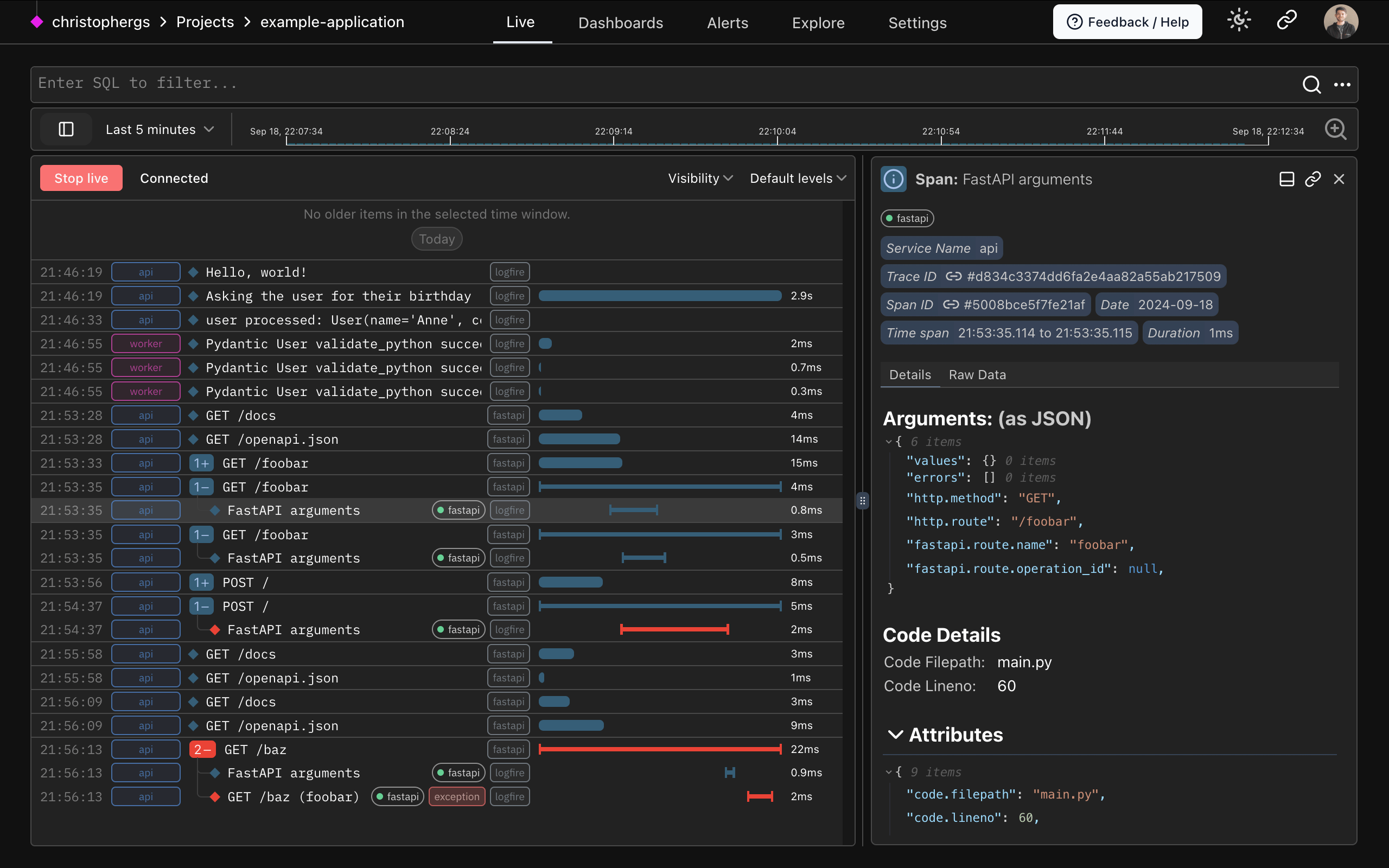
Logfire screenshot

Contributing

We'd love anyone interested to contribute to the Logfire SDK and documentation, see the contributing guide.

Reporting a Security Vulnerability

See our security policy.

Logfire Open-Source and Closed-Source Boundaries

The Logfire SDKs (we also have them for TypeScript and Rust) are open source, and you can use them to export data to any OTel-compatible backend.

The Logfire platform (the UI and backend) is closed source. You can self-host it by purchasing an enterprise license.

Frequently asked questions

Is Logfire free to use?

Logfire is open source under the MIT licence. There is no licence fee and no seat count — you can self-host it or, where the project offers one, pay a vendor for a managed version instead.

What does Logfire do?

Powerful observability made simple for developers

What is Logfire written in?

Logfire is primarily written in Python. Its source is publicly available at https://github.com/pydantic/logfire, and it has 4,478 GitHub stars.

