LiteDB is a free, open source databases project written in C# and released under MIT. It has 9,467 GitHub stars, 1,325 forks and 209 open issues, and was last pushed 50 minutes ago. On this registry it ranks #87 of 203 tracked projects in Databases, with 5 head-to-head comparisons available.

What is LiteDB?

LiteDB is an open-source, MIT-licensed embedded NoSQL document database for .NET, distributed as a single DLL under 450 KB and storing an entire database in one data file.

What it is

LiteDB is a serverless NoSQL document store written entirely in C# and shipped as a single assembly for .NET 4.5 and NETStandard 1.3/2.0. Rather than running as a separate service, it is linked directly into a .NET application, which opens the database by pointing at a file path such as MyData.db. Documents are stored as BsonDocument values, and application classes are mapped to them through attributes or the fluent mapper API, so ordinary POCO types can be persisted and queried without an object-relational layer.

The concrete problem it solves is the need for a document database inside desktop, mobile, and small-server .NET applications where installing and administering a database server is not practical. It lives in the .NET ecosystem and replaces the combination of a separate database server plus a data-access layer, in the same way SQLite replaces a client-server relational database for single-file storage. The v5 storage engine supports multiple concurrent readers with no locks on read operations and write locks per collection, so multiple writers can proceed against different collections. It also replaces ad-hoc file and BLOB storage by offering stream and file storage inside the same data file, comparable to GridFS in MongoDB.

Key capabilities

  • Serverless embedded execution: the database runs in-process inside the application, with no separate server to install or manage.
  • Single data file storage: all collections, indexes, and documents live in one file, in the manner of SQLite.
  • ACID transactions with full transaction support and a WAL log file that enables data recovery after a write failure.
  • Thread-safe access under the v5 engine, which allows multiple readers without locks and applies write locks per collection.
  • POCO mapping through attributes or the fluent mapper API, including DbRef for one-to-one and one-to-many cross-document references and embedded sub-documents.
  • Indexing of document fields via EnsureIndex, for example col.EnsureIndex(x => x.Name, true) to create a unique index.
  • LINQ query support such as col.Find(x => x.Age > 20), alongside SQL-like commands for accessing and transforming data.
  • File and stream storage inside the database, similar to GridFS in MongoDB.
  • Partial document load at the root level, plus internal and system collections introduced in v5.

Who uses it and how

  • .NET desktop and client applications that ship as a single installable artifact and need local persistence without asking users to run a database server.
  • Small web and service deployments where a single-process application owns its data file and wants MongoDB-style document modeling without operating a MongoDB cluster.
  • Applications storing small binary assets and streams, using the built-in file storage in place of an external object store.
  • Development and testing environments where a real database server is unavailable, since the database can be created on disk by opening a connection.
  • Teams that already model data as POCO classes and want document persistence with LINQ queries rather than mapping to relational tables.

Getting started

Install from NuGet with Install-Package LiteDB, then open the database in code with new LiteDatabase(@"MyData.db") and obtain a collection through db.GetCollection("customers"). A companion UI, LiteDB Studio, provides graphical access and visualization of the same data files.

How it compares

Among the tools named in the project's own documentation, LiteDB positions itself against SQLite for single-file storage and against MongoDB for document modeling, a simple API of similar shape, and GridFS-style file storage. It differs from MongoDB in that it is embedded rather than a server, so there is no network layer, no cluster, and no separate process to operate. Compared with SQLite it offers schema-free documents, BsonDocument storage, and LINQ-native queries instead of SQL over relational tables.

When to use it — and when not to

A self-hoster operates no server, but does own the data file: backups, file placement, disk space, and write-failure recovery through the WAL log are the adopter's responsibility. Do not use it when multiple application processes or hosts must write to the same database concurrently, and do not rely on the datafile encryption option, which the README marks as currently not secure with the instruction "DO NOT USE". The project also carries a substantial open-issue count, and the broken encryption option should be treated as an absent feature rather than a safeguard when planning sensitive data.

project readme (upstream, from github) — read inline

LiteDB - A .NET NoSQL Document Store in a single data file


NuGet Version NuGet Downloads Build status

LiteDB is a small, fast and lightweight .NET NoSQL embedded database.

  • Serverless NoSQL Document Store
  • Simple API, similar to MongoDB
  • 100% C# code for .NET 4.5 / NETStandard 1.3/2.0 in a single DLL (less than 450kb)
  • Thread-safe
  • ACID with full transaction support
  • Data recovery after write failure (WAL log file)
  • Datafile encryption using DES (AES) cryptography This implemention is currently not secure, DO NOT USE.
  • Map your POCO classes to BsonDocument using attributes or fluent mapper API
  • Store files and stream data (like GridFS in MongoDB)
  • Single data file storage (like SQLite)
  • Index document fields for fast search
  • LINQ support for queries
  • SQL-Like commands to access/transform data
  • LiteDB Studio - Nice UI for data access
  • Open source and free for everyone - including commercial use
  • Install from NuGet: Install-Package LiteDB

New v5

  • New storage engine
  • No locks for read operations (multiple readers)
  • Write locks per collection (multiple writers)
  • Internal/System collections
  • New SQL-Like Syntax
  • New query engine (support projection, sort, filter, query)
  • Partial document load (root level)
  • and much, much more!

Lite.Studio

New UI to manage and visualize your database:
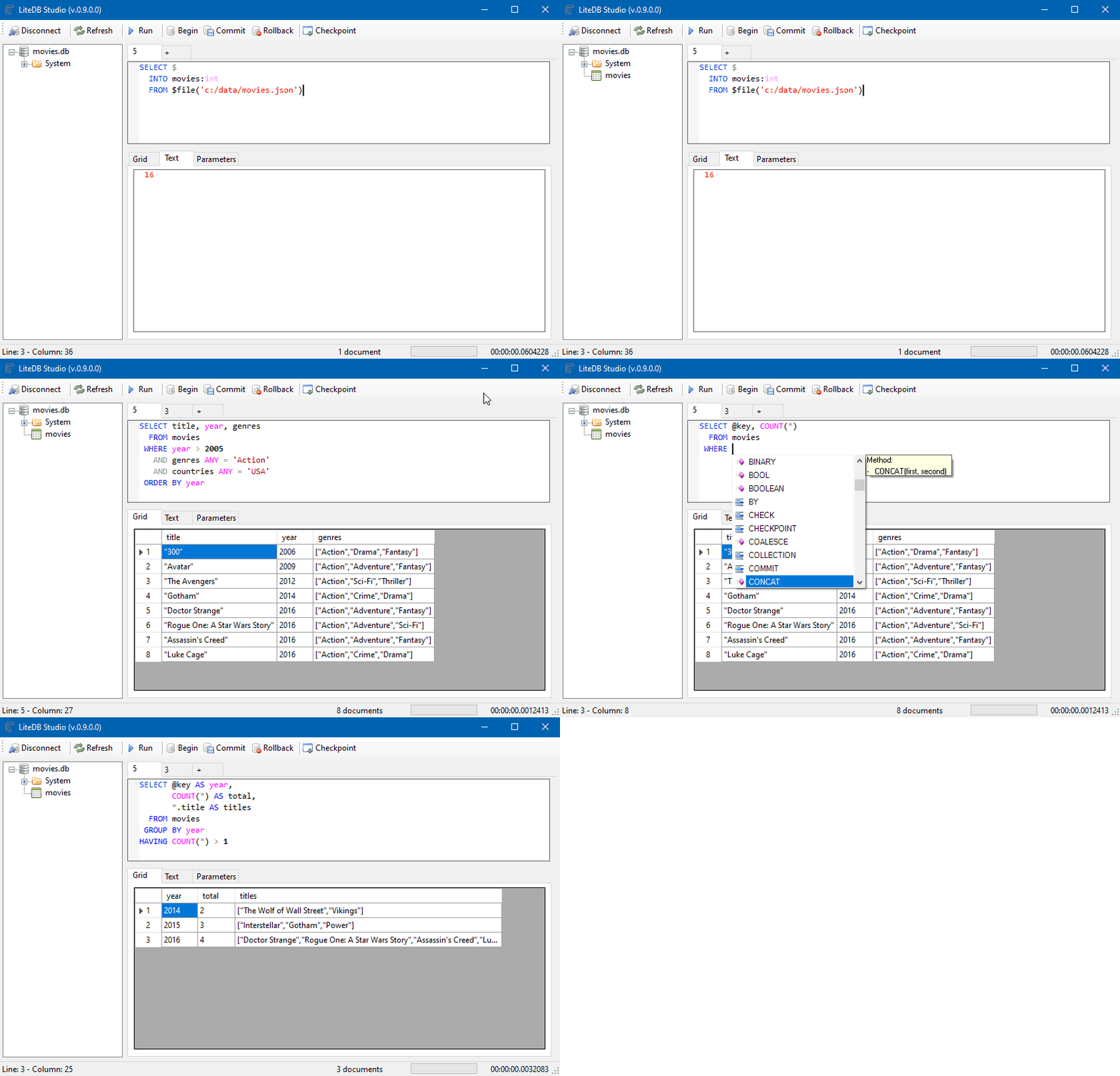
LiteDB.Studio

Documentation

Visit the Wiki for full documentation. For simplified chinese version, check here.

LiteDB Community

Help LiteDB grow its user community by answering this simple survey

How to use LiteDB

A quick example for storing and searching documents:

// Create your POCO class
public class Customer
{
    public int Id { get; set; }
    public string Name { get; set; }
    public int Age { get; set; }
    public string[] Phones { get; set; }
    public bool IsActive { get; set; }
}

// Open database (or create if doesn't exist)
using(var db = new LiteDatabase(@"MyData.db"))
{
    // Get customer collection
    var col = db.GetCollection<Customer>("customers");

    // Create your new customer instance
    var customer = new Customer
    { 
        Name = "John Doe", 
        Phones = new string[] { "8000-0000", "9000-0000" }, 
        Age = 39,
        IsActive = true
    };

    // Create unique index in Name field
    col.EnsureIndex(x => x.Name, true);

    // Insert new customer document (Id will be auto-incremented)
    col.Insert(customer);

    // Update a document inside a collection
    customer.Name = "Joana Doe";

    col.Update(customer);

    // Use LINQ to query documents (with no index)
    var results = col.Find(x => x.Age > 20);
}

Using fluent mapper and cross document reference for more complex data models

// DbRef to cross references
public class Order
{
    public ObjectId Id { get; set; }
    public DateTime OrderDate { get; set; }
    public Address ShippingAddress { get; set; }
    public Customer Customer { get; set; }
    public List<Product> Products { get; set; }
}        

// Re-use mapper from global instance
var mapper = BsonMapper.Global;

// "Products" and "Customer" are from other collections (not embedded document)
mapper.Entity<Order>()
    .DbRef(x => x.Customer, "customers")   // 1 to 1/0 reference
    .DbRef(x => x.Products, "products")    // 1 to Many reference
    .Field(x => x.ShippingAddress, "addr"); // Embedded sub document
            
using(var db = new LiteDatabase("MyOrderDatafile.db"))
{
    var orders = db.GetCollection<Order>("orders");
        
    // When query Order, includes references
    var query = orders
        .Include(x => x.Customer)
        .Include(x => x.Products) // 1 to many reference
        .Find(x => x.OrderDate <= DateTime.Now);

    // Each instance of Order will load Customer/Products references
    foreach(var order in query)
    {
        var name = order.Customer.Name;
        ...
    }
}

Where to use?

  • Desktop/local small applications
  • Application file format
  • Small web sites/applications
  • One database per account/user data store

Plugins

Changelog

Change details for each release are documented in the release notes.

Code Signing

LiteDB is digitally signed courtesy of SignPath

Frequently asked questions

Is LiteDB free to use?

LiteDB is open source under the MIT licence. There is no licence fee and no seat count — you can self-host it or, where the project offers one, pay a vendor for a managed version instead.

What does LiteDB do?

LiteDB - A .NET NoSQL Document Store in a single data file

What is LiteDB written in?

LiteDB is primarily written in C#. Its source is publicly available at https://github.com/litedb-org/LiteDB, and it has 9,467 GitHub stars.