
Secure, traceable file sharing for organizations that care about privacy.





Try it · Install · Documentation · Repositories · Contributing · Website
What is LinShare?
LinShare is an open-source file sharing platform built for organizations that need to exchange documents with internal and external collaborators while keeping full control over privacy and traceability. It replaces email attachments, USB sticks and consumer cloud drives with a self-hosted service you run on your own infrastructure.
Key features
- Personal space – upload, version and organize your files, then share them by link or email.
- Shared spaces – workgroups with roles, nested folders and shared drives for teams.
- Upload requests – ask external people to send you files through a secure, expiring drop box.
- Guests – invite external users with restricted, time-limited accounts.
- Contact lists – reuse groups of recipients for recurring shares.
- Activity logs and audit – every download, share and change is traced.
- Enterprise integration – LDAP directories, LemonLDAP::NG and Microsoft Azure SSO (OpenID Connect), JWT, antivirus scanning, file previews.
- REST API – automate everything from your own tools.
- AI assistants – an MCP server lets any MCP-compatible assistant manage files, shares, guests and workgroups on your behalf.
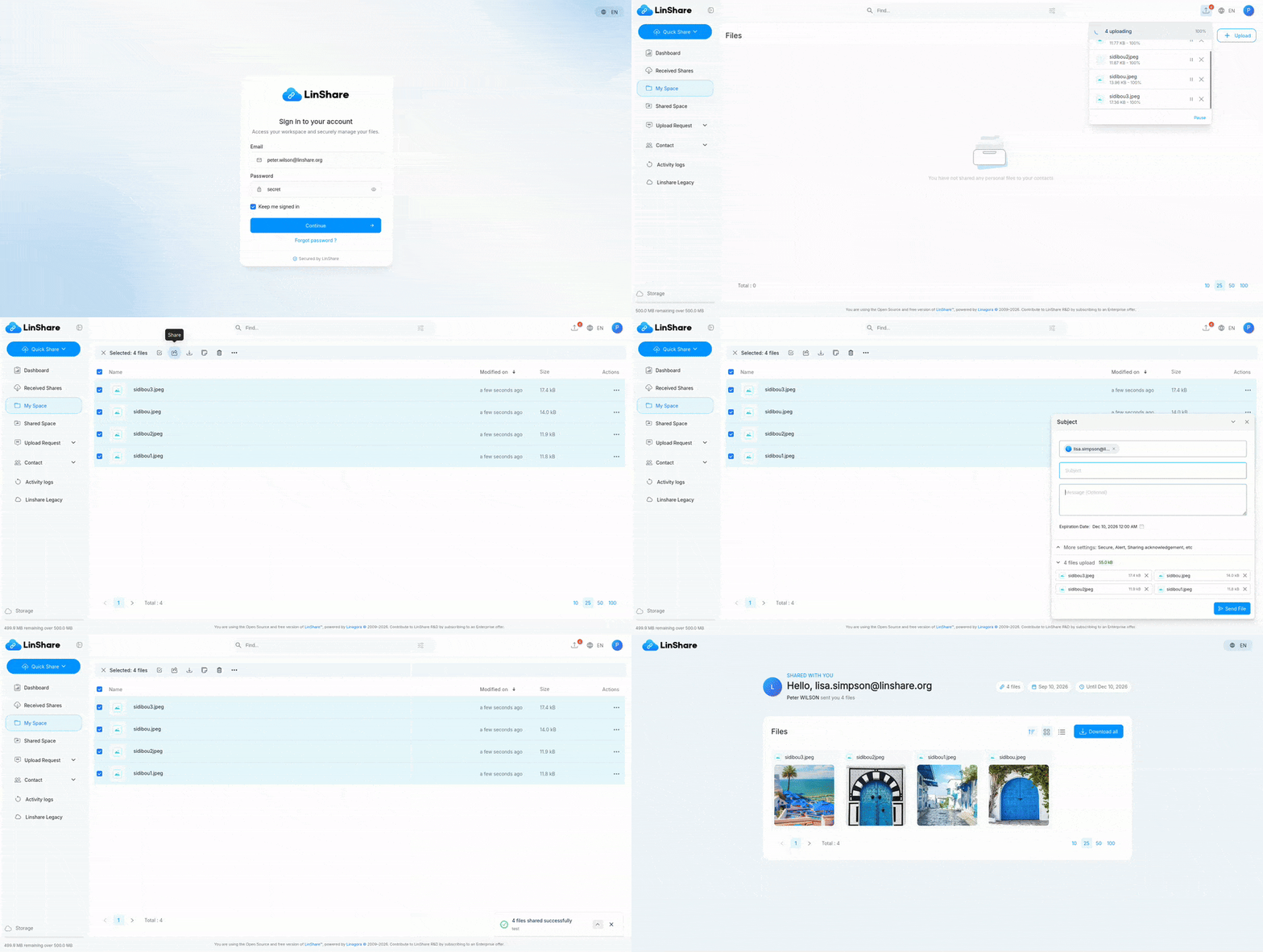
What's new
LinShare 6.5.4 (July 2026):
- Guest accounts can now share through contact lists. When no list is assigned to the guest, the public contact lists of its source domain become usable as recipients.
- Fixed an anonymous share error when a restricted guest shares through a contact list.
- Upgrading from 6.5.3: follow the upgrade guide.
Full release notes for every version, with per-component changelogs, are in CHANGELOG.md.
Try it
Live demo
A public instance running the latest LinShare release is available at https://demo.linshare.org/. It is reset and updated on a regular basis.
Demo accounts and webmail (click to expand)
Internal users (password: secret):
- abbey.curry@linshare.org
- amy.wolsh@linshare.org
- anderson.waxman@linshare.org
- cornell.able@linshare.org
- dawson.waterfield@linshare.org
- felton.gumper@linshare.org
- grant.big@linshare.org
- nick.derbies@linshare.org
- peter.wilson@linshare.org
- walker.mccallister@linshare.org
External recipients (email addresses without a LinShare account):
external1@linshare.org to external5@linshare.org.
Guest candidates (external addresses you can turn into guest accounts):
guest1@linshare.org to guest5@linshare.org.
Emails are only delivered to @linshare.org addresses. To read them, use the demo webmail at
https://demo-webmail.linshare.org:
| Account | Password |
|---|---|
*@linshare.org internal users |
secret |
external1@linshare.org … external5@linshare.org |
password1 … password5 |
guest1@linshare.org … guest5@linshare.org |
password1 … password5 |
Run it locally with Docker
The linshare-docker repository ships a docker-compose
stack with the server, both web interfaces, PostgreSQL, MongoDB, a sample LDAP directory, ClamAV,
a thumbnail server and a test SMTP relay:
git clone https://github.com/linagora/linshare-docker.git
cd linshare-docker
docker-compose up -d
Then open https://linshare.local (see the repository README for the /etc/hosts entries).
Install
For a production deployment, start with the compatibility matrix and pick the guide for your distribution.
| Step | Guide |
|---|---|
| Check requirements (OS, JVM, PostgreSQL, MongoDB, Tomcat, Apache) | Compatibility matrix |
| Install on Debian 12 (LinShare 6.x) | Debian 12 guide |
| Install on Debian (older releases) | Debian guide |
| Install on CentOS 7 | CentOS guide |
| Single sign-on | LemonLDAP::NG (headers) · LemonLDAP::NG (OIDC) · Microsoft Azure (OIDC) |
| Upgrade an existing instance | Upgrade guides |
Release packages (WAR files, UI bundles, SQL scripts) are published at http://download.linshare.org/versions/. You can also fetch every component of a release with Maven from this repository:
mvn dependency:copy-dependencies -DoutputDirectory='linshare'
Documentation
All user-facing documentation lives in this repository under documentation/.
| Guide | English | Français |
|---|---|---|
| Overview | EN | FR |
| Installation | EN | FR |
| Upgrade | EN | FR |
| User guide | EN | FR |
| Administration | EN | FR |
| Development | EN | EN |
| API | EN | FR |
The French translation sometimes lags behind English. Contributions to the FR tree are welcome.
Components and repositories
LinShare is split into several components, each in its own repository. This repository is the
meta repository: it holds the documentation, the EPIC and user-story specifications, and a Maven
aggregator (pom.xml) that pins the version of every component for a release.
Architecture
%%{init: {'flowchart': {'nodeSpacing': 18, 'rankSpacing': 45, 'padding': 8}}}%%
flowchart LR
    subgraph clients [Clients]
        web[Web browser]
        mobile[Mobile app<br/>iOS · Android]
        mail[Thunderbird · Outlook<br/>plugins]
        ai[AI assistant<br/>MCP server]
    end
    front[Apache · nginx<br/>HTTPS 443<br/>ui-user · ui-admin · ui-upload-request]
    core[Tomcat · linshare-core<br/>REST API · HTTP 8080]
    subgraph data [Data]
        pg[(PostgreSQL)]
        mongo[(MongoDB)]
    end
    subgraph services [Services]
        ldap[LDAP · SSO]
        smtp[SMTP]
        thumb[Thumbnail server]
        av[ClamAV]
    end
    web --> front
    mobile --> front
    mail --> front
    ai --> front
    front --> core
    core --> pg
    core --> mongo
    core --> ldap
    core --> smtp
    core --> thumb
    core --> av

    classDef client stroke:#1E6FD9,stroke-width:2px
    classDef front stroke:#E08A00,stroke-width:2px
    classDef core stroke:#0AA3FF,stroke-width:3px,font-weight:bold
    classDef data stroke:#2E9E4F,stroke-width:2px
    classDef svc stroke:#7A7A8C,stroke-width:2px
    class web,mobile,mail,ai client
    class front front
    class core core
    class pg,mongo data
    class ldap,smtp,thumb,av svc
    style clients stroke:#1E6FD9,stroke-dasharray:4 3
    style data stroke:#2E9E4F,stroke-dasharray:4 3
    style services stroke:#7A7A8C,stroke-dasharray:4 3
Ports, daemons, configuration and log paths are detailed in the exploitation guide.
Components
| Component | Role | Repository |
|---|---|---|
| linshare-core | Backend server (Java WAR, REST API, SQL scripts) | linagora/linshare-core |
| linshare-ui-user | End-user web interface | linagora/linshare-ui-user |
| linshare-ui-admin | Administration web interface | linagora/linshare-ui-admin |
| linshare-ui-upload-request | Public upload request interface | linagora/linshare-ui-upload-request |
| linshare-mobile-flutter-app | Mobile application for iOS and Android | linagora/linshare-mobile-flutter-app |
| linshare-mcp | MCP server: lets AI assistants manage files, shares, guests and workgroups through the REST API | linagora/linshare-mcp |
| thumbnail-server | Generates file previews | distributed with the release bundle |
| linshare-plugin-thunderbird | Thunderbird extension to send attachments through LinShare | linagora/linshare-plugin-thunderbird |
| linshare-plugin-outlook | Outlook add-in to send attachments through LinShare | private repository, not published |
| linshare-docker | Docker Compose stack for tests and demos | linagora/linshare-docker |
Clone everything at once:
git clone https://github.com/linagora/linshare.git
git clone https://github.com/linagora/linshare-core.git
git clone https://github.com/linagora/linshare-ui-user.git
git clone https://github.com/linagora/linshare-ui-admin.git
git clone https://github.com/linagora/linshare-ui-upload-request.git
git clone https://github.com/linagora/linshare-mobile-flutter-app.git
git clone https://github.com/linagora/linshare-mcp.git
git clone https://github.com/linagora/linshare-plugin-thunderbird.git
git clone https://github.com/linagora/linshare-docker.git
Contributing
Contributions are welcome: bug reports, documentation fixes, translations, specifications and code.
- Read CONTRIBUTING.md for where development happens (GitLab is the canonical upstream, GitHub is a mirror), how to report issues, how documentation and translations are organized, and how features are specified as EPICs and user stories before development.
- Found a security issue? Please follow SECURITY.md instead of opening a public issue.
- Setting up a development environment: see the developer guide.
Releases
Release notes for every version, with links to the per-component changelogs and to the matching upgrade guide, are in CHANGELOG.md. Packages are available at http://download.linshare.org/versions/.
License
LinShare is free software released under the GNU Affero General Public License v3. See LICENSE.md for the full text.
LinShare is developed by Linagora. More information at https://linshare.app/.