
Linkding is a free, open source bookmark & content management project written in Python and released under MIT. It has 11,196 GitHub stars, 616 forks and 221 open issues, and was last pushed 4 days ago. On this registry it ranks #4 of 14 tracked projects in Bookmark & Content Management, with 5 head-to-head comparisons available. It gained 32 stars over the last 6 tracked days.

What is Linkding?

What it is

Linkding is an open-source, self-hosted bookmark manager written in Python and built on the Django web framework. It is released under the MIT license and is presented as a minimal, fast tool that is easy to set up using Docker. The project lives in the self-hosted productivity and bookmark-management ecosystem, with Firefox and Chrome extensions, a Progressive Web App option, a REST API, and community projects such as mobile apps and libraries.

The problem Linkding addresses is the scattering of saved links across browser bookmarks, notes, and external services. It centralizes links in a self-hosted web application where users can organize them with tags, add Markdown notes, mark items for later reading, edit many bookmarks at once, and share collections with other users or guests. It also reduces manual bookkeeping by automatically providing titles, descriptions, and icons for bookmarked websites, and it can archive pages as local HTML files or on the Internet Archive.

Key capabilities

  • Bookmarks can be organized with tags, bulk editing, Markdown notes, and read-it-later functionality.
  • Linkding automatically provides titles, descriptions, and icons for bookmarked websites.
  • Websites can be archived automatically as local HTML files or on the Internet Archive.
  • Bookmark collections can be imported and exported in Netscape HTML format.
  • Bookmarks can be shared with other users or guests, and an admin panel supports user self-service and raw data access.
  • The project supports OIDC or authentication-proxy single sign-on, a REST API, Firefox and Chrome extensions, a bookmarklet, and PWA installation.

Who uses it and how

  • Self-hosting users run Linkding on their own server to keep a private, browser-independent collection of links.
  • Readers add links through the browser extension, bookmarklet, or PWA, then tag, annotate, and revisit them later.
  • Multi-user deployments share bookmark sets with other users or guests while using the admin panel for account and data access.
  • Developers extend the system with third-party apps, mobile clients, libraries, or other community projects built around the REST API.

Getting started

Typical deployment uses Docker-based self-hosting from the installation guide, with managed hosting options also available; local development uses Python 3.13, uv, Node.js, make init, make frontend, and make serve.

When to use it — and when not to

Linkding fits users who want a minimal self-hosted bookmark manager with tags, notes, sharing, archiving, and API access, and who are willing to operate the server, database, and local HTML archive storage. It is less suitable for people who need a fully managed experience without selecting a hosting option, or who expect a broad extensible platform, since larger feature contributions may be declined when they do not align with maintainer goals.

project readme (upstream, from github) — read inline


Introduction

linkding is a bookmark manager that you can host yourself. It's designed be to be minimal, fast, and easy to set up using Docker.

The name comes from:

  • link which is often used as a synonym for URLs and bookmarks in common language
  • Ding which is German for thing
  • ...so basically something for managing your links

Feature Overview:

  • Clean UI optimized for readability
  • Organize bookmarks with tags
  • Bulk editing, Markdown notes, read it later functionality
  • Share bookmarks with other users or guests
  • Automatically provides titles, descriptions and icons of bookmarked websites
  • Automatically archive websites, either as local HTML file or on Internet Archive
  • Import and export bookmarks in Netscape HTML format
  • Installable as a Progressive Web App (PWA)
  • Extensions for Firefox and Chrome, as well as a bookmarklet
  • SSO support via OIDC or authentication proxies
  • REST API for developing 3rd party apps
  • Admin panel for user self-service and raw data access

Demo: https://demo.linkding.link/

Screenshot:
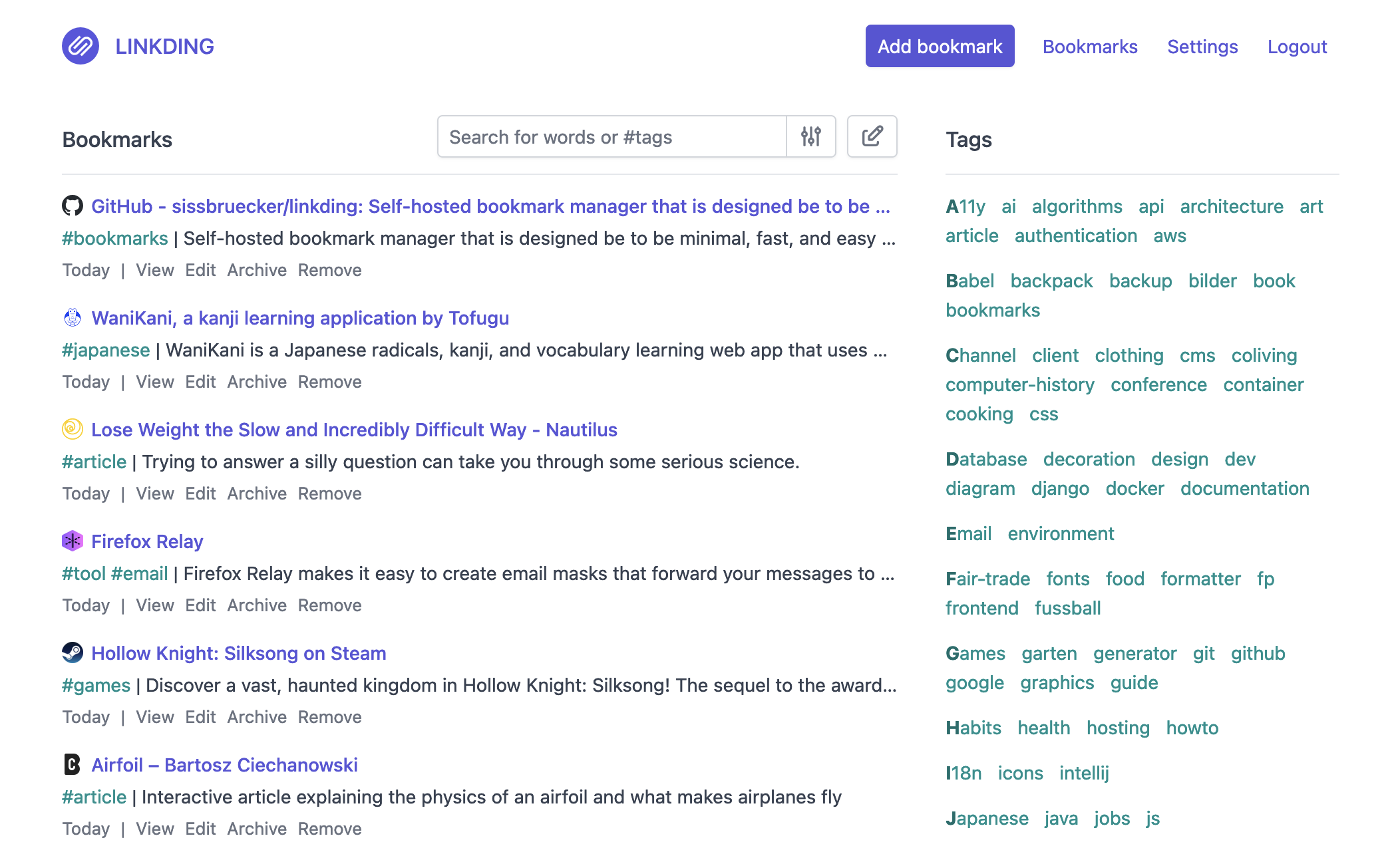
Screenshot

Getting Started

The following links help you to get started with linkding:

Documentation

The full documentation is now available at linkding.link.

If you want to contribute to the documentation, you can find the source files in the docs folder.

If you want to contribute a community project, feel free to submit a PR.

Contributing

Small improvements, bugfixes and documentation improvements are always welcome. If you want to contribute a larger feature, consider opening an issue first to discuss it. I may choose to ignore PRs for features that don't align with the project's goals or that I don't want to maintain.

Development

The application is built using the Django web framework. You can get started by checking out the excellent Django docs. The bookmarks folder contains the actual bookmark application. Other than that the code should be self-explanatory / standard Django stuff 🙂.

Prerequisites

  • Python 3.13
  • uv
  • Node.js

Setup

Initialize the development environment with:

make init

This sets up a virtual environment using uv, installs NPM dependencies and runs migrations to create the initial database.

Create a user for the frontend:

uv run manage.py createsuperuser --username=joe [email protected]

Run the frontend build for bundling frontend components with:

make frontend

Then start the Django development server with:

make serve

The frontend is now available under http://localhost:8000

Tests

Run all tests with pytest:

make test

Linting

Run linting with ruff:

make lint

Formatting

Format Python code with ruff, Django templates with djlint, and JavaScript code with prettier:

make format

DevContainers

This repository also supports DevContainers: Open in Remote - Containers

Once checked out, only the following commands are required to get started:

Create a user for the frontend:

uv run manage.py createsuperuser --username=joe [email protected]

Start the Node.js development server (used for compiling JavaScript components like tag auto-completion) with:

make frontend

Start the Django development server with:

make serve

The frontend is now available under http://localhost:8000

Frequently asked questions

Is Linkding free to use?

Linkding is open source under the MIT licence. There is no licence fee and no seat count — you can self-host it or, where the project offers one, pay a vendor for a managed version instead.

What does Linkding do?

Self-hosted bookmark manager built for speed and simplicity

What is Linkding written in?

Linkding is primarily written in Python. Its source is publicly available at https://github.com/sissbruecker/linkding, and it has 11,196 GitHub stars.