









Make GPU Sharing Flexible and Easy
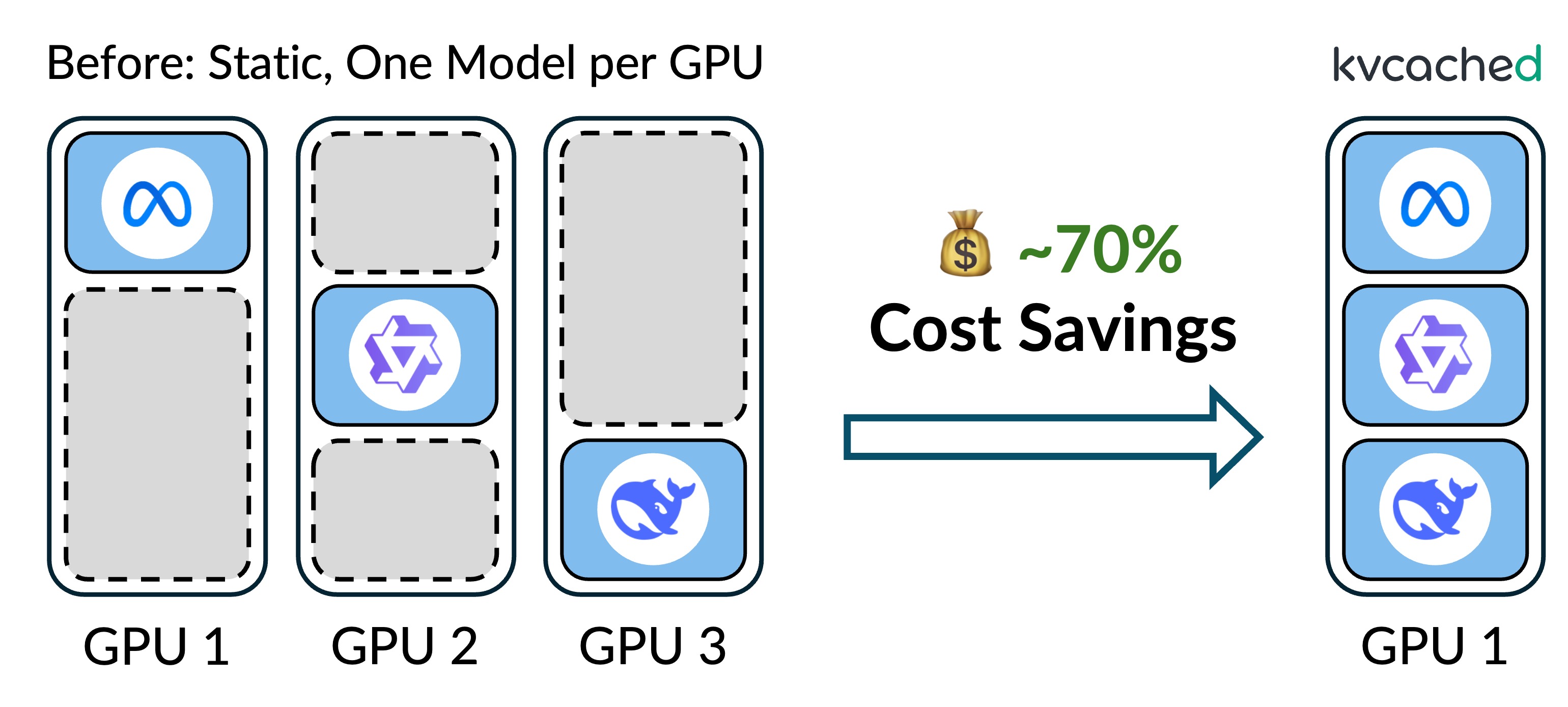
kvcached (KV cache daemon) is a KV cache library for LLM serving/training on shared GPUs. By bringing OS-style virtual memory abstraction to LLM systems, it enables elastic and demand-driven KV cache allocation, improving GPU utilization under dynamic workloads.
kvcached achieves this by decoupling GPU virtual addressing from physical memory allocation for KV caches. It allows serving engines to initially reserve virtual memory only and later back it with physical GPU memory when the cache is actively used. This decoupling enables on-demand allocation and flexible sharing, bringing better GPU memory utilization under dynamic and mixed workloads. Check out more details in the blog.
Key Features
- Elastic KV cache: allocate and reclaim KV memory dynamically to match live load.
- GPU virtual memory: decouple logical KV from physical GPU memory via runtime mapping.
- Memory control CLI: enforce memory limits with kvcached CLI.
- Frontend router and sleep mode: route requests to the target models and put models to sleep when idle.
- Support mainstream serving engines: integrate with SGLang and vLLM.
- Prefix caching: support automatic prefix caching (APC) with a configurable memory bound. See the example doc for details.
📢 Updates
[2026-04] kvcached is featured by Red Hat for running LLMs dynamically in production under limited resources! Red Hat's Sardeenz builds on kvcached to provide dynamic multi-model serving with Kubernetes and OpenShift support. See the blog post for more details. [▶ View Demo]
[2026-04] Added prefix caching support. kvcached now supports automatic prefix caching (APC) for vLLM and RadixCache for SGLang, enabling cross-request prefix reuse while maintaining elastic memory management.
[2026-03] Added pipeline parallelism support. MLA models (DeepSeek-V3, DeepSeek-V2 etc.) and GPT-OSS hybrid attention models (
openai/gpt-oss-20b) are now also supported in vLLM. GPT-OSS support in SGLang updated to v0.5.9.
Supported engines and models
| Engine | Versions | Attention types | Example models |
|---|---|---|---|
| SGLang | ≥ v0.4.9 (tested up to v0.5.15) | MHA / GQA / MLA / sliding window / hybrid | DeepSeek-V3, Qwen3-8B, GPT-OSS-20B, Qwen3.5-9B, Gemma-4-E2B-it, Gemma-4-12B-it |
| vLLM | ≥ v0.8.4 (tested up to v0.24.0) | MHA / GQA / MLA / sliding window / hybrid | DeepSeek-V3, Qwen3-8B, GPT-OSS-20B, Qwen3.5-9B, Gemma-4-E2B-it, Gemma-4-12B-it |
See #425 for per-model results on each engine and KV layout.
Example use cases

|
Multi‑LLM serving kvcached allows multiple LLMs to share a GPU's memory elastically, enabling concurrent deployment without the rigid memory partitioning used today. This improves GPU utilization and saves serving costs. |
|
Serverless LLM By allocating KV cache only when needed, kvcached supports serverless deployments where models can spin up and down on demand. |

|
Compound AI systems kvcached makes compound AI systems practical on limited hardware by elastically allocating memory across specialized models in a pipeline (e.g., retrieval, reasoning, and summarization). |

|
GPU workload colocation kvcached allows LLM inference to coexist with other GPU workloads such as training jobs, fine-tuning, or vision models. |
See concrete examples here: kvcached/examples.
kvcached in action
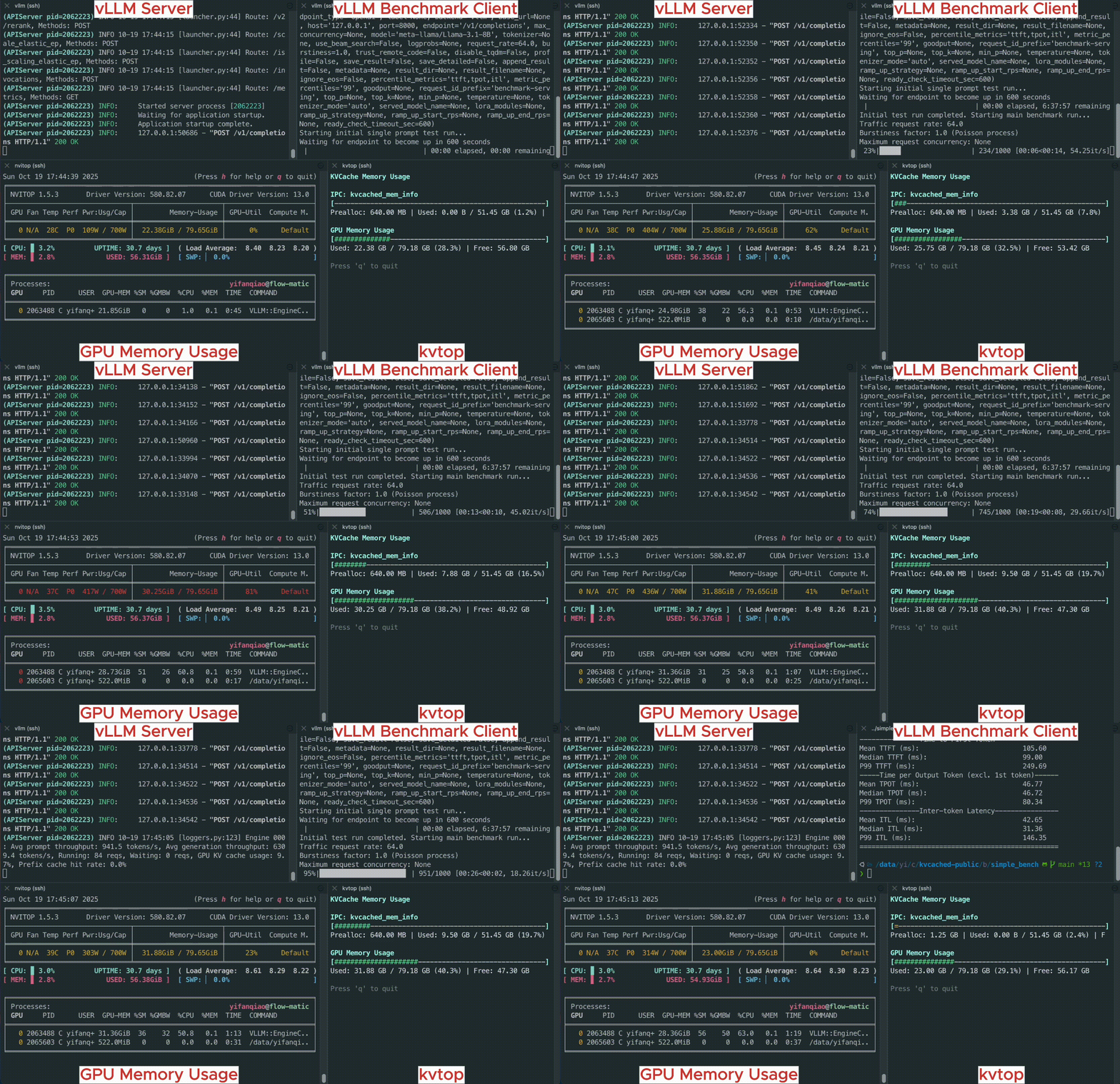
The following simple example shows how kvcached enables an unmodified vLLM engine run with dynamically allocated memory.
Performance: Multi-LLM serving
kvcached enables dynamic memory sharing between LLMs, allowing them to share the same GPU memory elastically. As a comparison, the current serving engines need to statically reserve GPU memory at startup.
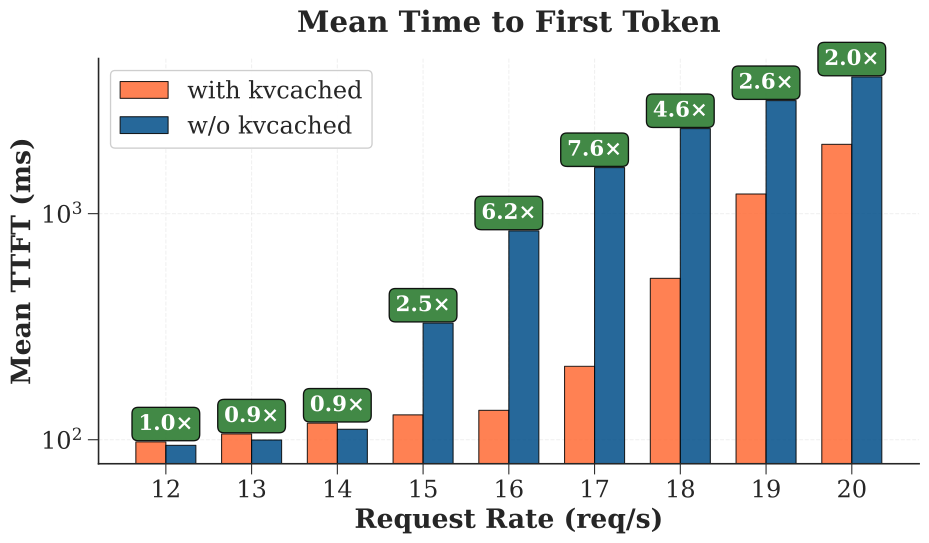
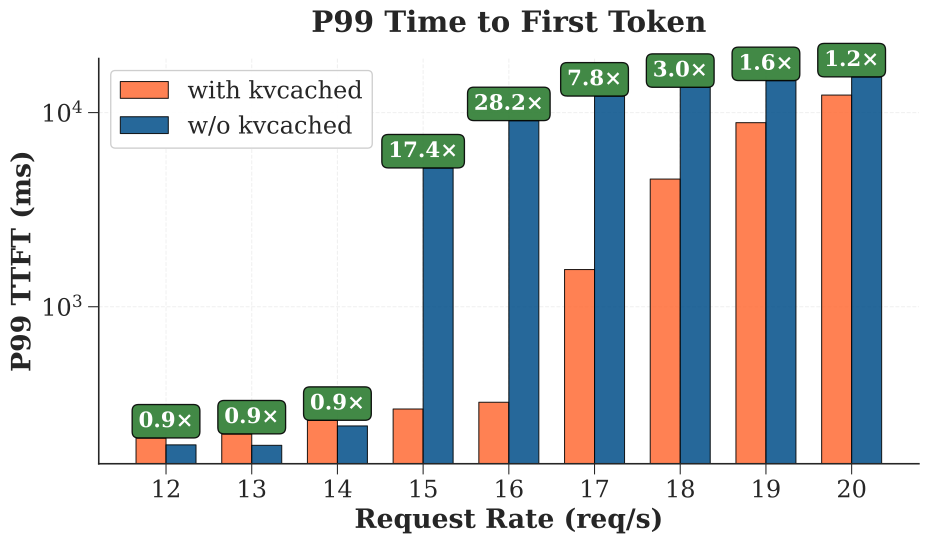
This benchmark shows the performance benefits of kvcached when serving three Llama-3.1-8B models on an A100-80G GPU under workloads with intermittent peaks. kvcached can achieve 2-28x TTFT reduction compared to the current serving engines. This performance gain can be converted to significant cost savings for LLM serving. Without kvcached, the systems have to provision more GPUs to achieve the same performance.
Details can be found in benchmarks/bench_latency_benefit.
Installation
Prerequisites
- Python (tested with 3.9 - 3.13)
- SGLang (tested with v0.5.15) or vLLM (tested with v0.19.0)
kvcached can be installed as a plugin with existing SGLang or vLLM environment.
Install from PyPI
pip install kvcached --no-build-isolation
Install from source
# under the project root folder

pip install -e . --no-build-isolation --no-cache-dir
python tools/dev_copy_pth.py
Using Docker
kvcached installed with original engine dockers.
docker pull ghcr.io/ovg-project/kvcached-sglang:latest   # kvcached-v0.1.5-sglang-v0.5.10
docker pull ghcr.io/ovg-project/kvcached-vllm:latest     # kvcached-v0.1.5-vllm-v0.19.0
We prepare an all-in-one docker for developers:
docker pull ghcr.io/ovg-project/kvcached-dev:latest
More instructions can be found here. GB200 dockers are on the way.
Documentation
kvcached is indexed on DeepWiki for LLM-powered documentation.
The documentation covers:
- Core architecture and memory management system
- Integration with vLLM and SGLang
- Multi-model serving and controller system
- Deployment guides and configuration reference
- Performance benchmarking and analysis
- Development tools and testing
Testing
kvcached can be enabled by setting the following environmental variables:
export ENABLE_KVCACHED=true
export KVCACHED_AUTOPATCH=1
If you are using the engine-specific dockers, you can test kvcached by running the original engines' benchmark scripts. For example:
# for sglang
python -m sglang.launch_server --model meta-llama/Llama-3.2-1B-Instruct --port 30000
python -m sglang.bench_serving --backend sglang-oai --model meta-llama/Llama-3.2-1B-Instruct --dataset-name sharegpt --request-rate 10 --num-prompts 1000 --port 30000

# for vllm
vllm serve meta-llama/Llama-3.2-1B-Instruct --port=12346
vllm bench serve --model meta-llama/Llama-3.2-1B-Instruct --request-rate 10 --num-prompts 1000 --port 12346
[!NOTE] If you prefer to disable prefix caching, use
--no-enable-prefix-cachingfor vLLM and--disable-radix-cachefor SGLang.When kvcached is enabled, there is NO need to set memory utilization limit (e.g., using
--gpu-memory-utilization) as kvcached will automatically manage the memory.
[!NOTE] AMD / ROCm: on ROCm (HIP) builds, kvcached automatically defaults to the non-contiguous KV-cache layout. The contiguous layout (the default on NVIDIA) hands vLLM's ROCm attention backend strided per-layer KV tensors it cannot read correctly, whereas non-contiguous matches the layout the backend expects. You can override with
KVCACHED_CONTIGUOUS_LAYOUT=true|false, but contiguous is not recommended on ROCm.
If you installed kvcached using its source code, you can also do the following:
cd benchmarks/simple_bench
./start_server.sh [sglang|vllm] --venv-path $VENV_PATH --model meta-llama/Llama-3.2-1B-Instruct
# Wait until LLM server is ready
./start_client.sh [sglang|vllm] --venv-path $VENV_PATH --model meta-llama/Llama-3.2-1B-Instruct
The benchmark scripts automatically set ENABLE_KVCACHED=true. Please refer to each script for instructions on how to run inference with kvcached.
[!NOTE] We haven’t fully tested kvcached with every version of SGLang and vLLM (there are too many!). If you run into issues with a specific version, please open an issue---we'll look into it and fix it within a few hours.
Contributing
We are grateful for and open to contributions and collaborations of any kind.
We use pre-commit to ensure a consistent coding style. You can set it up by
pip install pre-commit
pre-commit install
Before pushing your code, please run the following check and make sure your code passes all checks.
pre-commit run --all-files
Contacts
kvcached is developed by many contributors from the community. The best way to contact us for questions, issues, and contributions, is through our Slack channel or GitHub Issues.
Trusted and deployed by












Citation
If you find kvcached useful, please cite our paper:
@article{xing2025towards,
  title={Towards Efficient and Practical GPU Multitasking in the Era of LLM},
  author={Xing, Jiarong and Qiao, Yifan and Mo, Simon and Cui, Xingqi and Sela, Gur-Eyal and Zhou, Yang and Gonzalez, Joseph and Stoica, Ion},
  journal={arXiv preprint arXiv:2508.08448},
  year={2025}
}

@article{yu2026prism,
  title={Prism: Cost-Efficient Multi-LLM Serving via GPU Memory Ballooning},
  author={Yu, Shan and Qiao, Yifan and Ma, Mingyuan and Li, Yangmin and Yang, Shuo and Tong, Xinyuan and Wang, Yang and Xie, Zhiqiang and An, Yuwei and Cao, Shiyi and Bao, Ke and Vij, Deepak and Ding, Xiaoning and Wang, Yichen and Lu, Qingda and Wang, Zhong and Gao, Gao and Xu, Harry and Shu, Junyi and Xing, Jiarong and Sheng, Ying},
  journal={OSDI},
  year={2026}
}