kubestellar is a free, open source scheduling & event management project written in Go and released under Apache-2.0. It has 711 GitHub stars, 316 forks and 215 open issues, and was last pushed 15 days ago. On this registry it ranks #19 of 23 tracked projects in Scheduling & Event Management, with 5 head-to-head comparisons available.

What is kubestellar?

KubeStellar is an Apache-2.0, CNCF Sandbox multi-cluster configuration management engine, written in Go, that lets teams deploy and configure workloads across many Kubernetes clusters — edge, multi-cloud, and hybrid cloud — using the same single-cluster tooling they already run.

What it is

KubeStellar is a platform for managing Kubernetes objects across multiple clusters. Its core orchestration engine handles workload propagation through BindingPolicy, WDS (Workload Description Space), ITS (Inventory and Transport Space), and WEC (Workload Execution Cluster) concepts. A developer defines a binding policy between clusters and Kubernetes objects, and KubeStellar uses regular single-cluster tooling to deploy and configure each cluster according to those policies. The project lives in the Kubernetes and Cloud Native Computing Foundation ecosystem, and it integrates with tools teams already use, eliminating the need to modify existing resources. It is accompanied by sub-projects: the console (an AI-powered web dashboard with 160+ cards, GPU monitoring, and AI missions), console-marketplace (153+ community card presets covering GPU/AI/ML, ArgoCD, OPA, Falco, and LLM-d), console-kb (an AI knowledge base of community missions and operational runbooks), and kubestellar-mcp (an MCP server providing AI agent tooling for Claude, Cursor, Windsurf, and VS Code).

The concrete problem it solves is per-cluster manual work. Without KubeStellar, multiple clusters are usually deployed and configured individually, which is time-consuming and complex. It replaces that individual deployment and configuration of each cluster with a single binding policy that drives propagation, giving a developer experience akin to using one cluster. The multi-cluster setups it targets exist for separation of environments such as development, testing, and staging; isolation of groups, teams, or departments; enterprise security and data governance compliance; resiliency across clouds; improved resource availability; heterogeneous resources; and running applications on the edge, including disconnected environments.

Key capabilities

  • BindingPolicy definition that binds clusters to Kubernetes objects and drives propagation to each cluster.
  • Workload propagation across the WDS, ITS, and WEC planes of the core engine.
  • GitOps-oriented placement, rollout, scheduling, status, and summarization behaviour, as reflected in the project topic list.
  • console dashboard with 160+ cards, GPU monitoring, and AI missions.
  • console-marketplace with 153+ community card presets for GPU/AI/ML, ArgoCD, OPA, Falco, and LLM-d.
  • console-kb knowledge base of community missions and operational runbooks.
  • kubestellar-mcp MCP server exposing natural-language cluster operations to AI agents in Claude, Cursor, Windsurf, and VS Code.
  • Support for edge and disconnected environments alongside multi-cloud and hybrid cloud clusters.

Who uses it and how

  • Teams already deploying to a single Kubernetes cluster that want to expand to multiple clusters without rewriting resources.
  • Teams already running multiple clusters that want a more streamlined developer experience than configuring each cluster separately.
  • Organisations separating development, testing, and staging environments across distinct clusters.
  • Enterprises that must isolate groups, teams, or departments, or satisfy security and data governance requirements.
  • Operators running applications at the edge, including in disconnected environments, and those needing resiliency across clouds or access to heterogeneous resources.
  • Platform teams that want cluster operations driven from an AI agent or a web dashboard instead of direct per-cluster access.

Getting started

The README points to a Quickstart in the documentation at docs.kubestellar.io. The Console can be tried at console.kubestellar.io in demo mode with no install required, and kubestellar-mcp ships its own installation instructions.

How it compares

This registry names no paid products that KubeStellar replaces, so no cost-model or licensing comparison is available here. Among tools named in the facts, ArgoCD, OPA, and Falco appear only as preset integrations inside console-marketplace rather than as comparable peers, and KubeStellar stands alone in this registry as a multi-cluster configuration management engine.

When to use it — and when not to

A self-hoster must operate a multi-cluster control plane covering the WDS, ITS, and WEC planes, with the Kubernetes clusters themselves as the backing infrastructure; the supplied facts name no required database, object storage, or SMTP dependency. Teams running a single cluster, or without Kubernetes operational experience, should not pick it, because the value only appears once several clusters must be kept consistent. Note the honest signals: 215 open issues against 711 stars and 316 forks, CNCF Sandbox rather than graduated maturity, and the repository is positioned as the core engine within a broader stack of sub-projects whose feature claims are documented separately.

project readme (upstream, from github) — read inline


Multi-cluster Configuration Management for Edge, Multi-Cloud, and Hybrid Cloud


    Join Slack Ask DeepWiki

KubeStellar is a Cloud Native Computing Foundation (CNCF) Sandbox project that simplifies the deployment and configuration of applications across multiple Kubernetes clusters. It provides a seamless experience akin to using a single cluster, and it integrates with the tools you're already familiar with, eliminating the need to modify existing resources.

KubeStellar is particularly beneficial if you're currently deploying in a single cluster and are looking to expand to multiple clusters, or if you're already using multiple clusters and are seeking a more streamlined developer experience.
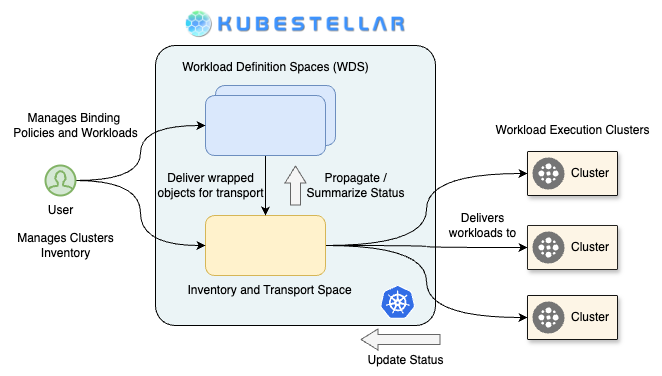
KubeStellar High Level View

The use of multiple clusters offers several advantages, including:

  • Separation of environments (e.g., development, testing, staging)
  • Isolation of groups, teams, or departments
  • Compliance with enterprise security or data governance requirements
  • Enhanced resiliency, including across different clouds
  • Improved resource availability
  • Access to heterogeneous resources
  • Capability to run applications on the edge, including in disconnected environments

In a single-cluster setup, developers typically access the cluster and deploy Kubernetes objects directly. Without KubeStellar, multiple clusters are usually deployed and configured individually, which can be time-consuming and complex.

KubeStellar simplifies this process by allowing developers to define a binding policy between clusters and Kubernetes objects. It then uses your regular single-cluster tooling to deploy and configure each cluster based on these binding policies, making multi-cluster operations as straightforward as managing a single cluster. This approach enhances productivity and efficiency, making KubeStellar a valuable tool in a multi-cluster Kubernetes environment.

Ecosystem

KubeStellar is a platform — the core orchestration engine is complemented by sub-projects that deliver UI, AI agent tooling, and community content.

Sub-project Role Links
kubestellar (this repo) Core engine — BindingPolicy, WDS, ITS, WEC workload propagation Docs · Quickstart
console AI-powered web dashboard — 160+ cards, GPU monitoring, AI missions console.kubestellar.io
console-marketplace 153+ community card presets — GPU/AI/ML, ArgoCD, OPA, Falco, LLM-d Browse
console-kb AI knowledge base — community missions and operational runbooks Browse
kubestellar-mcp MCP server — AI agent tooling for Claude, Cursor, Windsurf, VS Code Install

Try the Console → — start in demo mode, no install required. Monitor clusters, deploy workloads, manage GPU resources, and troubleshoot with 400+ AI-powered missions.

AI-native stack: combine kubestellar-mcp (natural-language cluster ops via Claude/Cursor/Windsurf) with Console's LLM-d monitoring cards for end-to-end AI inference infrastructure management.

Website

For usage, architecture, and other documentation, see the website.

Contributing

We ❤️ our contributors! If you're interested in helping us out, please head over to our Contributing guide and be sure to look at main or the release of interest to you.

This community has a Code of Conduct. Please make sure to follow it.

Our Roadmap

Have a look at what we are working on next, see our Roadmap

Getting in touch

There are several ways to communicate with us:

Red Heart Contributors


CLOMonitor report summary

FOSSA Status


We are a Cloud Native Computing Foundation sandbox project.
Kubernetes and the Kubernetes logo are registered trademarks of The Linux Foundation® (TLF).
The Linux Foundation has registered trademarks and uses trademarks. For a list of trademarks of The Linux Foundation, please see our Trademark Usage page.
© 2022-2025. The KubeStellar Author

readme truncated — read the full docs on github

Frequently asked questions

Is kubestellar free to use?

kubestellar is open source under the Apache-2.0 licence. There is no licence fee and no seat count — you can self-host it or, where the project offers one, pay a vendor for a managed version instead.

What does kubestellar do?

KubeStellar - a flexible solution for multi-cluster configuration management for edge, multi-cloud, and hybrid cloud

What is kubestellar written in?

kubestellar is primarily written in Go. Its source is publicly available at https://github.com/kubestellar/kubestellar, and it has 711 GitHub stars.