KubeHound is a free, open source threat detection & response project written in Go and released under Apache-2.0. It has 1,004 GitHub stars, 67 forks and 30 open issues, and was last pushed 3 days ago. On this registry it ranks #44 of 48 tracked projects in Threat Detection & Response, with 5 head-to-head comparisons available.

What is KubeHound?

KubeHound is an open-source Go tool for Kubernetes security teams that automatically calculates attack paths between assets in a cluster and builds them into a queryable attack graph.

What it is

KubeHound is a Kubernetes attack graph tool, released under the Apache-2.0 licence and written in Go, that ingests data from a target cluster and performs automated calculation of attack paths between the assets it finds. It lives in the Kubernetes and cloud-native security ecosystem, and its output is a graph database that practitioners query with the Gremlin query language through an API call or a dedicated graph query UI. It carries an accompanying Jupyter notebook, based on the AWS Graph Notebook, to let users connect to the graph, configure rendering, and run queries in a browser at http://localhost:8888/notebooks/KubeHound.ipynb.

The concrete problem it solves is determining, at scale and without manual tracing, how an attacker could move from one Kubernetes asset to another — the chains of privilege and access that connect workloads, identities, and cluster resources. Rather than reasoning about these routes by hand for each cluster, a security engineer dumps cluster state, ingests it, and gets back the calculated attack paths as graph data that can then be searched, rendered, and documented.

Key capabilities

  • Runs a dump / ingest command pair from the kubehound binary to collect cluster data and load it into the graph store.
  • Calculates attack paths between assets automatically, presenting them as a graph such as the sample path in docs/images/example-graph.png.
  • Supports the Gremlin query language for graph queries, alongside a purpose-built KubeHound DSL covering the most basic query cases.
  • Ships documented sample Gremlin queries in its documentation for common investigations.
  • Targets a selected cluster by context through kubectx, or by exporting KUBECONFIG to a specific kubeconfig file.
  • Provides advanced configuration through a configuration file and a troubleshooting guide for common errors.
  • Can be deployed as a service (KHaaS) rather than run ad hoc.
  • Generates a sample graph against a provided kind cluster via make sample-graph for evaluation without touching a real cluster.

Who uses it and how

  • Security auditors and red teams exploring a Kubernetes cluster's exposure, using the topics it is tagged with: red-team, purple-team, adversary-emulation, and MITRE ATT&CK mapping.
  • Security automation engineers embedding path calculation into pipelines, invoking dump and ingest programmatically against a chosen kubeconfig.
  • Blue and cloud-native security teams performing recurring assessments, who may run KubeHound as a service (KHaaS) instead of launching it per cluster.
  • Analysts investigating a specific attack path by querying the resulting graph in Gremlin, or by opening the provided Jupyter notebook to explore and render it interactively.
  • Contributors and evaluators building from source with make build, which outputs the binary to ./bin/build/kubehound.

Getting started

Install with brew update && brew install kubehound, or download the release binary for Linux, Windows, or macOS, or build from source with make build after checking out a tag. Requirements are Docker >= 19.03 and Docker Compose V2; select your target cluster and run the kubehound binary.

How it compares

The project's homepage is kubehound.io and its documentation covers advanced configuration, common operations, troubleshooting, and a query reference, so it stands alongside its own guides rather than a named set of alternatives in this registry.

When to use it — and when not

You must operate Docker and Docker Compose V2 locally, and if you deploy it as a service you take on running that stack; graph data is queried through Gremlin or the KubeHound DSL, which is an extra language to learn beyond kubectl. It is not a good fit for teams that only need ad-hoc RBAC review rather than a stored, queryable attack graph, or for clusters where installing supporting containers is not permitted. Thirty open issues and the requirement to check out a tag before building from source suggest some rough edges worth reviewing first.

project readme (upstream, from github) — read inline

KubeHound

A Kubernetes attack graph tool allowing automated calculation of attack paths between assets in a cluster.

Quick Start

Requirements

To run KubeHound, you need a couple dependencies

Install

From Release

Download binaries are available for Linux / Windows / Mac OS via the releases page or by running the following (Mac OS/Linux):

wget https://github.com/DataDog/KubeHound/releases/latest/download/kubehound-$(uname -o | sed 's/GNU\///g')-$(uname -m) -O kubehound
chmod +x kubehound
MacOS Notes

If downloading the releases via a browser you must run e.g xattr -d com.apple.quarantine kubehound before running to prevent MacOS blocking execution

With homebrew

KubeHound is available in homebrew-core and you can simply run

brew update && brew install kubehound

kubehound should now be in your path.

From source

If you wish to build KubeHound from source, you will need to checkout a tag before building

git clone https://github.com/DataDog/KubeHound.git
cd KubeHound
git checkout $(git describe --tags --abbrev=0)
make build

KubeHound binary will be output to ./bin/build/kubehound.

Run

Select a target Kubernetes cluster, either:

  • Using kubectx
  • Using specific kubeconfig file by exporting the env variable: export KUBECONFIG=/your/path/to/.kube/config

Then, simply run the kubehound binary:

# If you installed it from brew, it is in your path
kubehound

# If you installed it from release, it should be were you downloaded it
./kubehound

# If you installed it from source, it should be in the <repo_path>/bin/build folder
./bin/build/kubehound

For more advanced use case and configuration, see

Note: KubeHound can be deployed as a serivce (KHaaS), for more information.

Using KubeHound Data

To query the KubeHound graph data requires using the Gremlin query language via an API call or dedicated graph query UI. A number of fully featured graph query UIs are available (both commercial and open source), but we provide an accompanying Jupyter notebook based on the AWS Graph Notebook,to quickly showcase the capabilities of KubeHound. To access the UI:

  • Visit http://localhost:8888/notebooks/KubeHound.ipynb in your browser
  • Use the default password admin to login (note: this can be changed via the Dockerfile or by setting the NOTEBOOK_PASSWORD environment variable in the .env file)
  • Follow the initial setup instructions in the notebook to connect to the KubeHound graph and configure the rendering
  • Start running the queries and exploring the graph!

Example queries

We have documented a few sample queries to execute on the database in our documentation. A specific DSL has been developped to query the Graph for the most basic use cases (KubeHound DSL).

Sample Attack Path
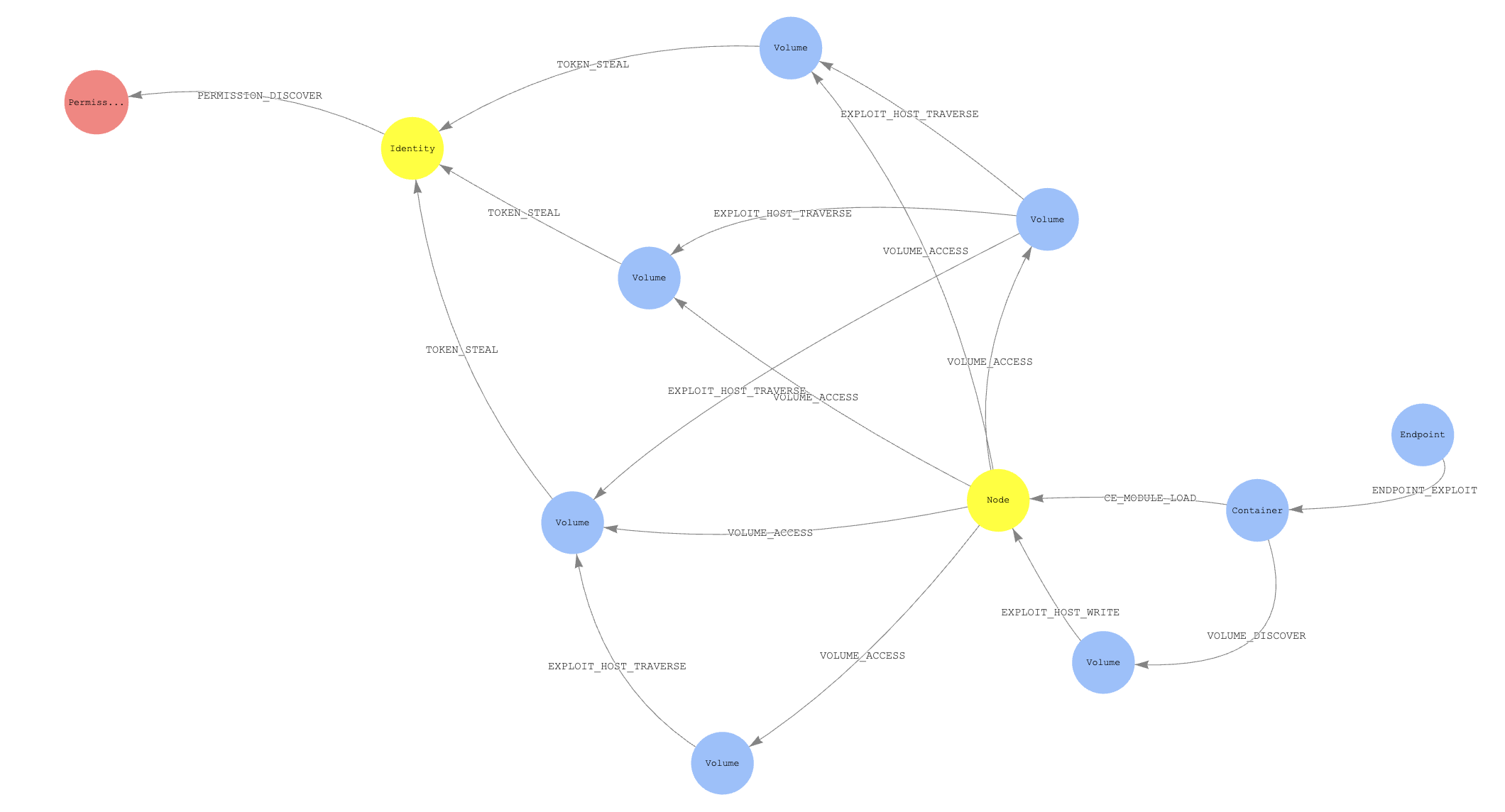
Example Path

Sample Data

To view a sample graph demonstrating attacks in a very, very vulnerable cluster you can generate data via running the app against the provided kind cluster:

make sample-graph

To view the generated graph see the Using KubeHound Data section.

Query data from your scripts

If you expose the graph endpoint you can automate some queries to gather some KPI and metadata for instance.

Python

You can query the database data in your python script by using the following snippet:

#!/usr/bin/env python
import sys
from gremlin_python.driver.client import Client

KH_QUERY = "kh.containers().count()"
c = Client("ws://127.0.0.1:8182/gremlin", "kh")
results = c.submit(KH_QUERY).all().result()

You'll need to install gremlinpython as a dependency via: pip install gremlinpython

Further information

Acknowledgements

KubeHound was created by the Adversary Simulation Engineering (ASE) team at Datadog:

With additional support from:

We would also like to acknowledge the BloodHound team for pioneering the use of graph theory in offensive security and inspiring us to create this project.

Frequently asked questions

Is KubeHound free to use?

KubeHound is open source under the Apache-2.0 licence. There is no licence fee and no seat count — you can self-host it or, where the project offers one, pay a vendor for a managed version instead.

What does KubeHound do?

Tool for building Kubernetes attack paths

What is KubeHound written in?

KubeHound is primarily written in Go. Its source is publicly available at https://github.com/DataDog/KubeHound, and it has 1,004 GitHub stars.