
Linux Kernel Manager and Activity Monitor 🐧💻







The kernel is the part of the operating system that facilitates interactions between hardware and software components. On most systems, it is loaded on startup after the bootloader and handles I/O requests as well as peripherals like keyboards, monitors, network adapters, and speakers. Typically, the kernel is responsible for memory management, process management, device management, system calls, and security.
Applications use the system call mechanism for requesting a service from the operating system and most of the time, this request is passed to the kernel using a library provided by the operating system to invoke the related kernel function. While the kernel performs these low-level tasks, it's resident on a separate part of memory named protected kernel space which is not accessible by applications and other parts of the system. In contrast, applications like browsers, text editors, window managers or audio/video players use a different separate area of the memory, user space. This separation prevents user data and kernel data from interfering with each other and causing instability and slowness, as well as preventing malfunctioning application programs from crashing the entire operating system.
There are different kernel designs due to the different ways of managing system calls and resources. For example, while monolithic kernels run all the operating system instructions in the same address space for speed, microkernels use different spaces for user and kernel services for modularity. Apart from those, there are hybrid kernels, nanokernels, and, exokernels. The hybrid kernel architecture is based on combining aspects of microkernel and monolithic kernels.
The Linux kernel is the open-source, monolithic and, Unix-like operating system kernel that used in the Linux distributions, various embedded systems such as routers and as well as in the all Android-based systems. Linus Torvalds conceived and created the Linux kernel in 1991 and it's still being developed by thousands of developers today. It's a prominent example of free and open source software and it's used in other free software projects, notably the GNU operating system. Although the Linux-based operating systems dominate the most of computing, it still carries some of the design flaws which were quite a bit of debate in the early days of Linux. For example, it has the largest footprint and the most complexity over the other types of kernels. But it's a design feature that monolithic kernels inherent to have. These kind of design issues led developers to add new features and mechanisms to the Linux kernel which other kernels don't have.
Unlike the standard monolithic kernels, the Linux kernel is also modular, accepting loadable kernel modules (LKM) that typically used to add support for new hardware (as device drivers) and/or filesystems, or for adding system calls. Since LKMs could be loaded and unloaded to the system at runtime, they have the advantage of extending the kernel without rebooting and re-compiling. Thus, the kernel functionalities provided by modules would not reside in memory without being used and the related module can be unloaded in order to free memory and other resources.
Loadable kernel modules are located in /lib/modules with the .ko (kernel object) extension in Linux. While the lsmod command could be used for listing the loaded kernel modules, modprobe or insmod/rmmod is used for loading or unloading a kernel module. insmod/rmmod are used for modules independent of modprobe and without requiring an installation to /lib/modules/$(uname -r).
Here's a simple example of a Linux kernel module that prints a message when it's loaded and unloaded. The build and installation steps of the module using a Makefile are shown below.
make                         # build
sudo make install            # install
sudo modprobe lkm_example    # load
sudo modprobe -r lkm_example # unload
The dmesg command is used below to retrieve the message buffer of the kernel.
[16994.295552] [+] Example kernel module loaded.
[16996.325674] [-] Example kernel module unloaded.
kmon provides a text-based user interface for managing the Linux kernel modules and monitoring the kernel activities. By managing, it means loading, unloading, blacklisting and showing the information of a module. These updates in the kernel modules, logs about the hardware and other kernel messages can be tracked with the real-time activity monitor in kmon. Since the usage of different tools like dmesg and kmod are required for these tasks in Linux, kmon aims to gather them in a single terminal window and facilitate the usage as much as possible while keeping the functionality.
kmon is written in Rust and uses Ratatui & termion libraries for its text-based user interface.
Table of Contents
- Installation
- Usage
- Key Bindings
- Features
- Help
- Navigating & Scrolling
- Options Menu
- Block Sizes
- Block Positions
- Kernel Information
- Module Information
- Searching a module
- Loading a module
- Unloading a module
- Blacklisting a module
- Reloading a module
- Clearing the ring buffer
- Copy & Paste
- Sorting/reversing the kernel modules
- Customizing the colors
- Unicode symbols
- Setting the terminal tick rate
- Searching modules by regular expression
- Roadmap
- Resources
- Funding
- License
- Copyright
Installation

Cargo
kmon can be installed from crates.io using Cargo if Rust is installed.
cargo install kmon
The minimum supported Rust version (MSRV) is 1.74.1.
Arch Linux
kmon can be installed from the Arch Linux official repository.
pacman -S kmon
There is also a development package on the AUR. Use your favorite AUR helper to install. For example,
paru -S kmon-git
Nixpkgs
kmon can be installed using Nix package manager from nixpkgs-unstable channel.
nix-channel --add https://nixos.org/channels/nixpkgs-unstable
nix-channel --update nixpkgs
nix-env -iA nixpkgs.kmon
On NixOS:
nix-channel --add https://nixos.org/channels/nixos-unstable
nix-channel --update nixos
nix-env -iA nixos.kmon
Alpine Linux
kmon is available for Alpine Edge. It can be installed via apk after enabling the community repository.
apk add kmon
Docker

docker run -it --cap-add syslog orhunp/kmon:tagname
Build
docker build -t kmon .
Run
docker run -it --cap-add syslog kmon
Manual
- Download the latest binary from releases section and pick between glibc or musl-libc binary.
- To download the package compiled with glibc run:
wget https://github.com/orhun/kmon/releases/download/v[VERSION]/kmon-[VERSION]-x86_64-unknown-linux-gnu.tar.gz
- To download the package compiled with musl-libc run:
wget https://github.com/orhun/kmon/releases/download/v[VERSION]/kmon-[VERSION]-x86_64-unknown-linux-musl.tar.gz
- Extract the files.
tar -xvzf kmon-*.tar.gz
- Enter in the new folder.
cd kmon-[VERSION]
- Run the binary.
./kmon
Move binary to
/usr/local/bin/for running it from the terminal usingkmoncommand.Man page and shell completions are generated at build time in
targetdirectory.
Note
libxcb should be installed for using the copy/paste commands of X11.
e.g: Install libxcb1-dev package for Debian/Ubuntu* and libxcb-devel package for Fedora/openSUSE/Void Linux.
Usage
kmon [OPTIONS] [COMMAND]
Options
-a, --accent-color <COLOR>  Set the accent color using hex or color name [default: white]
-c, --color <COLOR>         Set the main color using hex or color name [default: darkgray]
-t, --tickrate <MS>         Set the refresh rate of the terminal [default: 250]
-r, --reverse               Reverse the kernel module list
-u, --unicode               Show Unicode symbols for the block titles
-E, --regex                 Interpret the module search query as a regular expression
-h, --help                  Print help information
-V, --version               Print version information
Commands
sort Sort kernel modules
Sort
kmon sort [OPTIONS]
Options:
-s, --size       Sort modules by their sizes
-n, --name       Sort modules by their names
-d, --dependent  Sort modules by their dependent modules
-h, --help       Print help information
Key Bindings
[?], F1 |
Help |
right/left, h/l |
Switch between blocks |
up/down, k/j, alt-k/j |
Scroll up/down [selected block] |
pgup/pgdown |
Scroll up/down [kernel activities] |
| `` | Scroll up/down [module information] |
alt-h/l |
Scroll right/left [kernel activities] |
ctrl-t/b, home/end |
Scroll to top/bottom [module list] |
alt-e/s |
Expand/shrink the selected block |
ctrl-x |
Change the block position |
ctrl-l/u, alt-c |
Clear the kernel ring buffer |
[d], alt-d |
Show the dependent modules |
[1]..[9] |
Jump to the dependent module |
[\], tab, backtab |
Show the next kernel information |
[/], s, enter |
Search a kernel module |
[+], i, insert |
Load a kernel module |
[-], u, backspace |
Unload the kernel module |
[x], b, delete |
Blacklist the kernel module |
ctrl-r, alt-r |
Reload the kernel module |
m, o |
Show the options menu |
y/n |
Execute/cancel the command |
c/v |
Copy/paste |
r, F5 |
Refresh |
q, ctrl-c/d, ESC |
Quit |
Features
Help
Press '?' while running the terminal UI to see key bindings.

Navigating & Scrolling
Arrow keys are used for navigating between blocks and scrolling.

Scrolling Kernel Activities
Some kernel messages might be long enough for not fitting into the kernel activities block since they are not wrapped. In this situation, kernel activities can be scrolled horizontally with alt-h & alt-l keys. Vertical scrolling mechanism is the same as other blocks.

Smooth Scrolling
alt-j & alt-k keys can be used to scroll kernel activity and module information blocks slowly.

Options Menu
m and o keys can be used as a shortcut for kernel management operations. When pressed, an options menu will be provided for managing the currently selected kernel module.

Block Sizes
alt-e & alt-s keys can be used for expanding/shrinking the selected block.
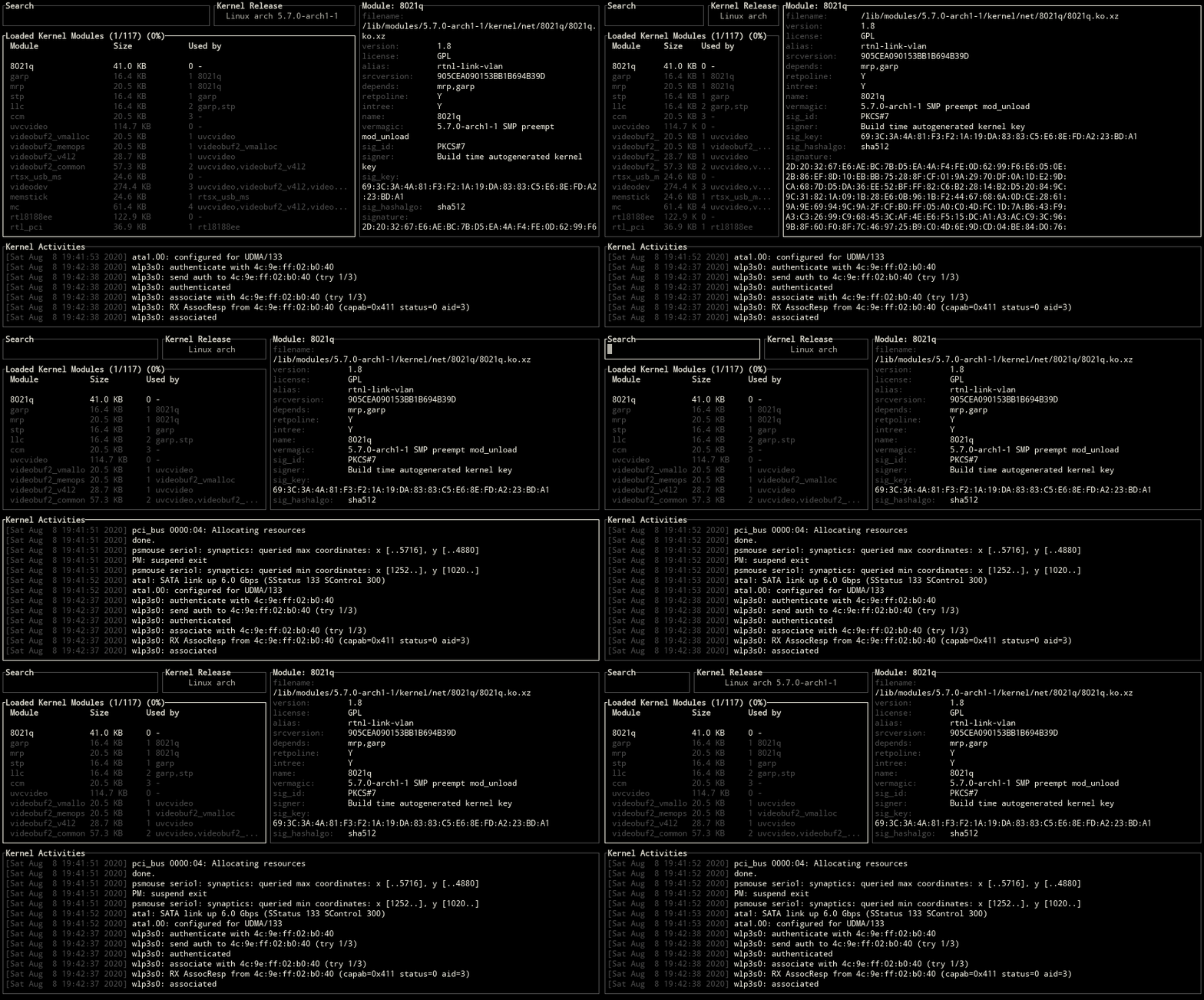
Block Positions
ctrl-x key can be used for changing the positions of blocks.

Kernel Information
Use one of the \, tab, backtab keys to switch between kernel release, version and platform information.

Module Information
The status of a kernel module is shown on selection.

Displaying the dependent modules
Use one of the d, alt-d keys to show all the dependent modules of the selected module.
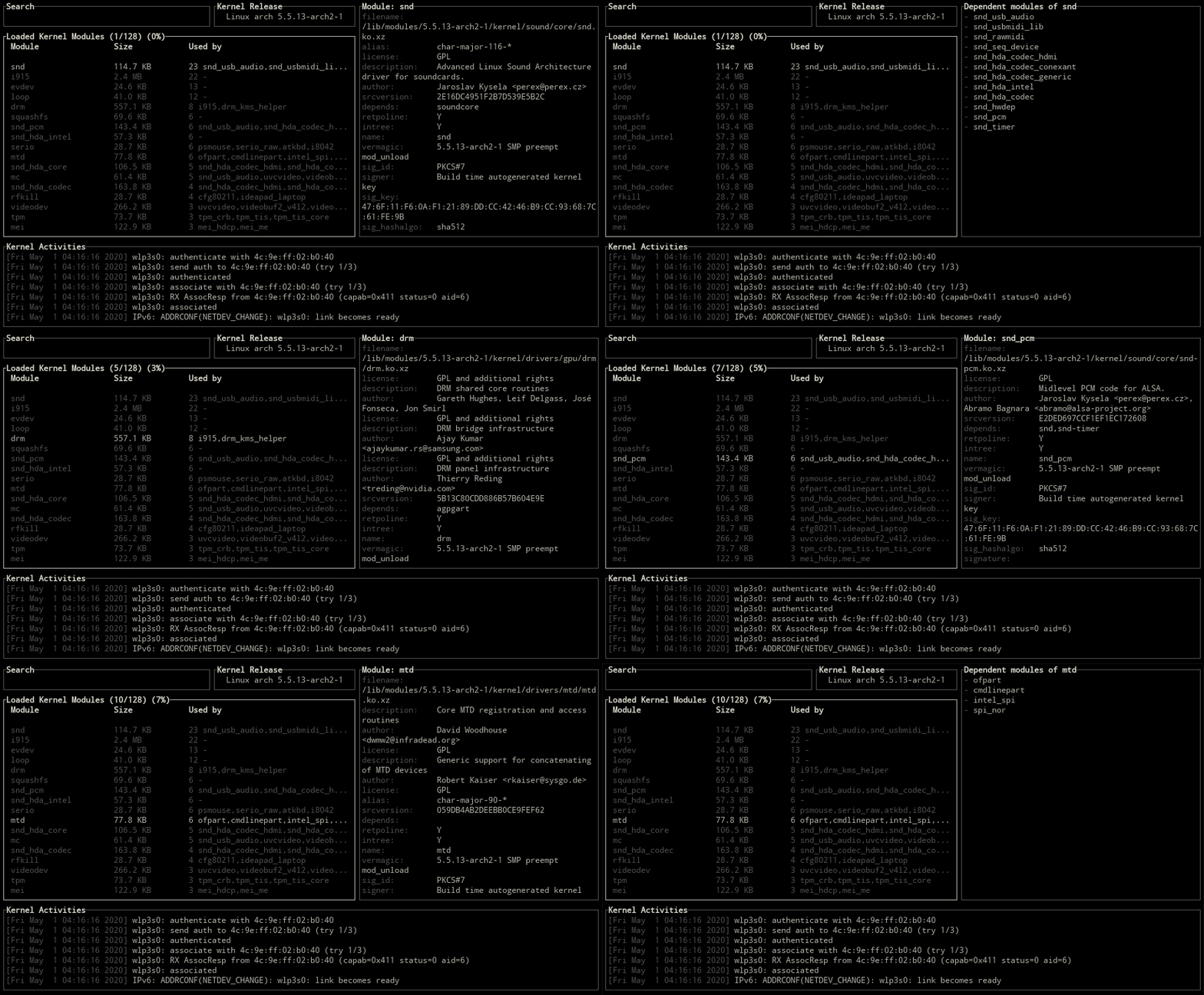
Jumping to dependent modules
For jumping to a dependent kernel module from its parent module, number keys (1-9) can be used for specifying the index of the module on the Used By column.

Searching a module
Switch to the search area with arrow keys or using one of the /, s, enter and provide a search query for the module name.

Loading a module
For adding a module to the Linux kernel, switch to load mode with one of the +, i, insert keys and provide the name of the module to load. Then confirm/cancel the execution of the load command with y/n.

The command that used for loading a module:
modprobe <module_name> || insmod <module_name>.ko
Unloading a module
Use one of the -, u, backspace keys to remove the selected module from the Linux kernel.

The command that used for removing a module:
modprobe -r <module_name> || rmmod <module_name>
Blacklisting a module
Blacklisting is a mechanism to prevent the kernel module from loading. To blacklist the selected module, use one of the x, b, delete keys and confirm the execution.
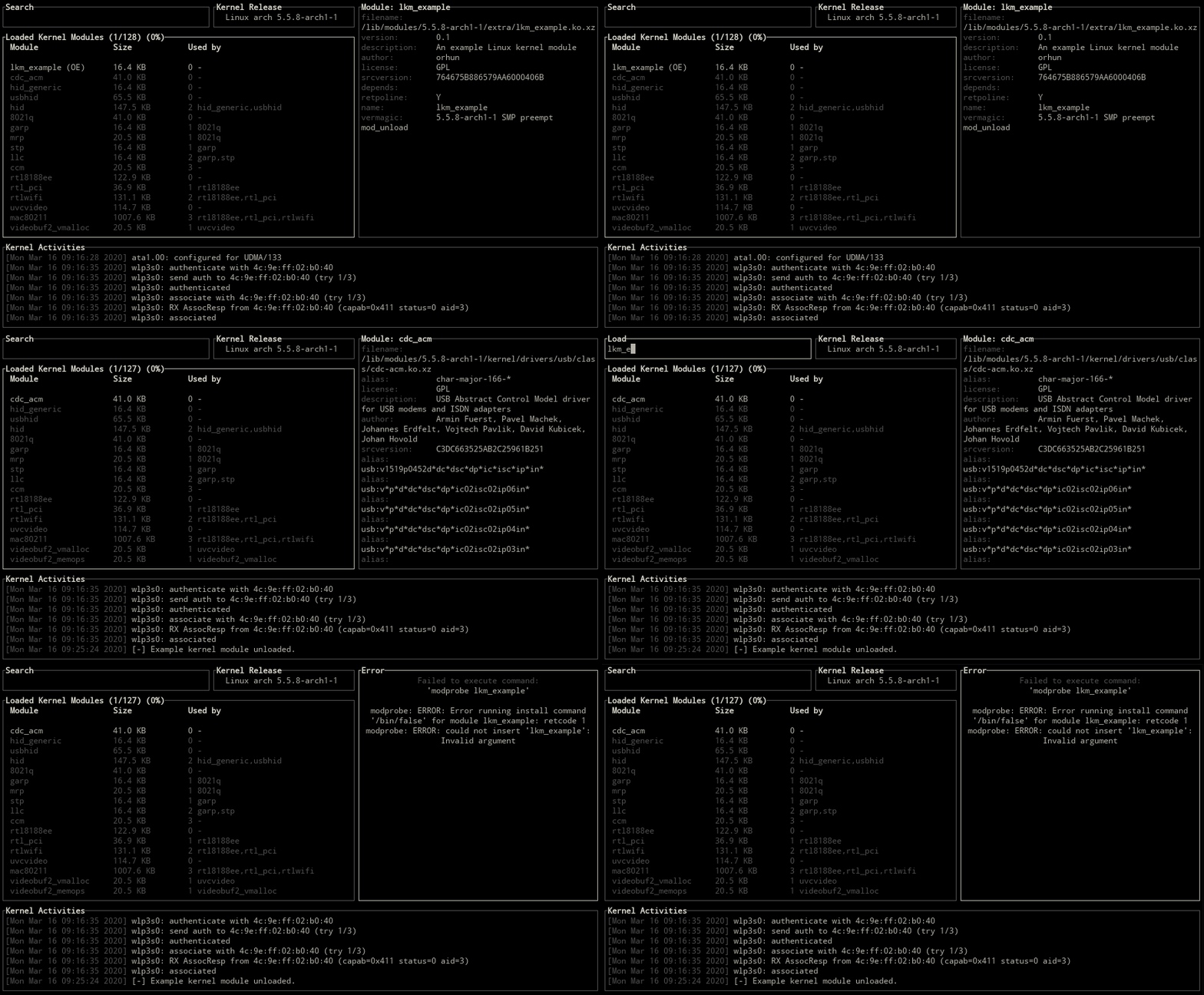
The command that used for blacklisting a module:
if ! grep -q <module_name> /etc/modprobe.d/blacklist.conf; then
  echo 'blacklist <module_name>' >> /etc/modprobe.d/blacklist.conf
  echo 'install <module_name> /bin/false' >> /etc/modprobe.d/blacklist.conf
fi
Reloading a module
Use ctrl-r or alt-r key for reloading the selected module.

The command that used for reloading a module:
modprobe -r <module_name> || rmmod <module_name> && modprobe <module_name> || insmod <module_name>.ko
Clearing the ring buffer
The kernel ring buffer can be cleared with using one of the ctrl-l/u, alt-c keys.

dmesg --clear
Copy & Paste
c/v keys are set for copy/paste operations.
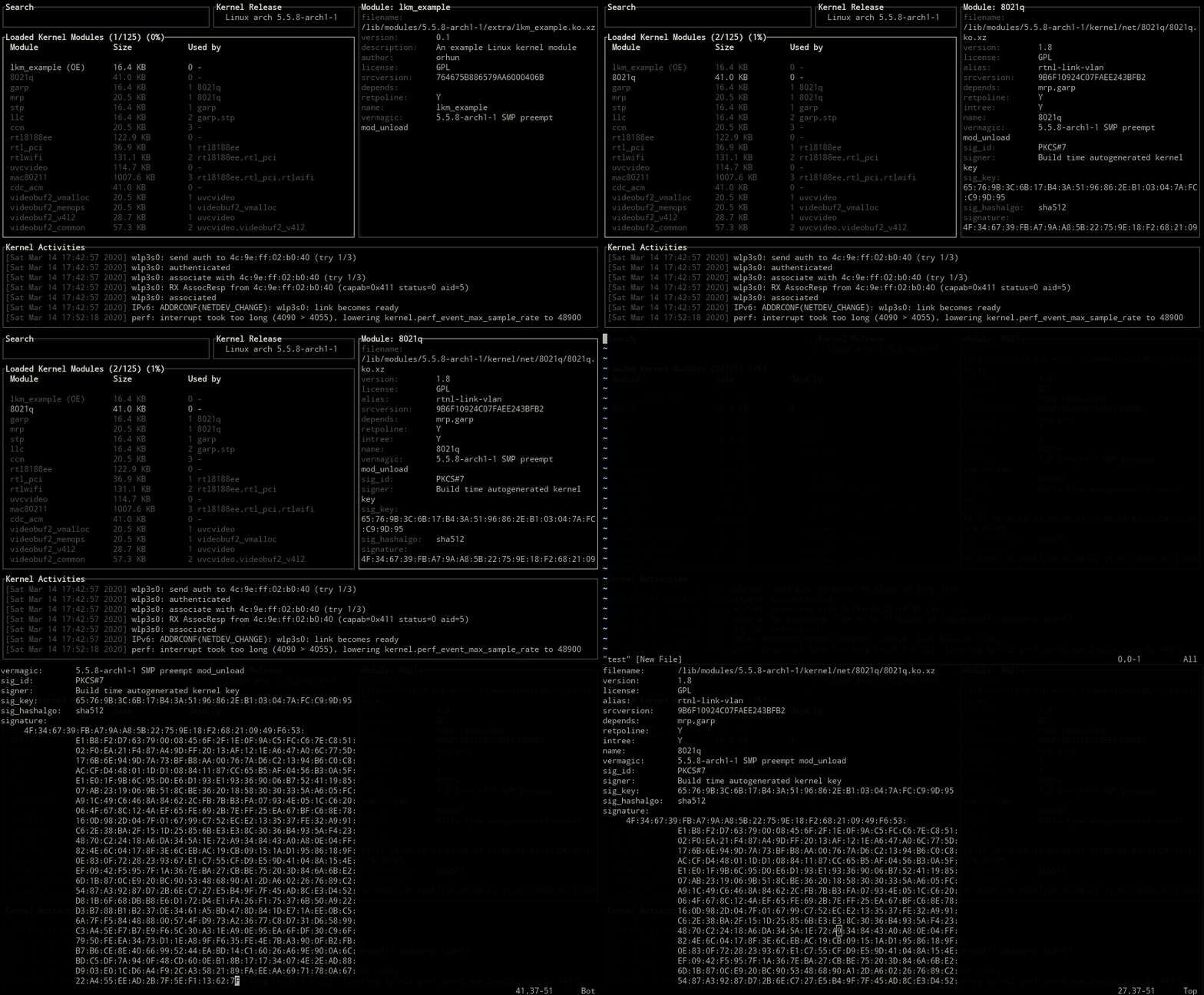
Use ctrl-c/ctrl-v for copying and pasting while in input mode.
Sorting/reversing the kernel modules
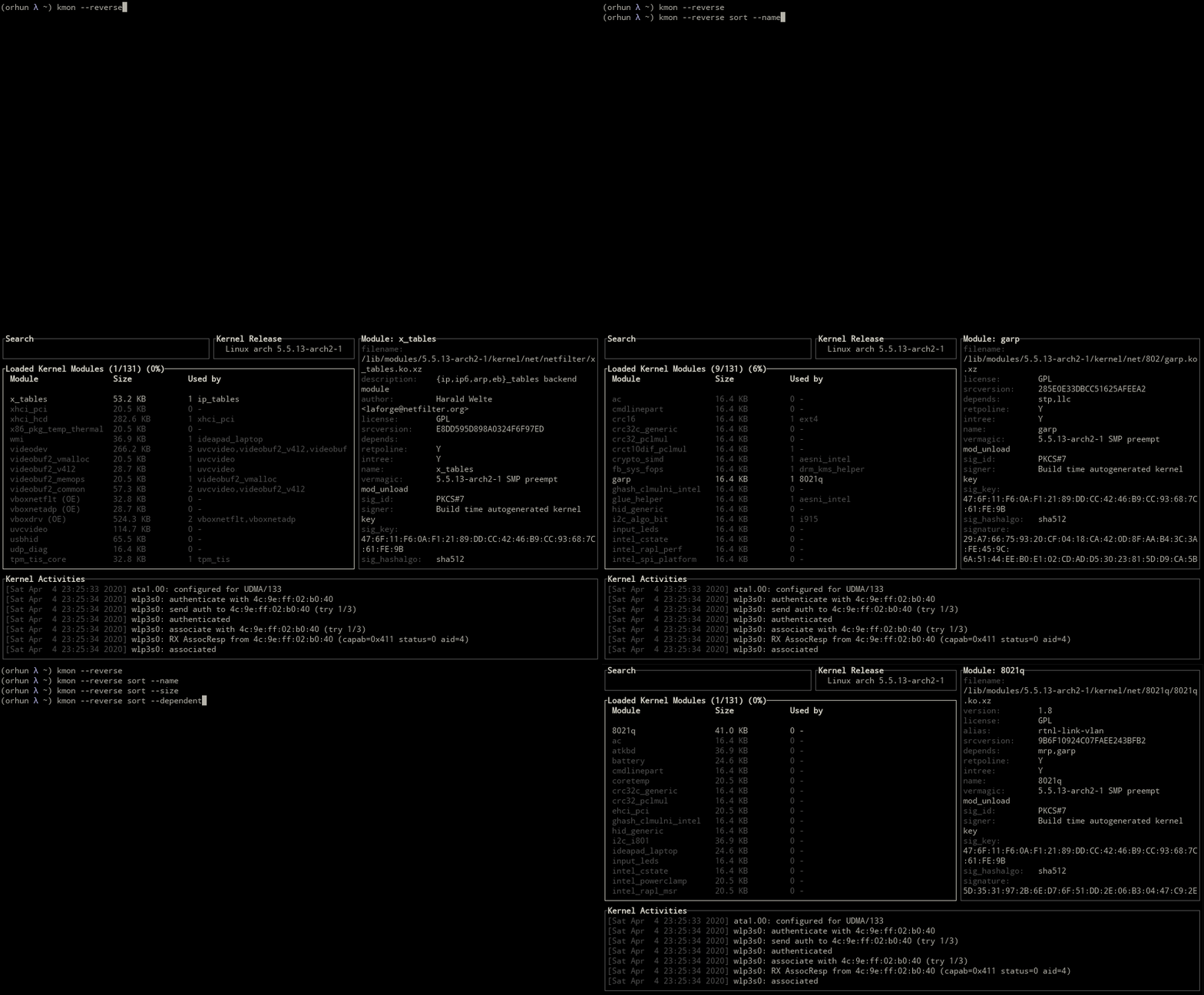
sort subcommand can be used for sorting the kernel modules by their names, sizes or dependent modules.
kmon sort --name
kmon sort --size
kmon sort --dependent

Also the -r, --reverse flag is used for reversing the kernel module list.
kmon --reverse
Customizing the colors
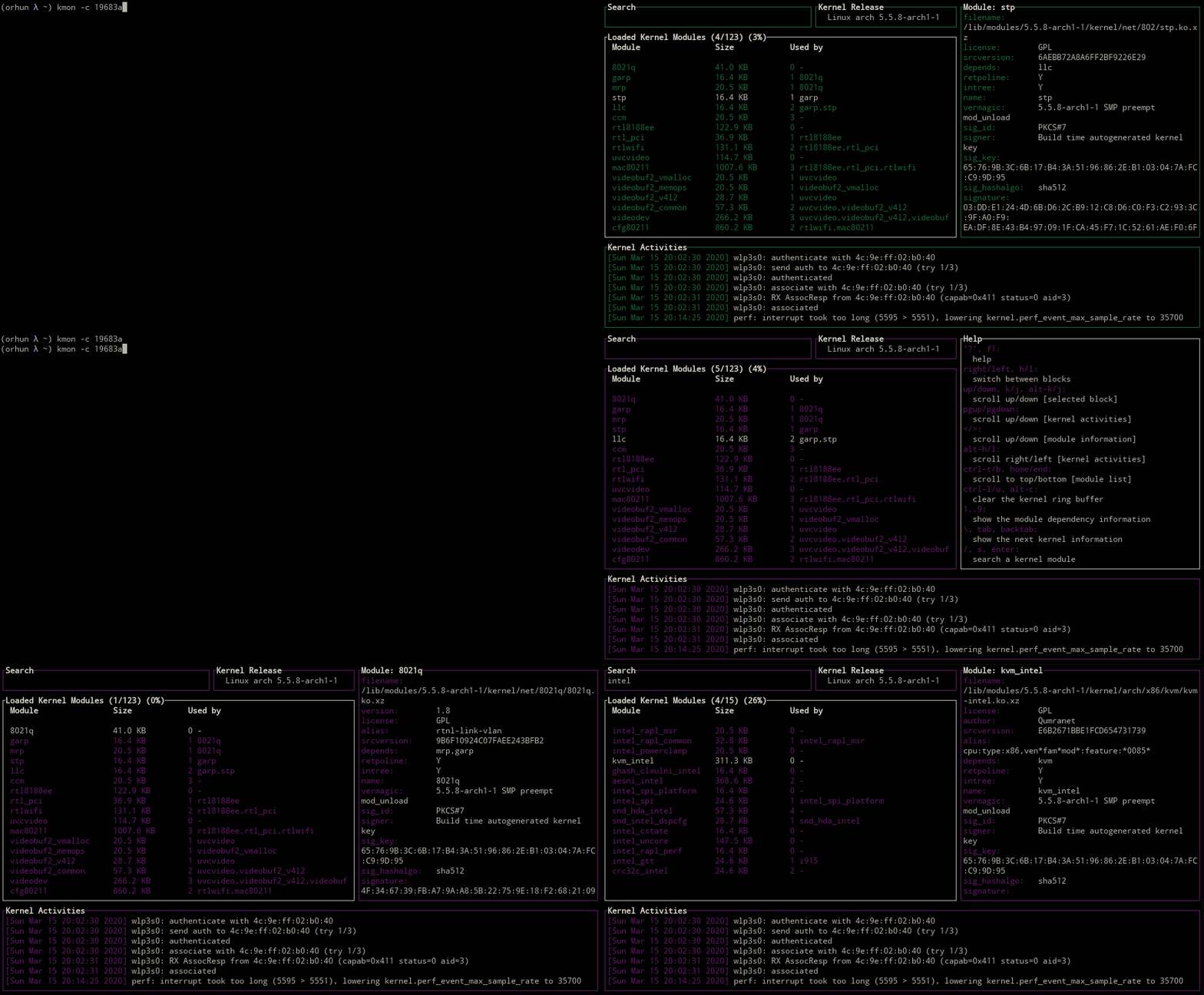
kmon uses the colors of the terminal as default but the highlighting color could be specified with -c, --color option. Alternatively, default text color can be set via -a, --accent-color option.
Supported colors
Supported terminal colors are black, red, green, yellow, blue, magenta, cyan, gray, darkgray, lightred, lightgreen, lightyellow, lightblue, lightmagenta, lightcyan, white.
kmon --color red

Using a custom color
Provide a hexadecimal value for the color to use.
kmon --color 19683a
Changing the accent color
Default text color might cause readability issues on some themes that have transparency. -a, --accent-color option can be used similarly to the -c, --color option for overcoming this issue.
kmon --color 6f849c --accent-color e35760

Unicode symbols
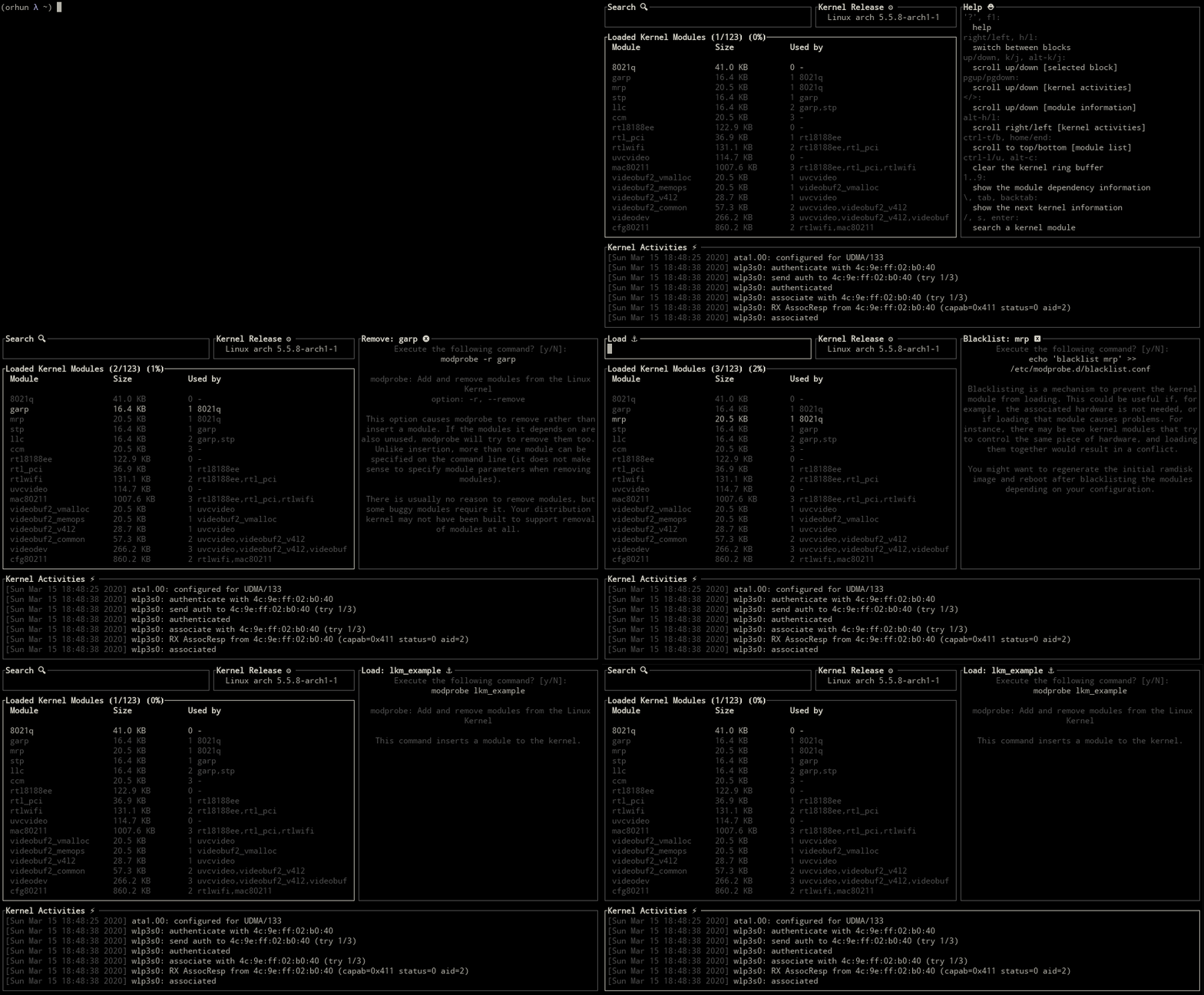
Use -u, --unicode flag for showing Unicode symbols for the block titles.
kmon --unicode
Setting the terminal tick rate
-t, --tickrate option can be used for setting the refresh interval of the terminal UI in milliseconds.

Searching modules by regular expression
-E, --regex option can be used for searching modules by regular expression.
Roadmap
kmon aims to be a standard tool for Linux kernel management while supporting most of the Linux distributions.
Accessibility
For achieving this goal, kmon should be accessible from different package managers such as Snap* and RPM.
Dependencies
It is required to have the essential tools like dmesg and kmod on the system for kmon to work as expected. Thus the next step would be using just the system resources for these functions.
Features
Management actions about the Linux kernel should be applicable in kmon for minimizing the dependence on to command line and other tools.
Testing
kmon should be tested and reported on different architectures for further development and support.
Resources
About the project
Articles
- Exploring the Linux Kernel by Bob Cromwell
- Anatomy of the Linux loadable kernel module by Terenceli
- Managing kernel modules with kmod by Lucas De Marchi
In the media
- Manage And Monitor Linux Kernel Modules With Kmon ( OSTechNix)
- Kmon The Linux Kernel Management And Monitoring Software (Brodie Robertson on YouTube)
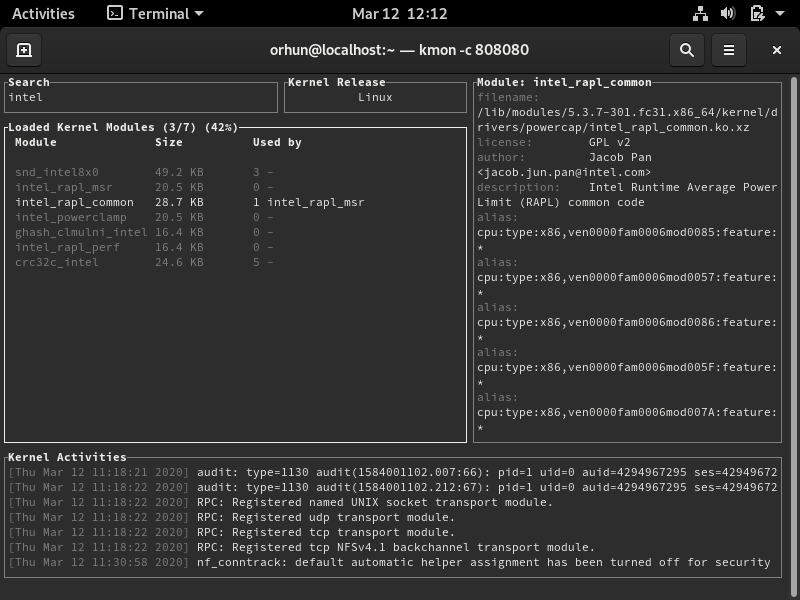
Gallery
| Fedora 31 | Debian 10 | Manjaro 19 |
|---|---|---|
 |
 |
 |
| Ubuntu 18.04 | openSUSE | Void Linux |
|---|---|---|
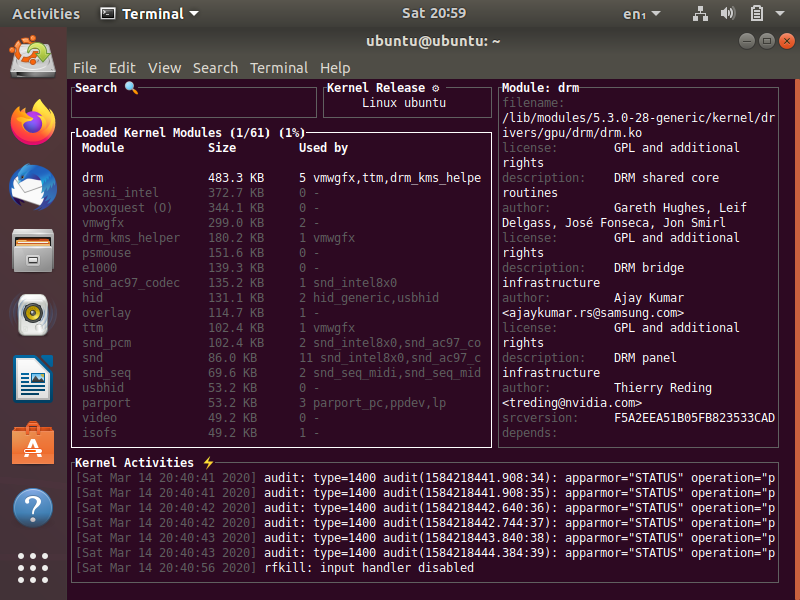 |
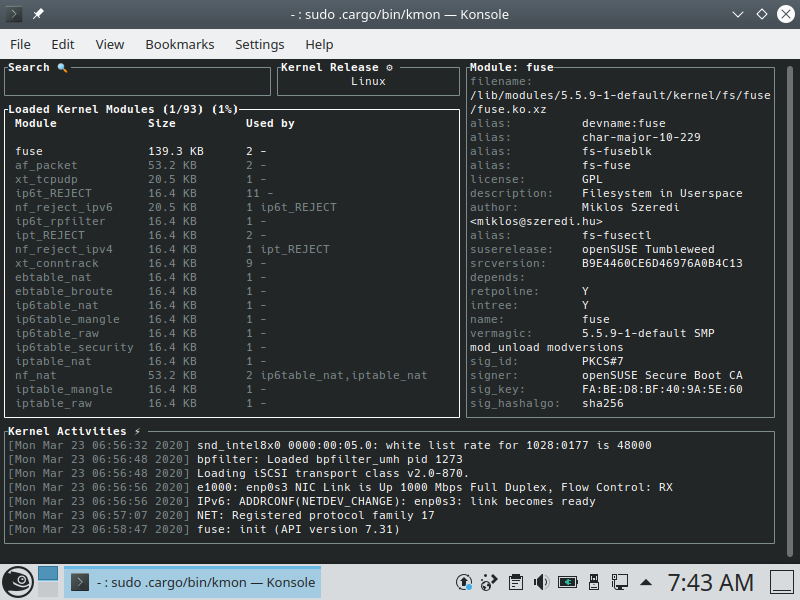 |
 |
Social Media
- Follow @kmonitor_ on Twitter
- Follow the author:
Funding
GitHub
Support the development of my projects by supporting me on GitHub Sponsors.
Patreon

Open Collective


Support the open source development efforts by becoming a backer or sponsor.

License
GNU General Public License (3.0)
Copyright
Copyright © 2020-2024, Orhun Parmaksız