Kanba is a free, open source project & work management project written in TypeScript and released under MIT. It has 656 GitHub stars, 110 forks and 11 open issues, and was last pushed 1 months ago. On this registry it ranks #55 of 62 tracked projects in Project & Work Management, with 5 head-to-head comparisons available. It gained 1 stars over the last 6 tracked days.

What is Kanba?

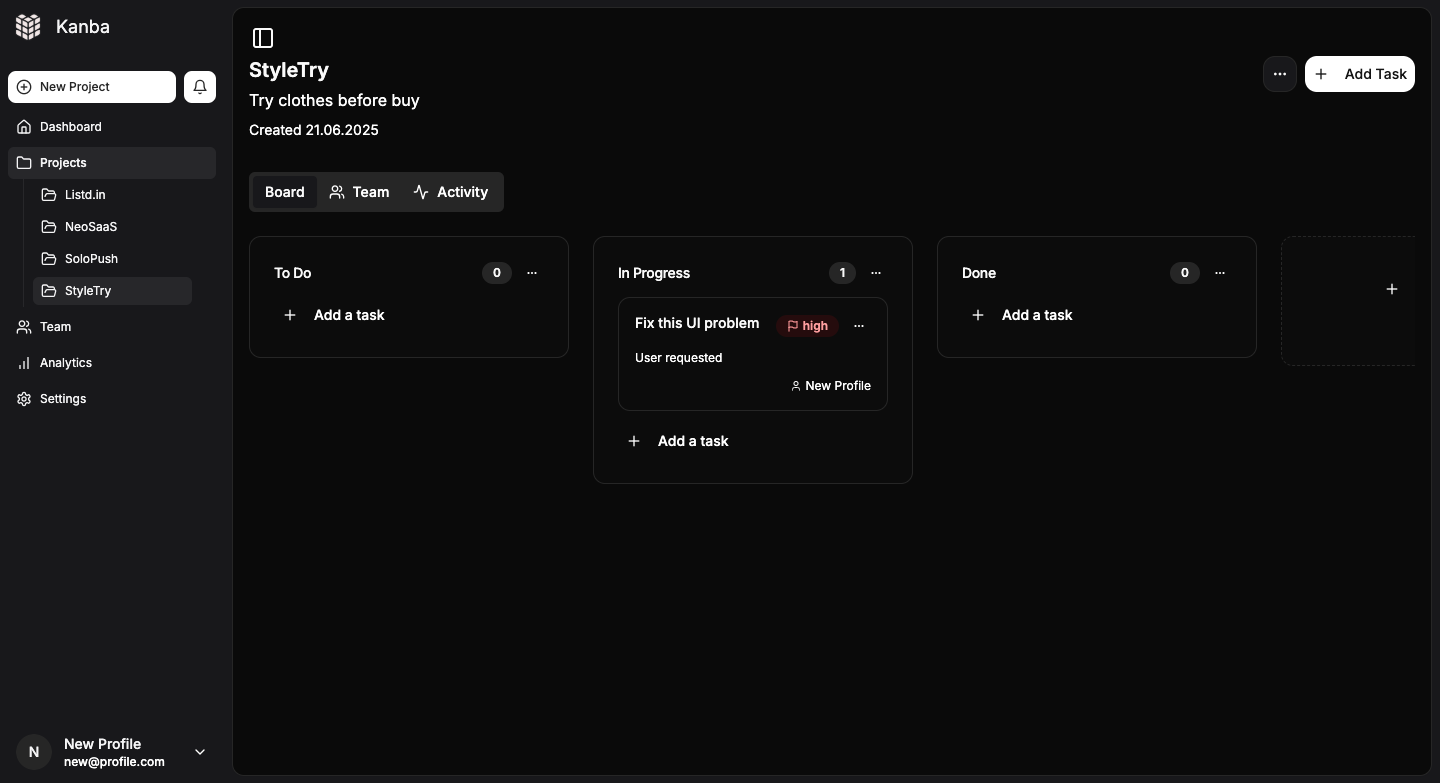
Kanba is an open-source Kanban board application in the Business Software / Project & Work Management category, a lightweight Trello alternative written in TypeScript for makers, indie hackers, solo developers, and small teams who want to run their own project and task management boards.

What it is

Kanba is an MIT-licensed Kanban board built on a modern JavaScript stack: Tailwind CSS and shadcn/ui for the interface, Supabase for backend services, and Stripe for payment integration. The project describes itself as an open-source, lightweight Trello alternative designed for makers and indie hackers, with an emphasis on simplicity, speed, and scalability. It supports unlimited projects, team collaboration, and dark/light mode, and its repository carries 656 stars, 110 forks, and 11 open issues, with the last push on 2026-08-08.

The concrete problem Kanba solves is ownership of a hosted board. Where a Trello-style service keeps the boards, the accounts, and the billing relationship on someone else's infrastructure, Kanba ships as an application that a team deploys itself, pointed at its own Supabase project. The payment side is part of the same package rather than a separate service: the repository replaces Supabase Edge Functions with local Next.js API routes, so POST /api/stripe/checkout creates Stripe checkout sessions and POST /api/stripe/webhook handles Stripe webhook events from inside the deployed application. The result is a board that can take payments without standing up an additional payment backend or deploying separate edge functions.

Key capabilities

  • Kanban boards with lists, notes, and task management, matching the project's kanban-board, lists, notes, and task-management topics.
  • Unlimited projects per deployment, per the README's feature description.
  • Team collaboration on shared boards, alongside dark and light mode.
  • Stripe checkout sessions created through POST /api/stripe/checkout.
  • Stripe webhook event handling through POST /api/stripe/webhook, verified with STRIPE_WEBHOOK_SECRET.
  • Local Next.js API routes in place of Supabase Edge Functions, which the README lists as simpler deployment, standard .env file support, easier local debugging, tighter Next.js integration, and no vendor lock-in.
  • NextAuth-based authentication configured through NEXTAUTH_URL and NEXTAUTH_SECRET.

Who uses it and how

  • Solo developers and small teams that want a board with full control and without unnecessary complexity, the audience the README names directly.
  • Makers and indie hackers shipping a paid product, who need the board's Stripe integration to accept payments without building a separate billing backend.
  • Teams deploying to Vercel with npx vercel, then registering the production webhook at https://your-domain.vercel.app/api/stripe/webhook.
  • Self-hosters who want board and account data to live in their own Supabase project rather than a hosted board vendor's.
  • Developers testing payment flows locally with the Stripe CLI, forwarding events via stripe listen --forward-to localhost:3000/api/stripe/webhook.

Getting started

Local setup is npm install, then copy .env.example to .env.local and fill in the Supabase, NextAuth, and optional Stripe variables, then npm run dev. Production deployment is npx vercel with the same environment variables added through the Vercel dashboard or CLI, followed by pointing a Stripe webhook at https://your-domain.vercel.app/api/stripe/webhook.

How it compares

The README positions Kanba explicitly against Trello, and its topic list also names Notion: it is the free, self-hosted alternative to those hosted board and workspace products. Where those services bundle hosting and billing into a subscription, Kanba is MIT-licensed, runs on infrastructure the operator chooses, and keeps board data in the operator's own Supabase project. Payment handling is not a hosted add-on layer but routes inside the application, configured with the operator's own Stripe keys.

When to use it — and when not to

A self-hoster must run a Supabase project, supply a NextAuth secret, and, if payments are wanted, hold a Stripe account with a webhook secret, keeping STRIPE_SECRET_KEY and SUPABASE_SERVICE_ROLE_KEY server-side and rotating webhook secrets regularly. Teams that do not want to operate Supabase or Next.js hosting, or that want a zero-configuration hosted board, should not pick Kanba. The README is heavily weighted toward deployment and environment configuration rather than feature documentation, so expect to read configuration files to understand behavior.

project readme (upstream, from github) — read inline
🌐 Language

English | 简体中文 | 繁體中文 | 日本語 | 한국어 | हिन्दी | ไทย | Français | Deutsch | Español | Itapano | Русский | Português | Nederlands | Polski | العربية | فارسی | Türkçe | Tiếng Việt | Bahasa Indonesia


Kanba


Vercel OSS Program

Open-source, lightweight Trello alternative designed for makers and indie hackers.

Focus on simplicity, speed, and scalability. Built with modern stack: Tailwind CSS, shadcn/ui, Supabase, Stripe integration. Supports unlimited projects, team collaboration, dark/light mode, and seamless user experience. Perfect for solo devs and small teams who want full control without unnecessary complexity.

🌟 If you find this project useful, consider giving it a star! It helps others discover it too.

Deployment Guide

Overview

This application now uses local Next.js API routes instead of Supabase Edge Functions for Stripe integration. This makes deployment simpler and allows you to use standard .env files for configuration.

Environment Variables Setup

1. Create .env.local file

Copy .env.example to .env.local and fill in your actual values:

cp .env.example .env.local

2. Required Environment Variables

Supabase Configuration
  • NEXT_PUBLIC_SUPABASE_URL - Your Supabase project URL
  • NEXT_PUBLIC_SUPABASE_ANON_KEY - Your Supabase anonymous key
  • SUPABASE_SERVICE_ROLE_KEY - Your Supabase service role key (server-side only)
Stripe Configuration (optional)
  • STRIPE_SECRET_KEY - Your Stripe secret key (server-side only)
  • NEXT_PUBLIC_STRIPE_PUBLISHABLE_KEY - Your Stripe publishable key
  • STRIPE_WEBHOOK_SECRET - Your Stripe webhook secret
Site Configuration
  • NEXT_PUBLIC_SITE_URL - Your site URL (for production)
  • NEXTAUTH_URL - Your site URL (same as above)
  • NEXTAUTH_SECRET - A random secret for NextAuth

Local Development

  1. Install dependencies:
npm install
  1. Set up your environment variables in .env.local

  2. Run the development server:

npm run dev
  1. Test Stripe webhooks locally using Stripe CLI:
stripe listen --forward-to localhost:3000/api/stripe/webhook

Production Deployment

Vercel Deployment

  1. Deploy to Vercel:
npx vercel
  1. Environment Variables: Add all environment variables through Vercel dashboard or CLI

  2. Stripe Webhook Setup:

    • Point webhook to: https://your-domain.vercel.app/api/stripe/webhook

API Endpoints

The application now uses these local API routes:

  • POST /api/stripe/checkout - Creates Stripe checkout sessions
  • POST /api/stripe/webhook - Handles Stripe webhook events

Benefits of Local API Routes

  1. Simpler Deployment - No need to deploy separate edge functions
  2. Environment Variables - Standard .env file support
  3. Better Debugging - Easier to debug locally
  4. Framework Integration - Better integration with Next.js
  5. No Vendor Lock-in - Can deploy to any platform that supports Next.js

Troubleshooting

  1. Webhook Issues:

    • Ensure STRIPE_WEBHOOK_SECRET matches your Stripe webhook endpoint
    • Check webhook logs in Stripe dashboard
    • Verify webhook URL is correct
  2. Environment Variables:

    • Ensure all required variables are set
    • Check for typos in variable names
    • Verify Supabase service role key has proper permissions
  3. CORS Issues:

    • API routes include proper CORS headers
    • Ensure your domain is whitelisted if needed

Security Notes

  • Never expose STRIPE_SECRET_KEY or SUPABASE_SERVICE_ROLE_KEY to the client
  • Use NEXT_PUBLIC_ prefix only for client-side variables
  • Regularly rotate your webhook secrets
  • Monitor webhook delivery in Stripe dashboard

Frequently asked questions

Is Kanba free to use?

Kanba is open source under the MIT licence. There is no licence fee and no seat count — you can self-host it or, where the project offers one, pay a vendor for a managed version instead.

What does Kanba do?

Beautiful Kanban boards with seamless payment integration

What is Kanba written in?

Kanba is primarily written in TypeScript. Its source is publicly available at https://github.com/uaghazade1/kanba, and it has 656 GitHub stars.