








k8sgpt is a tool for scanning your Kubernetes clusters, diagnosing, and triaging issues in simple English.
It has SRE experience codified into its analyzers and helps to pull out the most relevant information to enrich it with AI.
Out of the box integration with OpenAI, Azure, Cohere, Amazon Bedrock, Google Gemini and local models.
Sister project: Check out sympozium for managing agents in Kubernetes.


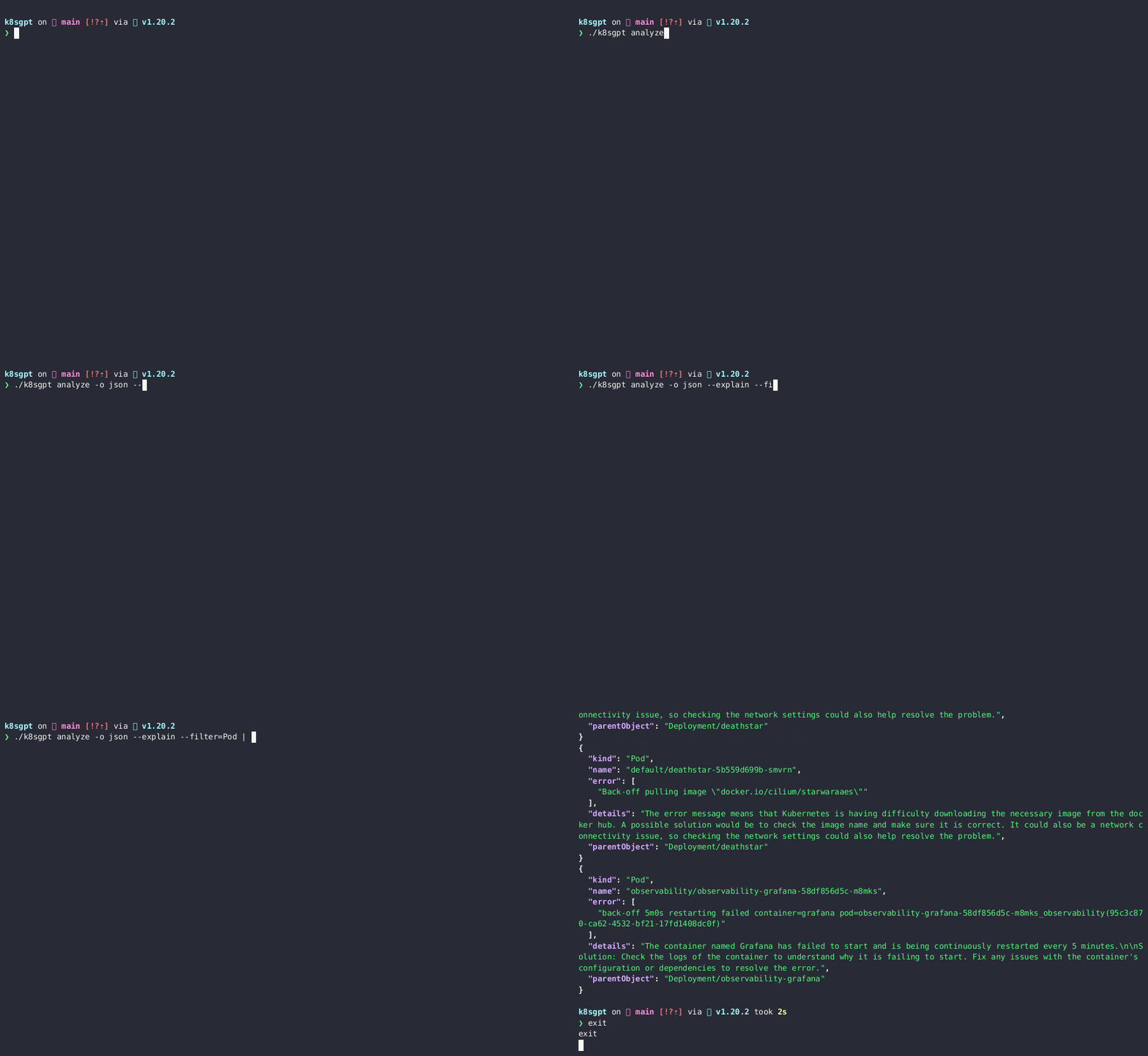
Table of Contents
- Overview
- Installation
- Quick Start
- Analyzers
- Examples
- LLM AI Backends
- Key Features
- Model Context Protocol (MCP)
- Documentation
- Contributing
- Community
CLI Installation
Linux/Mac via brew
brew install k8sgpt
or
brew tap k8sgpt-ai/k8sgpt
brew install k8sgpt
RPM-based installation (RedHat/CentOS/Fedora)
32 bit:
sudo rpm -ivh https://github.com/k8sgpt-ai/k8sgpt/releases/download/v0.4.39/k8sgpt_386.rpm
64 bit:
sudo rpm -ivh https://github.com/k8sgpt-ai/k8sgpt/releases/download/v0.4.39/k8sgpt_amd64.rpm
DEB-based installation (Ubuntu/Debian)
32 bit:
curl -LO https://github.com/k8sgpt-ai/k8sgpt/releases/download/v0.4.39/k8sgpt_386.deb
sudo dpkg -i k8sgpt_386.deb
64 bit:
curl -LO https://github.com/k8sgpt-ai/k8sgpt/releases/download/v0.4.39/k8sgpt_amd64.deb
sudo dpkg -i k8sgpt_amd64.deb
APK-based installation (Alpine)
32 bit:
wget https://github.com/k8sgpt-ai/k8sgpt/releases/download/v0.4.39/k8sgpt_386.apk
apk add --allow-untrusted k8sgpt_386.apk
64 bit:
wget https://github.com/k8sgpt-ai/k8sgpt/releases/download/v0.4.39/k8sgpt_amd64.apk
apk add --allow-untrusted k8sgpt_amd64.apk
Failing Installation on WSL or Linux (missing gcc)
When installing Homebrew on WSL or Linux, you may encounter the following error:==> Installing k8sgpt from k8sgpt-ai/k8sgpt Error: The following formula cannot be installed from a bottle and must be
built from the source. k8sgpt Install Clang or run brew install gcc.
If you install gcc as suggested, the problem will persist. Therefore, you need to install the build-essential package.
   sudo apt-get update
   sudo apt-get install build-essential
Windows
- Download the latest Windows binaries of k8sgpt from the Release tab based on your system architecture.
- Extract the downloaded package to your desired location. Configure the system PATH environment variable with the binary location
Operator Installation
To install within a Kubernetes cluster please use our k8sgpt-operator with installation instructions available here
This mode of operation is ideal for continuous monitoring of your cluster and can integrate with your existing monitoring such as Prometheus and Alertmanager.
Quick Start
- Currently, the default AI provider is OpenAI, you will need to generate an API key from OpenAI
- You can do this by running
k8sgpt generateto open a browser link to generate it
- You can do this by running
- Run
k8sgpt auth addto set it in k8sgpt.- You can provide the password directly using the
--passwordflag.
- You can provide the password directly using the
- Run
k8sgpt filtersto manage the active filters used by the analyzer. By default, all filters are executed during analysis. - Run
k8sgpt analyzeto run a scan. - And use
k8sgpt analyze --explainto get a more detailed explanation of the issues. - You also run
k8sgpt analyze --with-doc(with or without the explain flag) to get the official documentation from Kubernetes.
Using with Claude Desktop
K8sGPT can be integrated with Claude Desktop to provide AI-powered Kubernetes cluster analysis. This integration requires K8sGPT v0.4.14 or later.
Prerequisites
Install K8sGPT v0.4.14 or later:
brew install k8sgptInstall Claude Desktop from the official website
Configure K8sGPT with your preferred AI backend:
k8sgpt auth
Setup
Start the K8sGPT MCP server:
k8sgpt serve --mcpIn Claude Desktop:
- Open Settings
- Navigate to the Integrations section
- Add K8sGPT as a new integration
- The MCP server will be automatically detected
Configure Claude Desktop with the following JSON:
{
  "mcpServers": {
    "k8sgpt": {
      "command": "k8sgpt",
      "args": [
        "serve",
        "--mcp"
      ]
    }
  }
}
Usage
Once connected, you can use Claude Desktop to:
- Analyze your Kubernetes cluster
- Get detailed insights about cluster health
- Receive recommendations for fixing issues
- Query cluster information
Example commands in Claude Desktop:
- "Analyze my Kubernetes cluster"
- "What's the health status of my cluster?"
- "Show me any issues in the default namespace"
Troubleshooting
If you encounter connection issues:
- Ensure K8sGPT is running with the MCP server enabled
- Verify your Kubernetes cluster is accessible
- Check that your AI backend is properly configured
- Restart both K8sGPT and Claude Desktop
For more information, visit our documentation.
Analyzers
K8sGPT uses analyzers to triage and diagnose issues in your cluster. It has a set of analyzers that are built in, but you will be able to write your own analyzers.
Built in analyzers
Enabled by default
- podAnalyzer
- pvcAnalyzer
- rsAnalyzer
- serviceAnalyzer
- eventAnalyzer
- ingressAnalyzer
- statefulSetAnalyzer
- deploymentAnalyzer
- jobAnalyzer
- cronJobAnalyzer
- nodeAnalyzer
- mutatingWebhookAnalyzer
- validatingWebhookAnalyzer
- configMapAnalyzer
Optional
- hpaAnalyzer
- pdbAnalyzer
- networkPolicyAnalyzer
- gatewayClass
- gateway
- httproute
- logAnalyzer
- storageAnalyzer
- securityAnalyzer
- CatalogSource
- ClusterCatalog
- ClusterExtension
- ClusterService
- ClusterServiceVersion
- OperatorGroup
- InstallPlan
- Subscription
- ValidatingAdmissionPolicy
Examples
Run a scan with the default analyzers
k8sgpt generate
k8sgpt auth add
k8sgpt analyze --explain
k8sgpt analyze --explain --with-doc
Filter on resource
k8sgpt analyze --explain --filter=Service
Filter by namespace
k8sgpt analyze --explain --filter=Pod --namespace=default
Output to JSON
k8sgpt analyze --explain --filter=Service --output=json
Anonymize during explain
k8sgpt analyze --explain --filter=Service --output=json --anonymize
Using filters
List filters
k8sgpt filters list
Add default filters
k8sgpt filters add [filter(s)]
Examples :
- Simple filter :
k8sgpt filters add Service - Multiple filters :
k8sgpt filters add Ingress,Pod
Remove default filters
k8sgpt filters remove [filter(s)]
Examples :
- Simple filter :
k8sgpt filters remove Service - Multiple filters :
k8sgpt filters remove Ingress,Pod
Additional commands
List configured backends
k8sgpt auth list
Update configured backends
k8sgpt auth update $MY_BACKEND1,$MY_BACKEND2..
Remove configured backends
k8sgpt auth remove -b $MY_BACKEND1,$MY_BACKEND2..
List integrations
k8sgpt integrations list
Activate integrations
k8sgpt integrations activate [integration(s)]
Use integration
k8sgpt analyze --filter=[integration(s)]
Deactivate integrations
k8sgpt integrations deactivate [integration(s)]
Serve mode
k8sgpt serve
Serve mode with MCP (Model Context Protocol)
# Enable MCP server on default port 8089
k8sgpt serve --mcp --mcp-http

# Enable MCP server on custom port
k8sgpt serve --mcp --mcp-http --mcp-port 8089

# Full serve mode with MCP
k8sgpt serve --mcp --mcp-http --port 8080 --metrics-port 8081 --mcp-port 8089
The MCP server enables integration with tools like Claude Desktop and other MCP-compatible clients. It runs on port 8089 by default and provides:
- Kubernetes cluster analysis via MCP protocol
- Resource information and health status
- AI-powered issue explanations and recommendations
For Helm chart deployment with MCP support, see the charts/k8sgpt/values-mcp-example.yaml file.
Analysis with serve mode
grpcurl -plaintext -d '{"namespace": "k8sgpt", "explain" : "true"}' localhost:8080 schema.v1.ServerAnalyzerService/Analyze
{
  "status": "OK"
}
Analysis with custom headers
k8sgpt analyze --explain --custom-headers CustomHeaderKey:CustomHeaderValue
Print analysis stats
k8sgpt analyze -s
The stats mode allows for debugging and understanding the time taken by an analysis by displaying the statistics of each analyzer.
- Analyzer Ingress took 47.125583ms
- Analyzer PersistentVolumeClaim took 53.009167ms
- Analyzer CronJob took 57.517792ms
- Analyzer Deployment took 156.6205ms
- Analyzer Node took 160.109833ms
- Analyzer ReplicaSet took 245.938333ms
- Analyzer StatefulSet took 448.0455ms
- Analyzer Pod took 5.662594708s
- Analyzer Service took 38.583359166s
Diagnostic information
To collect diagnostic information use the following command to create a dump__json in your local directory.
k8sgpt dump
LLM AI Backends
K8sGPT uses the chosen LLM, generative AI provider when you want to explain the analysis results using --explain flag e.g. k8sgpt analyze --explain. You can use --backend flag to specify a configured provider (it's openai by default).
You can list available providers using k8sgpt auth list:
Default:
> openai
Active:
Unused:
> openai
> localai
> ollama
> azureopenai
> cohere
> amazonbedrock
> amazonsagemaker
> google
> huggingface
> noopai
> googlevertexai
> watsonxai
> customrest
> ibmwatsonxai
> litellm
For detailed documentation on how to configure and use each provider see here.
Using LiteLLM (route to 100+ providers through one proxy)
The litellm backend talks to a LiteLLM proxy,
which exposes an OpenAI-compatible API in front of 100+ providers (OpenAI, Azure,
Anthropic, Bedrock, Gemini, ...). It defaults to the proxy's standard local
endpoint (http://localhost:4000/v1); use --model to pick a model configured
in your proxy, and --baseurl to point at a remote proxy. A password is only
needed if your proxy enforces a virtual key.
k8sgpt auth add --backend litellm --model gpt-4o
k8sgpt analyze --explain --backend litellm
To set a new default provider
k8sgpt auth default -p azureopenai
Default provider set to azureopenai
Using Amazon Bedrock Converse with inference profiles
System Inference Profile
k8sgpt auth add --backend amazonbedrockconverse --providerRegion us-east-1 --model arn:aws:bedrock:us-east-1:123456789012:inference-profile/my-inference-profile
Application Inference Profile
k8sgpt auth add --backend amazonbedrockconverse --providerRegion us-east-1 --model arn:aws:bedrock:us-east-1:123456789012:application-inference-profile/2uzp4s0w39t6
Using Amazon Bedrock with inference profiles
System Inference Profile
k8sgpt auth add --backend amazonbedrock --providerRegion us-east-1 --model arn:aws:bedrock:us-east-1:123456789012:inference-profile/my-inference-profile
Application Inference Profile
k8sgpt auth add --backend amazonbedrock --providerRegion us-east-1 --model arn:aws:bedrock:us-east-1:123456789012:application-inference-profile/2uzp4s0w39t6
Key Features
With this option, the data is anonymized before being sent to the AI Backend. During the analysis execution, k8sgpt retrieves sensitive data (Kubernetes object names, labels, etc.). This data is masked when sent to the AI backend and replaced by a key that can be used to de-anonymize the data when the solution is returned to the user.
Anonymization
- Error reported during analysis:
Error: HorizontalPodAutoscaler uses StatefulSet/fake-deployment as ScaleTargetRef which does not exist.
- Payload sent to the AI backend:
Error: HorizontalPodAutoscaler uses StatefulSet/tGLcCRcHa1Ce5Rs as ScaleTargetRef which does not exist.
- Payload returned by the AI:
The Kubernetes system is trying to scale a StatefulSet named tGLcCRcHa1Ce5Rs using the HorizontalPodAutoscaler, but it cannot find the StatefulSet. The solution is to verify that the StatefulSet name is spelled correctly and exists in the same namespace as the HorizontalPodAutoscaler.
- Payload returned to the user:
The Kubernetes system is trying to scale a StatefulSet named fake-deployment using the HorizontalPodAutoscaler, but it cannot find the StatefulSet. The solution is to verify that the StatefulSet name is spelled correctly and exists in the same namespace as the HorizontalPodAutoscaler.
Further Details
Note: Anonymization does not currently apply to events.
In a few analysers like Pod, we feed to the AI backend the event messages which are not known beforehand thus we are not masking them for the time being.
The following is the list of analysers in which data is being masked:-
- Statefulset
- Service
- PodDisruptionBudget
- Node
- NetworkPolicy
- Ingress
- HPA
- Deployment
- Cronjob
The following is the list of analysers in which data is not being masked:-
- ReplicaSet
- PersistentVolumeClaim
- Pod
- Log
- *Events
*Note:
k8gpt will not mask the above analysers because they do not send any identifying information except Events analyser.
Masking for Events analyzer is scheduled in the near future as seen in this issue. Further research has to be made to understand the patterns and be able to mask the sensitive parts of an event like pod name, namespace etc.
The following is the list of fields which are not being masked:-
- Describe
- ObjectStatus
- Replicas
- ContainerStatus
- *Event Message
- ReplicaStatus
- Count (Pod)
*Note:
- It is quite possible the payload of the event message might have something like "super-secret-project-pod-X crashed" which we don't currently redact (scheduled in the near future as seen in this issue).
Proceed with care
- The K8gpt team recommends using an entirely different backend (a local model) in critical production environments. By using a local model, you can rest assured that everything stays within your DMZ, and nothing is leaked.
- If there is any uncertainty about the possibility of sending data to a public LLM (open AI, Azure AI) and it poses a risk to business-critical operations, then, in such cases, the use of public LLM should be avoided based on personal assessment and the jurisdiction of risks involved.
Configuration management
k8sgpt stores config data in the $XDG_CONFIG_HOME/k8sgpt/k8sgpt.yaml file. The data is stored in plain text, including your OpenAI key.
Config file locations:
| OS | Path |
|---|---|
| MacOS | ~/Library/Application Support/k8sgpt/k8sgpt.yaml |
| Linux | ~/.config/k8sgpt/k8sgpt.yaml |
| Windows | %LOCALAPPDATA%/k8sgpt/k8sgpt.yaml |
Remote caching
Note: You can configure and use only one remote cache at a timeAdding a remote cache
- AWS S3
- As a prerequisite
AWS_ACCESS_KEY_IDandAWS_SECRET_ACCESS_KEYare required as environmental variables. - Configuration,
k8sgpt cache add s3 --region --bucket - Minio Configuration with HTTP endpoint
k8sgpt cache add s3 --bucket --endpoint - Minio Configuration with HTTPs endpoint, skipping TLS verification
k8sgpt cache add s3 --bucket --endpoint --insecure- K8sGPT will create the bucket if it does not exist
- As a prerequisite
- Azure Storage
- We support a number of techniques to authenticate against Azure
- Configuration,
k8sgpt cache add azure --storageacc --container- K8sGPT assumes that the storage account already exist and it will create the container if it does not exist
- It is the user responsibility have to grant specific permissions to their identity in order to be able to upload blob files and create SA containers (e.g Storage Blob Data Contributor)
- Google Cloud Storage
- As a prerequisite
GOOGLE_APPLICATION_CREDENTIALSare required as environmental variables. - Configuration,
k8sgpt cache add gcs --region --bucket --projectid- K8sGPT will create the bucket if it does not exist
- As a prerequisite
Listing cache items
k8sgpt cache list
Purging an object from the cache Note: purging an object using this command will delete upstream files, so it requires appropriate permissions.
k8sgpt cache purge $OBJECT_NAME
Removing the remote cache Note: this will not delete the upstream S3 bucket or Azure storage container
k8sgpt cache remove
Custom Analyzers
There may be scenarios where you wish to write your own analyzer in a language of your choice. K8sGPT now supports the ability to do so by abiding by the schema and serving the analyzer for consumption. To do so, define the analyzer within the K8sGPT configuration and it will add it into the scanning process. In addition to this you will need to enable the following flag on analysis:
k8sgpt analyze --custom-analysis
Here is an example local host analyzer in Rust
When this is run on localhost:8080 the K8sGPT config can pick it up with the following additions:
custom_analyzers:
  - name: host-analyzer
    connection:
      url: localhost
      port: 8080
This now gives the ability to pass through hostOS information ( from this analyzer example ) to K8sGPT to use as context with normal analysis.
See the docs on how to write a custom analyzer
Listing custom analyzers configured
k8sgpt custom-analyzer list
Adding custom analyzer without install
k8sgpt custom-analyzer add --name my-custom-analyzer --port 8085
Removing custom analyzer
k8sgpt custom-analyzer remove --names "my-custom-analyzer,my-custom-analyzer-2"
K8sGPT provides a Model Context Protocol server that exposes Kubernetes operations as standardized tools for AI assistants like Claude, ChatGPT, and other MCP-compatible clients.
Start the MCP server:
Stdio mode (for local AI assistants):
k8sgpt serve --mcp
HTTP mode (for network access):
k8sgpt serve --mcp --mcp-http --mcp-port 8089
Features:
- 12 tools for cluster analysis, resource management, and debugging
- 3 resources for cluster information access
- 3 interactive troubleshooting prompts
- Stateless HTTP mode for one-off invocations
- Full integration with Claude Desktop and other MCP clients
Learn more: See MCP.md for complete documentation, usage examples, and integration guides.
Documentation
Find our official documentation available here
Contributing
Please read our contributing guide.
Community
Find us on Slack