just-the-browser is a free, open source browsers & extensions project written in Shell and released under MIT. It has 3,059 GitHub stars, 92 forks and 17 open issues, and was last pushed 4 days ago. On this registry it ranks #83 of 147 tracked projects in Browsers & Extensions, with 5 head-to-head comparisons available.

What is just-the-browser?

Just the Browser is an MIT-licensed collection of configuration files, install scripts, and documentation that removes AI features, telemetry data reporting, sponsored content, product integrations, and other annoyances from desktop web browsers, and it is aimed at anyone who wants a browser that does nothing but browse.

What it is

Just the Browser is a Shell-based repository that gathers browser configuration files, per-browser documentation, and easy installation scripts for four desktop web browsers: Google Chrome, Microsoft Edge, Mozilla Firefox, and Brave. The configuration lives in per-browser directories and ships in three formats — JSON files, Windows Registry .reg files for Windows, and Profile Manager .mobileconfig profiles for macOS — so the same intent can be expressed in whatever mechanism each operating system and browser combination accepts. The repository also contains the static site generator for justthebrowser.com, built with Eleventy and Simple.css, with icons drawn from Bootstrap Icons.

The problem it solves is the default state of a modern desktop browser, which arrives carrying vendor AI assistants, telemetry reporting, sponsored content, and product integrations switched on. Rather than patching or rebuilding the browser, Just the Browser applies the hidden settings that browser vendors already expose for companies and other organizations, then documents what each setting does. The specific thing it replaces is the stock, vendor-configured browser profile: after installation, the enterprise-grade policy configuration takes over that role, and the browser is left as just a browser.

Key capabilities

  • A Windows installer delivered as a PowerShell script, main.ps1, invoked through & ([scriptblock]::Create((irm "https://raw.githubusercontent.com/corbindavenport/just-the-browser/main/main.ps1"))) from an administrator session.
  • A macOS and Linux installer delivered as main.sh, run through /bin/bash -c "$(curl -fsSL https://raw.githubusercontent.com/corbindavenport/just-the-browser/main/main.sh)".
  • Dedicated configuration directories and documentation pages for Google Chrome, Microsoft Edge, Mozilla Firefox, and Brave.
  • Three parallel configuration formats: JSON, Windows Registry .reg files, and macOS Profile Manager .mobileconfig files.
  • Manual installation guides that explain each individual setting, provided as an alternative for people who will not run scripts with administrator or root access.
  • Coverage organised around the project's own topics: ai-blocker, anti-ai, bloatware-removal, and bloatware-remover.
  • An RSS/Atom releases feed at releases.atom, usable with Feedly, Inoreader, The Old Reader, or Feedbin, that signals when configuration files, documentation, and scripts change.
  • The justthebrowser.com static site, built with Eleventy, npm install, and npx @11ty/eleventy --serve for local testing, compiled and deployed through the eleventy_build.yml GitHub Action.

Who uses it and how

  • Windows users open Windows PowerShell from the Start Menu, choose "Run as administrator", and paste one command to install the configuration files in a few clicks.
  • macOS users apply the .mobileconfig profiles following the manual guides, or run the shell script instead.
  • Linux users run the same main.sh script, since the macOS and Linux path is shared.
  • IT administrators can standardise behaviour across a mixed fleet of Chrome, Edge, Firefox, and Brave machines by reusing the same organisational policy settings browsers already support.
  • Readers who prefer to understand every change before making it use the per-browser README pages and the justthebrowser.com documentation site rather than the scripts.

Getting started

On Windows, run the main.ps1 command from an administrator PowerShell window (older Windows versions need the TLS 1.2 line first); on macOS and Linux, run the main.sh command from Terminal. Anyone unwilling to run scripts with administrator or root access can follow the manual guides for Chrome, Edge, Firefox, and Brave instead.

How it compares

No competing tool is named in the supplied facts, so Just the Browser stands alone in this registry rather than sitting in a field of alternatives. The only products referenced are the four browsers whose settings it modifies, and it addresses them through their own enterprise policy mechanisms rather than through a competing browser build.

When to use it — and when not to

The scripted path requires administrator or root privileges to install, which is the reason the project maintains manual guides for users who object to running fetched scripts at that level of access. Coverage is confined to desktop Chrome, Edge, Firefox, and Brave, so anyone running a different desktop browser, or anyone who actively wants the vendor AI and integration features, should not pick it. It changes settings rather than removing code, so it is a configuration layer over a browser that continues to be updated by its vendor.

project readme (upstream, from github) — read inline

Just the Browser

Just the Browser helps you remove AI features, telemetry data reporting, sponsored content, product integrations, and other annoyances from desktop web browsers. The goal is to give you "just the browser" and nothing else, using hidden settings in web browsers intended for companies and other organizations.

This project includes configuration files for popular web browsers, documentation for installing and modifying them, and easy installation scripts.
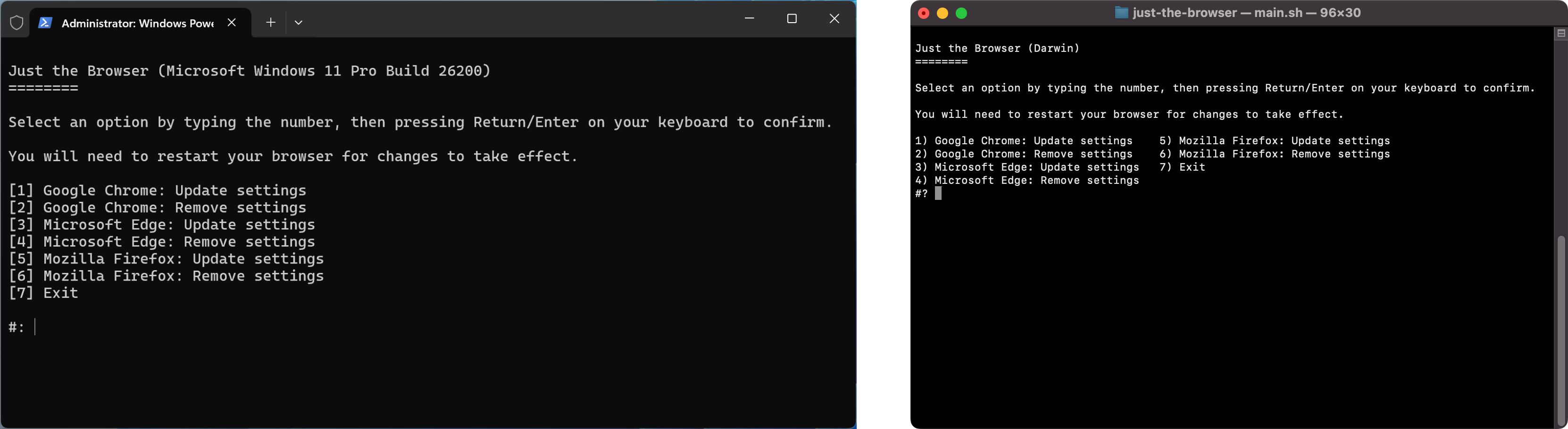
Screenshot of setup utility on Windows and macOS

Install script

The setup script can install the configuration files in a few clicks. You can also follow the manual guides for Google Chrome, Microsoft Edge, Firefox, and Brave. If you don't like running scripts with administrator/root access, or the script does not work, use the guides instead.

Windows: Search for "Windows PowerShell" in the Start Menu, right-click it, and select the "Run as administrator" option. Next, copy the below command, paste it into the window (Ctrl+V), and press the Enter/Return key:

& ([scriptblock]::Create((irm "https://raw.githubusercontent.com/corbindavenport/just-the-browser/main/main.ps1")))

If you are on older versions of Windows, you may need to run this command first:

[Net.ServicePointManager]::SecurityProtocol=[Net.SecurityProtocolType]::Tls12

Mac and Linux: Search for the Terminal in your applications list and open it. Next, copy the below command, paste it into the window (Ctrl+V or Cmd+V), and press the Enter/Return key:

/bin/bash -c "$(curl -fsSL https://raw.githubusercontent.com/corbindavenport/just-the-browser/main/main.sh)"

Documentation and config files

See the Google Chrome, Microsoft Edge, Mozilla Firefox, and Brave documentation pages for manual installation instructions, and explanations for each setting. The browser directories also contain the configuration files, which are either JSON files, Windows Registry .reg files for Windows, or Profile Manager .mobileconfig files for macOS.

Website

This repository also includes the static site generator for justthebrowser.com, built with Eleventy and Simple.css. The icons are from Bootstrap Icons.

With Node.js and NPM installed, you can test the site like this:

npm install
npx @11ty/eleventy --serve

The site is compiled and deployed with the eleventy_build.yml GitHub Action.

Subscribe to updates

You can subscribe to the RSS/Atom releases feed to know when the configuration files, documentation, and scripts are updated:

https://github.com/corbindavenport/just-the-browser/releases.atom

This feed can be used with Feedly, Inoreader, The Old Reader, Feedbin, or any other reader tool. You can also subscribe to new releases with your GitHub account by clicking the Watch button at the top of the page, then selecting Custom > New releases.

Frequently asked questions

Is just-the-browser free to use?

just-the-browser is open source under the MIT licence. There is no licence fee and no seat count — you can self-host it or, where the project offers one, pay a vendor for a managed version instead.

What does just-the-browser do?

Remove AI features, telemetry data reporting, sponsored content, product integrations, and other annoyances from web browsers.

What is just-the-browser written in?

just-the-browser is primarily written in Shell. Its source is publicly available at https://github.com/corbindavenport/just-the-browser, and it has 3,059 GitHub stars.