Just-API

Just-API is a declarative, specification based test framework for REST, GraphQL APIs. Users can test APIs without writing code, but they can also tap into code when they want to. It reads API test specification from YAML files and runs them in serial/parallel mode. Test reports can be generated in several formats including HTML and JSON.
In simple terms, users build a test suite by providing a set of request and response validation specification in a YAML file. Each suite can have one or more specs. Just-API builds the request, sends it to server and validates response as per the specification. One can choose to validate any or all of following
- Status code
- Headers
- Cookies
- Response JSON body
- Response JSON schema
or Provide a custom Javascript function to validate the response
Find more here
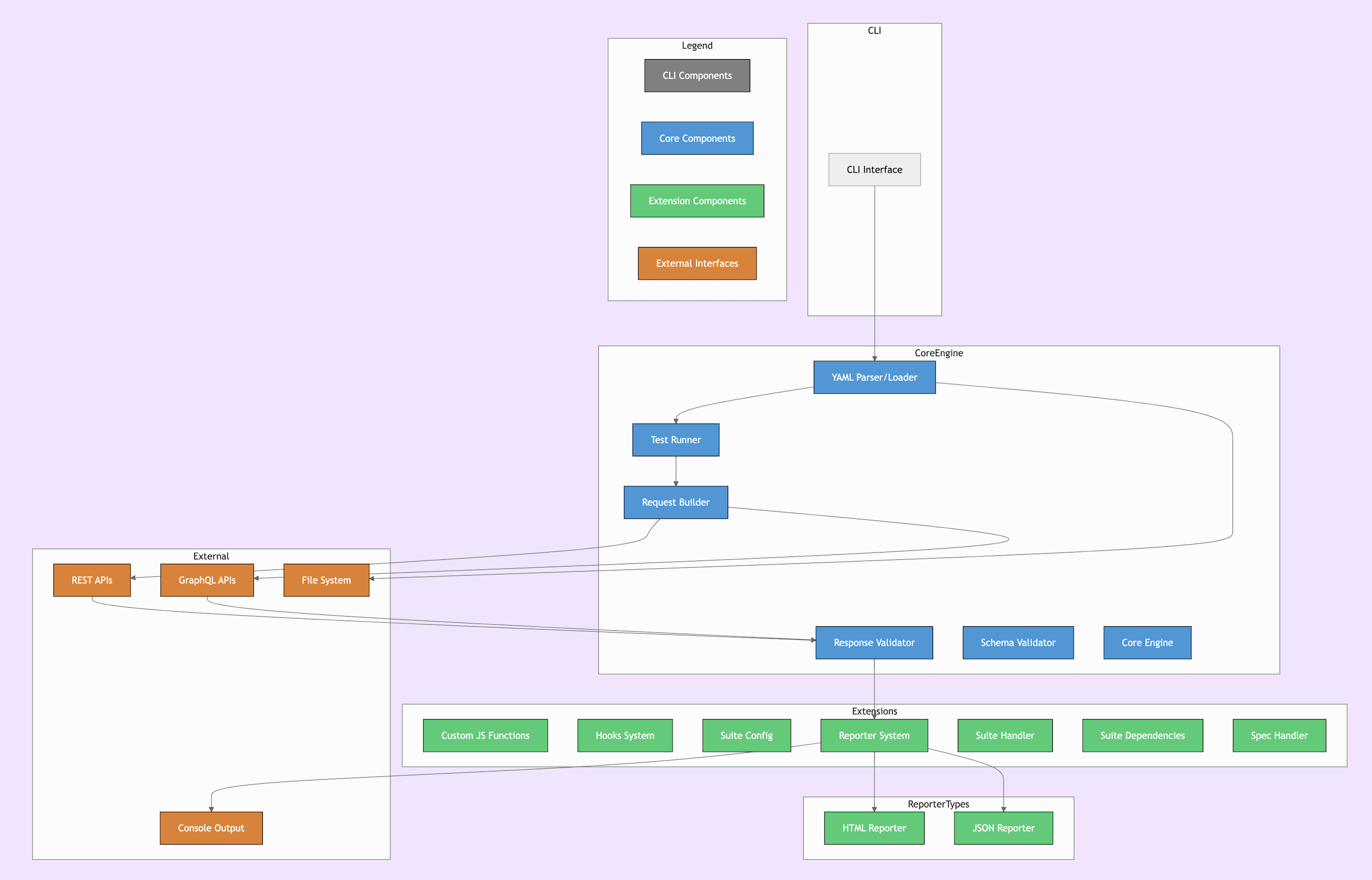
Codebase visualization diagram
Links
Features
- Runs test suites in parallel/serial mode
- Supports all widely used HTTP methods
- Supports x-www-form-urlencoded requests, Multipart requests, File uploads
- Built-in Response Validation Constructs(Headers, Cookies, Status code, JSON body, JSON schema)
- Custom Response validator functions
- Supports running custom inline or module javascript sync/async functions
- Supports Hooks (Before All, After All, Before Each, After Each, Before Test, After Test)
- Custom suite configuration
- Chained Request flows
- Define/override Request path, query params, path params, headers, body at runtime
- Suite and test context for reuse
- Supports importing specs from one or more test suites
- Intrasuite and Intersuite spec dependencies
- Reusing test specification
- Retry failed tests
- Looping: Generate 'n' number of tests with a list
- Built-in HTML, JSON reporters
- Can generate reports in multiple formats for the same run
- Logging HTTP request/response data for failed tests
- Proper error reporting
- Can run tests matching with a given pattern/string
- Skipping tests with specification
- Disable or Enable redirections
- Reports test duration
- Allows user to plug-in custom reporters
Getting Started
To run just-api, you will need Node.js v10.x.x or newer.
Installation
$ npm install just-api
Following is a simple example showing usage of Just-API.
$ mkdir specs
$ vim specs/starwars_service.yml
Write following suite in your editor
meta:
  name: Star Wars suite
configuration:
  scheme: https
  host: swapi.co
  base_path: /api
specs:
  - name: get Luke Skywalker info
    request:
      path: /people/1/
      method: get
    response:
      status_code: 200
      headers:
        - name: content-type
          value: !!js/regexp application/json
      json_data:
        - path: $.name
          value: Luke Skywalker
Back in the terminal
$ ./node_modules/.bin/just-api

   ✓ get Luke Skywalker info (1216ms)

  Done: specs/starwars_service.yml (Passed)

0 skipped, 0 failed, 1 passed (1 tests)
0 skipped, 0 failed, 1 passed (1 suites)
Duration: 1.3s
Testing GraphQL APIs
Following example tests a GraphQL API that returns Person info for a given name.
Create a YAML suite and run just-api.
meta:
  name: GraphQL Starwars service
configuration:
  host: swapi.graph.cool
  scheme: https
specs:
  - name: Get Details of a character
    request:
      method: post
      headers:
        - name: content-type
          value: application/json
      payload:
        body:
          type: json
          content:
            query: >
                   {
                    Person(name: "Luke Skywalker") {
                      name,
                      id,
                      gender
                     }
                    }
            variables: null
            operationName: null
    response:
      status_code: 200
      json_data:
        - path: $.data.Person.name
          value: "Luke Skywalker"
A chained request flow with hook and custom validation
When you need to test complex chained API flows, run dependencies in hooks to fetch pre-requisite data and pass it to actual test.
Following example shows how to run dependencies using a hook, get data and validating response with a custom validator function.
meta:
  name: Starwars suite
configuration:
  scheme: https
  host: swapi.co
  base_path: /api
specs:
  - name: get R2-D2 info
    request:
      path: /people/3/
      method: get
    response:
      status_code: 200
      json_data:
        - path: $.name
          value: R2-D2

  - name: search R2-D2 info
    before_test:
      run_type: inline
      inline:
        function: !js/asyncFunction >
          async function() {
            var response = await this.runSpec('get R2-D2 info');
            var jsonData = JSON.parse(response.body);
            this.test.query_params = { name:  jsonData.name };
          }
    request:
      path: /people
      method: get
    response:
      status_code: 200
      custom_validator:
        run_type: inline
        inline:
          function: !!js/function >
            function() {
              var jsonData = JSON.parse(this.response.body);
              var r2d2 = jsonData.results.find(result => result.name === 'R2-D2');

              if (!r2d2)
                throw new Error('R2-D2 not returned in search results');
            }
Note: You can also place custom JS functions in a module and specify the function name, module path in YAML to import.
More advanced stuff can be done with Just-API. Documentation says it all. Take a look at Just-API Website for detailed documentation.
If you are looking to use Docker to run Just-API, you might want to checkout Just-API docker boilerplate here
Maintainer
Kiran kiran.6d.hex@gmail.com
License
References
Donation
If this project helps you in anyway, Please consider making a donation
Contributing
NOTE: recommend Node v10.x since v12.x has gulp compatibility issue.
- Install deps
npm install - Install gulp
npm install -g gulp - Install test files
gulp - Install test API
npm run install_testapi - Run test API
npm run start_testapi - (in a new window)
npm test
Test Structure
test/cli/src/suites/[suite].spec.yamlcontains sample suites/specstest/cli/[suite].spec.jscontains JS chai/mocha test assertions about the sample suite/specs
You may need to create/modify both a sample suite/spec and corresponding JS assertion
Code Quality & Formatting
TODO: add linter/hinter/prettier or whatever spec is used
Community

