Joplin is a free, open source, privacy-focused note-taking and to-do application that keeps notes as Markdown on your own device and synchronises them, end-to-end encrypted, across Windows, macOS, Linux, Android and iOS.
What it is
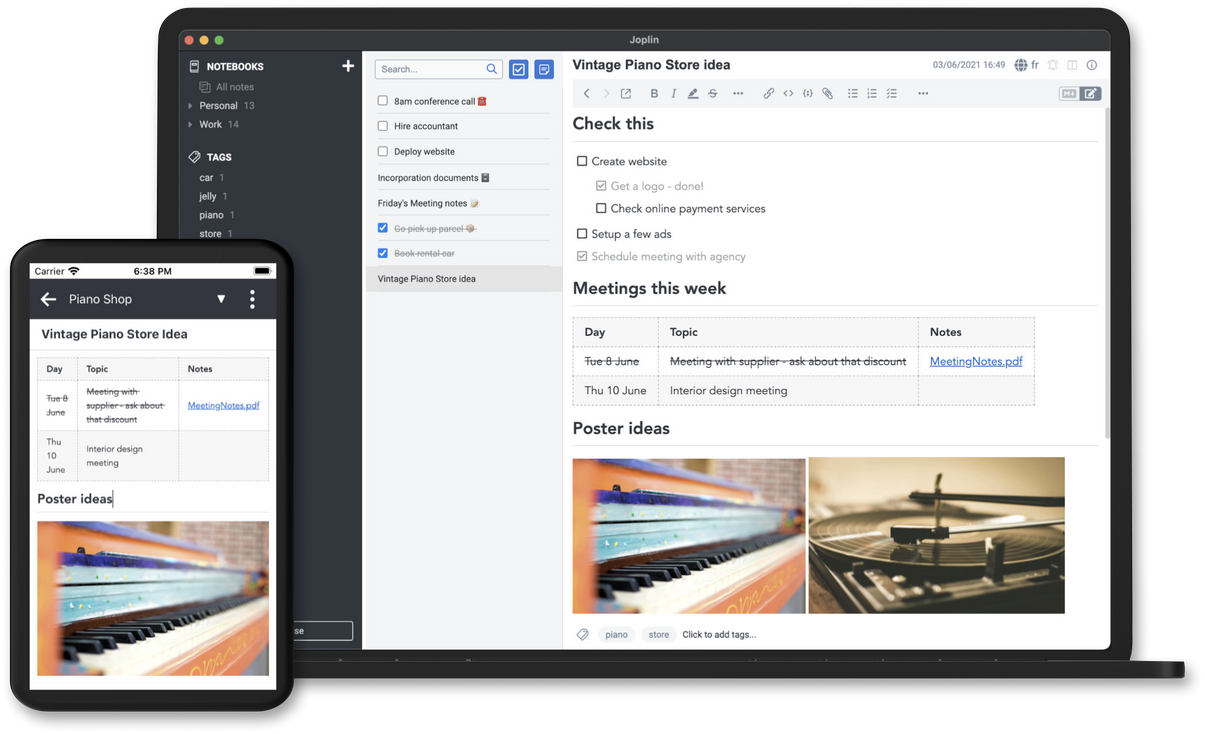
Joplin is a TypeScript and Node.js application, built on Electron, that stores Markdown notes inside notebooks and makes them searchable, taggable, copyable and editable either in the Joplin apps or in an external text editor. It runs on Windows, Linux, macOS, Android and iOS, and it is offline first, so the complete note collection lives on each phone or computer and stays accessible without an internet connection. Notes synchronise through Nextcloud, Dropbox, OneDrive or Joplin Cloud, with end-to-end encryption protecting them on the sync target. A plugin and theme system allows extensions and restyling, and a Web Clipper for Firefox and Chrome saves web pages and screenshots into notebooks.
The problem it solves is lock-in and cloud dependence in note taking. Joplin imports Evernote .enex exports, converting formatted content to Markdown and carrying across resources such as images and attachments together with metadata including geolocation, created time and updated time; plain Markdown files can also be imported. Rather than leaving notes inside a proprietary service, the user keeps a local Markdown copy and chooses where the synchronised version lives: a self-hosted Nextcloud instance, a Dropbox or OneDrive account, or the hosted Joplin Cloud.
Key capabilities
- Markdown notes organised into notebooks, with tags, copy and modification from the Joplin apps or from an external text editor.
- Import of Evernote
.enex files, with formatted content converted to Markdown and resources plus metadata such as geolocation, created time and updated time preserved; plain Markdown files import as well.
- Synchronisation with end-to-end encryption through Nextcloud, Dropbox, OneDrive or Joplin Cloud.
- Offline-first operation, keeping the full note set on every device.
- Full-text search on all supported platforms.
- Plugin and theme support, including user-authored plugins and themes.
- Web Clipper extensions for Firefox and Chrome that capture web pages and screenshots.
Who uses it and how
- Individuals who want the same notes on phone and desktop while keeping the master copy in storage they control, typically a self-hosted Nextcloud instance.
- Evernote users migrating their archive through
.enex import, retaining attachments and metadata and continuing in Markdown.
- Writers and developers who keep Markdown files editable in their own text editor while Joplin supplies notebooks, tags and full-text search.
- Browser-heavy users who clip pages and screenshots with the Firefox or Chrome Web Clipper.
- Organisations that require notes to stay on infrastructure they operate, using a self-hosted sync target with end-to-end encryption.
Getting started
Install the desktop and mobile clients from joplinapp.org for Windows, Linux, macOS, Android and iOS, then point synchronisation at Nextcloud, Dropbox, OneDrive or the paid Joplin Cloud plans. The Web Clipper is installed from the Firefox add-ons site or the Chrome Web Store.
How it compares
The registry facts list Evernote as the migration source whose .enex exports Joplin imports, and place Obsidian and Notesnook in the same topic list. No licence, pricing or hosting comparison for those products is supplied in the facts, so no ranking is offered here.
When to use it — and when not to
A self-hoster must supply a sync target such as Nextcloud, Dropbox or OneDrive, or pay for Joplin Cloud, and must configure end-to-end encryption themselves. The licence field reads NOASSERTION, so terms should be verified before corporate deployment, and 632 open issues indicate an active project with a sizeable backlog. Anyone wanting a fully managed service with no local data, or unwilling to manage encryption setup, is a poor fit.
project readme (upstream, from github) — read inline





Joplin is a free, open source note taking and to-do application, which can handle a large number of notes organised into notebooks. The notes are searchable, can be copied, tagged and modified either from the applications directly or from your own text editor. The notes are in Markdown format.
Notes exported from Evernote can be imported into Joplin, including the formatted content (which is converted to Markdown), resources (images, attachments, etc.) and complete metadata (geolocation, updated time, created time, etc.). Plain Markdown files can also be imported.
Joplin is "offline first", which means you always have all your data on your phone or computer. This ensures that your notes are always accessible, whether you have an internet connection or not.
The notes can be securely synchronised using end-to-end encryption with various cloud services including Nextcloud, Dropbox, OneDrive and Joplin Cloud.
Full text search is available on all platforms to quickly find the information you need. The app can be customised using plugins and themes, and you can also easily create your own.
The application is available for Windows, Linux, macOS, Android and iOS. A Web Clipper, to save web pages and screenshots from your browser, is also available for Firefox and Chrome.
Help and documentation
For more information about the applications, see the full Joplin documentation
Donations
Donations to Joplin support the development of the project. Developing quality applications mostly takes time, but there are also some expenses, such as digital certificates to sign the applications, app store fees, hosting, etc. Most of all, your donation will make it possible to keep up the current development standard.
Please see the donation page for information on how to support the development of Joplin.
Sponsors











Community
Contributing
Please see the guide for information on how to contribute to the development of Joplin: https://github.com/laurent22/joplin/blob/dev/readme/dev/index.md
Warrant Canary Signing Key
Fingerprint:
F820 F830 6DD0 05A1 02D1 8CD5 946A E9FA 5915 EF53
Public key: https://github.com/laurent22/joplin/raw/dev/Assets/keys/joplin-canary-signing-key.asc
Contributors
Thank you to everyone who've contributed to Joplin's source code!