
Jitsi is a free, open source collaboration & communication project written in TypeScript and released under Apache-2.0. It has 29,931 GitHub stars, 8,026 forks and 141 open issues, and was last pushed 6 hours ago. On this registry it ranks #5 of 41 tracked projects in Collaboration & Communication, and is listed as an open source replacement for 3 paid products, with 5 head-to-head comparisons available. It gained 28 stars over the last 6 tracked days.

Jitsi — Private, secure video calls with no account needed

What is Jitsi?

What it is

Jitsi Meet is an open-source video conferencing platform built on WebRTC standards, designed for privacy-focused, account-free video calls. It operates as a standalone web application or embeddable component, supporting both browser-based and native mobile usage without requiring user accounts to join meetings. The project lives in the video-communication ecosystem, competing directly with proprietary services like Zoom, Google Meet, and Slack’s built-in calling.

It solves the problem of vendor lock-in, data surveillance, and licensing costs associated with commercial platforms by offering a fully self-hostable alternative with end-to-end encryption support, while maintaining high-quality HD audio and video and real-time collaboration features.

Key capabilities

  • Full WebRTC-based video conferencing with SFU (Selective Forwarding Unit) architecture for scalable group calls
  • End-to-end encryption (E2EE) for private conversations, documented in a dedicated whitepaper
  • Cross-platform support: desktop browsers, mobile web, and native Android/iOS apps (including F-Droid distribution)
  • Real-time collaboration features: content sharing, raise hand, reactions, polls, private chat, and virtual backgrounds
  • Embeddable SDKs for web and native applications via JavaScript and mobile SDKs
  • Debian package and Docker-based deployment for self-hosted instances
  • Support for deep-video features and scalable video conferences via modular architecture

Who uses it and how

Organizations deploy Jitsi Meet internally to avoid third-party data collection and comply with strict data-residency policies, using Debian or Docker images for on-premises hosting.
Developers integrate Jitsi Meet into custom web or mobile apps using its JavaScript SDK or mobile SDKs to embed secure video sessions.
Enterprises adopt 8x8 Jitsi as a Service (JaaS) for branded, managed video experiences without handling infrastructure, leveraging the same core codebase.
Educational institutions run self-hosted instances for virtual classrooms, using the browser-based interface for student access without account creation.

Getting started

Deploy via Docker (jitsi/meet image), Debian packages (apt install jitsi-meet), or use the hosted demo at meet.jit.si. Mobile apps are available on Google Play, F-Droid, and Apple App Store.

When to use it — and when not to

Use Jitsi Meet when you need full control over data, E2EE, or integration into existing workflows without vendor lock-in. Avoid it if you lack infrastructure resources to manage TURN/STUN servers, persistent storage, SMTP for invites, and monitoring — self-hosting requires operational overhead. While it replaces Zoom/Google Meet functionally, it does not offer native telephony (PSTN) or automated transcription out-of-the-box, which paid alternatives provide.

project readme (upstream, from github) — read inline

Jitsi Meet

Jitsi Meet is a set of Open Source projects which empower users to use and deploy video conferencing platforms with state-of-the-art video quality and features.
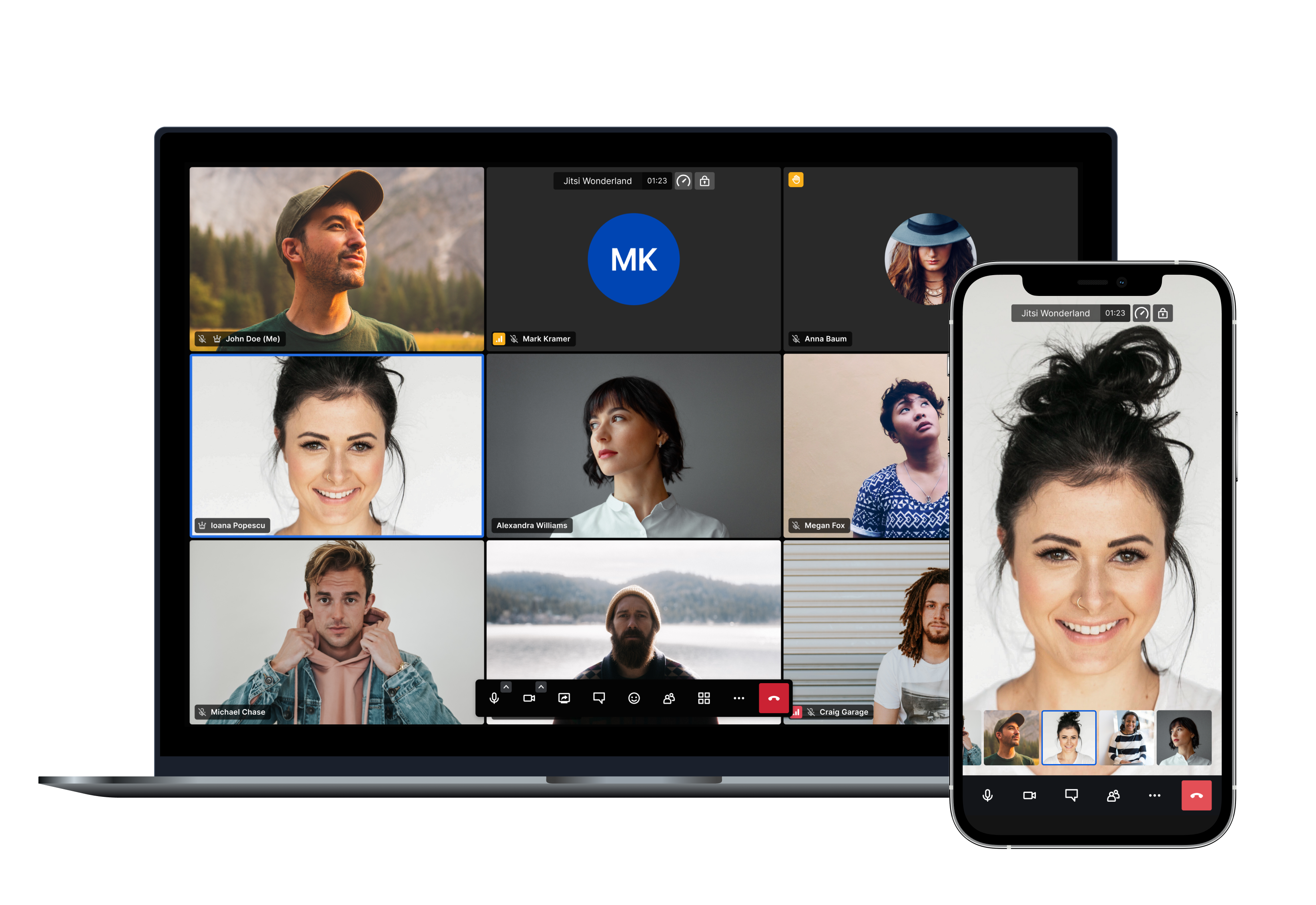


Amongst others here are the main features Jitsi Meet offers:

  • Support for all current browsers
  • Mobile applications
  • Web and native SDKs for integration
  • HD audio and video
  • Content sharing
  • Raise hand and reactions
  • Chat with private conversations
  • Polls
  • Virtual backgrounds

And many more!

Using Jitsi Meet

Using Jitsi Meet is straightforward, as it's browser based. Head over to meet.jit.si and give it a try. It's scalable and free to use. All you need is a Google, Facebook or GitHub account in order to start a meeting. All browsers are supported!

Using mobile? No problem, you can either use your mobile web browser or our fully-featured mobile apps:

Android Android (F-Droid) iOS

If you are feeling adventurous and want to get an early scoop of the features as they are being developed you can also sign up for our open beta testing here:

Running your own instance

If you'd like to run your own Jitsi Meet installation head over to the handbook to get started.

We provide Debian packages and a comprehensive Docker setup to make deployments as simple as possible. Advanced users also have the possibility of building all the components from source.

You can check the latest releases here.

Jitsi as a Service

If you like the branding capabilities of running your own instance but you'd like to avoid dealing with the complexity of monitoring, scaling and updates, JaaS might be for you.

8x8 Jitsi as a Service (JaaS) is an enterprise-ready video meeting platform that allows developers, organizations and businesses to easily build and deploy video solutions. With Jitsi as a Service we now give you all the power of Jitsi running on our global platform so you can focus on building secure and branded video experiences.

Documentation

All the Jitsi Meet documentation is available in the handbook.

Security

For a comprehensive description of all Jitsi Meet's security aspects, please check this link.

For a detailed description of Jitsi Meet's End-to-End Encryption (E2EE) implementation, please check this link.

For information on reporting security vulnerabilities in Jitsi Meet, see SECURITY.md.

Contributing

If you are looking to contribute to Jitsi Meet, first of all, thank you! Please see our guidelines for contributing.


Built with ❤️ by the Jitsi team at 8x8 and our community.

Frequently asked questions

Is Jitsi free to use?

Jitsi is open source under the Apache-2.0 licence. There is no licence fee and no seat count — you can self-host it or, where the project offers one, pay a vendor for a managed version instead.

What does Jitsi do?

Private, secure video calls with no account needed

What is Jitsi written in?

Jitsi is primarily written in TypeScript. Its source is publicly available at https://github.com/jitsi/jitsi-meet, and it has 29,931 GitHub stars.

What is a good open source alternative to Google Meet?

Jitsi is one of the open source options listed as an alternative to Google Meet, Slack, Zoom. Compare licences, stars and activity side by side on the Jitsi profile.