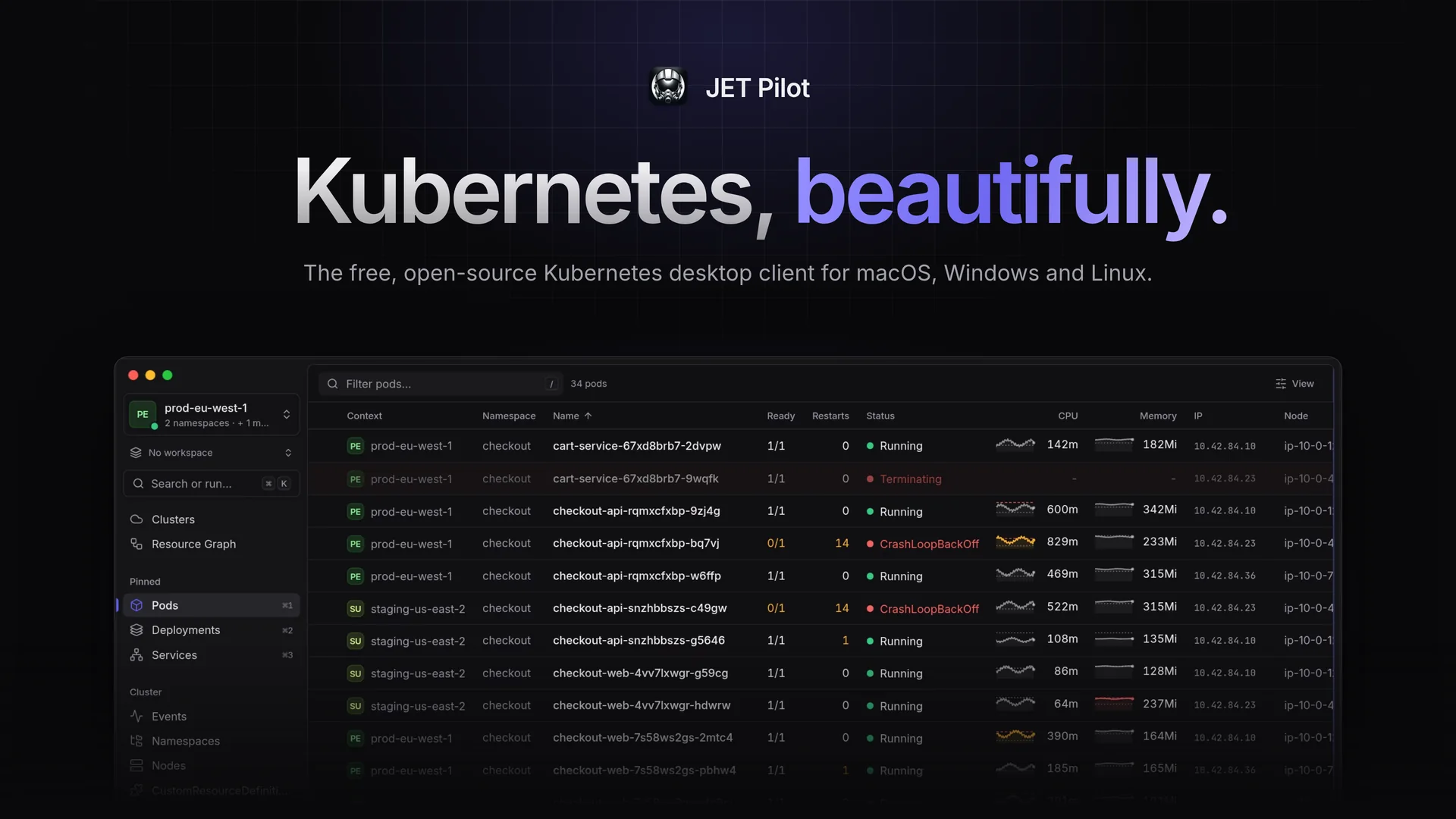
jet-pilot is a free, open source cloud infrastructure management project written in Rust and released under MIT. It has 629 GitHub stars, 28 forks and 0 open issues, and was last pushed 11 hours ago. On this registry it ranks #76 of 76 tracked projects in Cloud Infrastructure Management, with 5 head-to-head comparisons available.

What is jet-pilot?

JET Pilot is a free, MIT-licensed, native Kubernetes desktop client built in Rust and Tauri that gathers every cluster from every kubeconfig and cloud account into one local app, with no account and no telemetry.

What it is

JET Pilot is an open-source Kubernetes IDE distributed as a native desktop application for macOS (Apple Silicon and Intel), Windows (x64) and Linux (x64 and ARM64). It lives in the cloud-native tooling ecosystem alongside kubectl, helm and the managed platforms its topics name — AKS, EKS and GKE — and it works with the kubeconfig files and kubectl binary already on the machine instead of replacing them. Built with Rust and Tauri, it stays small and fast, and it connects cloud accounts only when asked.

The problem it solves is the gap left when well-designed Kubernetes IDEs went commercial: engineers who wanted a polished graphical client had to pay for one, while the strong free alternative, k9s, relies heavily on keyboard input. JET Pilot replaces that trade-off by pairing a keyboard-first workflow — a command palette on Cmd/Ctrl+K and an in-app terminal on Ctrl+— with a mouse-friendly desktop UI. It also removes the chore of juggling kubeconfigs across providers: clusters added to it live in its own kubeconfig at~/.kube/jet-pilot/config, with credentials in the system keychain, and still work in kubectlandk9s`.

Key capabilities

  • Clusters hub: every cluster from every kubeconfig and cloud account in one list with live status; clusters can be given names, colours, environments, folders and tags, and clicking one shows everything about it.
  • Cloud discovery: connects AWS (IAM Identity Center, profiles or access keys), Google Cloud and Azure through gcloud and az, plus DigitalOcean, Akamai/Linode, Civo, Scaleway, Vultr and Exoscale, and keeps the cluster list current.
  • Multi-cluster and multi-namespace aggregation: several contexts across multiple kubeconfig files and namespaces are active at once, and every table aggregates them with Context and Namespace columns.
  • Keyboard workflow: a local terminal on Ctrl+withkubectl` preconfigured for the current context (the user's own kubeconfig is never modified), one-click shell into any container, and a fuzzy-search command palette on Cmd/Ctrl+K.
  • Observability views: a resource graph relating Services, Deployments, ReplicaSets, Pods, ConfigMaps and Secrets with live health indicators, and a structured log viewer that follows logs, parses JSON log lines into fields and filters them with facets.
  • Object management in YAML: browse, describe, create and edit any Kubernetes object in a full YAML editor, applied with Cmd/Ctrl+S.
  • Day-two operations and guardrails: port forwarding, Helm releases and charts, pod metrics, events, scaling, rollouts and cordon/drain, with protected clusters requiring the cluster name to be typed before destructive actions and read-only clusters unchangeable from the app.

Who uses it and how

  • Platform and DevOps engineers running fleets across AKS, EKS and GKE who want one aggregated table per resource type instead of one terminal tab per cluster.
  • Power users currently working in k9s who want the same keyboard-first speed with a polished, mouse-friendly desktop UI.
  • Teams that sign in through SSO: in-app sign-in for AWS IAM Identity Center, gcloud, az, kubelogin/OIDC and other exec plugins, with device codes shown in the app and every view reconnecting afterwards.
  • Operators of production clusters that need friction before damage: name-typing confirmation on protected clusters and read-only clusters that cannot be changed.
  • Privacy-conscious engineers and organisations: no account and no telemetry, with existing kubeconfig files and kubectl reused rather than replaced.

Getting started

Download the latest release for macOS, Windows or Linux from the releases page or jet-pilot.app; on macOS, install with brew install --cask unxsist/tap/jet-pilot from the JET Pilot tap, which clears the quarantine flag. The app updates itself automatically, and when kubectl or helm are missing from PATH it can download them, verified against their official checksums (Settings › Advanced).

How it compares

JET Pilot sits between command-line tools such as kubectl and k9s and the commercial Kubernetes IDEs whose pricing prompted its creation: it keeps the keyboard-first workflow of k9s while adding a polished desktop UI, and unlike the commercial options it is MIT licensed and free. It still depends on kubectl and honours helm for its Helm views, so it works alongside those tools rather than replacing them.

When to use it — and when not to

Choose it when a native graphical client with no account and no telemetry is wanted and the machine can hold credentials in the system keychain. Nothing runs server-side, so there is no database, object storage or SMTP to operate, but the app depends on kubectl, and on helm for the Helm views, or on permission to download them. It is a poor fit for teams needing a browser-based or shared multi-user interface, or for locked-down air-gapped machines where those tools cannot be fetched; the project is also small, at 629 stars and 28 forks, so its community is thinner than that of more established clients.

project readme (upstream, from github) — read inline

JET Pilot

The open-source Kubernetes IDE that focuses on less clutter, speed and good looks.
Free · MIT licensed · macOS (Apple Silicon and Intel), Windows (x64) and Linux (x64 and ARM64) · jet-pilot.app

Introduction

JET Pilot is an open-source K8s IDE. It was created out of frustration, as all "good-looking" K8s IDEs went commercial. Power-users nowadays resort to tools like k9s, which works great, but heavily relies on keyboard input. JET Pilot combines a keyboard-first workflow with a polished, mouse-friendly desktop UI — built with Rust and Tauri, so it stays small and fast.

No account, no telemetry: JET Pilot uses your existing kubeconfig files and kubectl, and connects your cloud accounts when you want it to.

A quick tour
What's new in 2.0

  • Clusters hub: every cluster from every kubeconfig and cloud account in one list, with live status. Give clusters names, colours, environments, folders and tags; click one for everything about it.
  • Every cloud: connect AWS (IAM Identity Center, profiles or access keys), Google Cloud and Azure (through gcloud and az), DigitalOcean, Akamai/Linode, Civo, Scaleway, Vultr and Exoscale. JET Pilot finds their clusters and keeps the list current.
  • Add anything: paste or import a kubeconfig, or enter a cluster by hand. Added clusters live in JET Pilot's own kubeconfig (~/.kube/jet-pilot/config), with their credentials in your system keychain, and work in kubectl and k9s too.
  • Sign in without leaving the app: device codes and browser sign-ins appear in JET Pilot, and every view reconnects afterwards.
  • Production guardrails: protected clusters ask you to type the name before destructive actions; read-only clusters can't be changed from JET Pilot.
  • Settings, rebuilt: searchable, with a settings.json editor. Plus a setup guide for new installs and a calmer design across the whole app.

Features

  • Multi-cluster & multi-namespace: connect to several contexts (across multiple kubeconfig files) and namespaces at once; every table aggregates them with Context and Namespace columns.
  • Built-in terminal: open a local terminal (Ctrl+) with kubectl` preconfigured for the current context — your own kubeconfig is never modified. Shell into any container with one click, on macOS, Linux and Windows.
  • Resource graph: see how Services, Deployments, ReplicaSets, Pods, ConfigMaps and Secrets relate, with live health indicators.
  • Structured log viewer: follow logs, parse JSON log lines into fields and filter them with facets.
  • Object management: browse, describe, create and edit any Kubernetes object in a full YAML editor (Cmd/Ctrl+S to apply).
  • Command palette: Cmd/Ctrl+K to jump anywhere, switch contexts and namespaces or open a terminal — with fuzzy search.
  • Port forwarding, Helm releases and charts, pod metrics, events, scaling, rollouts, cordon/drain and more.
  • SSO-friendly: in-app sign-in for AWS IAM Identity Center, gcloud, az, kubelogin/OIDC and other exec plugins, with device codes shown in the app.
  • A premium, accessible UI with polished dark and light themes.

Installation

Download the latest release for your platform from the releases page or from jet-pilot.app. JET Pilot updates itself automatically.

JET Pilot uses kubectl (and helm for the Helm views). When they aren't on your PATH, it can download them for you, verified against their official checksums (Settings › Advanced).

macOS

Install with Homebrew from the JET Pilot tap:

brew install --cask unxsist/tap/jet-pilot

The tap's cask clears macOS's quarantine flag after installing, so the app opens right away and keeps itself up to date.

[!NOTE] JET Pilot is no longer in Homebrew's main cask repository: since October 2026 Homebrew only accepts apps notarized by Apple there. If you installed it with brew install --cask jet-pilot before, switch once with brew uninstall --cask jet-pilot && brew install --cask unxsist/tap/jet-pilot (your settings are kept).

…or download the .dmg for Apple Silicon (aarch64) or Intel (x64), open it and drag JET Pilot into your Applications folder.

[!IMPORTANT] JET Pilot is not notarized by Apple. It's free and open source, and we'd rather not pay Apple's yearly developer fee. When you install the .dmg yourself, macOS will say the app "is damaged and can't be opened" or "cannot be verified". Remove the quarantine flag once after installing:

xattr -dr com.apple.quarantine "/Applications/JET Pilot.app"

That's it — automatic updates keep working afterwards. (The Homebrew tap does this for you.)

Linux

Packages are available for x64 (amd64 / x86_64) and ARM64 (aarch64):

  • Debian / Ubuntu: sudo apt install ./JET.Pilot__.deb
  • Fedora / RHEL / openSUSE: sudo rpm -i JET.Pilot--1..rpm
  • AppImage (any distribution): chmod +x JET.Pilot__.AppImage and run it.

Windows

Download the .exe (or .msi) installer and run it. The installer isn't code-signed, so Windows SmartScreen may warn you — click More info → Run anyway.

Contributing

Issues and pull requests are very welcome! JET Pilot is built with Tauri v2 (Rust) and Vue 3.

npm ci
npm run dev             # run the app
npx vitest run          # unit tests
npm run harness         # UI in the browser with mocked cluster data (no cluster needed)

Commits follow Conventional Commits; releases are created with semantic-release.

License

MIT

Frequently asked questions

Is jet-pilot free to use?

jet-pilot is open source under the MIT licence. There is no licence fee and no seat count — you can self-host it or, where the project offers one, pay a vendor for a managed version instead.

What does jet-pilot do?

A beautiful, native Kubernetes desktop client. Every cluster and cloud account in one place. Free and open source, no account, no telemetry.

What is jet-pilot written in?

jet-pilot is primarily written in Rust. Its source is publicly available at https://github.com/unxsist/jet-pilot, and it has 629 GitHub stars.