Klisé is a minimalist, MIT-licensed Jekyll theme for running a personal site or blog, intended for writers and developers who want a lightweight static site with light and dark mode support.
What it is
Klisé is an open-source theme for Jekyll, the Ruby-based static site generator, in the Content & Publishing / Blogging & Personal Sites category. It supplies layouts, SCSS, and configuration conventions for a personal site or blog, with a demo at klise.vercel.app. The project is distributed on GitHub under the MIT License and targets Jekyll ~> 4.4 with Ruby >= 3.0. Its topics cover Jekyll blogs, GitHub Pages sites, and starter themes for Netlify and now.sh, but the product is a theme, not a hosted publishing platform.
The concrete problem it solves is the assembly work that precedes a polished Jekyll blog. A site owner would otherwise need to create a custom theme and wire together a sitemap, an RSS feed, syntax highlighting, image handling, a table of contents, comment layout, analytics, and HTML minification. Klisé packages those pieces into one theme and exposes several through configuration or front matter: site-wide direction: rtl in _config.yml, toc: true for an automatic table of contents, and a comment layout enabled in a post's frontmatter. It relies on jekyll-postfiles for organized post images, jekyll-sitemap and jekyll-feed for discovery, rouge for highlighting, and jekyll-compress-html for minification.
Key capabilities
- Light and dark mode support that follows the OS preference by default, with customization through .scss.
- RTL and LTR text direction support: set direction: rtl in _config.yml or override it per page or post, with paragraph-level direction resolution so an LTR site can host RTL posts.
- Post images organized with jekyll-postfiles, a dependency-free lightbox that zooms clicked images, and a responsive image gallery.
- SEO support with schema.org structured data in JSON-LD, a generated sitemap through jekyll-sitemap, and an RSS feed through jekyll-feed.
- Syntax highlighting with rouge, an opt-in table of contents via toc: true, next and previous post navigation, and a comment layout enabled in frontmatter.
- Google Analytics integration and HTML minification through jekyll-compress-html.
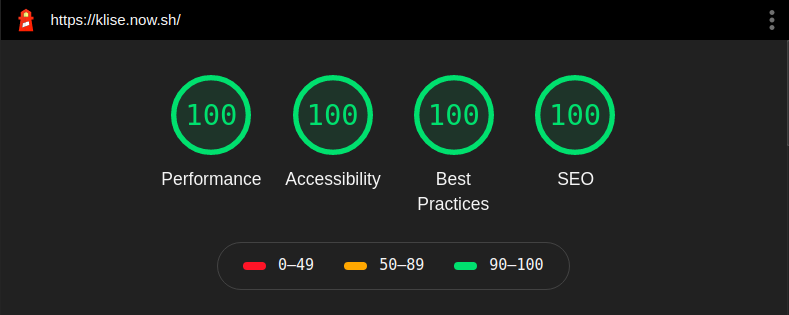
- A responsive, mobile-first design; the README reports W3C validation and passing Lighthouse and PageSpeed results.
Who uses it and how
- Individual writers and developers running a personal Jekyll site or blog who want a minimal theme adjustable through SCSS rather than layouts built from scratch.
- People deploying to Netlify, Vercel, Azure Static Web Apps, or surge.sh, especially when jekyll-postfiles rules out GitHub Pages.
- Authors publishing mixed-direction content, using a site-wide setting and per-post overrides so an LTR site can include RTL posts.
- Bloggers enabling features per post: toc: true for a table of contents, the comment layout in frontmatter, or images for the lightbox and gallery.
- Users starting from the repository as a starter and deploying through the README's Netlify, Vercel, and Azure buttons.
Getting started
Clone the repository, run bundle install, and start the local server with bundle exec jekyll serve, which requires Ruby >= 3.0 and Jekyll ~> 4.4; the site is available at localhost:4000. The README also offers Deploy to Netlify, Deploy with Vercel, and Deploy to Azure buttons.
How it compares
No similar themes or paid products are named in the provided facts, so Klisé stands alone in this registry entry. The only comparison in the README is between GitHub Pages, which does not support jekyll-postfiles, and hosts such as Netlify, Vercel, Azure, and surge.sh.
When to use it — and when not to
Choose Klisé when a self-hoster is comfortable with a Ruby and Jekyll toolchain, running bundle install and bundle exec jekyll serve, and selecting a host that supports jekyll-postfiles if image organization matters. It is a poor fit for anyone who needs GitHub Pages compatibility with organized post images, because the README states that jekyll-postfiles is unsupported there and can cause broken paths or missing images. That limitation also rules it out for users who want to stay on GitHub Pages without an alternative host.
project readme (upstream, from github) — read inline
Klisé
Klisé is minimalist Jekyll theme for running a personal site and blog running on Jekyll.
For demo klise.now.sh
Features
Installation
Requires Ruby >= 3.0 and Jekyll ~> 4.4.
Run local server:
$ git clone https://github.com/piharpi/jekyll-klise.git
$ cd jekyll-klise
$ bundle install
$ bundle exec jekyll serve
Navigate to localhost:4000. You're Welcome, Fork and be Stargazer.



Table of contents
Add toc: true to a post's front matter to render an automatic table of
contents (built from its h2/h3 headings) above the article:
---
title: My post
toc: true
---
Text direction (RTL)
Set the site-wide direction in _config.yml:
direction: rtl # "ltr" (default) | "rtl"
You can override it per page/post in the front matter with direction: rtl.
Post content also resolves its direction per paragraph, so an LTR site can
host individual RTL posts (and vice versa) without extra markup.
Limitation
Contributing
If you see any typos or formatting errors in a post, or want to helping reduce backlogs or any other issue that needs to be addressed, please do not hesitate to open a pull request and fix it!, please read contributing before PR.
Yeaaa feel free to open a pull request.
Support


License
This project is open source and available under the MIT License.