
The Declarative JSON Gantt Chart Engine
Where human intuition meets declarative AI planning.






Turn any declarative JSON document into a high-performance, interactive, draggable Gantt chart.
Zero runtime dependencies. 100% pure TypeScript.
Runs everywhere: Plain HTML, React, Next.js, Node.js CLI, and autonomous AI toolchains.
Designed from the ground up for:
- Autonomous AI Agents & LLMs — Declarative JSON schema contract eliminates UI hallucinations; models generate timeline data with 10x fewer tokens than fragile JSX code.
- Students, Hobbyists & Creators — Lightweight, beautiful Swiss Noir dark mode, intuitive drag-and-drop, touch gestures, and instant local storage persistence.
- Engineering Teams & Program Directors — Operations Research Critical Path solver, EVM (Earned Value Management), DCMA-14 schedule health audits, and multi-user CRDT collaboration with secure role-based permissions.
Live Playground • JSON Cheatsheet • Architecture • Schema Specification • API Docs • Roadmap • Changelog
Why Jantt? The Declarative Revolution
Traditional project management and timeline tools force an impossible choice:
- Enterprise Bloat: Commercial suites (DHTMLX, Bryntum) demand 200KB to 800KB runtime dependencies, complex imperative APIs (
gantt.init(),gantt.addTask()), and expensive recurring per-seat fees. - Brittle AI Generations: Prompting LLMs (ChatGPT, Claude, Gemini) to generate React JSX or SVG coordinate math produces broken layouts, coordinate hallucinations, and wastes thousands of tokens on boilerplate UI code.
- Static Limitations: DSLs like Mermaid.js are read-only, non-interactive images. They cannot be dragged, edited, recalculated, or synchronized back to living project state.
The 4 Superpowers of Jantt
- Zero Runtime Dependencies: The core math and layout engine (
@jantt/core) is pure, zero-dependency TypeScript weighing under 14 KB gzipped. - AI-Native & 10x Fewer Tokens: Declarative JSON schema contract eliminates UI hallucinations; models generate timeline data with 10x fewer tokens than fragile JSX code.
- Swiss Modernism 2.0 Aesthetics: Deep OLED Swiss Noir (
#080D18), 90-degree CAD orthogonal routing, glassmorphic HUD cards, and high-contrast typography. - Defense-Grade Operations Research: Built-in topological DAG solver, Critical Path Method (CPM), Earned Value Management (EVM - ANSI/EIA-748), DCMA-14 schedule health audits, and multi-user CRDT cloud rooms.
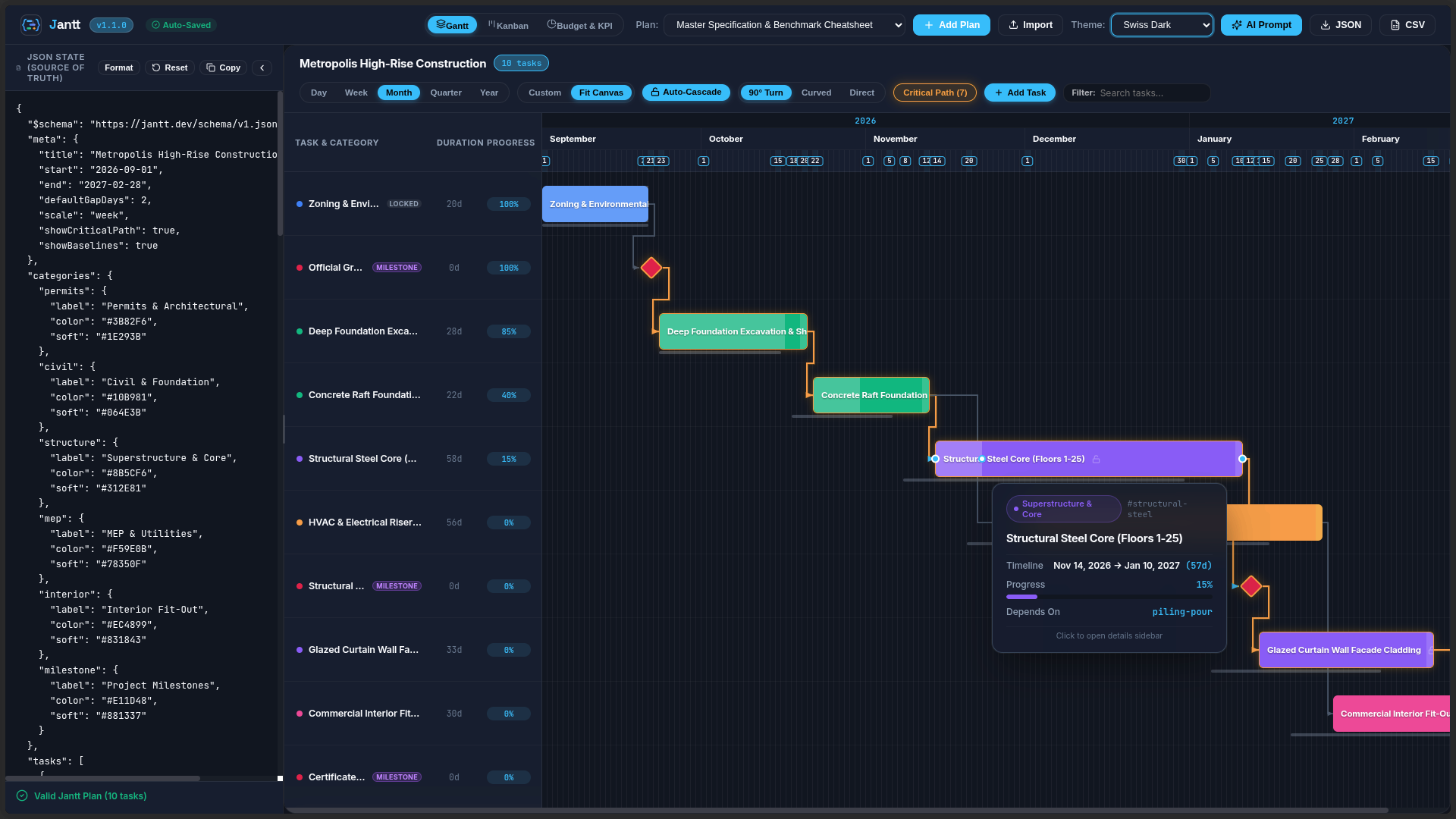
Visual Showcase & Curated Themes
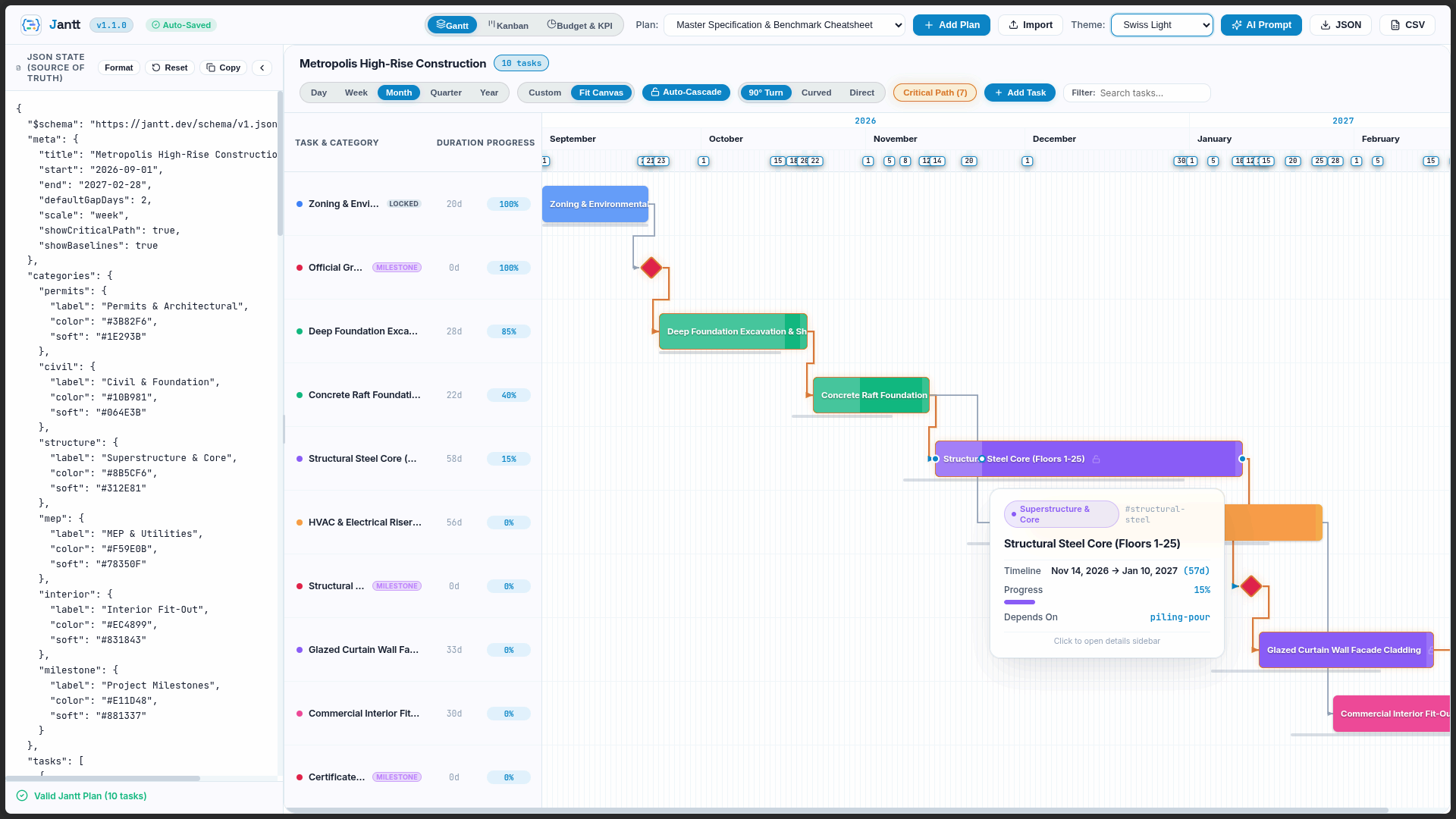
Jantt features a fully reactive, CSS variable-driven theming architecture with out-of-the-box support for light modes, sleek dark modes, and high-contrast vibrant styles:
Swiss Light Mode
Daylight clarity, high contrast typography, and subtle glassmorphic tooltips.
Swiss Dark Mode
Sleek obsidian palette with glowing critical path indicators and 90° right-angle routing.
Color Theme Gallery
Cyber Emerald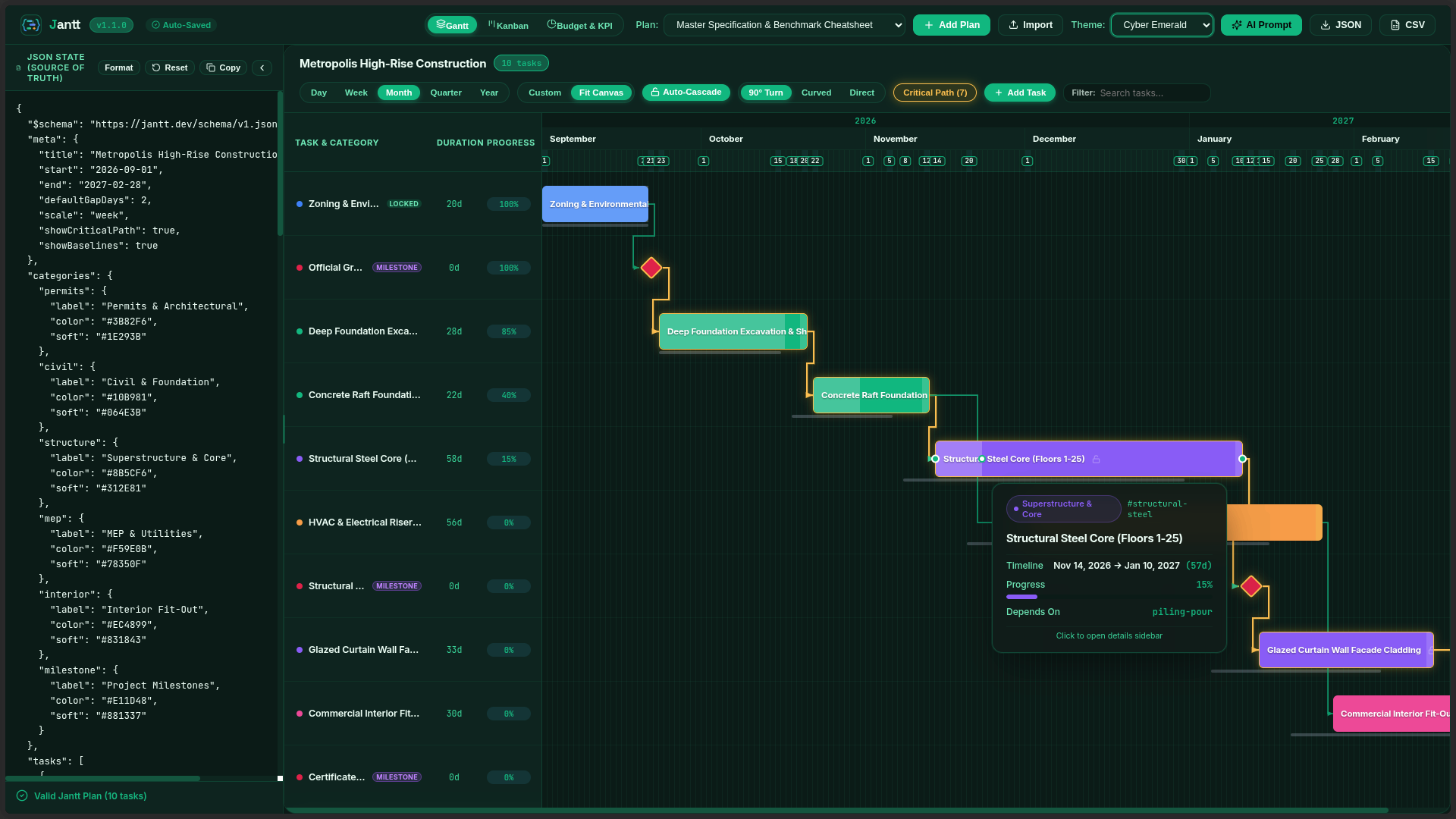
|
Midnight Rose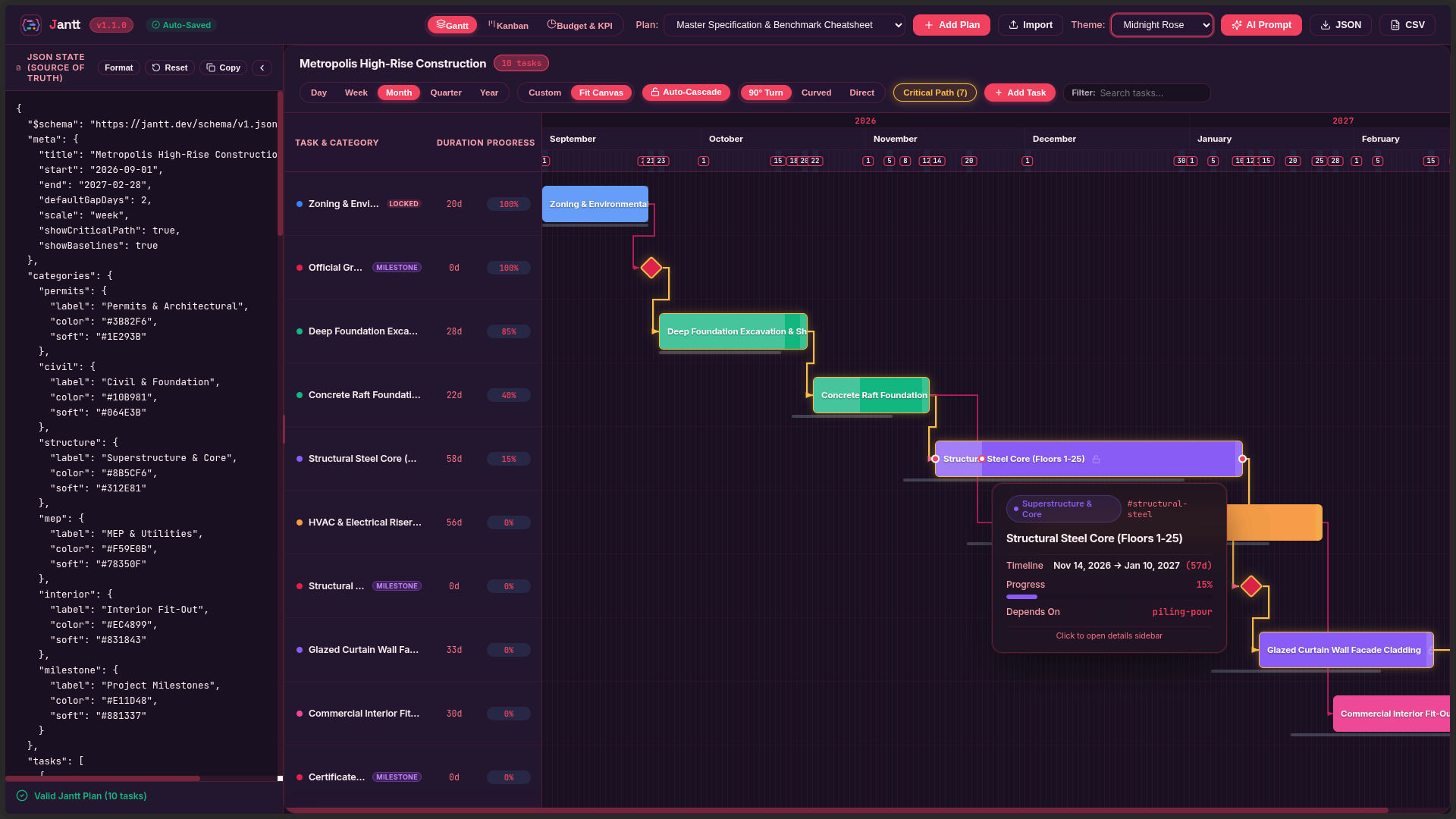
|
Sunset Crimson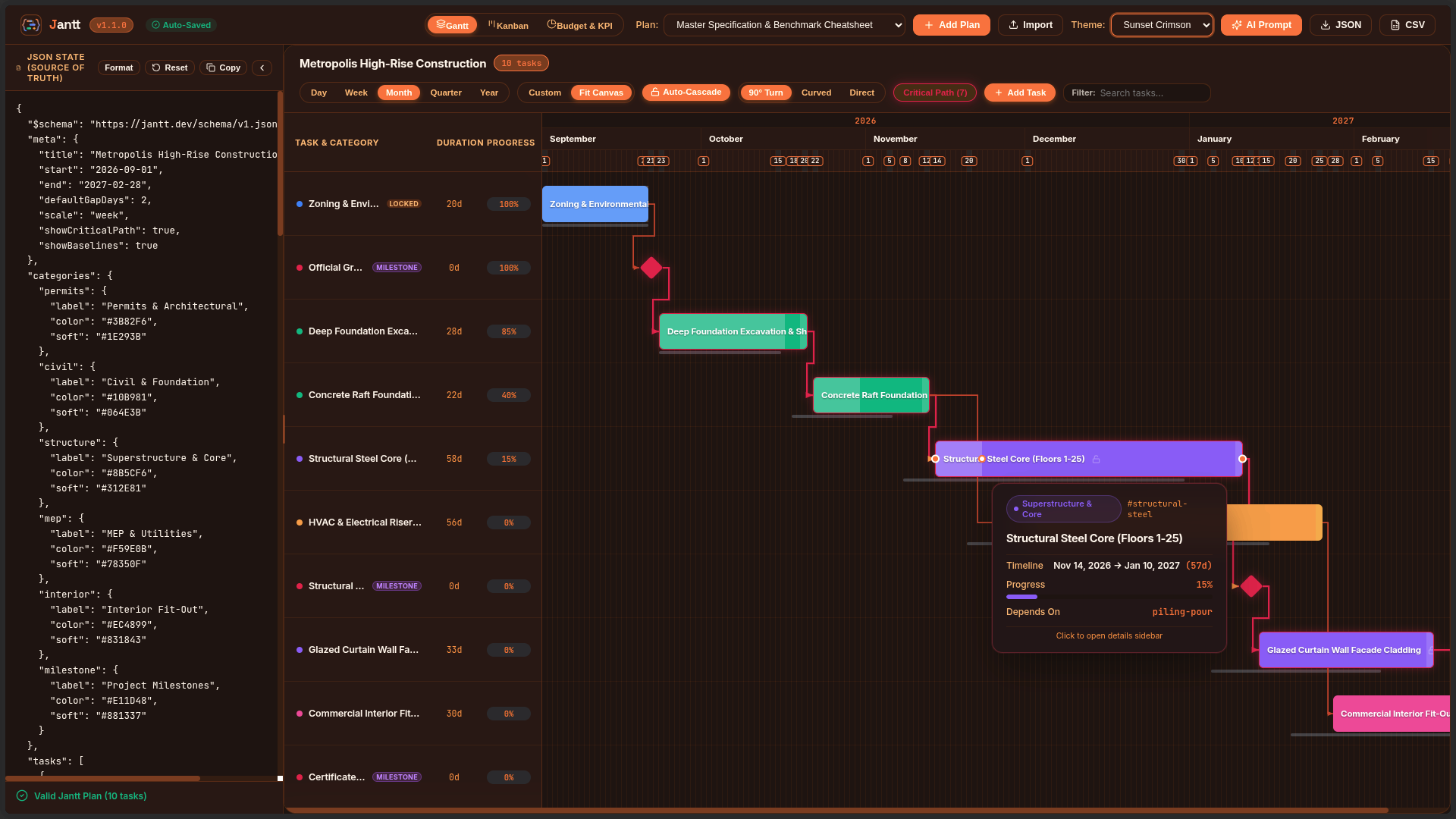
|
Master Specification Benchmark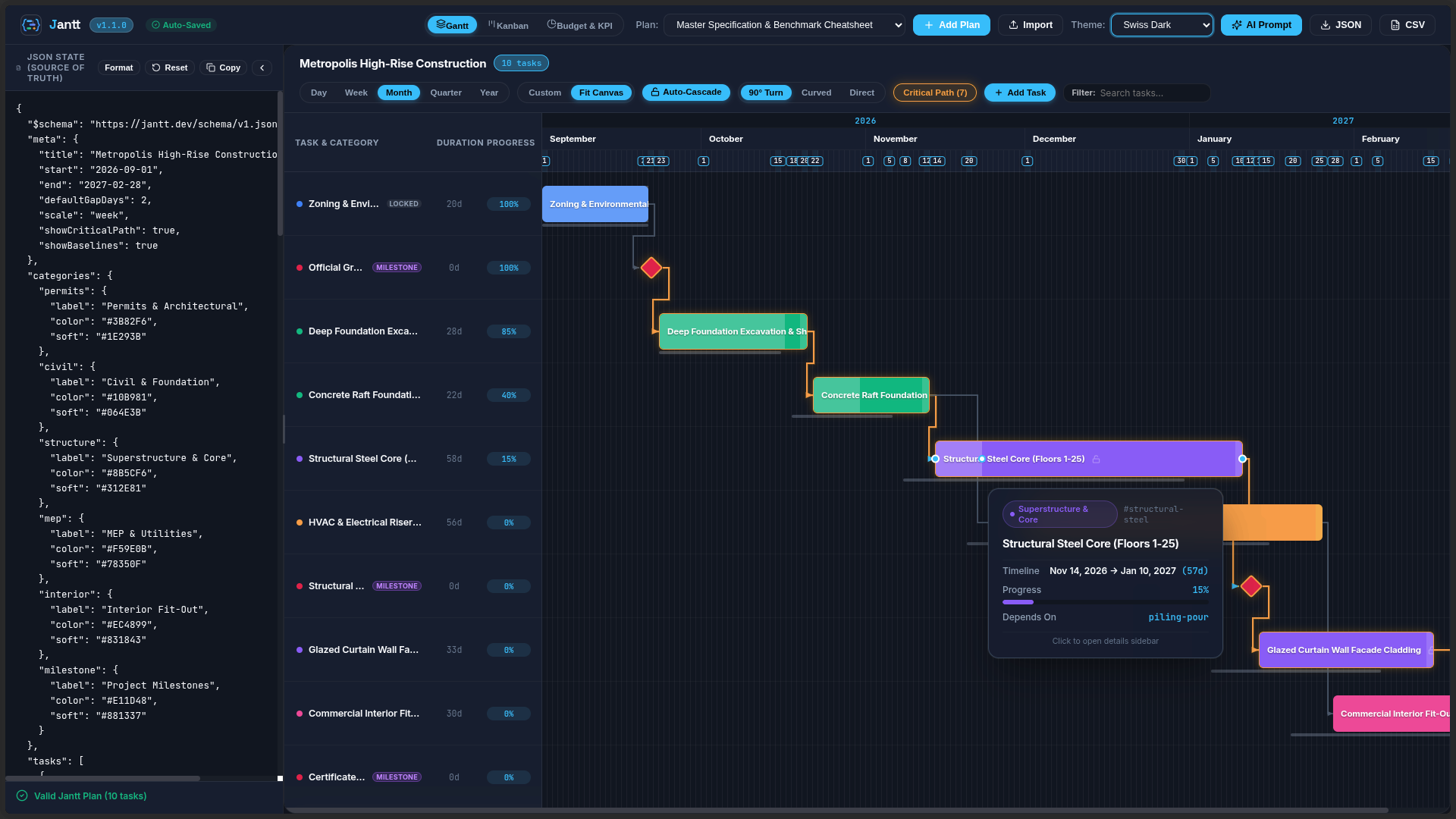
|
Comparison Matrix
| Capability | Jantt Engine (@jantt/core) |
DHTMLX Gantt | Frappe Gantt | Mermaid.js |
|---|---|---|---|---|
| Runtime Dependencies | 0 (Zero) | Multiple | Multiple | Multiple |
| State Paradigm | 100% Declarative JSON | Imperative JS API | Imperative JS API | Text-based DSL |
| Interactive Drag-to-Link | 90° Orthogonal Step | Supported | Not Supported | Static only |
| Timeline Zoom Scales | 5 (Day to Year) | Supported | Limited | Not Supported |
| Critical Path Analysis | Built-in Solver | Commercial tier | Not Supported | Not Supported |
| Milestones & Baselines | Native in Schema | Commercial tier | Not Supported | Milestones only |
| Inline Progress Dragging | Interactive Handle | Supported | Read-only | Not Supported |
| Bi-directional CLI Sync | Built-in | Not Supported | Not Supported | Not Supported |
| Bundle Size (gzip) | ** |
| 10× | 0 | 100% | 2-Way |
|---|---|---|---|
| Fewer LLM Tokens vs JSX | Runtime Dependencies | Deterministic DAG Solver | Bidirectional State Sync |
Schema Contract: https://raw.githubusercontent.com/AhmadHassan-BTed/Jantt/main/schema/jantt.schema.json (v1.4.0)
flowchart LR
    A["<b>Step 1: Feed Cheatsheet to LLM</b><br/>Compact schema contract (WBS, dates, DAG, budget)"] --> B["<b>Step 2: AI Outputs Pure JSON</b><br/>10x fewer tokens, type-safe, 0 hallucinations"]
    B --> C["<b>Step 3: Instant Interactive Suite</b><br/>Deterministic DAG solver, Gantt, Kanban & Analytics"]
    C --> D["<b>Step 4: Bidirectional Loop</b><br/>Humans adjust visually, syncs clean JSON back to AI"]
    D --> B
- Step 1: Feed Cheatsheet to LLM — Give the AI the compact schema contract (WBS, dates, DAG dependencies, milestones, budget). See the full Jantt JSON Cheatsheet.
- Step 2: AI Outputs Pure JSON — Uses 10× fewer tokens than JSX. Machine-checkable, type-safe, and zero UI hallucinations.
- Step 3: Instant Interactive Suite — Jantt resolves topological DAG schedules, routes orthogonal wires, and renders Gantt, Kanban, Notes & Analytics.
- Step 4: Bidirectional Loop — Humans drag and adjust visually. Jantt syncs clean JSON back to localStorage/disk for the AI agent.
LLM System Prompt
Hand this prompt to ChatGPT, Claude, Gemini, Cursor, or your autonomous AI agent pipelines. The model will output 100% valid, constraint-checked Jantt JSON schedules without hallucinating UI code:
You are a precision project management schedule generator.
Output ONLY raw, valid JSON conforming strictly to the Jantt JSON Schema (https://raw.githubusercontent.com/AhmadHassan-BTed/Jantt/main/schema/jantt.schema.json).

# JANTT JSON SCHEMA BENCHMARK & SPECIFICATION CHEATSHEET (v1.4.0)

## 1. Top-Level Root Structure
{
  "$schema": "https://raw.githubusercontent.com/AhmadHassan-BTed/Jantt/main/schema/jantt.schema.json",
  "meta": {
    "title": "<Project Title>",
    "description": "<Project narrative and objectives>",
    "person": "<Lead Program Manager / Owner>",
    "organization": "<Enterprise / Organization Name>",
    "start": "YYYY-MM-DD",
    "end": "YYYY-MM-DD",
    "defaultGapDays": 2,
    "scale": "day" | "week" | "month" | "quarter" | "year",
    "linkRouting": "orthogonal" | "curved" | "direct",
    "showCriticalPath": true,
    "showBaselines": true,
    "autoCascade": true,
    "currency": "USD",
    "budget": 450000,
    "version": "1.4.0"
  },
  "categories": {
    "<category_id>": {
      "label": "<Category Display Name>",
      "color": "#HEX_COLOR",
      "soft": "#BG_TINT_HEX",
      "icon": "<lucide_icon_name>"
    }
  },
  "people": [
    {
      "id": "@alex",
      "name": "Alex Mercer",
      "username": "@alex",
      "role": "Lead Architect",
      "email": "alex@org.com",
      "teamId": "core-team",
      "color": "#3B82F6"
    },
    {
      "id": "person-contractor",
      "name": "Sarah Miller",
      "role": "External Specialist",
      "teamId": "core-team",
      "color": "#10B981"
    }
  ],
  "teams": [
    {
      "id": "core-team",
      "name": "Core Platform Squad",
      "color": "#3B82F6",
      "description": "Backend services and architecture"
    }
  ],
  "notes": [
    {
      "id": "note-unique-id",
      "title": "Architecture RFC & Specs",
      "content": "Detailed markdown requirements, meeting minutes, and acceptance criteria.",
      "color": "#3B82F6",
      "pinned": true,
      "category": "Architecture",
      "tags": ["RFC", "Architecture"],
      "task_ids": ["task-1"],
      "updatedBy": "@alex",
      "createdAt": "YYYY-MM-DDTHH:mm:ssZ",
      "updatedAt": "YYYY-MM-DDTHH:mm:ssZ"
    }
  ],
  "documents": [
    {
      "id": "doc-unique-id",
      "label": "<Document or Deliverable Title>",
      "status": "have" | "pending" | "missing",
      "owner": "<Owner Name>",
      "url": "<Documentation Link>",
      "note": "<Review notes / status>"
    }
  ],
  "tasks": [
    {
      "id": "task-unique-id",
      "wbs": "1.1",
      "label": "Task Name / Title",
      "category": "<matching_category_id>",
      "start": "YYYY-MM-DD",
      "end": "YYYY-MM-DD",
      "assignee": "@alex",
      "phase": "Phase 1: Foundation",
      "priority": "low" | "medium" | "high" | "urgent",
      "estimatedCost": 28000,
      "actualCost": 15000,
      "dependsOn": "prereq-id" | ["prereq-1", "prereq-2"] | null,
      "gapDays": 2,
      "locked": false,
      "progress": 0.75,
      "milestone": false,
      "status": "not-started" | "in-progress" | "submitted" | "completed" | "blocked",
      "urgent": false,
      "color": "#EC4899",
      "baseline": {
        "start": "YYYY-MM-DD",
        "end": "YYYY-MM-DD"
      },
      "notes": "Detailed task description, acceptance criteria, and technical specs.",
      "fields": {
        "jira": "JANTT-101",
        "storyPoints": 13,
        "repo": "github.com/org/repo",
        "deliverable": "schemas/v1.json"
      }
    }
  ]
}

## 2. Critical Constraints & Validation Rules:
1. DATES: All dates must be ISO "YYYY-MM-DD" format. "end" must be >= "start".
2. CATEGORIES: Every task "category" must match an existing key in the "categories" dictionary.
3. DEPENDENCIES (DAG):
   - "dependsOn" can be a single task ID string, an array of strings ["t1", "t2"], or null.
   - All referenced dependency IDs must exist in the "tasks" list (no dangling references).
   - Strict Directed Acyclic Graph: NO circular dependency loops (e.g. A -> B -> C -> A).
   - Timing Sanity: A task's "start" must be on or after prerequisite "end" + gapDays.
4. MILESTONES: For zero-duration milestone gates, set "milestone": true and "start" equal to "end".
5. PROGRESS: Must be a decimal float from 0.0 (0%) to 1.0 (100%).
6. BASELINES: Optional planned timeframe object { "start": "YYYY-MM-DD", "end": "YYYY-MM-DD" } for baseline variance tracking.
7. LOCKED: Set "locked": true on fixed gates or hard-deadline milestones to prevent accidental drag shifts.
8. SINGLE SOURCE OF TRUTH & ZERO DATABASE IDS IN JSON:
   - Real registered teammates use canonical "@username" for both "id" and "username".
   - Non-account individuals are defined as offline personas (e.g. "id": "person-contractor", without "username").
   - Tasks assigned to real accounts reference the handle in "assignee": "@username".
   - NO INTERNAL DATABASE IDS OR UIDs IN JSON: Private database keys, Firebase UIDs, auth tokens, and secret keys are strictly stripped from JSON. The ONLY exception is public "@username" mentions.
Minimal JSON Template
Provide this minimal benchmark template directly to any code or LLM pipeline:
{
  "$schema": "https://raw.githubusercontent.com/AhmadHassan-BTed/Jantt/main/schema/jantt.schema.json",
  "meta": {
    "title": "Master Delivery Plan",
    "person": "@ahmadhassan",
    "start": "2026-09-01",
    "end": "2027-02-28",
    "scale": "week",
    "linkRouting": "orthogonal",
    "showCriticalPath": true,
    "currency": "USD",
    "budget": 250000
  },
  "categories": {
    "core": { "label": "Core Dev", "color": "#38BDF8" },
    "qa": { "label": "QA & Release", "color": "#10B981" }
  },
  "tasks": [
    {
      "id": "t1",
      "wbs": "1.0",
      "label": "Engine Architecture",
      "category": "core",
      "start": "2026-09-01",
      "end": "2026-09-20",
      "progress": 1.0,
      "status": "completed",
      "assignee": "@ahmadhassan"
    },
    {
      "id": "gate-1",
      "wbs": "1.1",
      "label": "Architecture Approved",
      "category": "core",
      "start": "2026-09-21",
      "end": "2026-09-21",
      "milestone": true,
      "dependsOn": "t1"
    },
    {
      "id": "t2",
      "wbs": "2.0",
      "label": "Core Implementation",
      "category": "core",
      "start": "2026-09-23",
      "end": "2026-10-30",
      "dependsOn": "gate-1",
      "gapDays": 2,
      "progress": 0.4,
      "status": "in-progress"
    }
  ]
}
System Architecture
Jantt operates on a strictly decoupled, unidirectional data flow. Raw JSON is validated, topologically solved, mapped into coordinate space, and presented via modular DOM and SVG layers.
flowchart TD
    classDef input fill:#0B111E,stroke:#38BDF8,stroke-width:2px,color:#F1F5F9;
    classDef core fill:#141D2F,stroke:#24324B,stroke-width:1px,color:#F1F5F9;
    classDef algo fill:#1E293B,stroke:#10B981,stroke-width:1px,color:#ECFDF5;
    classDef render fill:#1A263D,stroke:#F59E0B,stroke-width:1px,color:#FFFBEB;
    classDef target fill:#0F172A,stroke:#EC4899,stroke-width:1px,color:#FFF1F2;

    JSON["Declarative JSON Document<br/>(Jantt v1 Schema)"]:::input

    subgraph CoreEngine ["@jantt/core (Zero Runtime Dependencies)"]
        VAL["1. Schema & Graph Validator<br/>(Cycle & Integrity Diagnostics)"]:::core
        RES["2. Topological Schedule Resolver<br/>(Constraint Relaxation & Critical Path)"]:::algo
        LAY["3. Multi-Scale Layout Engine<br/>(90° Orthogonal Line Routing)"]:::algo

        subgraph Renderers ["Modular Presentation Layer"]
            REN_TBAR["Toolbar Subsystem"]:::render
            REN_GRID["Sticky Data Grid & Splitter"]:::render
            REN_HEAD["Multi-Tier Date Header"]:::render
            REN_BARS["Task Bars & Milestones"]:::render
            REN_SVG["SVG 90° Dependency Overlay"]:::render
            REN_TIP["Glassmorphic Tooltips"]:::render
        end

        CTRL["4. Interaction Controller<br/>(Pointer Event State Machine)"]:::core
    end

    JSON --> VAL
    VAL --> RES
    RES --> LAY
    LAY --> Renderers
    Renderers --> CTRL

    CTRL -- "Immutable Commit" --> JSON

    subgraph Targets ["Deployment Surfaces"]
        T_REACT["@jantt/react<br/>(<Jantt /> Component)"]:::target
        T_STAND["@jantt/standalone<br/>(UMD / IIFE Script Tag)"]:::target
        T_CLI["jantt CLI<br/>(Two-Way Live Sync)"]:::target
    end

    Renderers --> Targets
Interaction & Request Lifecycle
When dragging task bars, resizing durations, connecting dependency handles, or adjusting progress, the event cycle flows cleanly through the state machine:
sequenceDiagram
    autonumber
    actor User as User / Contributor
    participant DOM as DOM / SVG Canvas
    participant Controller as Interaction Controller
    participant Resolver as Topological Resolver
    participant AppState as JSON State
    participant Callback as onCommit / Disk

    User->>DOM: PointerDown on Drag Port / Task Bar
    DOM->>Controller: startDrag(mode: move | resize | progress | link | split)

    loop Live Interaction (PointerMove)
        User->>DOM: Drag pointer across timeline
        Controller->>DOM: Update temporary visual draft (90° preview wire / coordinate shift)
    end

    User->>DOM: PointerUp (Release)
    Controller->>Resolver: resolveSchedule(mutatedTasks, defaultGapDays)
    Resolver-->>Controller: Return schedule-consistent tasks
    Controller->>AppState: Generate new immutable JanttData state
    Controller->>DOM: Re-render layout with updated constraints
    Controller->>Callback: Emit onCommit(finalData) / Write to file on disk
Feature Matrix & Capabilities Guide
Jantt bridges the gap between declarative machine data and human project intuition with high-performance visualization across timelines, agile boards, and documentation.
Visual & Interactive Experience (Up Front)
| Surface | Core Capabilities | Highlights |
|---|---|---|
| Interactive Gantt Timeline | 90° CAD orthogonal dependency wiring, live drag-to-link anchor ports, baseline ghost bars, inline progress drag handle, split-pane resizer. | 60/120fps smooth canvas, 5-tier zoom (Day to Year) + continuous slider, fit-to-height mode. |
| Agile Kanban Board | 4-state workflow columns (pending, in-progress, completed, blocked), priority badges, category color dots, drag & drop status transitions. |
Multi-rule sorting (by Priority, Start Date, Assignee, WBS), live progress indicators. |
| Todo Checklist & Cards | 1-click [x] completion checkboxes, strikethrough styling, expandable task cards, category tags. |
Quick status switching, assignee avatars, team squad badges. |
| Shared Notes & Docs | Markdown editor & preview, @person tagging, /task mentions, attached tasks lists, color palettes, pin to top. |
Real-time debounced auto-save into JSON, sectioned attached & mentioned task views. |
| Executive PM & KPIs | Dual-mode dashboard: Essential (progress velocity, health readiness) vs Advanced (EVM, Critical Path, DCMA-14). | Quick status filters (Ready, Blocked, Bottleneck), schedule buffer diagnostic cards. |
| Personalization & AI | Features | Highlights |
|---|---|---|
| Curated Theme Engine | 7 handcrafted themes: Swiss Noir (True OLED Black), Nordic Frost, Cyber Emerald, Midnight Rose, Sunset Crimson, Swiss Light, Beenie. | Clean dark & light mode grouping, high-contrast typography, zero emojis. |
| Resources & Squads | Automatic assignee discovery from tasks[].assignee, squad groupings (Engineering, Design, QA), workload counts. |
1-click "Save to JSON" sync directly into root people[] and teams[] arrays. |
| Time Blocking & Focus | Universal 1-click filter bar: Today, This Week, Specific Date, Date Range. | Dim Mode (fades non-matching tasks) vs Filter Mode (hides non-matching tasks). |
| AI Agent Toolchains | JSON-as-Interface: $10\times$ token reduction vs JSX/HTML, zero graphical hallucinations. | Copy-paste benchmark prompts for Claude 3.5 Sonnet, GPT-4o, and Gemini 1.5 Pro. |
Core Engine & Algorithmic Internals (Under the Hood)
| Algorithmic Engine | Mathematics & Standards | Description |
|---|---|---|
| Topological Solver | Graph constraint resolution ($ES(T) = \max(EF(P) + \text{gap})$) | Automatically paces successor chains when predecessors shift; respects locked: true milestones. |
| Critical Path & Float | Dual-pass forward / backward scheduling | Computes early/late start, early/late finish, and total slack/float ($TF = LS - ES$). Zero-float bottleneck glow. |
| PERT Estimation | $\mu = \frac{O + 4M + P}{6}, \quad \sigma = \frac{P - O}{6}$ | 3-point probabilistic duration calculations using optimistic, most likely, and pessimistic bounds. |
| Earned Value (EVM) | $CV = EV - AC, \quad SV = EV - PV, \quad CPI = \frac{EV}{AC}, \quad SPI = \frac{EV}{PV}$ | ANSI/EIA-748 standard cost & schedule variance monitoring and forecasting ($EAC = \frac{BAC}{CPI}$). |
| DCMA-14 Schedule Audit | Defense Contract Management 14-point audit metrics | Flags missing logic, negative float, high float (>44 days), invalid leads, and relationship inconsistencies. |
| Enterprise & Developer Tooling | Description |
|---|---|
| Client-Side Exporters | 1-click RFC-4180 CSV spreadsheet export, high-resolution vector SVG extraction, and raw JSON export. |
| Cloud Remote URL Sync | Bidirectional synchronization with remote JSON endpoints, ETag caching, background polling, and conflict warnings. |
| Split Monaco Editor | Built-in VS Code-grade Monaco code editor with real-time JSON schema validation and error diagnostic squiggles. |
Bidirectional CLI (jantt) |
CLI runner (npx jantt open ) providing live file-watching and bidirectional browser-to-disk synchronization. |
| Zero Runtime Dependencies | @jantt/core is 100% pure TypeScript with zero external packages (Tab / Shift+Tab |
| ArrowLeft / ArrowRight | Move task start & end by 1 day (or defaultGapDays with Alt) |
| Shift+ArrowLeft / Right | Resize task duration |
| Enter or Space | Open task detail modal |
| Escape | Close modal / cancel active drag |
Local Development & Contributing
New contributors are welcomed. Please review CONTRIBUTING.md and CODE_OF_CONDUCT.md.
# Clone the repository
git clone https://github.com/AhmadHassan-BTed/Jantt.git
cd Jantt

# Install dependencies
npm install

# Run verification test suite (339/339 passing across 22 test suites)
npm test

# Typecheck all packages
npm run typecheck

# Launch local interactive development playground
npm run dev
Author & Maintainer
Ahmad Hassan (B-Ted)
- Email: ahmadhassan.bted@gmail.com
- GitHub: @AhmadHassan-BTed
- Project Repository: https://github.com/AhmadHassan-BTed/Jantt
License
This project is licensed under the MIT License — see the LICENSE file for details.