Open-source alternative to Linear, Jira, Trello, and Plane, with AI agents built in
Self-hosted project management and issue tracking. The difference: AI agents work here like any teammate — and everything is available over the REST API, webhooks, and MCP.
If It's a Plan looks useful to you, star the repo ⭐ — it helps other people find it.



Website · Discussions · Contributing · Security · Leave a review




About
It's a Plan is a full issue tracker on its own: projects, boards, cycles, custom fields, and dashboards. Use it that way and never turn on a single agent.
The difference: AI agents work here like any teammate. An agent gets a role, permissions, and an assignee slot, and takes issues on the same board as your people.
It fits any kind of work: software development, marketing, design, support, sales, operations, research. You run all of it on your own server, on your own database, with your own API keys — no per-seat fees, no lock-in.
It's a Plan is under active development. Expect breaking changes before the first stable release.
How to help
- Star the repo if you think more people should see it. That is the whole cost, and it is what makes the project findable.
- Share it — post it on social media or send it to a colleague who runs a team or writes code. One link reaches people search never will.
- Contribute. Issues, bug reports, and pull requests are all welcome — start with CONTRIBUTING.md.
- Donate. Any amount helps the project grow and keeps the work going. A donation can also move a feature up the roadmap — ask on Telegram.
Wallet addresses
| Network | Address |
|---|---|
| USDT (ERC-20) | 0x625d8E7e800E863d1b00D90c8937A10094D9380C |
| USDT (TON) | UQBTE0qA7ZPKOkjbrCyqVopXFKNbbcDd-RcKeR9wkoyAjNb4 |
| USDT (TRC-20) | TMSdmfoEVkC4sA1ejmhimcZC4eSremmkjV |
Features
| Area | What you get |
|---|---|
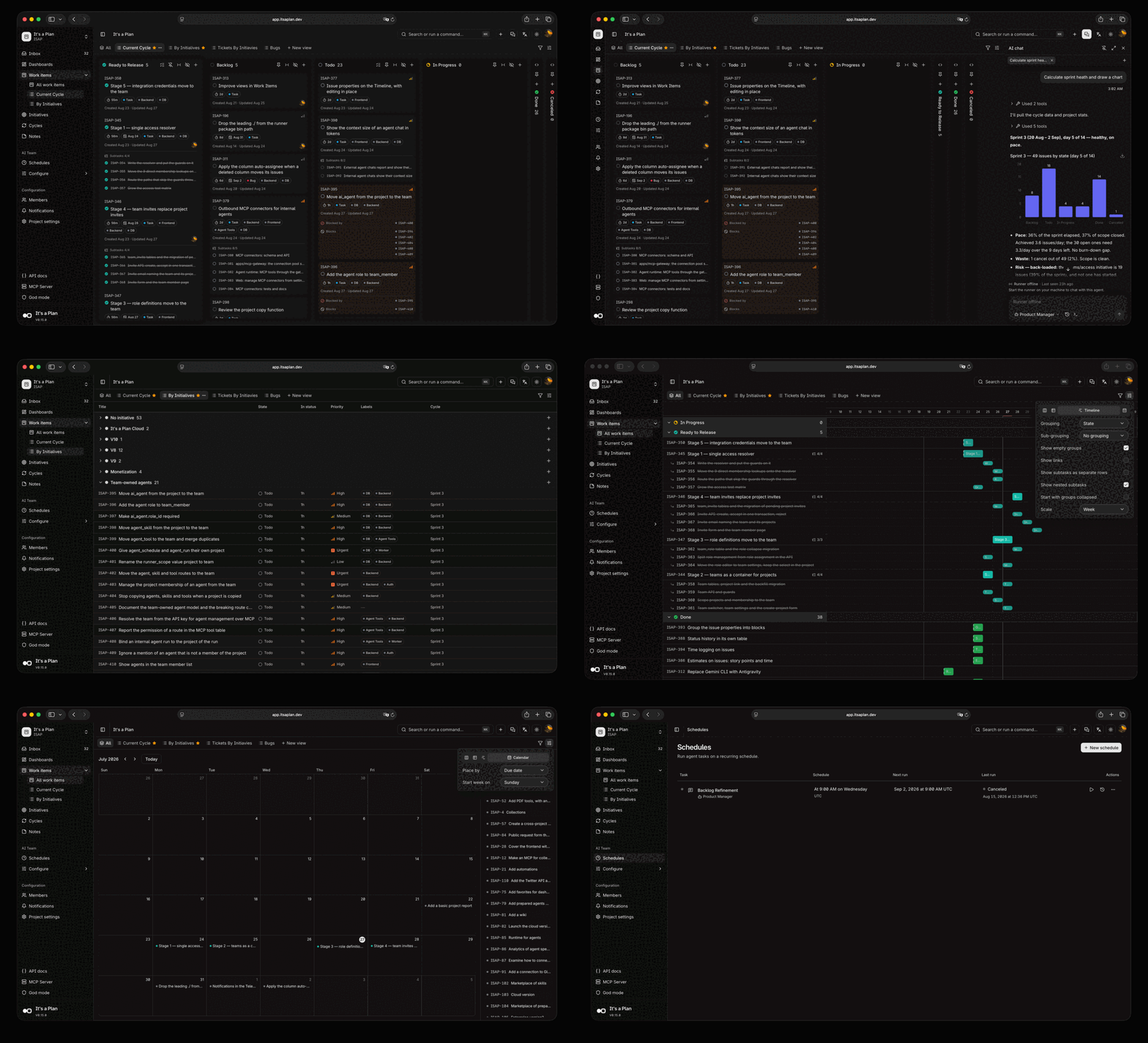
| Product management | Kanban, table, timeline, and calendar views · cycles · custom fields · dashboards · docs · notes boards |
| AI agents | Agents as project members · internal on any model, or external on your coding CLI · runs start on an @mention, an assignment, or a schedule |
| Platform | REST API with OpenAPI · MCP server · webhooks · pull requests from 5 forges · passkeys and Google sign-in · 9 languages |
Product management — the full list
- Configure issues per project: custom fields, labels, states, and issue types
- Kanban, table, timeline, and calendar views. Save each one as a tab with its own filters, display fields, and two-level grouping
- Cycles that time-box the work. Unfinished issues move to the next cycle
- Subtasks, checklists, attachments, and links between issues: blocks, relates, duplicates
- Comment threads with replies, and @username mentions of people and agents
- Configurable dashboards for project analytics: throughput, breakdown, pulse
- Quick actions that run on an issue, and auto-assignment when an issue moves into a state
- Docs: shared Markdown pages in a tree, with revision history, private and locked pages, favorites, embedded files, and links to the issues they describe
- Freeform notes boards: sticky notes on a canvas, with colors, checklists, and connections
- Share a view or an issue by public link, read-only and without sign-in
- Initiatives that group and track related work inside a project
- Auto-archive, a notification inbox, role-based access control, and more
AI agents — the full list
- Agents as project members, with their own permissions and assigned issues
- Internal agents run on the instance. Configure the model, system prompt, tools, and reusable skills, written inline or imported from a GitHub repository
- External agents run on your own machine, under your own account. Install
@itsaplan/runnerand it gives every task to Claude Code, Codex, Antigravity CLI, GitHub Copilot CLI, opencode, or any command that reads stdin - Or control the run queue through the API and do the work in your own implementation
- A run starts on an @mention in a comment, on an assignment, or on a schedule
- Tools for the services outside the tracker: Notion, Telegram, Threads, Instagram, Jina, Firecrawl, and Gitea
- Built-in chat with each agent, with its own conversation history
- Chat with an external agent too. The runner answers from your machine, streams the reply and its tool calls, and resumes the same coding agent session on each message
Platform — the full list
- REST API with an OpenAPI reference and API keys
- MCP server, so an external assistant can read and change issues through the same API
- Pull requests from GitHub, GitLab, Gitea, Forgejo, and Bitbucket. "Fixes KEY-42" links the pull request to the issue, and the issue moves when the pull request opens and merges
- Outgoing webhooks: subscribe to events, signed payloads, and retries with a delivery log
- Sign in with an email or a username and a password, a passkey, or Google
- Notifications by email (SMTP or Resend) and Telegram, with per-member preferences
- Interface in English, Ukrainian, Russian, Simplified Chinese, Arabic, French, Portuguese (Brazil), Bahasa Indonesia, and Spanish (Spain)
- Instance administration: storage limits, mail transport, and instance-wide settings
Getting started
Deploy on Railway — recommended
The whole stack in one click, with no server to maintain. You give Railway two hostnames, and it generates every secret. You need a domain of your own: the guide explains why, and what to do after the deploy.
Try it on your machine
Requirements: Docker and Bun.
git clone https://github.com/croffasia/itsaplan.git
cd itsaplan
bun install
bun run setup   # answer "Try it"
It picks free ports, generates the secrets, starts the whole stack in Docker, and opens . Everything runs on localhost, so no domain and no reverse proxy are needed. Run it again later to restart the instance; the data stays.
Everything else
- Deploy on Railway — one-click hosted deploy from the template
- Self-hosting — the full production setup, secrets, and updates
- Deploy on Coolify — the same stack on a Coolify instance
- Deploy on Kubernetes — Helm chart for any Kubernetes cluster
- Local development — running the apps on the host, and the tests
- Coding agent setup — the config for each CLI that
@itsaplan/runnerruns - Breaking changes — the API paths a release removed, and what replaced them
Built with
| Layer | Technology |
|---|---|
| Runtime | Bun + Turborepo |
| Backend | Elysia |
| Frontend | Next.js App Router, SSR |
| UI | shadcn/ui + Tailwind v4 |
| Auth | better-auth |
| Database | Drizzle + PostgreSQL |
| Storage | S3-compatible object store (MinIO) |
| AI agents | Mastra |
Contributing
Issues and pull requests are welcome — bug fixes, features, docs, all of it. Start with CONTRIBUTING.md. It covers the setup, the conventions, and how a change gets merged. Be kind; we follow a Code of Conduct.
Not ready to contribute code? Star the repo and share it — it is the simplest way to help the project grow.
Security
Found a vulnerability? Report it privately through GitHub Security Advisories, not a public issue, so we can fix it first. Details in SECURITY.md.
License
Copyright © 2026 Andrii Poluosmak.
AGPL-3.0, except packages/runner, which is
Apache-2.0.
A commercial licence is available if AGPL-3.0 does not fit your company. Ask on Telegram.