Integuru is a free, open source api development & testing project written in Python and released under AGPL-3.0. It has 4,765 GitHub stars, 382 forks and 24 open issues, and was last pushed 3 months ago. On this registry it ranks #51 of 103 tracked projects in API Development & Testing, with 5 head-to-head comparisons available.

What is Integuru?

Integuru is an open-source Python AI agent that builds permissionless integrations by reverse engineering platforms' internal APIs, aimed at developers who need to automate a platform that provides no public API of its own.

What it is

Integuru is an agent, published under the AGPL-3.0 licence, that turns a captured browser session into runnable integration code. It lives on GitHub in the Developer Tools / API Development & Testing category and has 4,765 stars and 382 forks, with a hosted homepage at integuru.ai. The repository holds Integuru v0, described in its own README as the earliest version of the agent released publicly; it demonstrates the original approach of using browser network requests to generate code, and the README notes that the newest version of Integuru is available at www.integuru.com. Configuration happens locally: the tool reads a .har network capture, a cookie file, and a natural-language prompt, and writes Python that performs the requested action.

The problem it solves is the platform with no supported doorway. Many services expose only internal endpoints behind a logged-in browser session, so any automation has to be written by hand: open developer tools, find which request actually downloads the bill or submits the order, trace where its parameters come from, and repeat that work every time the platform changes. Integuru replaces that manual reverse engineering. Given a request such as https://www.example.com/utility-bills?accountId=123&userId=456, it identifies the target request, detects the dynamic parts (accountId, userId), locates the requests that supply those values, and links them into a dependency graph until the remaining request needs nothing but the authentication cookies.

Key capabilities

  • create_har.py spawns a browser and records every network request into a HAR file alongside a separate cookie file, so the agent has a full session to reason over.
  • Builds a dependency graph of requests, attaching supplying requests to the target request until only the authentication cookies remain at the root.
  • Traverses that graph from leaf requests to the master node, converting each node into a runnable function.
  • Accepts input variables, such as choosing the YEAR to download a document from, though the README states these are currently supported only for graph generation.
  • --generate-code produces the full integration code that hits every request in the graph rather than stopping at the graph itself.
  • Configurable paths and limits: --har-path defaults to ./network_requests.har, --cookie-path to ./cookies.json, and --max_steps to 20.
  • Model selection via --model defaults to gpt-4o for graph generation, and Integuru automatically switches to o1-preview for code generation when that model is available on the account.

Who uses it and how

  • Developers automating a platform that has no documented API, where the only available route is the internal endpoint the web app itself calls.
  • Back-office and operations workflows of the kind the README demonstrates directly, such as downloading utility bills, where the desired action is a file retrieval behind a login.
  • Teams that want generated Python functions as a starting point for a maintained integration, running Integuru once and then keeping the output in their own codebase.
  • Interactive sessions in Jupyter through main.ipynb, for exploring a platform's request graph before committing to code generation.
  • Engineers following an OpenAPI-adjacent workflow, given the repository's openapi topic, who want to reverse-engineer request structure before documenting or reimplementing it.

Getting started

Install Python requirements with Poetry (poetry install, then poetry shell), set the OPENAI_API_KEY environment variable, generate a capture with poetry run python create_har.py, and then run poetry run integuru --prompt "download utility bills" --model. A hosted option is available at www.integuru.com for the newer version.

How it compares

No list of paid products that this project replaces is provided in the registry facts, and no similar tools are named. Integuru therefore stands alone in this registry on that basis.

When to use it — and when not to

A self-hoster must operate a Python and Poetry environment, hold an OpenAI API key and pay for the models used, and drive a real browser session to capture HAR files and cookies, so there is no fully offline or dependency-free path. Input variables do not yet reach code generation, and the README recommends a model at least as capable as o1-mini, which means capability and cost both matter. Anyone needing a stable, long-term maintenance commitment should look at the newer version at integuru.com rather than this repository, which is explicitly the earliest public version.

project readme (upstream, from github) — read inline

Integuru v0

This repo contains the earliest version of the Integuru agent we released publicly. It shows the original approach: using browser network requests to generate runnable integration code for platforms without official APIs.

We've kept building since then. The newest version of Integuru is available at www.integuru.com.

Integuru v0 in Action
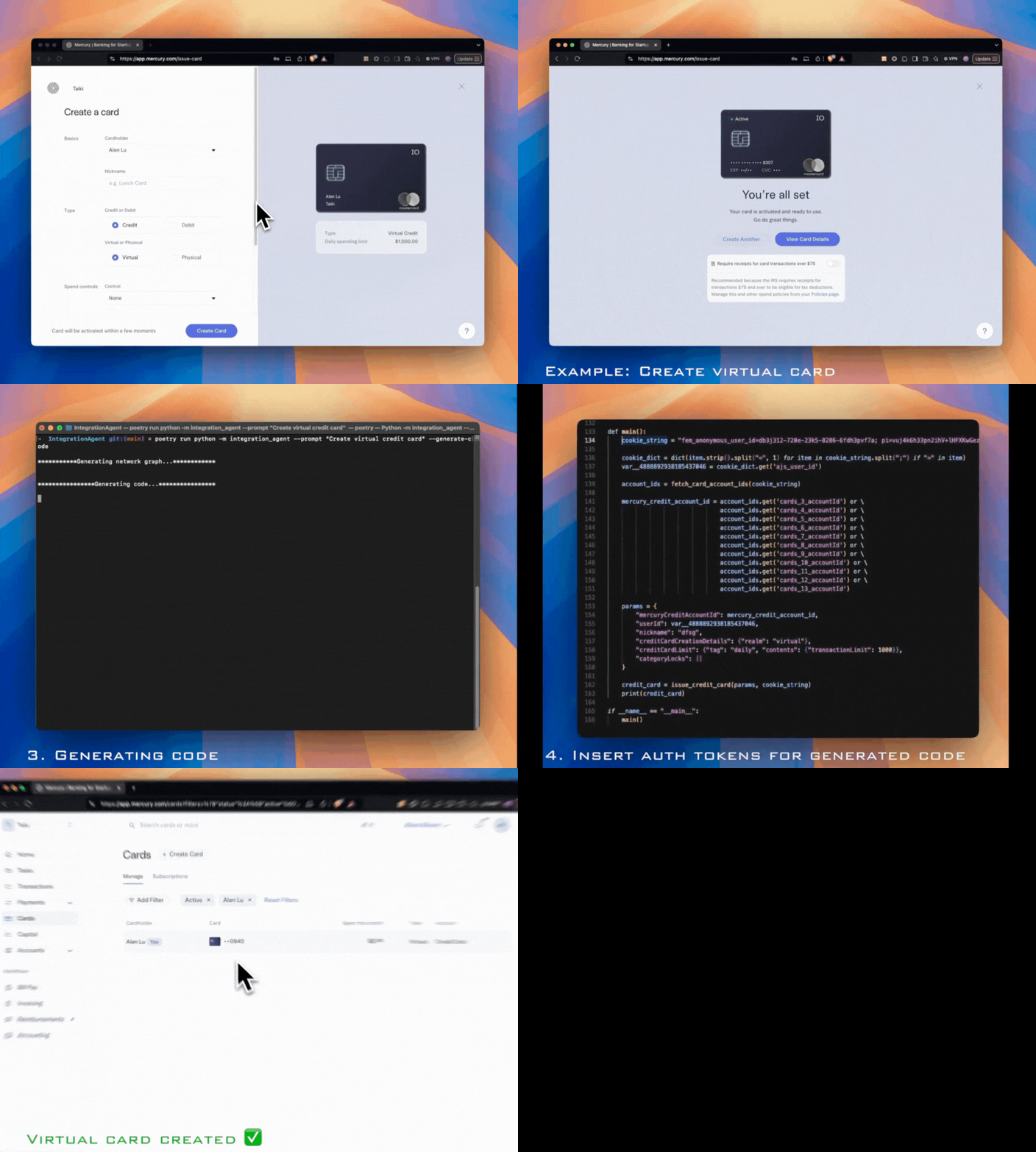
Integuru in action

What Integuru v0 Does

You use create_har.py to generate a file containing all browser network requests, a file with the cookies, and write a prompt describing the action triggered in the browser. The agent outputs runnable Python code that hits the platform's internal endpoints to perform the desired action.

How It Works

Let's assume we want to download utility bills:

  1. The agent identifies the request that downloads the utility bills. For example, the request URL might look like this:
    https://www.example.com/utility-bills?accountId=123&userId=456
    
  2. It identifies parts of the request that depend on other requests. The above URL contains dynamic parts (accountId and userId) that need to be obtained from other requests.
    accountId=123 userId=456
    
  3. It finds the requests that provide these parts and makes the download request dependent on them. It also attaches these requests to the original request to build out a dependency graph.
    GET https://www.example.com/get_account_id
    GET https://www.example.com/get_user_id
    
  4. This process repeats until the request being checked depends on no other request and only requires the authentication cookies.
  5. The agent traverses up the graph, starting from nodes (requests) with no outgoing edges until it reaches the master node while converting each node to a runnable function.

Features

  • Generate a dependency graph of requests to make the final request that performs the desired action.
  • Allow input variables (for example, choosing the YEAR to download a document from). This is currently only supported for graph generation. Input variables for code generation coming soon!
  • Generate code to hit all requests in the graph to perform the desired action.

Setup

  1. Set up your OpenAI API Keys and add the OPENAI_API_KEY environment variable. (We recommend using an account with access to models that are at least as capable as OpenAI o1-mini. Models on par with OpenAI o1-preview are ideal.)

  2. Install Python requirements via poetry:

    poetry install
    
  3. Open a poetry shell:

    poetry shell
    
  4. Register the Poetry virtual environment with Jupyter:

    poetry run ipython kernel install --user --name=integuru
    
  5. Run the following command to spawn a browser:

    poetry run python create_har.py
    

    Log into your platform and perform the desired action (such as downloading a utility bill).

  6. Run Integuru:

    poetry run integuru --prompt "download utility bills" --model 
    

    You can also run it via Jupyter Notebook main.ipynb

    Recommended to use gpt-4o as the model for graph generation as it supports function calling. Integuru will automatically switch to o1-preview for code generation if available in the user's OpenAI account.

Usage

After setting up the project, you can use Integuru to analyze and reverse-engineer API requests for external platforms. Simply provide the appropriate .har file and a prompt describing the action that you want to trigger.

poetry run integuru --help
Usage: integuru [OPTIONS]

Options:
  --model TEXT                    The LLM model to use (default is gpt-4o)
  --prompt TEXT                   The prompt for the model  [required]
  --har-path TEXT                 The HAR file path (default is
                                  ./network_requests.har)
  --cookie-path TEXT              The cookie file path (default is
                                  ./cookies.json)
  --max_steps INTEGER             The max_steps (default is 20)
  --input_variables <TEXT TEXT>...
                                  Input variables in the format key value
  --generate-code                 Whether to generate the full integration
                                  code
  --help                          Show this message and exit.

Running Unit Tests

To run unit tests using pytest, use the following command:

poetry run pytest

Continuous Integration (CI) Workflow

This repository includes a CI workflow using GitHub Actions. The workflow is defined in the .github/workflows/ci.yml file and is triggered on each push and pull request to the main branch. The workflow performs the following steps:

  1. Checks out the code.
  2. Sets up Python 3.12.
  3. Installs dependencies using poetry.
  4. Runs tests using pytest.

Note on 2FA

When the destination site uses two-factor authentication (2FA), the workflow remains the same. Ensure that you complete the 2FA process and obtain the cookies/auth tokens/session tokens after 2FA. These tokens will be used in the workflow.

Demo

Demo Video

Contributing

Contributions to improve Integuru are welcome. Please feel free to submit issues or pull requests on the project's repository.

Info

Integuru is now at Integuru.com. If you're looking for new integrations or the current version of the agent, visit www.integuru.com.

For direct questions, reach out at [email protected].

Privacy Policy

Data Storage

Collected data is stored locally in the network_requests.har and cookies.json files.

LLM Usage

The tool uses a cloud-based LLM (OpenAI's GPT-4o and o1-preview models).

LLM Training

The LLM is not trained or improved by the usage of this tool.

Frequently asked questions

Is Integuru free to use?

Integuru is open source under the AGPL-3.0 licence. There is no licence fee and no seat count — you can self-host it or, where the project offers one, pay a vendor for a managed version instead.

What does Integuru do?

The first AI agent that builds permissionless integrations through reverse engineering platforms' internal APIs.

What is Integuru written in?

Integuru is primarily written in Python. Its source is publicly available at https://github.com/Integuru-AI/Integuru, and it has 4,765 GitHub stars.