icestudio is a free, open source ides & code editors project written in JavaScript and released under GPL-2.0. It has 1,943 GitHub stars, 286 forks and 23 open issues, and was last pushed 2 days ago. On this registry it ranks #43 of 46 tracked projects in IDEs & Code Editors, with 5 head-to-head comparisons available.

What is icestudio?

Icestudio is a free, GPL-2.0-licensed visual editor that lets newcomers to FPGA design draw digital circuits as block diagrams and upload them directly to open-source FPGA boards on Linux, macOS or Windows.

What it is

Icestudio is a desktop design application written in JavaScript and released under GPL-2.0. Its stated purpose is to be a design tool focused on newcomers to the FPGA world, and it reduces the workflow to three steps: draw your circuit, upload it to your favourite open-source FPGA board, and you are done. The repository sits in the open-source FPGA ecosystem around the IceStorm toolchain and Lattice devices, and is tagged with the topics blocks, editor, fpga, icestorm, ide, javascript, lattice and verilog. Published builds cover Linux, MacOSX and Windows, and the project keeps both a stable and a work-in-progress version channel alongside a nightly build.

The concrete problem it addresses is the entry barrier in front of FPGA work: conventionally a designer writes hardware description text and drives a toolchain before anything reaches a board. Icestudio replaces the hand-authored starting point with a graphical block canvas, so a circuit is drawn rather than typed, and the same editor then pushes the result onto an open FPGA board. That draw-then-upload loop is the whole product argument, and the README demonstrates it with animated walkthroughs of a two-LED design from canvas to hardware.

Key capabilities

  • A block-based drawing canvas for composing digital circuits, listed in the project topics as blocks and editor and demonstrated in the README as the first step of the workflow.
  • Direct upload from the editor to an open-source FPGA board, the second step of the documented flow.
  • An open-source Lattice FPGA focus, reflected in the icestorm, lattice, fpga and verilog topic tags rather than a proprietary vendor flow.
  • Desktop builds for Linux, MacOSX and Windows.
  • Stable and work-in-progress version channels, plus a nightly build published through the README badges.
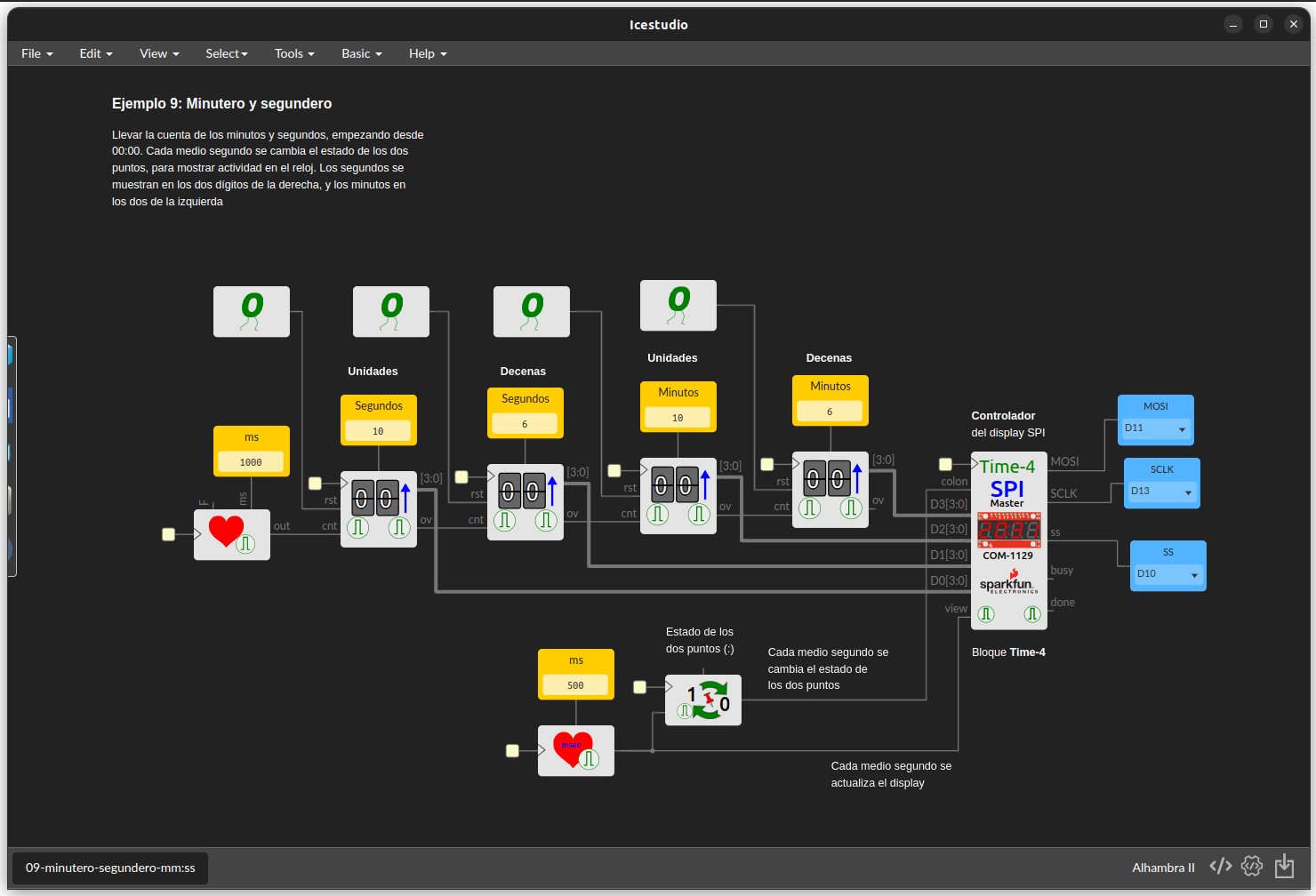
  • Example collections linked from the README: iceK with Alhambra II and iceBreaker board examples, IceMem, a four-digit SPI seven-segment display controller, a RISC-V CPU, a Z80 CPU and the Hack CPU from Nand2tetris.
  • A translated interface spanning 18 languages, with English and Spanish complete, Ukrainian at 94 percent of strings, and a wiki guide for contributing translations.

Who uses it and how

  • Newcomers to FPGA design, the audience the README names explicitly, who follow the draw, upload, done sequence instead of authoring HDL first.
  • Students and self-learners working through Nand2tetris, for whom a Hack CPU implementation is linked as an example.
  • Makers and hobbyists on open boards such as Alhambra II and iceBreaker, both represented in the iceK example repository.
  • CPU-design and retro-computing experimenters, served by the Z80 and RISC-V example projects referenced in the README.
  • Translators and code contributors, supported by the language progress table, a dedicated translating guide in the wiki and CONTRIBUTING.md for the codebase itself.

Getting started

Install a build for Linux, MacOSX or Windows from icestudio.io, with a nightly build available for testing. Full documentation, including the workflow and board support, is maintained in the project's GitHub wiki rather than in the README.

How it compares

The facts name no paid products, and Icestudio is best situated by the company it keeps: it is tagged icestorm, lattice and verilog, placing it in the same open-source toolchain family as the IceStorm flow and hand-written Verilog designs rather than in a proprietary vendor stack. No other visual block-based FPGA editor appears in the facts available here, so within this registry it stands alone as a graphical front end for open FPGA boards.

When to use it — and when not to

Choose it when the goal is graphical, low-ceremony entry to open Lattice FPGA boards and the IceStorm world is an acceptable dependency. Do not choose it if you need a vendor-proprietary device flow or prefer textual HDL as your primary medium. There is nothing to self-host, since it is a desktop application, but be aware that the README is thin and defers nearly all documentation to the wiki, that some linked technical write-ups are in Spanish only, and that the project carries 23 open issues.

project readme (upstream, from github) — read inline


Nightly Build

Version (Stable) Version (WIP)
License

Digital Design for OpenSource FPGAs made easy: icestudio.io

Platforms

Linux, MacOSX and Windows

Documentation

Find all the information on this WIKI PAGE

Introduction

Icestudio is a design tool focused on newcomers to the FPGA world

  • Step 1: Draw your circuit

  • Step 2: Upload it to your favorite OpenSource FPGA board

  • Step 3: Done! 😀️

To work on Icestudio itself, read CONTRIBUTING.md.

Screenshots

Hello world examples from the iceK collection

Alhambra II board

(Example repo)

iceBreaker board

(Example repo)

IceMem collection: example 23

(IceMem example repo)

SPI 7-segment 4 digits controller example

(SPI Display Notes) (In Spanish)

RISC-V CPU

(RISC-V FPGA Icestudio repo)

Z80 CPU

(Z80-FPGA Icestudio repo)

Hack CPU (Nand2tetris project)

(Nand2tetris-icestudio repo)

Languages

Language Translated strings
English (en) Progress
Spanish (es_ES) Progress
Ukrainian (uk_UA) Progress
Czech (cs_CZ) Progress
German (de_DE) Progress
French (fr_FR) Progress
Japanese (ja_JP) Progress
Russian (ru_RU) Progress
Italian (it_IT) Progress
Taiwanese (zh_TW) Progress
Turkish (tr_TR) Progress
Basque (eu_ES) Progress
Chinese (zh_CN) Progress
Korean (ko_KR) Progress
Catalonian (ca_ES) Progress
Dutch (nl_NL) Progress
Galician (gl_ES) Progress
Greek (el_GR) Progress

Contribute!. Any contribution is very welcome! Please follow the steps at Translating Icestudio

Contributors

Version Contributors
0.12 Carlos Venegas Arrabé, TimRudy, Joaquim (jojo535275), kanade-k-1228, will-hut, pcotret, Juan González (Obijuan)
0.11 Carlos Venegas Arrabé, Joaquim (jojo535275), mgesteiro, Laulin, aqumu, Doom4535, jrwagz, Saij, RBEGamer, Fernando Mosquera, ain101, Juan González (Obijuan)
0.10 kanade-k-1228, vr2045, Carlos Venegas Arrabé, Juan González (Obijuan)
0.9-1 Juan González (Obijuan)
0.9 Carlos Venegas Arrabé, mslider, Joaquim (jojo535275), Fernando Mosquera, TheSnowfield, Juan González (Obijuan)
0.8 Carlos Venegas Arrabé, Joaquim (jojo535275), Fernando Mosquera, Ümit Solmaz, TinLethax, seanybaggins, mslider, Juan González (Obijuan)
0.7 Carlos Venegas Arrabé, Juan González (Obijuan), Joaquim (jojo535275)
0.6 Carlos Venegas Arrabé, Juan González (Obijuan), Miodrag Milanovic, Pascal Cotret, aalku, Lorea Aldabaldetreku, TimRudy, Sam, Kyle Lomen, pitrz, Francisco Sayas, jojo535275, Fernando Mosquera, Derek Lai, wifasoi, Carls, Datanoise, Andrew Goodney, Jose Miguel Sánchez García, Alejomejia, reclaimed, Marcel Ochsendorf, HwaGyeong
0.5 Carlos Venegas Arrabé, Juan González (Obijuan), Zakary Kamal Ismail, Sam
0.4 Jesus Arroyo, Carlos Venegas Arrabé, Elektor.Labs, Piotr Esden-Tempski, Miodrag Milanović, ratmole, Luca Cristaldi
0.3 Jesus Arroyo, Luke Valenty, Lorea-Aldabaldetreku, Carlos Díaz, Martoni, Xoan Sampaiño, Unai, Francisco Sayas, Pascal Cotret, Juan Jose Luna Espinosa, Salvador E. Tropea, redbeard, Eladio Delgado, Philipp van Kempen
0.2 Jesus Arroyo, Tomás Calvo, Juan González (Obijuan), Carlos Díaz, Xoan Sampaiño, Salvador E. Tropea, Democrito, Martoni, Pascal Cotret
0.1 Jesus Arroyo, Miguel Sánchez de León Peque

Credits

  • Carlos Venegas Arrabé is the main developer since 2019/Oct

  • Jesus Arroyo started this project on 2016/Jan/28. He was the main developer from 2016/Jan to 2019/Oct

  • FPGAwars community has developed this project in a voluntary and altruistic way since 02/2017.

  • BQ sponsored this project from 02/2016 to 02/2017. Thanks

License

Licensed under GPL 2.0 and Creative Commons Attribution-ShareAlike 4.0 International License.


Frequently asked questions

Is icestudio free to use?

icestudio is open source under the GPL-2.0 licence. There is no licence fee and no seat count — you can self-host it or, where the project offers one, pay a vendor for a managed version instead.

What does icestudio do?

:snowflake: Visual editor for open FPGA boards

What is icestudio written in?

icestudio is primarily written in JavaScript. Its source is publicly available at https://github.com/FPGAwars/icestudio, and it has 1,943 GitHub stars.