Ibis






What is Ibis?
Ibis is the portable Python dataframe library:
- Fast local dataframes (via DuckDB by default)
- Lazy dataframe expressions
- Interactive mode for iterative data exploration
- Compose Python dataframe and SQL code
- Use the same dataframe API for more than 20 backends
- Iterate locally and deploy remotely by changing a single line of code
See the documentation on "Why Ibis?" to learn more.
Getting started
You can pip install Ibis with a backend and example data:
pip install 'ibis-framework[duckdb,examples]'
💡 Tip
See the installation guide for more installation options.
Then use Ibis:
>>> import ibis
>>> ibis.options.interactive = True
>>> t = ibis.examples.penguins.fetch()
>>> t
┏━━━━━━━━━┳━━━━━━━━━━━┳━━━━━━━━━━━━━━━━┳━━━━━━━━━━━━━━━┳━━━━━━━━━━━━━━━━━━━┳━━━━━━━━━━━━━┳━━━━━━━━┳━━━━━━━┓
┃ species ┃ island    ┃ bill_length_mm ┃ bill_depth_mm ┃ flipper_length_mm ┃ body_mass_g ┃ sex    ┃ year  ┃
┡━━━━━━━━━╇━━━━━━━━━━━╇━━━━━━━━━━━━━━━━╇━━━━━━━━━━━━━━━╇━━━━━━━━━━━━━━━━━━━╇━━━━━━━━━━━━━╇━━━━━━━━╇━━━━━━━┩
│ string  │ string    │ float64        │ float64       │ int64             │ int64       │ string │ int64 │
├─────────┼───────────┼────────────────┼───────────────┼───────────────────┼─────────────┼────────┼───────┤
│ Adelie  │ Torgersen │           39.1 │          18.7 │               181 │        3750 │ male   │  2007 │
│ Adelie  │ Torgersen │           39.5 │          17.4 │               186 │        3800 │ female │  2007 │
│ Adelie  │ Torgersen │           40.3 │          18.0 │               195 │        3250 │ female │  2007 │
│ Adelie  │ Torgersen │           NULL │          NULL │              NULL │        NULL │ NULL   │  2007 │
│ Adelie  │ Torgersen │           36.7 │          19.3 │               193 │        3450 │ female │  2007 │
│ Adelie  │ Torgersen │           39.3 │          20.6 │               190 │        3650 │ male   │  2007 │
│ Adelie  │ Torgersen │           38.9 │          17.8 │               181 │        3625 │ female │  2007 │
│ Adelie  │ Torgersen │           39.2 │          19.6 │               195 │        4675 │ male   │  2007 │
│ Adelie  │ Torgersen │           34.1 │          18.1 │               193 │        3475 │ NULL   │  2007 │
│ Adelie  │ Torgersen │           42.0 │          20.2 │               190 │        4250 │ NULL   │  2007 │
│ …       │ …         │              … │             … │                 … │           … │ …      │     … │
└─────────┴───────────┴────────────────┴───────────────┴───────────────────┴─────────────┴────────┴───────┘
>>> g = t.group_by("species", "island").agg(count=t.count()).order_by("count")
>>> g
┏━━━━━━━━━━━┳━━━━━━━━━━━┳━━━━━━━┓
┃ species   ┃ island    ┃ count ┃
┡━━━━━━━━━━━╇━━━━━━━━━━━╇━━━━━━━┩
│ string    │ string    │ int64 │
├───────────┼───────────┼───────┤
│ Adelie    │ Biscoe    │    44 │
│ Adelie    │ Torgersen │    52 │
│ Adelie    │ Dream     │    56 │
│ Chinstrap │ Dream     │    68 │
│ Gentoo    │ Biscoe    │   124 │
└───────────┴───────────┴───────┘
💡 Tip
See the getting started tutorial for a full introduction to Ibis.
Python + SQL: better together
For most backends, Ibis works by compiling its dataframe expressions into SQL:
>>> ibis.to_sql(g)
SELECT
  "t1"."species",
  "t1"."island",
  "t1"."count"
FROM (
  SELECT
    "t0"."species",
    "t0"."island",
    COUNT(*) AS "count"
  FROM "penguins" AS "t0"
  GROUP BY
    1,
    2
) AS "t1"
ORDER BY
  "t1"."count" ASC
You can mix SQL and Python code:
>>> a = t.sql("SELECT species, island, count(*) AS count FROM penguins GROUP BY 1, 2")
>>> a
┏━━━━━━━━━━━┳━━━━━━━━━━━┳━━━━━━━┓
┃ species   ┃ island    ┃ count ┃
┡━━━━━━━━━━━╇━━━━━━━━━━━╇━━━━━━━┩
│ string    │ string    │ int64 │
├───────────┼───────────┼───────┤
│ Adelie    │ Torgersen │    52 │
│ Adelie    │ Biscoe    │    44 │
│ Adelie    │ Dream     │    56 │
│ Gentoo    │ Biscoe    │   124 │
│ Chinstrap │ Dream     │    68 │
└───────────┴───────────┴───────┘
>>> b = a.order_by("count")
>>> b
┏━━━━━━━━━━━┳━━━━━━━━━━━┳━━━━━━━┓
┃ species   ┃ island    ┃ count ┃
┡━━━━━━━━━━━╇━━━━━━━━━━━╇━━━━━━━┩
│ string    │ string    │ int64 │
├───────────┼───────────┼───────┤
│ Adelie    │ Biscoe    │    44 │
│ Adelie    │ Torgersen │    52 │
│ Adelie    │ Dream     │    56 │
│ Chinstrap │ Dream     │    68 │
│ Gentoo    │ Biscoe    │   124 │
└───────────┴───────────┴───────┘
This allows you to combine the flexibility of Python with the scale and performance of modern SQL.
Backends
Ibis supports more than 20 backends:
- Apache DataFusion
- Apache Druid
- Apache Flink
- Apache Impala
- Apache PySpark
- Athena
- BigQuery
- ClickHouse
- Databricks
- DuckDB
- Exasol
- Materialize
- MySQL/MariaDB
- Oracle
- Polars
- PostgreSQL
- RisingWave
- SingleStoreDB
- SQL Server
- SQLite
- Snowflake
- Trino
How it works
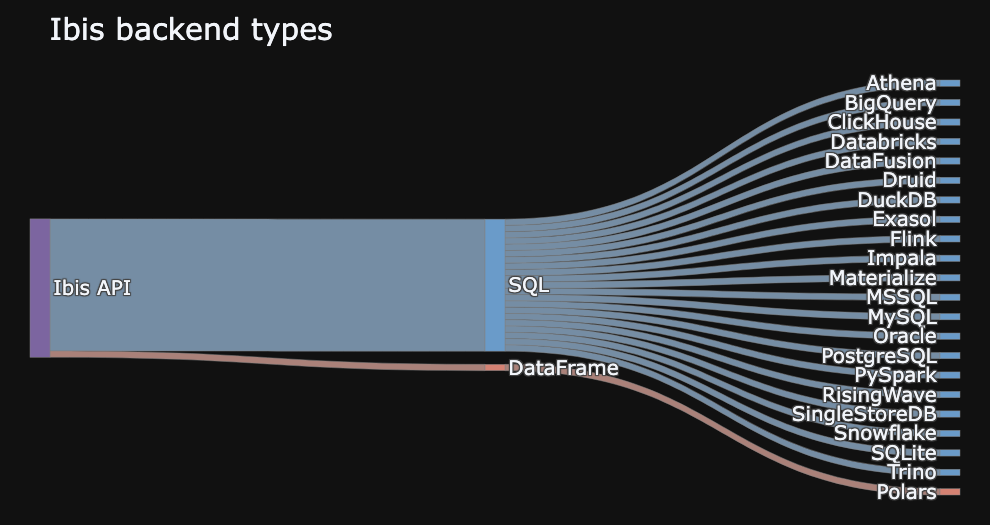
Most Python dataframes are tightly coupled to their execution engine. And many databases only support SQL, with no Python API. Ibis solves this problem by providing a common API for data manipulation in Python, and compiling that API into the backend’s native language. This means you can learn a single API and use it across any supported backend (execution engine).
Ibis broadly supports two types of backend:
- SQL-generating backends
- DataFrame-generating backends
Portability
To use different backends, you can set the backend Ibis uses:
>>> ibis.set_backend("duckdb")
>>> ibis.set_backend("polars")
>>> ibis.set_backend("datafusion")
Typically, you'll create a connection object:
>>> con = ibis.duckdb.connect()
>>> con = ibis.polars.connect()
>>> con = ibis.datafusion.connect()
And work with tables in that backend:
>>> con.list_tables()
['penguins']
>>> t = con.table("penguins")
You can also read from common file formats like CSV or Apache Parquet:
>>> t = con.read_csv("penguins.csv")
>>> t = con.read_parquet("penguins.parquet")
This allows you to iterate locally and deploy remotely by changing a single line of code.
💡 Tip
Check out the blog on backend agnostic arrays for one example using the same code across DuckDB and BigQuery.
Community and contributing
Ibis is an open source project and welcomes contributions from anyone in the community.
- Read the contributing guide.
- We care about keeping the community welcoming for all. Check out the code of conduct.
- The Ibis project is open sourced under the Apache License.
Join our community by interacting on GitHub or chatting with us on Zulip.
For more information visit https://ibis-project.org/.
Governance
The Ibis project is an independently governed open source community project to build and maintain the portable Python dataframe library. Ibis has contributors across a range of data companies and institutions.