🔓 Advanced DLL Hijack Scanner & Centralized Endpoint Management
Streamlined Vulnerability Discovery for Windows Privilege Escalation



🧠 Conceptual Overview
I built HydraSoft because I needed a fast, dependency-free, and open-source tool to hunt for DLL hijacking vulnerabilities across Windows environments. When Windows applications load dynamic-link libraries (DLLs), they follow a strict search order—starting with the executable's own directory, then moving to System32, the Windows folder, and finally the PATH environment variables.
If an application attempts to load a DLL that doesn't exist in a protected system directory, and I have write permissions to an earlier directory in that search chain, I can drop a malicious payload. HydraSoft automates this entire discovery process. It walks through directory trees, analyzes Portable Executable (PE) import tables, cross-references them with files actually present on the disk, and pinpoints exact hijacking opportunities.
🎯 Core Philosophy
"Find the missing link in the execution chain."
I designed HydraSoft to eliminate the noise. Instead of manually running Process Monitor (ProcMon) and sifting through thousands of "NAME NOT FOUND" events, this tool statically analyzes binaries at rest and provides immediate, actionable intelligence for Red Team operations.
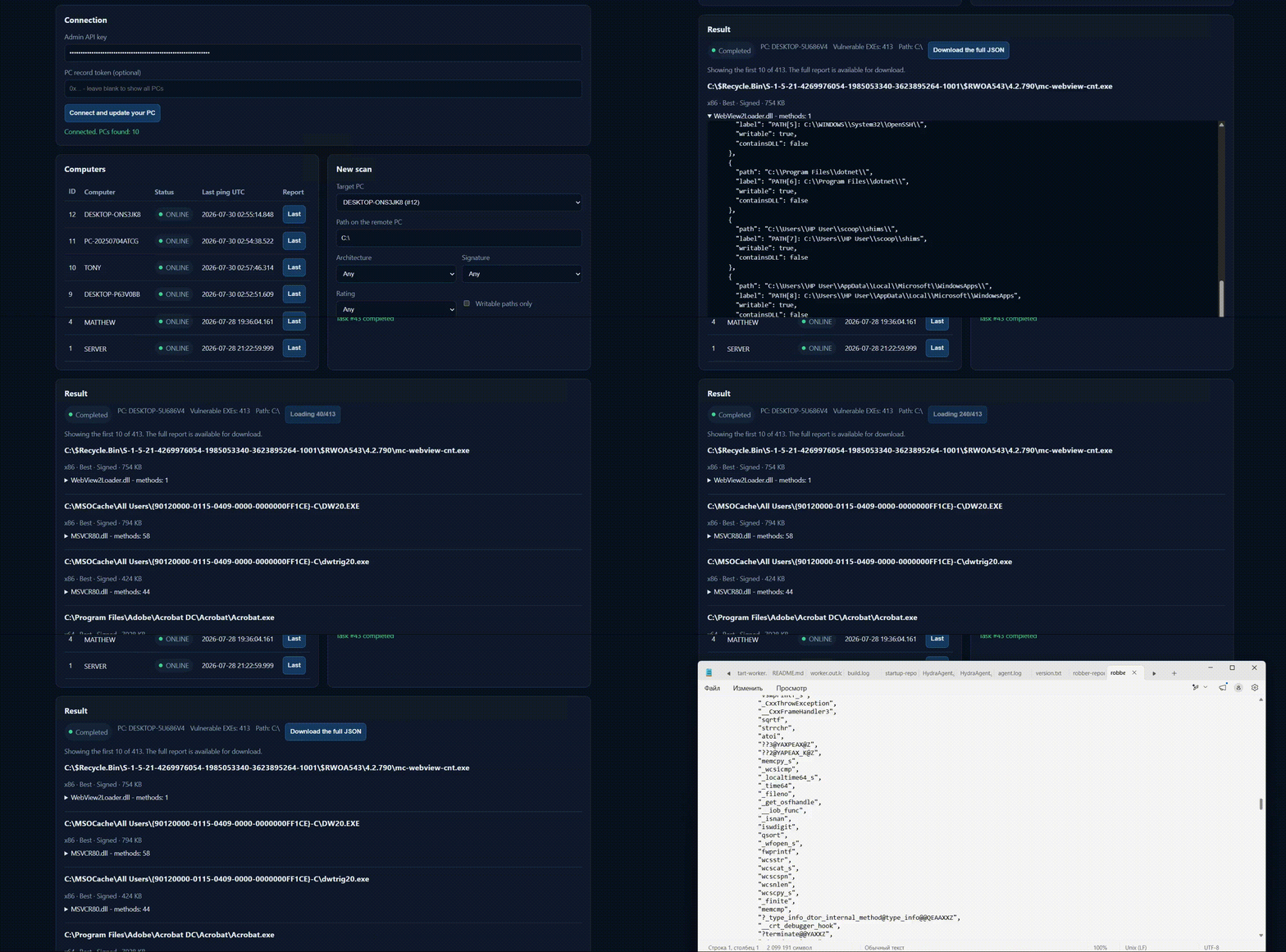
🖥 Centralized Endpoint Management (WEB Panel)
Point the GUI at a target directory and hit Scan. As Robber parses executables, results populate in the tree view in real-time. You can expand any vulnerable executable to inspect which specific DLLs are hijackable, the exported methods you need to proxy, and the full search order path (including writability flags).
🎨 Custom Rating Configuration
To help prioritize targets for crafting proxy DLLs, I implemented a color-coded rating system based on payload complexity:
| Rating Level | Color | Emoji | Characteristics & Proxy Difficulty |
|---|---|---|---|
| Best | Green | 🟢 | Few imported functions and a small binary footprint. Incredibly easy to build a proxy DLL that stubs out the required exports. |
| Good | Yellow | 🟡 | Moderate complexity. Requires slightly more effort to map exports without crashing the host application. |
| Bad | Red | 🔴 | Massive amount of imports or a very large binary. Extremely difficult to proxy effectively without causing execution instability. |
🚀 Quick Start Guide (CLI Mode)
For automation pipelines and headless environments, I included a robust Command Line Interface (CLI). Progress is routed to stderr, while clean JSON/CSV results go to stdout, making it completely pipe-friendly.
🧪 CLI Options
HydraSoft.exe --path <dir> [options]--path <dir>               Directory to scan (required)
--output <file>            Write to file (.json or .csv). Default: stdout
--image-type any|x86|x64   Filter by architecture
--sign any|signed          Filter by digital signature status
--rate any|best|good|bad   Filter by complexity rating
--write-perm               Only show results where the target directory is writable
--best-dll-count <n>       (default: 2)
--best-exe-size <n>        KB threshold (default: 10240)
--help
💻 Example Invocations
Hunting for the best, most easily exploitable targets and saving to JSON:
HydraSoft.exe --path "C:\Program Files" --rate best --output hits.jsonPiping output to jq for quick parsing of vulnerable paths:
HydraSoft.exe --path "C:\Program Files" | jq '.[].exePath'Looking strictly for signed binaries in writable directories (excellent for bypass/persistence):
HydraSoft.exe --path "C:\Tools" --sign signed --write-perm📊 System Architecture
graph TD
    A[Target Directory] --> B{PE Parser Engine}
    B --> C[Extract Standard & Delayed Imports]
    B --> D[Check UAC Manifest Requirements]
    C --> E{System DLL Filter}
    E -->|Ignore System32/SysWOW64| F[Skip False Positives]
    E -->|Valid Target| G[Evaluate Search Order Path]
    G --> H[Check Directory Writability]
    H --> I[Apply Complexity Rating]
    I --> J[Export JSON/CSV / Render GUI]
✨ Key Features & Smart Filtering
🛡 UAC Elevation Detection
Robber automatically parses the application manifest. If an executable requires elevation (requireAdministrator or highestAvailable), I flag it directly in the output. A successful DLL hijack on an elevated process isn't just arbitrary code execution—it is a direct Privilege Escalation vector.
🧠 Intelligent False-Positive Reduction
I specifically programmed the engine to automatically exclude known system DLLs (e.g., from System32, SysWOW64, Windows\System). This means you won't be flooded with false-positive noise regarding redistributable runtimes like msvcr120.dll. Furthermore, the scanner analyzes both standard and delayed imports.
🧰 Technical Specifications & Building
🛠 Compilation Requirements
- Written entirely in Delphi.
- Requires Delphi XE2 or later to compile.
- No external dependencies. Simply open
Robber\Robber.dprojand build.
⚖️ License & Legal
🚨 Disclaimer
This tool is provided strictly for authorized vulnerability research, system administration, and ethical hacking engagements.
Identifying and exploiting DLL hijacking vulnerabilities without explicit, written permission from the system owner is illegal and unethical. I assume no liability for the misuse of this utility, including but not limited to unauthorized privilege escalation or persistence creation on production systems. Always ensure you are operating within the bounds of a defined engagement scope.
🔗 SEO Keywords (Naturally Integrated)
- DLL hijacking vulnerability scanner
- Windows privilege escalation tools
- PE import table analysis
- Red Team lateral movement preparation
- Automated proxy DLL generation targets
- Unquoted service path alternatives
- Cybersecurity defensive posture validation
🔄 Download & Contribution

Contribution Guidelines:
- Fork the repository.
- Submit PRs focusing on performance improvements or UI enhancements in Delphi.
- Ensure that the dependency-free nature of the project is strictly maintained.
HydraSoft — Systematically dismantling Windows execution chains.