

Network, Service & Security Observability for Kubernetes
What is Hubble?
Hubble is a fully distributed networking and security observability platform for cloud native workloads. It is built on top of Cilium and eBPF to enable deep visibility into the communication and behavior of services as well as the networking infrastructure in a completely transparent manner.
Hubble can answer questions such as:
Service dependencies & communication map:
- What services are communicating with each other? How frequently? What does the service dependency graph look like?
- What HTTP calls are being made? What Kafka topics does a service consume from or produce to?
Operational monitoring & alerting:
- Is any network communication failing? Why is communication failing? Is it DNS? Is it an application or network problem? Is the communication broken on layer 4 (TCP) or layer 7 (HTTP)?
- Which services have experienced a DNS resolution problems in the last 5 minutes? Which services have experienced an interrupted TCP connection recently or have seen connections timing out? What is the rate of unanswered TCP SYN requests?
Application monitoring:
- What is the rate of 5xx or 4xx HTTP response codes for a particular service or across all clusters?
- What is the 95th and 99th percentile latency between HTTP requests and responses in my cluster? Which services are performing the worst? What is the latency between two services?
Security observability:
- Which services had connections blocked due to network policy? What services have been accessed from outside the cluster? Which services have resolved a particular DNS name?
Why Hubble?
The Linux kernel technology eBPF is enabling visibility into systems and applications at a granularity and efficiency that was not possible before. It does so in a completely transparent way, without requiring the application to change or for the application to hide information. By building on top of Cilium, Hubble can leverage eBPF for visibility. By leveraging eBPF, all visibility is programmable and allows for a dynamic approach that minimizes overhead while providing deep and detailed insight where required. Hubble has been created and specifically designed to make best use of these new eBPF powers.
Releases
The Hubble CLI is backward compatible with all supported Cilium releases. For this reason, only the latest Hubble CLI version is maintained.
| Version | Release Date | Maintained | Supported Cilium Version | Artifacts |
|---|---|---|---|---|
| v1.19 | 2026-06-04 (v1.19.4) | Yes | Cilium 1.19 and older | GitHub Release |
Component Stability
Hubble project consists of several components (see Architecture section).
While the core Hubble components have been running in production in multiple environments, new components continue to emerge as the project grows and expands in scope.
Some components, due to their relatively young age, are still considered beta and have to be used with caution in critical production workloads.
| Component | Area | State |
|---|---|---|
| Hubble CLI | Core | Stable |
| Hubble Server | Core | Stable |
| Hubble Metrics | Core | Stable |
| Hubble Relay | Multinode | Stable |
| Hubble UI | UI | Beta |
Architecture
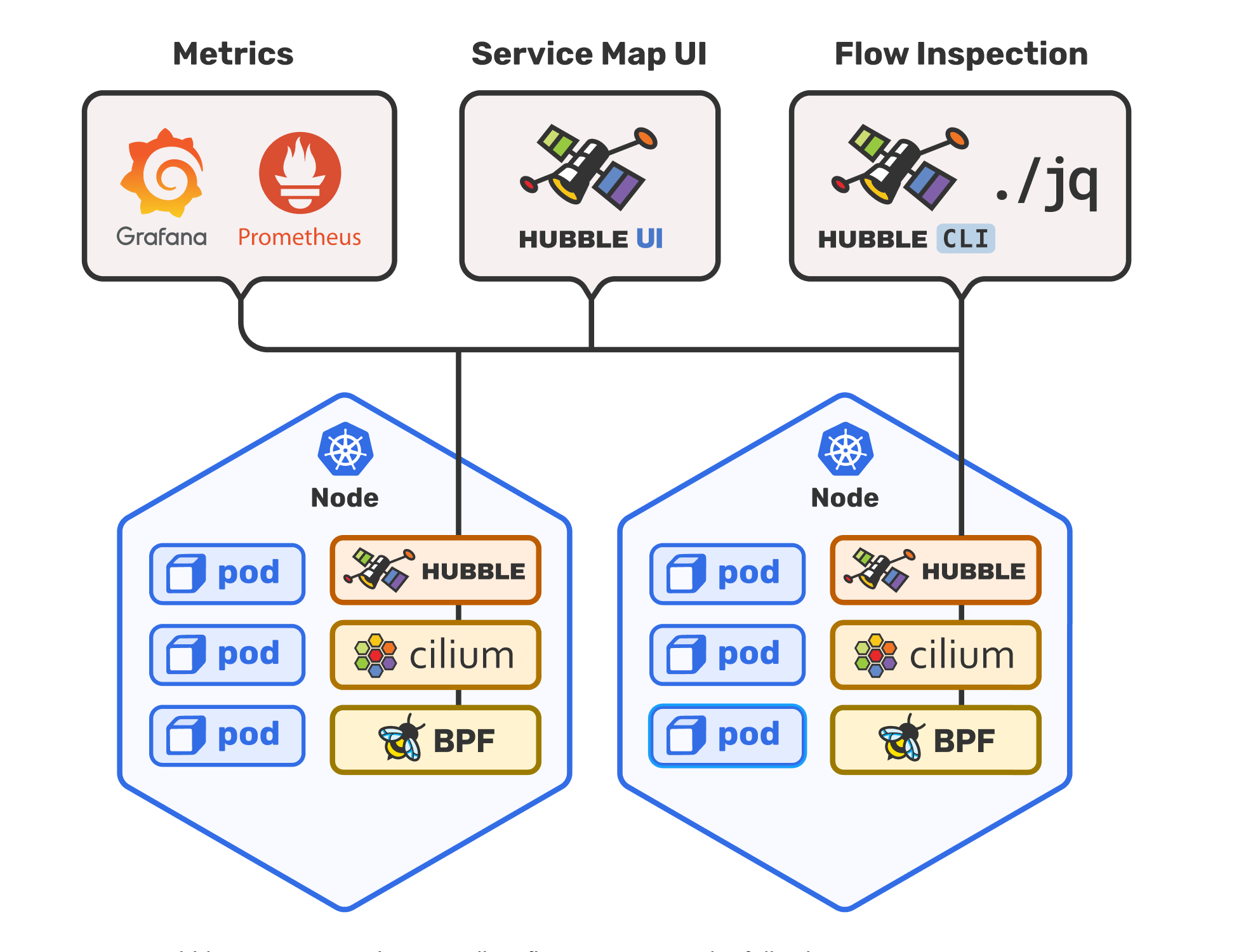
Getting Started
Features
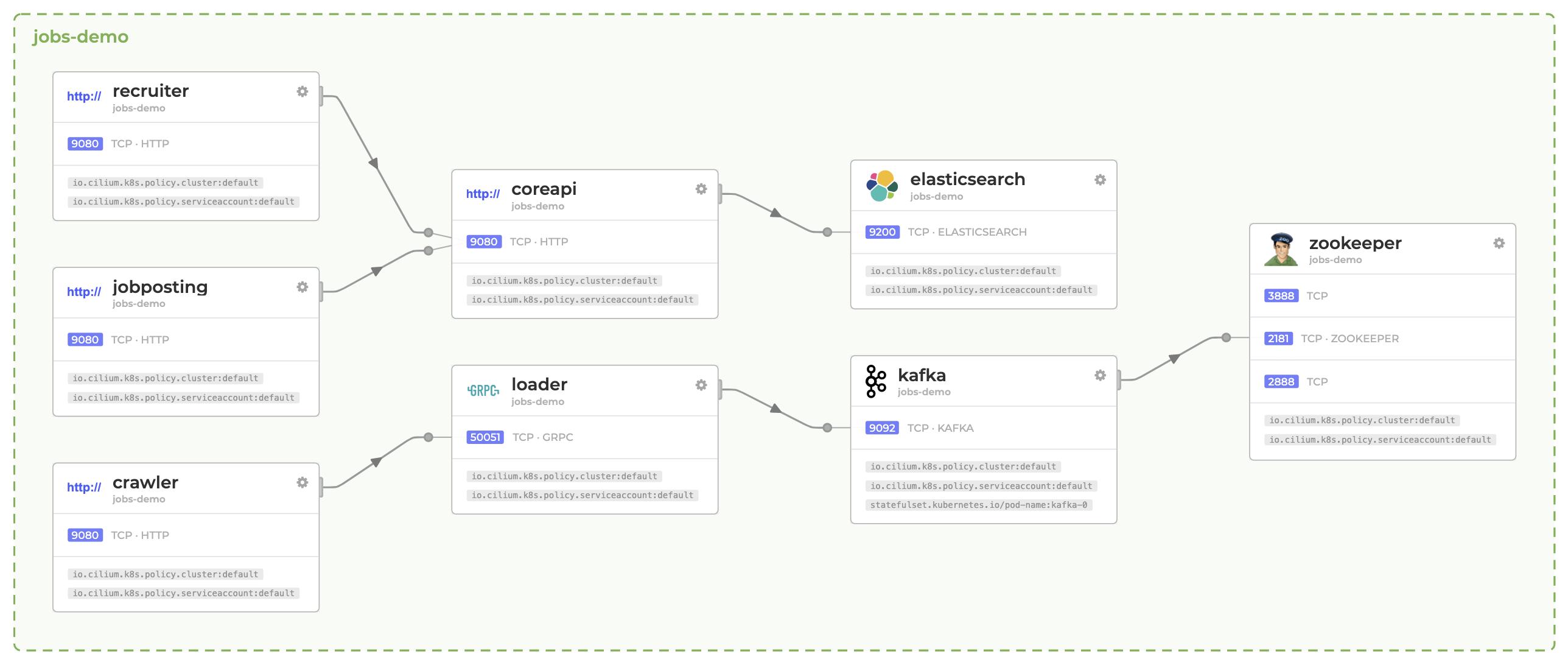
Service Dependency Graph
Troubleshooting microservices application connectivity is a challenging task. Simply looking at "kubectl get pods" does not indicate dependencies between each service or external APIs or databases.
Hubble enables zero-effort automatic discovery of the service dependency graph for Kubernetes Clusters at L3/L4 and even L7, allowing user-friendly visualization and filtering of those dataflows as a Service Map.
See Hubble Service Map Tutorial for more examples.
Metrics & Monitoring
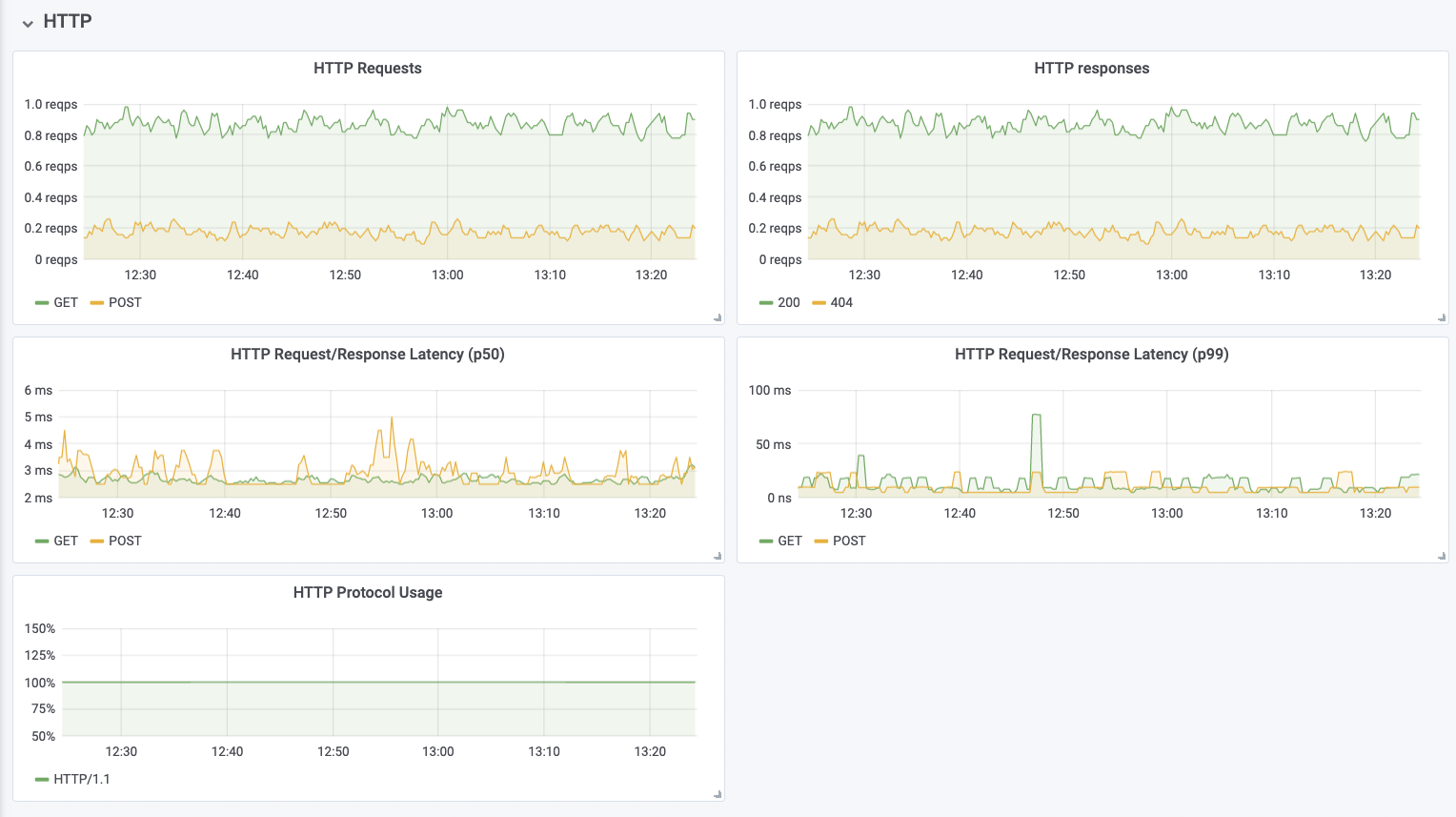
The metrics and monitoring functionality provides an overview of the state of systems and allow to recognize patterns indicating failure and other scenarios that require action. The following is a short list of example metrics, for a more detailed list of examples, see the Metrics Documentation.
Networking Behavior
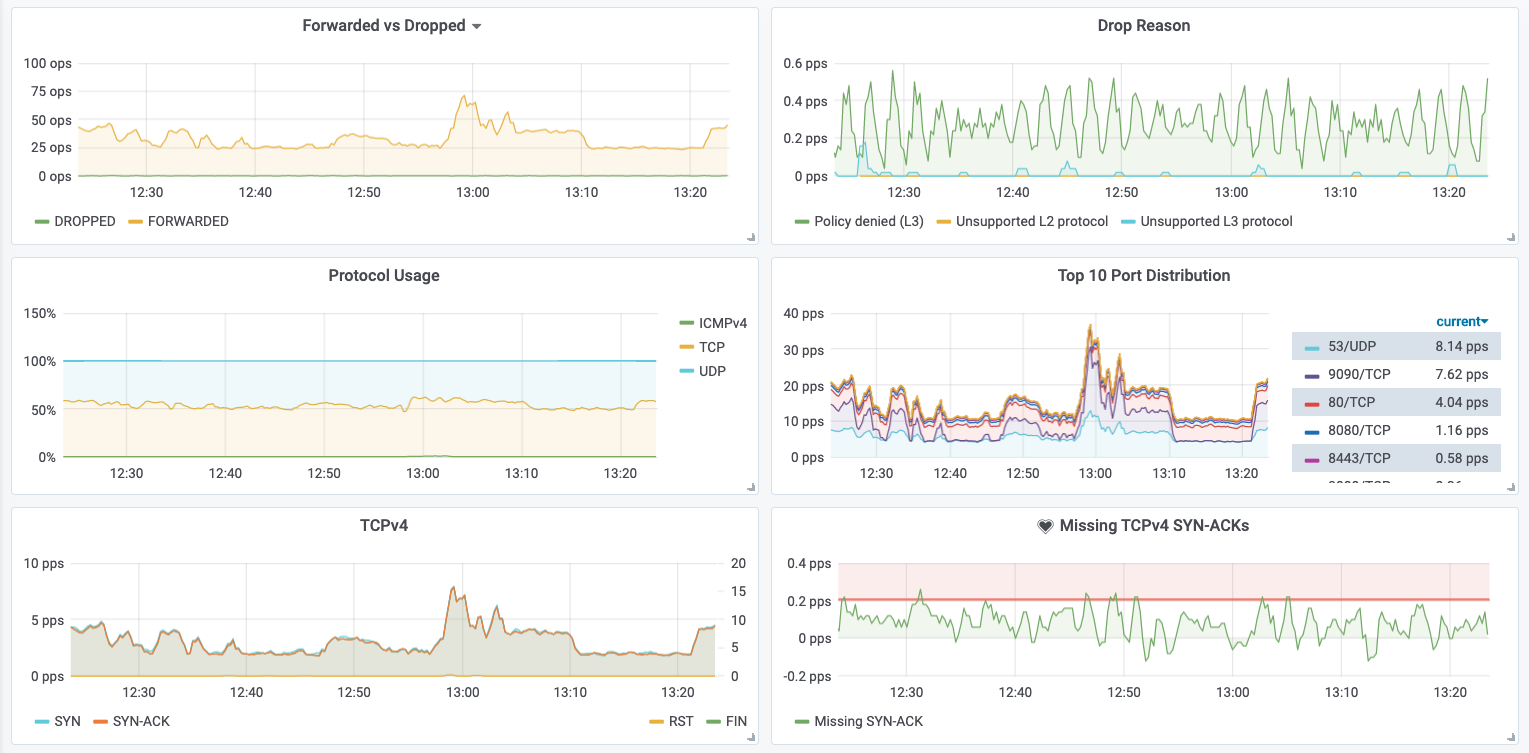
Network Policy Observation

HTTP Request/Response Rate & Latency
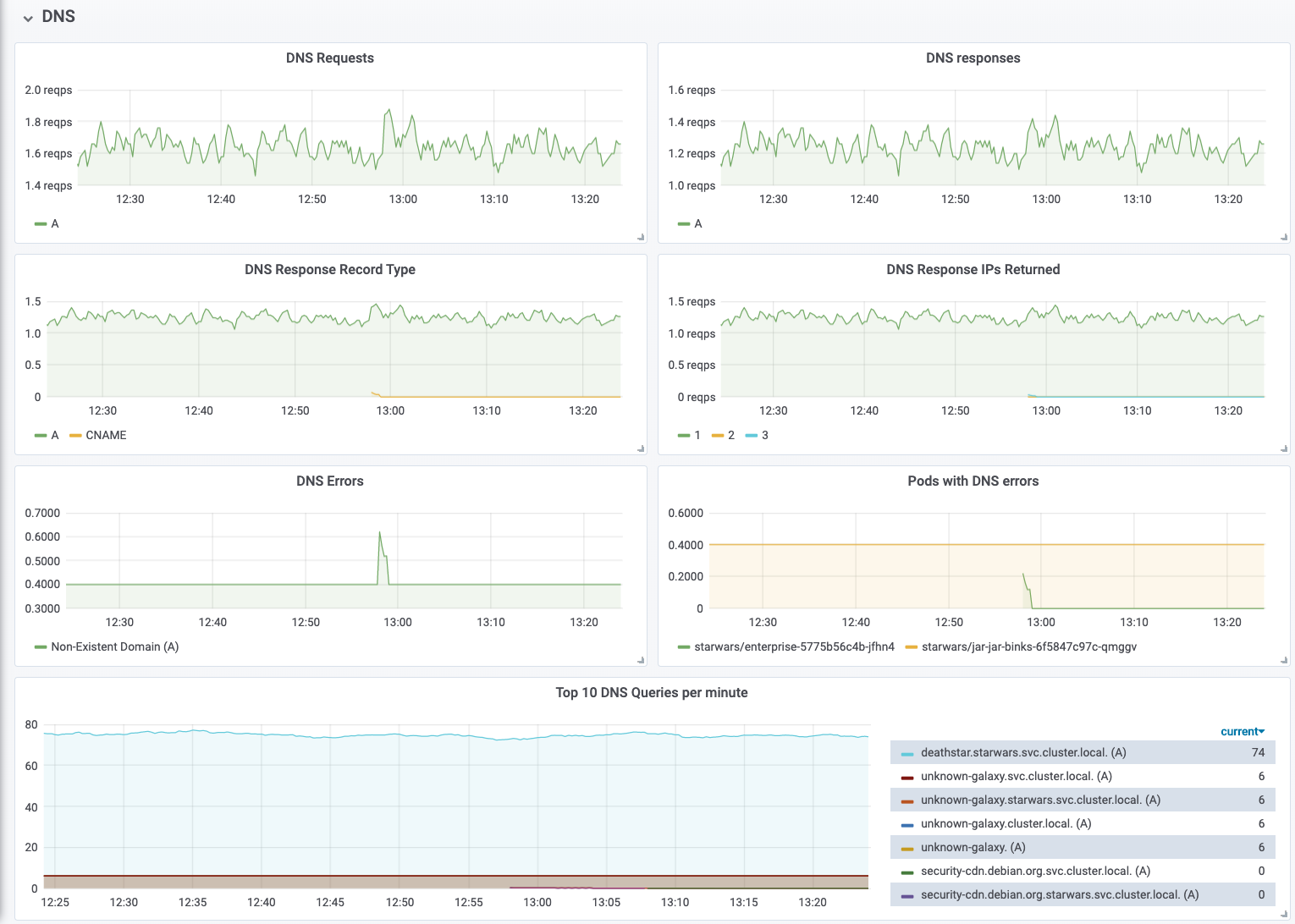
DNS Request/Response Monitoring
Flow Visibility
Flow visibility provides visibility into flow information on the network and application protocol level. This enables visibility into individual TCP connections, DNS queries, HTTP requests, Kafka communication, and much more.
DNS Resolution
Identifying pods which have received DNS response indicating failure:
hubble observe --since=1m -t l7 -o json \
   | jq 'select(.l7.dns.rcode==3) | .destination.namespace + "/" + .destination.pod_name' \
   | sort | uniq -c | sort -r
  42 "starwars/jar-jar-binks-6f5847c97c-qmggv"
Successful query & response:
starwars/x-wing-bd86d75c5-njv8k            kube-system/coredns-5c98db65d4-twwdg      DNS Query deathstar.starwars.svc.cluster.local. A
kube-system/coredns-5c98db65d4-twwdg       starwars/x-wing-bd86d75c5-njv8k           DNS Answer "10.110.126.213" TTL: 3 (Query deathstar.starwars.svc.cluster.local. A)
Non-existent domain:
starwars/jar-jar-binks-789c4b695d-ltrzm    kube-system/coredns-5c98db65d4-f4m8n      DNS Query unknown-galaxy.svc.cluster.local. A
starwars/jar-jar-binks-789c4b695d-ltrzm    kube-system/coredns-5c98db65d4-f4m8n      DNS Query unknown-galaxy.svc.cluster.local. AAAA
kube-system/coredns-5c98db65d4-twwdg       starwars/jar-jar-binks-789c4b695d-ltrzm   DNS Answer RCode: Non-Existent Domain TTL: 4294967295 (Query unknown-galaxy.starwars.svc.cluster.local. A)
kube-system/coredns-5c98db65d4-twwdg       starwars/jar-jar-binks-789c4b695d-ltrzm   DNS Answer RCode: Non-Existent Domain TTL: 4294967295 (Query unknown-galaxy.starwars.svc.cluster.local. AAAA)
HTTP Protocol
Successful request & response with latency information:
starwars/x-wing-bd86d75c5-njv8k:53410      starwars/deathstar-695d8f7ddc-lvj84:80    HTTP/1.1 GET http://deathstar/
starwars/deathstar-695d8f7ddc-lvj84:80     starwars/x-wing-bd86d75c5-njv8k:53410     HTTP/1.1 200 1ms (GET http://deathstar/)
TCP/UDP Packets
Successful TCP connection:
starwars/x-wing-bd86d75c5-njv8k:53410      starwars/deathstar-695d8f7ddc-lvj84:80    TCP Flags: SYN
deathstar.starwars.svc.cluster.local:80    starwars/x-wing-bd86d75c5-njv8k:53410     TCP Flags: SYN, ACK
starwars/x-wing-bd86d75c5-njv8k:53410      starwars/deathstar-695d8f7ddc-lvj84:80    TCP Flags: ACK, FIN
deathstar.starwars.svc.cluster.local:80    starwars/x-wing-bd86d75c5-njv8k:53410     TCP Flags: ACK, FIN
Connection timeout:
starwars/r2d2-6694d57947-xwhtz:60948   deathstar.starwars.svc.cluster.local:8080     TCP Flags: SYN
starwars/r2d2-6694d57947-xwhtz:60948   deathstar.starwars.svc.cluster.local:8080     TCP Flags: SYN
starwars/r2d2-6694d57947-xwhtz:60948   deathstar.starwars.svc.cluster.local:8080     TCP Flags: SYN
Network Policy Behavior
Denied connection attempt:
starwars/enterprise-5775b56c4b-thtwl:37800   starwars/deathstar-695d8f7ddc-lvj84:80(http)   Policy denied (L3)   TCP Flags: SYN
starwars/enterprise-5775b56c4b-thtwl:37800   starwars/deathstar-695d8f7ddc-lvj84:80(http)   Policy denied (L3)   TCP Flags: SYN
starwars/enterprise-5775b56c4b-thtwl:37800   starwars/deathstar-695d8f7ddc-lvj84:80(http)   Policy denied (L3)   TCP Flags: SYN
Specifying Raw Flow Filters
Hubble supports extensive set of filtering options that can be specified as a combination of allowlist and denylist. Hubble applies these filters as follows:
for each flow:
  if flow does not match any of the allowlist filters:
    continue
  if flow matches any of the denylist filters:
    continue
  send flow to client
You can pass these filters to hubble observe command as
JSON-encoded
FlowFilters. For
example, to observe flows that match the following conditions:
Either the source or destination identity contains
k8s:io.kubernetes.pod.namespace=kube-systemorreserved:hostlabel, ANDNeither the source nor destination identity contains
k8s:k8s-app=kube-dnslabel:hubble observe \ --allowlist '{"source_label":["k8s:io.kubernetes.pod.namespace=kube-system","reserved:host"]}' \ --allowlist '{"destination_label":["k8s:io.kubernetes.pod.namespace=kube-system","reserved:host"]}' \ --denylist '{"source_label":["k8s:k8s-app=kube-dns"]}' \ --denylist '{"destination_label":["k8s:k8s-app=kube-dns"]}'
Alternatively, you can also specify these flags as HUBBLE_{ALLOWLIST,DENYLIST} environment variables:
cat > allowlist.txt  denylist.txt  filters.yaml
% hubble observe --config ./filters.yaml
Community
Join the Cilium Slack #hubble channel to chat with Cilium Hubble developers and other Cilium / Hubble users. This is a good place to learn about Hubble and Cilium, ask questions, and share your experiences.
Learn more about Cilium.
Authors
Hubble is an open source project licensed under the Apache License. Everybody is welcome to contribute. The project is following the Governance Rules of the Cilium project. See CONTRIBUTING for instructions on how to contribute and details of the Code of Conduct.