
Hoppscotch
Open Source API Development Ecosystem



Built with ❤︎ by contributors
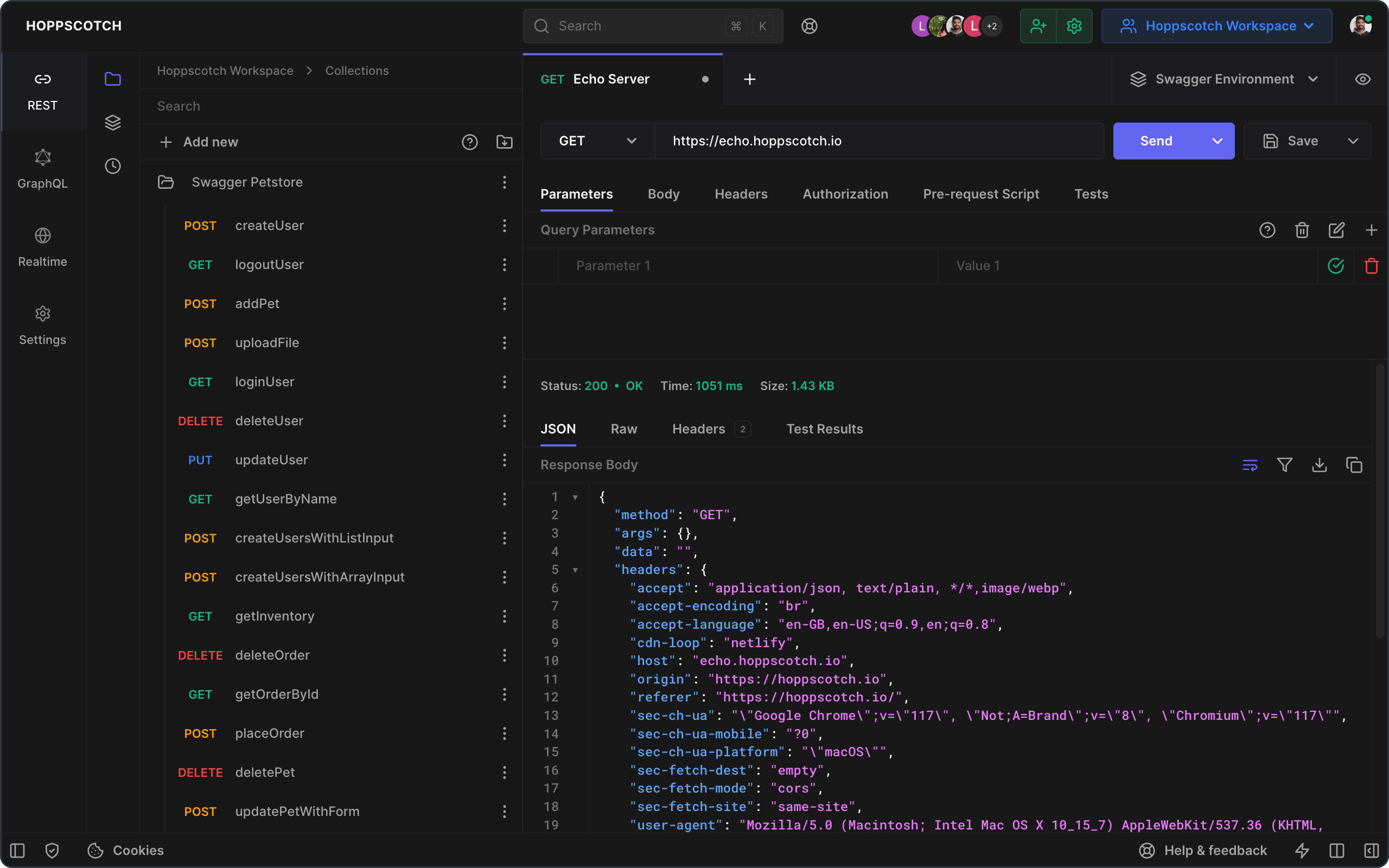
We highly recommend you take a look at the Hoppscotch Documentation to learn more about the app.
Support



Features
❤️ Lightweight: Crafted with minimalistic UI design.
⚡️ Fast: Send requests and get responses in real time.
🗄️ HTTP Methods: Request methods define the type of action you are requesting to be performed.
GET- Requests retrieve resource informationPOST- The server creates a new entry in a databasePUT- Updates an existing resourcePATCH- Very similar toPUTbut makes a partial update on a resourceDELETE- Deletes resource or related componentHEAD- Retrieve response headers identical to those of a GET request, but without the response body.CONNECT- Establishes a tunnel to the server identified by the target resourceOPTIONS- Describe the communication options for the target resourceTRACE- Performs a message loop-back test along the path to the target resource- `` - Some APIs use custom request methods such as
LIST. Type in your custom methods.
🌈 Theming: Customizable combinations for background, foreground, and accent colors — customize now.
- Choose a theme: System preference, Light, Dark, and Black
- Choose accent colors: Green, Teal, Blue, Indigo, Purple, Yellow, Orange, Red, and Pink
- Distraction-free Zen mode
Customized themes are synced with your cloud/local session.
🔥 PWA: Install as a Progressive Web App on your device.
- Instant loading with Service Workers
- Offline support
- Low RAM/memory and CPU usage
- Add to Home Screen
- Desktop PWA
🚀 Request: Retrieve response from endpoint instantly.
- Choose
method - Enter
URL - Send
- Copy/share public "Share URL"
- Generate/copy request code snippets for 10+ languages and frameworks
- Import
cURL - Label requests
🔌 WebSocket: Establish full-duplex communication channels over a single TCP connection.
📡 Server-Sent Events: Receive a stream of updates from a server over an HTTP connection without resorting to polling.
🌩 Socket.IO: Send and Receive data with the SocketIO server.
🦟 MQTT: Subscribe and Publish to topics of an MQTT Broker.
🔮 GraphQL: GraphQL is a query language for APIs and a runtime for fulfilling those queries with your existing data.
- Set endpoint and get schema
- Multi-column docs
- Set custom request headers
- Query schema
- Get query response
🔐 Authorization: Allows to identify the end-user.
- None
- Basic
- Bearer Token
- OAuth 2.0
- OIDC Access Token/PKCE
📢 Headers: Describes the format the body of your request is being sent in.
📫 Parameters: Use request parameters to set varying parts in simulated requests.
📃 Request Body: Used to send and receive data via the REST API.
- Set
Content Type - FormData, JSON, and many more
- Toggle between key-value and RAW input parameter list
📮 Response: Contains the status line, headers, and the message/response body.
- Copy the response to the clipboard
- Download the response as a file
- View response headers
- View raw and preview HTML, image, JSON, and XML responses
⏰ History: Request entries are synced with your cloud/local session storage.
📁 Collections: Keep your API requests organized with collections and folders. Reuse them with a single click.
- Unlimited collections, folders, and requests
- Nested folders
- Export and import as a file or GitHub gist
Collections are synced with your cloud/local session storage.
📜 Pre-Request Scripts: Snippets of code associated with a request that is executed before the request is sent.
- Set environment variables
- Include timestamp in the request headers
- Send a random alphanumeric string in the URL parameters
- Any JavaScript functions
👨👩👧👦 Teams: Helps you collaborate across your teams to design, develop, and test APIs faster.
- Create unlimited teams
- Create unlimited shared collections
- Create unlimited team members
- Role-based access control
- Cloud sync
- Multiple devices
👥 Workspaces: Organize your personal and team collections environments into workspaces. Easily switch between workspaces to manage multiple projects.
- Create unlimited workspaces
- Switch between personal and team workspaces
⌨️ Keyboard Shortcuts: Optimized for efficiency.
🌐 Proxy: Enable Proxy Mode from Settings to access blocked APIs.
- Hide your IP address
- Fixes
CORS(Cross-Origin Resource Sharing) issues - Access APIs served in non-HTTPS (
http://) endpoints - Use your Proxy URL
Official proxy server is hosted by Hoppscotch - GitHub - Privacy Policy.
🌎 i18n: Experience the app in your language.
Help us to translate Hoppscotch. Please read TRANSLATIONS for details on our CODE OF CONDUCT and the process for submitting pull requests to us.
☁️ Auth + Sync: Sign in and sync your data in real-time across all your devices.
Sign in with:
- GitHub
- Microsoft
- SSO (Single Sign-On)[^EE]
🔄 Synchronize your data: Handoff to continue tasks on your other devices.
- Workspaces
- History
- Collections
- Environments
- Settings
✅ Post-Request Tests: Write tests associated with a request that is executed after the request's response.
- Check the status code as an integer
- Filter response headers
- Parse the response data
- Set environment variables
- Write JavaScript code
🌱 Environments: Environment variables allow you to store and reuse values in your requests and scripts.
- Unlimited environments and variables
- Initialize through the pre-request script
- Export as / import from GitHub gist
Use-cases
- By storing a value in a variable, you can reference it throughout your request section
- If you need to update the value, you only have to change it in one place
- Using variables increases your ability to work efficiently and minimizes the likelihood of error
🚚 Bulk Edit: Edit key-value pairs in bulk.
- Entries are separated by newline
- Keys and values are separated by
: - Prepend
#to any row you want to add but keep disabled
🎛️ Admin dashboard: Manage your team and invite members.
- Insights
- Manage users
- Manage teams
📦 Add-ons: Official add-ons for hoppscotch.
Hoppscotch CLI - Command-line interface for Hoppscotch.
Proxy - A simple proxy server created for Hoppscotch.
Browser Extensions - Browser extensions that enhance your Hoppscotch experience.
Extensions fix
CORSissues.
 Firefox
 Chrome
Add-ons are developed and maintained under Hoppscotch Organization.
For a complete list of features, please read our documentation.
Demo
- Web : hoppscotch.io
- Windows/Linux/macOS : Desktop Apps
Usage
- Provide your API endpoint in the URL field
- Click "Send" to simulate the request
- View the response
Developing
Follow our self-hosting documentation to get started with the development environment.
Contributing
Please contribute using GitHub Flow. Create a branch, add commits, and open a pull request.
Please read CONTRIBUTING for details on our CODE OF CONDUCT, and the process for submitting pull requests to us.
Continuous Integration
We use GitHub Actions for continuous integration. Check out our build workflows.
Changelog
See the CHANGELOG file for details.
Authors
This project owes its existence to the collective efforts of all those who contribute — contribute now.

License
This project is licensed under the MIT License — see the LICENSE file for details.
[^EE]: Enterprise edition feature. Learn more.