homeThing is a free, open source internet of things (iot) project written in C++ and released under GPL-3.0. It has 548 GitHub stars, 42 forks and 13 open issues, and was last pushed 9 days ago. On this registry it ranks #97 of 99 tracked projects in Internet of Things (IoT), with 5 head-to-head comparisons available. It gained 2 stars over the last 30 tracked days.

What is homeThing?

homeThing is a collection of open-source hardware and software — a 3D-printable ESP32 remote, an ESPHome menu system, and components for controlling Home Assistant devices — for makers and Home Assistant users who want a battery-powered physical remote with a screen and scroll wheel instead of a touch screen.

What it is

homeThing is a set of three parts: the case and circuit board designs, the menu system code, and the code that controls smart home devices. The hardware is built around ESP32 boards with integrated displays, and the software runs on ESPHome, the firmware framework used to connect ESP32 devices to Home Assistant. The menu system is modeled on an iPod's menu, so a user scrolls through a list and presses the center button to select. Two reference remotes are documented, both based on Lilygo TDisplay boards, and the project also runs on a wide range of generic ESP32 hardware.

The concrete problem it solves is controlling smart home devices without a touch screen. The remotes are designed for exactly that use case, and the project moved from its first Lilygo TDisplay-based remote to the homeThing S3 because the original device had slow performance, lacked buttons, and presented challenges during assembly. In place of a phone app or a touch panel, homeThing gives a scroll wheel, configurable physical buttons, a power-efficient sleeping screen, and purpose-built apps for media players, televisions, and infrared devices. It fits inside the ESPHome and Home Assistant ecosystem rather than standing apart from it, and it replaces the touch-screen remote and the handset app as the everyday control surface.

Key capabilities

  • ESPHome menu system requiring minimal config, with scrolling list selection by pressing the center button; the top button goes back when a scroll wheel is present, and on M5Stack hardware scrolling up past the top of the list also goes back.
  • Now playing screen for media players such as Sonos, Spotify, and Google Home, with scroll-wheel volume, source changes from Spotify playlists, Sonos Favorites, and custom lists, and speaker group management.
  • A television control app offering menu navigation up, down, left, right, and select via the scroll wheel, plus power, back, home, and pause in a second menu, TV source lists, and optional soundbar support.
  • An IR Remote app with a custom UI and buttons for controlling infrared devices, backed by the IR blaster on the homeThing S3 hardware.
  • Games, specifically Snake and Breakout, on the remote's display.
  • Power management where the display sleeps after 10 seconds of idle and the device sleeps after 2 hours of idle, with the screen returning to now playing after the display sleeps.
  • Simple YAML configuration with adjustable font size and UI size, and all of the complicated code kept in other files; the menu system header is always shown at the top with current state information.

Who uses it and how

  • Home Assistant users who run ESPHome and want a dedicated physical remote for media and television control instead of reaching for a phone.
  • Makers who print the three-part TDisplay case or the two-part S3 case themselves, order the case 3D files or parts from PCBWay, or buy a fully assembled unit.
  • Households with Sonos, Spotify, or Google Home speakers that manage playback, volume, sources, and speaker groups from the scroll wheel.
  • Owners of existing ESP32 display boards, including the M5Stack Fire, M5Stick C, Lilygo T-Display T4, Lilygo T-Display TTGO, and Lilygo T-Display S3, who want to reuse hardware they already own.
  • Voice Assistant users, since the homeThing S3 includes an internal microphone; the project was mentioned in the Home Assistant Voice Contest.

Getting started

The documented path is to follow GettingStarted.md, which explains how to build your own remote, using the published ESPHome Config and case 3D Files, with parts or a fully assembled unit orderable from PCBWay. A fully assembled homeThing ships within 3 business days from Canada, and more information is available at homething.io.

How it compares

The facts provided do not name any commercial products that homeThing replaces, and they do not name comparable open-source remotes either. On the evidence in this registry it stands alone, distinguished by its GPL-3.0 licence and its dependence on the ESPHome and Home Assistant stack. Its positioning is as open, customizable, 3D-printable hardware paired with open firmware rather than as a sealed consumer product.

When to use it — and when not to

A self-hoster must already operate Home Assistant and ESPHome, compile YAML configuration, and either assemble hardware or source a finished unit, so anyone without that stack or without access to a 3D printer and PCBWay parts faces real setup work. The original Lilygo TDisplay remote is no longer available for purchase and was documented as having slow performance, missing buttons, and assembly challenges, so new builders should treat the homeThing S3 as the intended target. Anyone who wants a touch-screen interface or a device that works without Home Assistant should look elsewhere, and the repository, which carries 13 open issues and a small maintainer base relative to its 546 stars, offers no support guarantee beyond the community Discord.

project readme (upstream, from github) — read inline

homeThing Remote ⚙️

(esphome remote)

homeThing is a collection of software and hardware for creating universal remotes that control smart home devices.

There are 3 components that belong to homeThing: the case and circuit board, the menu system code, and the code to control smart home devices


Check out the next-generation homeThing C6


Learn More

  • Get Started - Learn how to build your own remote
  • Discord - support / chat with the community and the team
  • Instagram - Follow us on Instagram for updates and new products
  • Website - Check out our website for more information

Demo Video
Demo Video - Watch on YouTube 🎬

Hardware 💪

We designed the two remotes below to be ideal for controlling smart home devices without a touch screen. They are both battery-powered but can also be plugged into USB and left in one place. The first remote was based on a Lilygo TDisplay. We moved on to building the homeThing S3 because the original device had slow performance, lacked buttons, and had challenges with assembly.

TDisplay homeThing

TDisplay S3 homeThing

More Info
Not available for purchase Buy fully assembled, ships within 3 business days from 🇨🇦
Order Case from PCBWay Order parts or fully assembled from PCBWay
Case 3D Files Case 3D Files
ESPHome Config ESPHome Config

Features

  • Based on Lilygo TTGo TDisplay, an ESP32 with integrated screen
  • Low cost remote with minimal parts
  • Scroll wheel and 2 configurable buttons
  • USB-C Charging
  • 3D Printable case with 3 parts

Features

  • Based on Lilygo TDisplay S3, an ESP32 S3 with integrated screen
  • Faster processor and larger display
  • Custom PCB for easier setup
  • IR Blaster for controlling infrared devices
  • Interal microphone for Voice Assistant
  • Scroll wheel and 5 configurable buttons
  • USB-C Charging
  • 3D Printable case with 2 parts

We made a couple of custom devices for running homeThing, but it can also run on almost any ESP32 such as,

  • M5Stack Fire
  • M5Stick C
  • Lilygo T-Display T4
  • Lilygo T-Display TTGO
  • Lilygo T-Display S3

homeThing Menu 📝

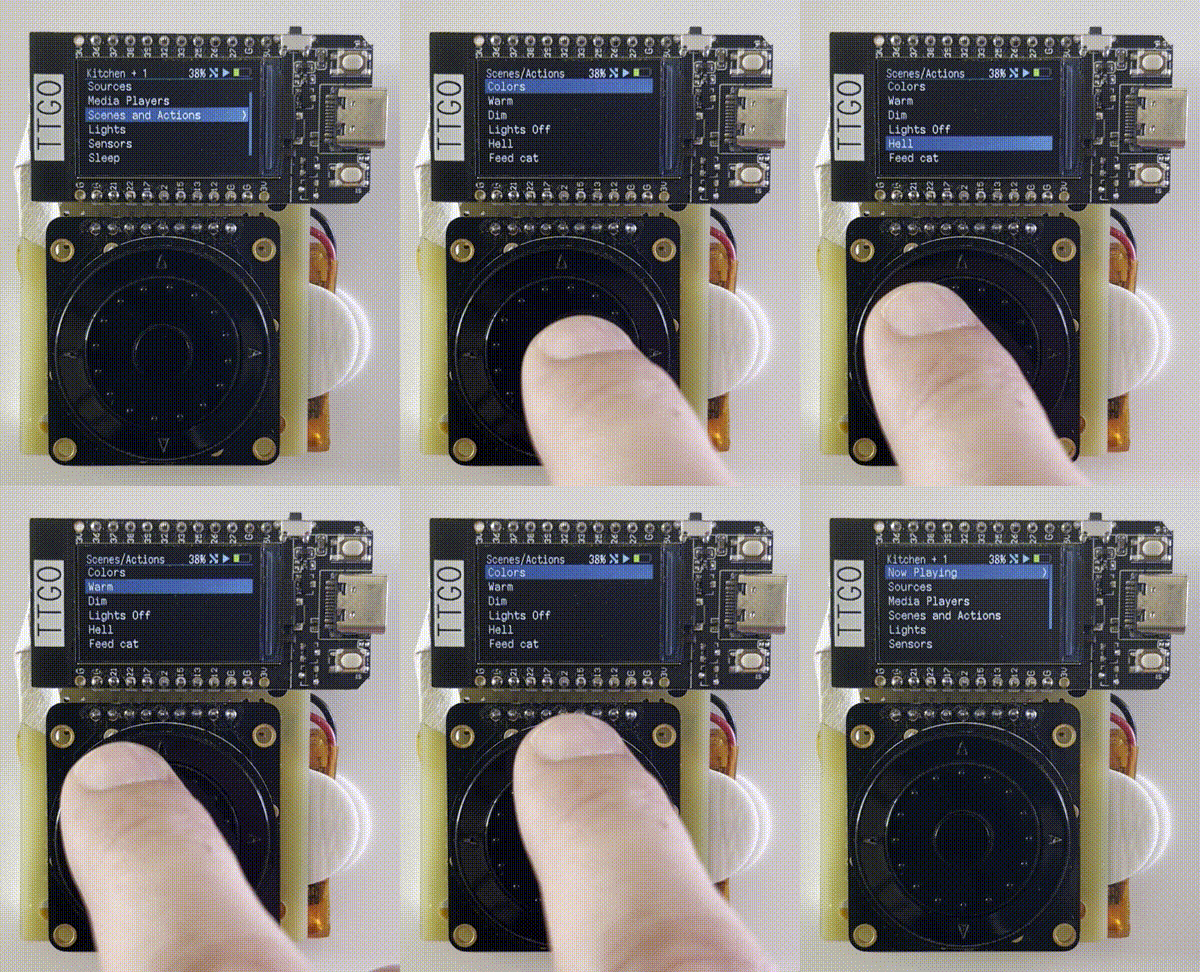
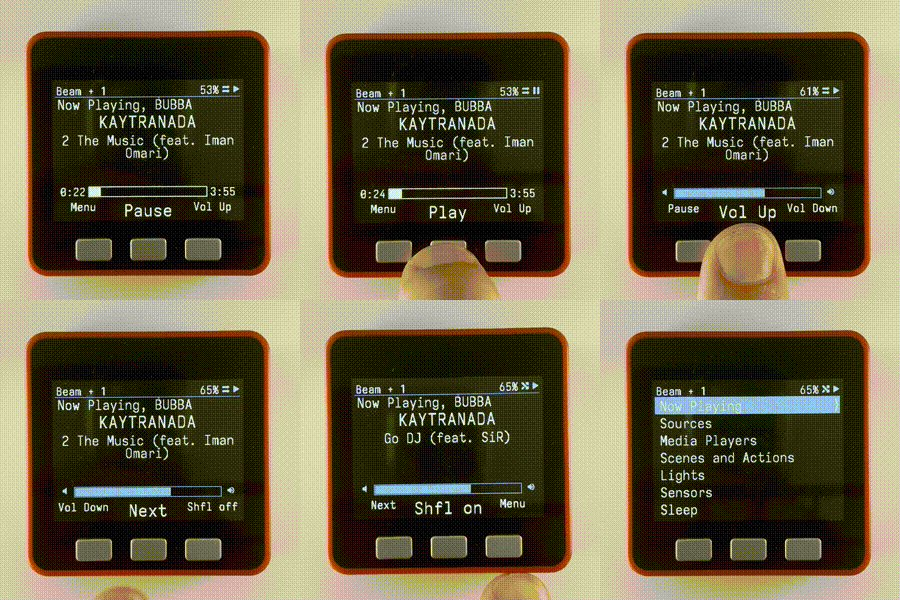
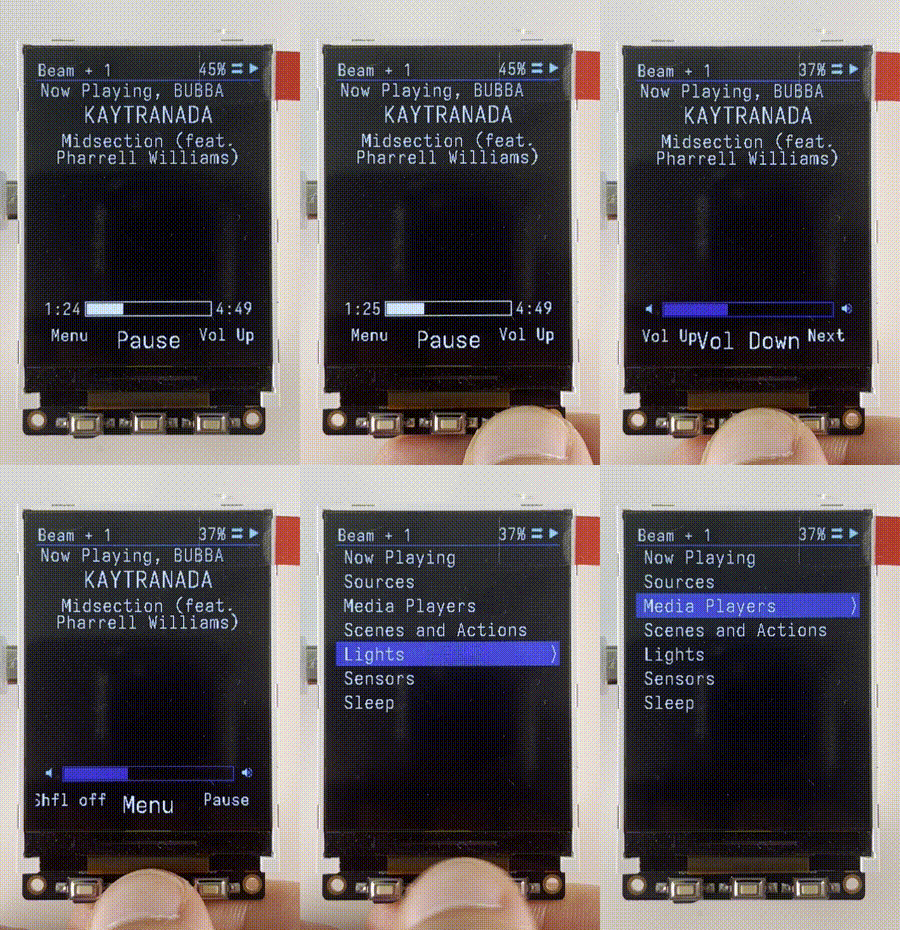
ESPHome menu system that requires minimal config. Features apps which have custom UIs

t-display demo m5stack fire demo lilygo T4 demo
Scroll Demo Gif Scroll List Fire Demo Gif Lilygo T4 Demo
  • Scroll through list and press center to select
  • With a scrollwheel the top button goes back
  • On M5Stack going up past the top of the list will go back
  • A scroll bar appears if list extends past the screen.
  • Screen returns to now playing after display sleeps
    • Display sleeps after 10s of idle. Device sleeps after 2h of idle 💤
  • Font size and UI size is adjustable in yaml 🔨
  • Simple yaml configuration. all of the complicated code is included in other files 🛠
  • Header is always shown at the top with info about the current state

Apps

Now playing screen ⏯
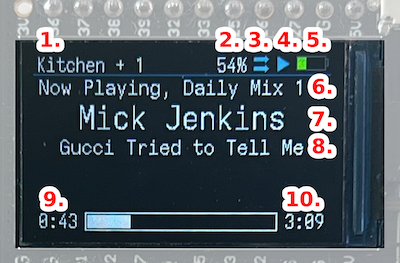
  • Control media players using the scroll wheel buttons
  • Scroll for volume using the scroll wheel
Music TV
  • Control smart speakers like Sonos, Spotify, or Google Home
  • Change source from Spotify playlists, Sonos Favorites, and custom lists
  • Manage speaker groups
  • Menu navigation such as up, down, left, right, select (with scroll wheel)
  • Power, back, home, pause in second menu
  • Change source from tv source list
  • Optional soundbar support

IR Remote

  • Custom UI and buttons to control infrared cat toys

Games

  • Snake
  • Breakout

Mentions

Includes

Sponsorship

PCBWay sponsors 3D Printing and PCB assembly costs on this project during the prototyping phase!

If you are interested in their awesome fabrication services please check them out.  They offer

3D prototyping, PCB design and assembly, as well as CNC metal fabrication.  Costs are reasonable and the quality is as good as it gets.  Thank you PCBWay for sponsoring us and other fun projects!

cargo sponsors our website!

They make it super easy to keep things pretty and up to date! It’s honestly so much easier than managing our own site, highly recommended!

Frequently asked questions

Is homeThing free to use?

homeThing is open source under the GPL-3.0 licence. There is no licence fee and no seat count — you can self-host it or, where the project offers one, pay a vendor for a managed version instead.

What does homeThing do?

Wifi Smart Home Remotes that run on ESPHome

What is homeThing written in?

homeThing is primarily written in C++. Its source is publicly available at https://github.com/landonr/homeThing, and it has 548 GitHub stars.