Khue's Homelab
Features • Get Started • Documentation




This project utilizes Infrastructure as Code and GitOps to automate provisioning, operating, and updating self-hosted services in my homelab. It can be used as a highly customizable framework to build your own homelab.
What is a homelab?
Homelab is a laboratory at home where you can self-host, experiment with new technologies, practice for certifications, and so on. For more information, please see the r/homelab introduction and the Home Operations Discord community (formerly known as k8s-at-home).
If you encounter an issue, please create a bug report (avoid asking for support about issues specific to this project in other communication channels).
Overview
Project status: ALPHA
This project is still in the experimental stage, and I don't use anything critical on it. Expect breaking changes that may require a complete redeployment. A proper upgrade path is planned for the stable release. More information can be found in the roadmap below.
Hardware

- 4 × NEC SFF
PC-MK26ECZDR(Japanese version of the ThinkCentre M700):- CPU:
Intel Core i5-6600T @ 2.70GHz - RAM:
16GB - SSD:
128GB
- CPU:
- TP-Link
TL-SG108switch:- Ports:
8 - Speed:
1000Mbps
- Ports:
Features
- Common applications: Gitea, Jellyfin, Paperless...
- Automated bare metal provisioning with PXE boot
- Automated Kubernetes installation and management
- Installing and managing applications using GitOps
- Automatic rolling upgrade for OS and Kubernetes
- Automatically update apps (with approval)
- Modular architecture, easy to add or remove features/components
- Automated certificate management
- Automatically update DNS records for exposed services
- VPN (Tailscale or Wireguard)
- Expose services to the internet securely with Cloudflare Tunnel
- CI/CD platform
- Private container registry
- Distributed storage
- Support multiple environments (dev, prod)
- Monitoring and alerting
- Automated backup and restore
- Single sign-on
- Infrastructure testing
Some demo videos and screenshots are shown here. They can't capture all the project's features, but they are sufficient to get a concept of it.
| Demo |
|---|
 |
| Deploy with a single command (after updating the configuration files) |
 |
| PXE boot |
| Observe network traffic with Hubble, built on top of Cilium and eBPF |
| Homepage powered by... Homepage |
| Monitoring dashboard powered by Grafana |
| Git server powered by Gitea |
 |
| Matrix chat server |
| Continuous integration with Woodpecker CI |
| Continuous deployment with ArgoCD |
| ntfy displaying received alerts |
| Self-hosted AI powered by Ollama (experimental, not very fast because I don't have a GPU) |
Tech stack
| Logo | Name | Description |
|---|---|---|
 |
Ansible | Automate bare metal provisioning and configuration |
 |
ArgoCD | GitOps tool built to deploy applications to Kubernetes |
 |
cert-manager | Cloud native certificate management |
 |
Cilium | eBPF-based Networking, Observability and Security (CNI, LB, Network Policy, etc.) |
 |
Cloudflare | DNS and Tunnel |
 |
Docker | Ephemeral PXE server |
 |
ExternalDNS | Synchronizes exposed Kubernetes Services and Ingresses with DNS providers |
 |
Fedora Server | Base OS for Kubernetes nodes |
 |
Gitea | Self-hosted Git service |
 |
Grafana | Observability platform |
 |
Helm | The package manager for Kubernetes |
 |
K3s | Lightweight distribution of Kubernetes |
 |
Kanidm | Modern and simple identity management platform |
 |
Kubernetes | Container-orchestration system, the backbone of this project |
 |
Loki | Log aggregation system |
 |
NGINX | Kubernetes Ingress Controller |
 |
Nix | Convenient development shell |
 |
ntfy | Notification service to send notifications to your phone or desktop |
 |
Prometheus | Systems monitoring and alerting toolkit |
 |
Renovate | Automatically update dependencies |
 |
Rook Ceph | Cloud-Native Storage for Kubernetes |
 |
Tailscale | VPN without port forwarding |
 |
Wireguard | Fast, modern, secure VPN tunnel |
 |
Woodpecker CI | Simple yet powerful CI/CD engine with great extensibility |
 |
Zot Registry | Private container registry |
Get Started
- Try it out locally without any hardware (just 4 commands!)
- Deploy on real hardware for production workload
Roadmap
See roadmap and open issues for a list of proposed features and known issues.
Contributing
Any contributions you make are greatly appreciated.
Please see contributing guide for more information.
License
Copyright © 2020 - 2024 Khue Doan
Distributed under the GPLv3 License.
See license page or LICENSE.md file for more information.
Acknowledgements
References:
- Ephemeral PXE server inspired by Minimal First Machine in the DC
- ArgoCD usage and monitoring configuration in locmai/humble
- README template
- Run the same Cloudflare Tunnel across many
cloudflaredprocesses - MAC address environment variable in GRUB config
- Official k3s systemd service file
- Official Cloudflare Tunnel examples
- Initialize GitOps repository on Gitea and integrate with Tekton by RedHat
- SSO configuration from xUnholy/k8s-gitops
- Pre-commit config from k8s-at-home/flux-cluster-template
- Diátaxis technical documentation framework
- Official Terratest examples
- Self-host an automated Jellyfin media streaming stack
- App Template Helm chart by bjw-s
- Various application configurations in onedr0p/home-ops
Here is a list of the contributors who have helped to improve this project. Big shout-out to them!
 @locmai
 @MatthewJohn
 @karpfediem
 @linhng98
 @elliotblackburn
 @dotdiego
 @Crimrose
 @eventi
 @Bourne-ID
 @akwan
 @trangmaiq
 @tangowithfoxtrot
 @raedkit
 @ClashTheBunny
 @retX0
 @zalsader
 @serpro69
 @llajas
- @zalsader
If you feel you're missing from this list, please feel free to add yourself in a PR.
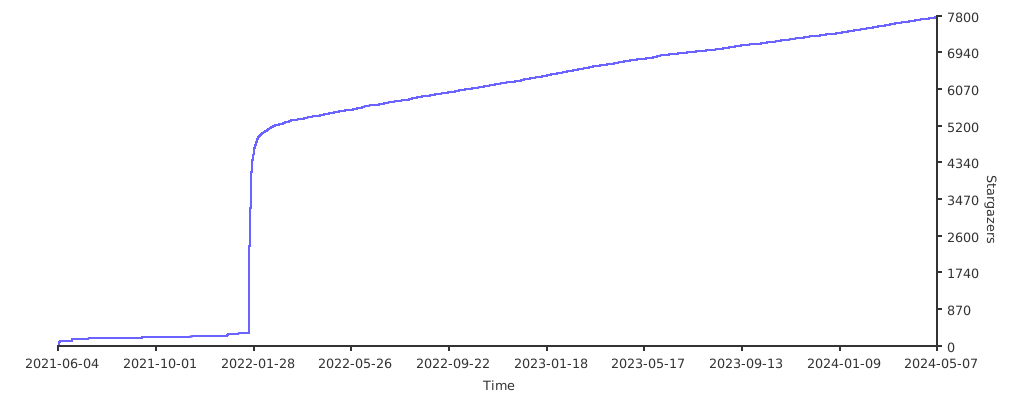
Stargazers over time