Homebridge Config UI X is the web-based management tool for Homebridge: it lets anyone running a Homebridge smart-home bridge install plugins, edit configuration, monitor logs and back up their instance from a browser instead of from the command line.
What it is
Homebridge Config UI X (npm package homebridge-config-ui-x) is a TypeScript application that wraps a Homebridge installation in a browser-accessible interface, listening by default on port 8581. It manages all aspects of a Homebridge setup: plugins, the config.json file, logs, accessories, and the Homebridge process itself. Access is behind a login, with default credentials of admin / admin, and the README's language badges indicate translations for a long list of locales. The project is MIT-licensed, lives in the Homebridge ecosystem, and points to homebridge.io for the wider project.
The concrete problem it solves is configuration friction. Homebridge is a plugin-driven bridge, and adding a device normally means hand-editing JSON: adding a plugin block, restarting, and finding out from the log whether a bracket was misplaced. This project replaces that workflow with a graphical settings editor that covers over 500 plugins, and for everything else with an editor that syntax-checks the JSON and validates its structure while taking a backup of the config on every change. It also moves operational chores — installing, updating and removing plugins, restarting Homebridge, and restoring from a backup — out of the shell and into a web page, with the companion hb-service tool handling the service setup underneath.
Key capabilities
- Install, configure, update and remove Homebridge plugins from a browser-based plugin screen.
- Edit the Homebridge
config.json in a built-in editor with advanced JSON syntax checking and structure validation, plus automatic backups on every change.
- Configure over 500 plugins visually, with no manual
config.json editing required.
- Monitor the Homebridge server through a fully customisable, widget-based dashboard with a number of available themes, including a dark mode.
- View the Homebridge rolling log for troubleshooting, and view and control Homebridge accessories.
- Restart Homebridge and back up or restore the whole instance from the interface.
- Set up and manage plugins as child bridges, and use
hb-service to install Homebridge as a service on Linux/Raspbian, macOS, FreeBSD and Windows.
Who uses it and how
- Raspberry Pi owners running the official Homebridge Raspberry Pi Image, who follow the wiki guide to bring up a bridge and then manage it from the browser.
- Homebridge hosts on Debian or Ubuntu, Windows 10/11, macOS or a Synology NAS with DSM, where
hb-service registers Homebridge as a managed service and the UI becomes the day-to-day control surface.
- Docker users who run Homebridge in a container and reach the UI on port
8581.
- Users who install the
homebridge-config-ui-x npm package directly on a platform not covered by the guides, following the manual configuration article.
- Plugin developers and power users who need plugin management, log tailing and child-bridge configuration in one place.
Getting started
Install the homebridge-config-ui-x npm package alongside Homebridge, or take one of the supported routes: the official Homebridge Raspberry Pi Image, Docker, or Synology DSM, following the wiki guides. The UI is then reachable at http://localhost:8581 with the default admin / admin credentials, and hb-service can install and run Homebridge as a service.
How it compares
No list of paid products replaced is supplied in these facts, so no such comparison is drawn. This project stands alone in this registry as a general-purpose Homebridge management interface: it is not an alternative to Homebridge itself, but the web layer that supervises a Homebridge installation, together with the hb-service command it provides.
When to use it — and when not to
Adopting it means operating a Node.js application on the same host as Homebridge, exposing web port 8581, and managing the process through hb-service; because the default login is admin / admin, that exposure is a deliberate decision rather than a neutral default. Anyone not running Homebridge, or wanting a hosted service that manages the bridge for them, is in the wrong place, since this is a self-hosted control panel for an installation the operator maintains. The README itself stays close to installation and delegates configuration depth to the project wiki, so a user who wants one self-contained document will have to follow those external guides.
project readme (upstream, from github) — read inline

Homebridge UI



:gb: :bulgaria: :cn: :taiwan: :czech_republic: :finland: :fr: :de: :hungary: :indonesia: :israel: :it: :jp: :kr: :macedonia: :netherlands: :norway: :poland: :portugal: :brazil: :ru: :slovenia: :es: :sweden: :thailand: :tr: :ukraine: :vietnam:
Homebridge UI is a web-based management tool for Homebridge that allows you to manage all aspects of your Homebridge setup.
- Install and configure Homebridge plugins
- Edit the Homebridge
config.json with advanced JSON syntax checking and structure validation
- Visual configuration for over 500 plugins (no manual config.json editing required)
- Monitor your Homebridge server via a fully customisable widget-based dashboard
- View the Homebridge logs
- View and control Homebridge accessories
- Restart Homebridge
- Back up and Restore your Homebridge instance
- Set up and manage your Homebridge plugins as child bridges
- and more...
Homebridge UI also provides a tool called hb-service which makes it easy to set up Homebridge as a service on Linux/Raspbian, macOS, FreeBSD and Windows.
Installation Instructions
For detailed instructions on how to set up Node.js and Homebridge with Homebridge UI as a service, see the guides on the wiki:
If your platform is not listed above, or you want to use your own service manager, see the Manual Configuration wiki article for instructions on installing and running hb-service manually.
The default username is admin and the default password is admin.
The UI can be accessed via web browser by default on port 8581 (e.g. http://localhost:8581).
Usage
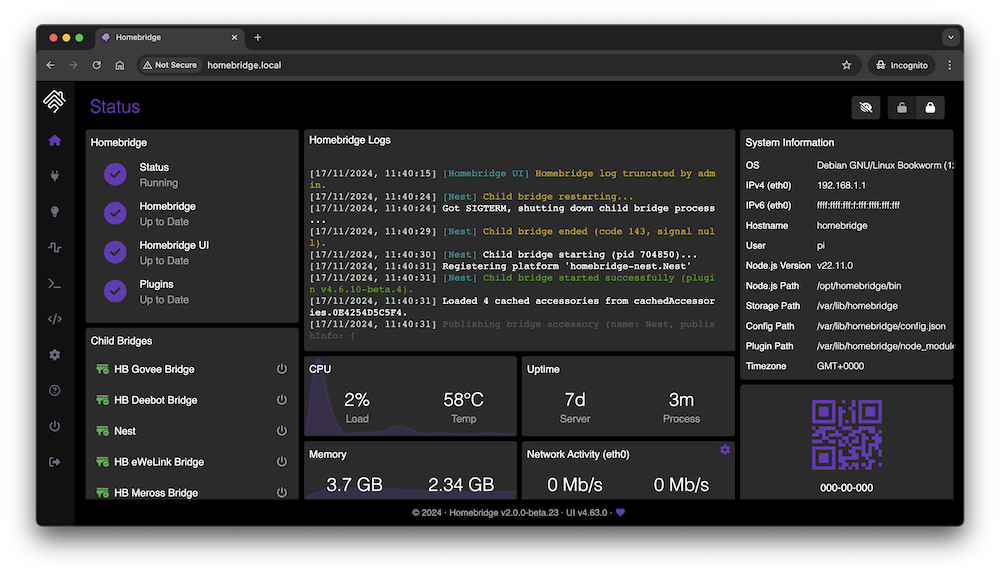
Status Screen
This shows an overview of your Homebridge system. The dashboard is widget-based and completely customisable with a number of themes available.
Plugin Screen
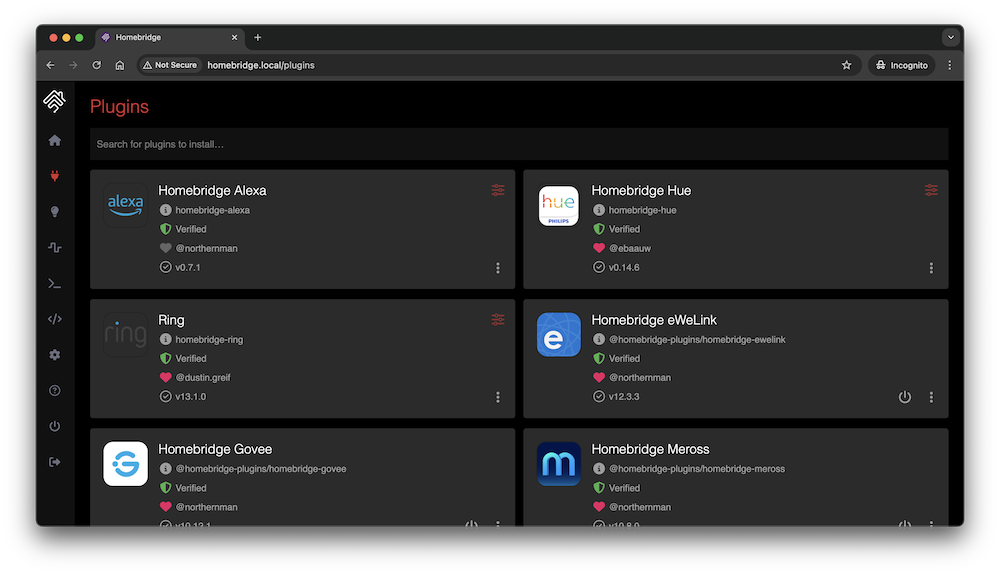
This shows you the currently installed plugins and allows you to install, configure, update, and remove plugins.
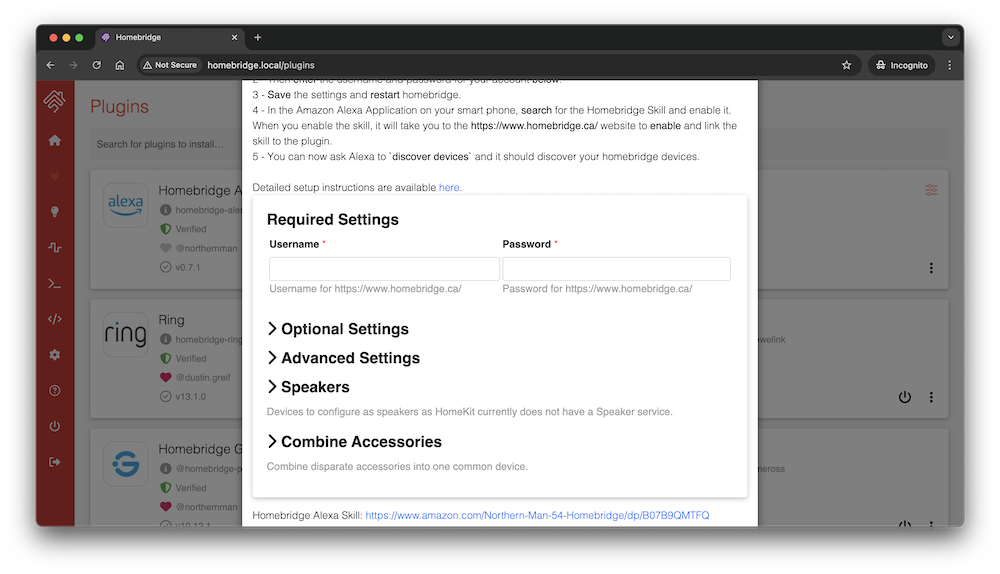
You can configure supported plugins using the graphical settings editor or by editing the config JSON directly.
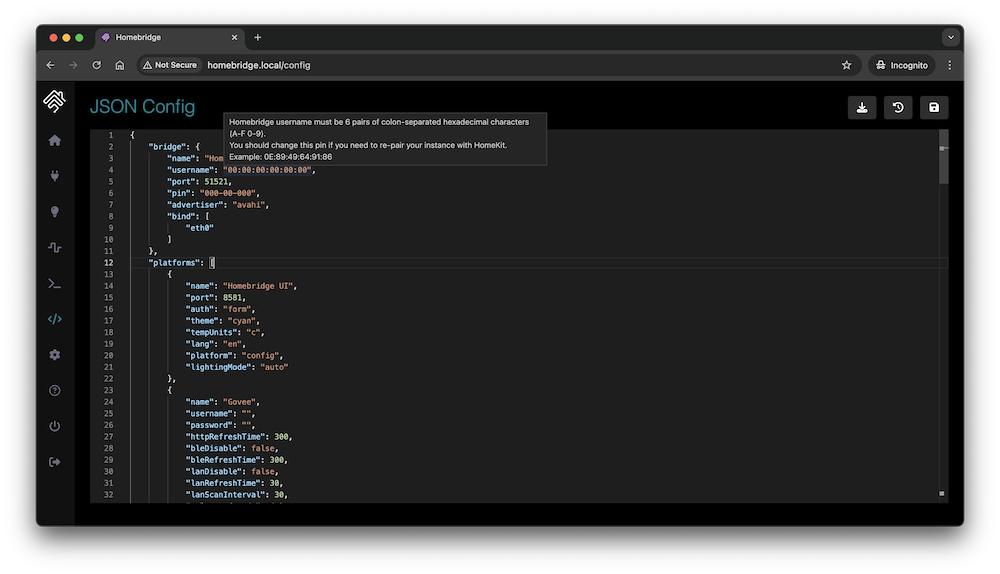
Configuration Screen
The configuration screen allows you to modify your Homebridge config.json. The built-in editor automatically syntax-checks your JSON and makes a backup of your config every time you make a change.
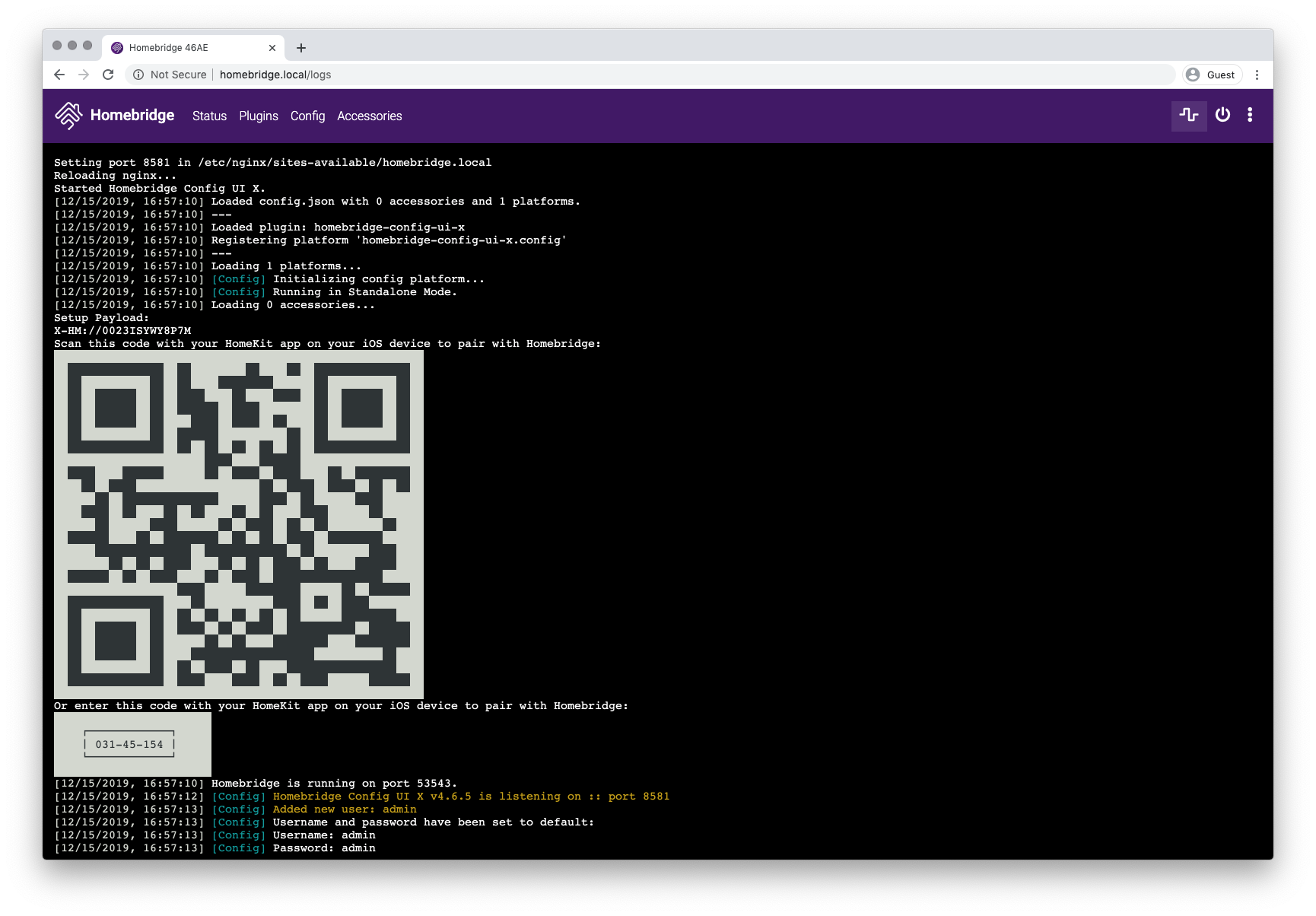
Log Screen
This shows you the Homebridge rolling log. This is helpful for troubleshooting.
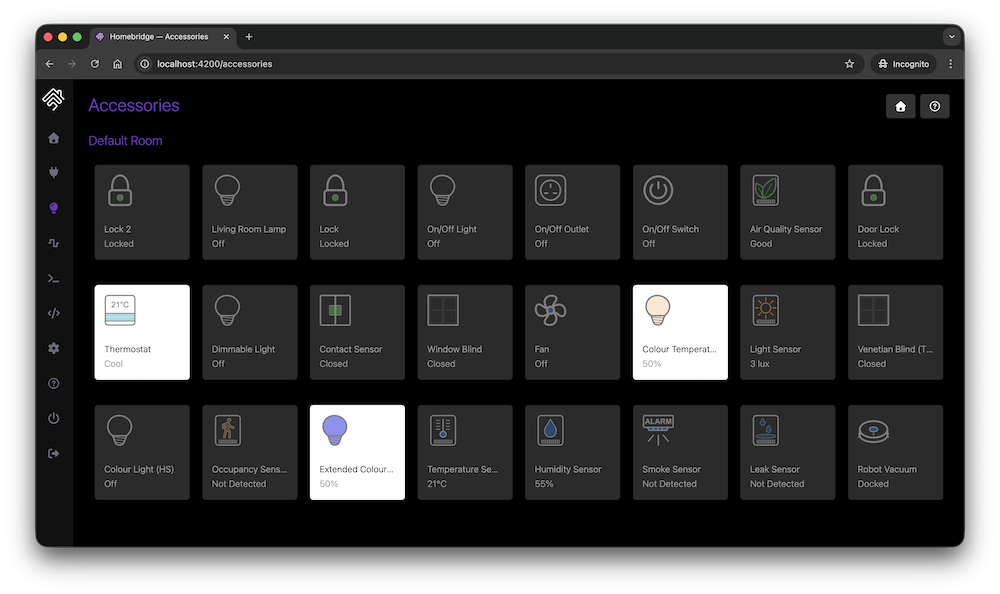
Accessories Screen
This shows you the Homebridge accessories for all the Homebridge instances on your network. You can use this to control accessories from a web browser and works well on mobile devices which allows users to control Homebridge from non-Apple devices.
Plugin Development
The https://developers.homebridge.io website contains the Homebridge API reference, available service and characteristic types, and plugin examples.
The Homebridge Plugin Template project provides a base you can use to create your own platform plugin.
There are many existing plugins you can study; you might start with the Homebridge Example Plugins or a plugin that already implements the device type you need.
Community
The official Homebridge Discord server and Reddit community are where users can discuss Homebridge and ask for help.


HomeKit communities can also be found on both Discord and Reddit.
Limitations
- One bridge can only expose 150 accessories due to a HomeKit limit. You can, however, run your plugins as a Child Bridge or run Multiple Homebridge Instances to get around this limitation.
- Once an accessory has been added to the Home app, changing its name via Homebridge won't be automatically reflected in iOS. You must change it via the Home app as well.
Credits
- Homebridge was originally created by Nick Farina.
- The original HomeKit API work was done by Khaos Tian in his HAP-NodeJS project.
- Homebridge UI was originally created by oznu.
 Setup Homebridge using the official Homebridge Raspberry Pi Image
 Setup Homebridge on a Raspberry Pi (Raspbian)
 Setup Homebridge on Debian or Ubuntu Linux
 Setup Homebridge on Windows 10/11
 Setup Homebridge on macOS
 Setup Homebridge using Docker
 Setup Homebridge on a Synology NAS