PowerCalc is a free, MIT-licensed Home Assistant custom component that estimates the power and energy consumption of lights, fans, media players and other appliances that cannot measure themselves, letting Home Assistant users monitor energy across a whole home without fitting a smart plug to every device.
What it is
PowerCalc is a Python custom component for Home Assistant, distributed through the Home Assistant Community Store (HACS), where it is listed as a HACS Default integration. It runs inside an existing Home Assistant installation and creates virtual power sensors rather than reading a physical meter. The estimates come from models built on real device measurements and from a built-in profile library, with light consumption modelled from brightness, colour and temperature, fan consumption modelled from speed, and other devices handled through configurable strategies or measured profiles. Documentation lives at docs.powercalc.nl, and the community-maintained device profile library is published separately at library.powercalc.nl.
The concrete problem it solves is hardware cost and clutter. Conventional energy monitoring in Home Assistant requires a metering device — typically a smart plug — in front of each appliance, which is expensive and impractical at household scale, and impossible for hard-wired or permanently installed loads. PowerCalc replaces that per-device smart plug with a software estimate, so every light, fan and media player can appear as an energy sensor in Home Assistant without additional hardware. On top of the power and energy sensors, it also produces cost sensors for tracking spending, utility meters that break usage down by day, week or month, and group sensors that combine devices, rooms or an entire home into a single total.
Key capabilities
- Virtual power sensors that represent devices which have no metering hardware of their own.
- A built-in profile library of real device measurements, browsable at library.powercalc.nl, so common devices work out of the box.
- Device modelling that accounts for light brightness, colour and temperature, and for fan speed.
- Configurable strategies or measured profiles for appliances that do not follow a light or fan pattern.
- Cost sensors that turn consumption into tracked spending inside Home Assistant.
- Utility meters that split usage into daily, weekly or monthly figures.
- Group sensors that aggregate individual devices, rooms or the whole home into one combined total.
Who uses it and how
- Home Assistant households that want whole-home energy visibility but do not want to buy and manage a smart plug per appliance.
- Users with hard-wired or awkwardly placed loads, such as ceiling lights, where inserting a plug is not an option.
- Cost-conscious users who want spending tracked per day, week or month through the generated cost sensors and utility meters.
- Room-level and whole-home reporting, using group sensors to roll several devices into one figure.
- Community contributors who share measurements and contribute new device profiles so that accuracy improves for everyone, working through CONTRIBUTING.md and the Code of Conduct.
Getting started
Install PowerCalc as a Home Assistant custom component through HACS, where it is a HACS Default integration, and then follow the Quick Start Guide at docs.powercalc.nl/quick-start/. Full reference documentation is at docs.powercalc.nl.
How it compares
No equivalent or competing tools are named in the facts provided for this registry, so PowerCalc stands alone here. It is best understood as a software substitute for per-device metering hardware inside Home Assistant rather than as an alternative to any other listed project.
When to use it — and when not to
PowerCalc is worth adopting if Home Assistant is already the hub and the goal is broad, low-cost energy visibility across many devices. It should not be chosen by anyone who needs billing-grade measurement or who is not prepared to run and maintain a Home Assistant instance, since every reading is an estimate derived from models rather than a direct measurement. Accuracy also depends on whether a profile exists for the specific device, and devices without one must be handled through configurable strategies or your own measurements; the project itself shows steady activity, with a last push in September 2026 and 17 open issues.
project readme (upstream, from github) — read inline






⚡ Turn any device into an energy monitor, no smart plug required
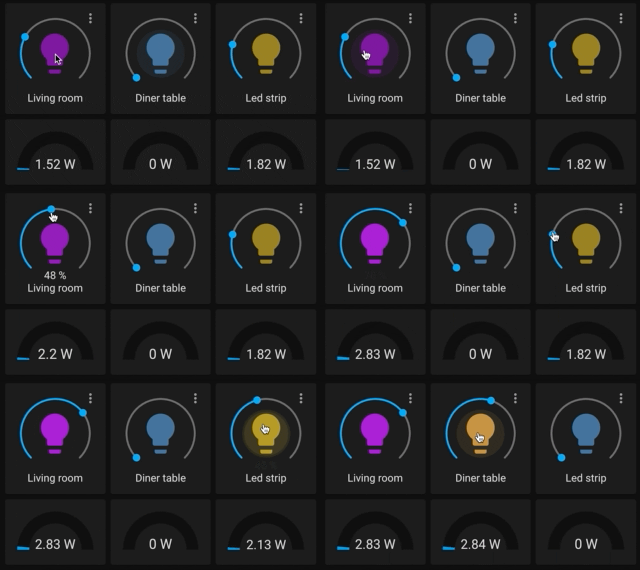
PowerCalc estimates energy consumption for devices that can't measure it themselves, like lights, fans and media players, with no extra hardware. Instead of measuring power directly, it accurately estimates consumption using smart models based on real measurements, all inside Home Assistant.
On top of power and energy sensors, PowerCalc also creates cost sensors to track spending, utility meters to break usage down by day, week or month, and group sensors to combine devices, rooms or your whole home into a single total.
See it in action
Why use PowerCalc?
- 💰 Save money - no need to buy smart plugs for every device
- 🔍 Full visibility - track energy usage across your entire home
- ⚡ Accurate estimates - based on real device measurements
- 🔌 Works out of the box - huge built-in profile library
- 🧠 Advanced modeling - brightness, color, fan speed, and more
How it works
PowerCalc creates virtual power sensors in Home Assistant.
For example:
- 💡 Lights → power based on brightness, color, temperature
- 🌀 Fans → power based on speed
- 📺 Other devices → configurable strategies or measured profiles
You get realistic energy data — without physically measuring every device.
Get started
🌍 Community & contributions
PowerCalc is powered by a growing community:
See CONTRIBUTING.md to get started, and the Code of Conduct for how we work together.
⭐ Support the project
If PowerCalc helped you:
🙌 Powered by
