HA Vibecode Agent




Let AI build your Home Assistant automations – or act as your DevOps for the ones you write by hand. Just describe what you need in natural language. 🏠🤖
You describe your goal → AI inspects your Home Assistant → designs a custom solution → and deploys it on-board automatically. 🚀
And if you prefer to handcraft your automations and scripts yourself, the agent can simply act as your DevOps and extra pair of hands: quickly uploading your changes, running tests, and analyzing logs on demand. You stay in control and decide how much you delegate to AI and how deep it should go.
Transform the way you manage your smart home. This agent enables Claude Code, Cursor, Visual Studio Code (VS Code), or any MCP-enabled IDE to:
- 📝 Analyze your Home Assistant configuration, entities, and devices
- 🏗️ Create intelligent automations, scripts, and complete systems — including Home Assistant helpers that can be fully managed programmatically
- 🎨 Design and customize UI dashboards with full control over cards, layouts, and styling
- 🖌️ Create and tweak themes for a personalized UI
- 🔄 Safely deploy changes with automatic Git-based versioning
- 🔍 Monitor and troubleshoot your setup through log analysis
- 📦 Install and manage HACS integrations and custom repositories
No more manual YAML editing or searching through documentation - just describe what you want in natural language!
Real example: User says "Install smart climate control" → AI analyzes 7 TRVs, creates 10 automations + 9 helpers + 10 sensors + 5 scripts, deploys everything, and it just works!
https://github.com/user-attachments/assets/0df48019-06c0-48dd-82ad-c7fe0734ddb3
Full YouTube Demo:
🎯 What is this?
HA Vibecode Agent is a service that exposes a safe REST API and toolset, allowing AI assistants (Claude Code, Cursor, VS Code, Antigravity, and any MCP-enabled IDE) to safely work with your Home Assistant instead of just generating YAML in the dark.
It supports two deployment modes:
| Mode | For whom | How it runs |
|---|---|---|
| Supervisor (Add-on) | Home Assistant OS / Supervised | Installed via HA Add-on Store (default) |
| Standalone (Docker) | HA Container in Docker / Proxmox / NAS | Runs as a separate Docker container |
Both modes provide the same core functionality. The only difference: Add-on management (install/uninstall/restart add-ons) requires the Supervisor and is not available in standalone mode.
🚀 How is this different from other MCP modules for Home Assistant?
Home Assistant Agent + MCP Server
Most MCP integrations for Claude, Cursor, VS Code or Antigravity run only on your local machine and talk to Home Assistant over SSH, sometimes with the REST API.
For serious Home Assistant work, that is not enough.
Home Assistant is not just a set of YAML files. It exposes internal APIs, runtime state, entities, services and capabilities that are much easier and safer to access from inside Home Assistant itself.
SSH-based integrations often force the AI to generate and run temporary helper scripts on every request. Since those scripts can change every time, the result is hard to predict, hard to repeat and risky to rely on.
This project uses a different architecture.
Architecture
The project is split into two modules:
Home Assistant Agent
Runs inside, or alongside, Home Assistant.
It has native access to relevant APIs, files, entities, services and runtime state, and exposes a safe, well-defined interface for external tools.
Home Assistant MCP Server
Runs on your computer alongside your AI IDE, such as Cursor, VS Code, Claude Desktop or Antigravity.
It talks to the Agent over a controlled API instead of relying on SSH hacks.
Why this design
This makes Home Assistant automation faster, safer, more predictable and repeatable.
The AI IDE gets exactly the actions and data it needs through a stable API, instead of constantly inventing ad-hoc scripts.
It also improves context efficiency.
Instead of loading huge YAML files, full entity dumps, logs or generated scripts into the prompt, the Agent can return only the relevant context: selected entities, services, automation fragments, validation results, errors or structured summaries.
The result is less noise, fewer tokens, fewer wrong assumptions and more reliable edits.
In short
The MCP server gives your AI IDE a standard way to talk to Home Assistant.
The Agent gives it safe, native access to Home Assistant itself.
Together, they replace fragile SSH-based scripting with a stable, structured and context-efficient automation layer
⚡ Installation (5 minutes)
Option A: Home Assistant Add-on (default, recommended)
For users running Home Assistant OS or Supervised installation.
This is the standard deployment — the agent runs as a managed add-on inside Home Assistant with full access to Supervisor API.
1. Add Repository
Open your Home Assistant UI (usually http://homeassistant.local:8123):
- Go to Settings → Add-ons → Add-on Store → ⋮ → Repositories (usually http://homeassistant.local:8123/hassio/dashboard )
- Add:
https://github.com/coolver/home-assistant-vibecode-agent - Click Add
2. Install and Start Add-on
Still in Home Assistant UI:
- Refresh the page
- Find HA Vibecode Agent → Click INSTALL
- Wait for installation to complete
- Enable → Start on boot: ON → and push START button
- Wait for startup (~10 seconds)
- Click "Open Web UI" button
You'll see this interface:
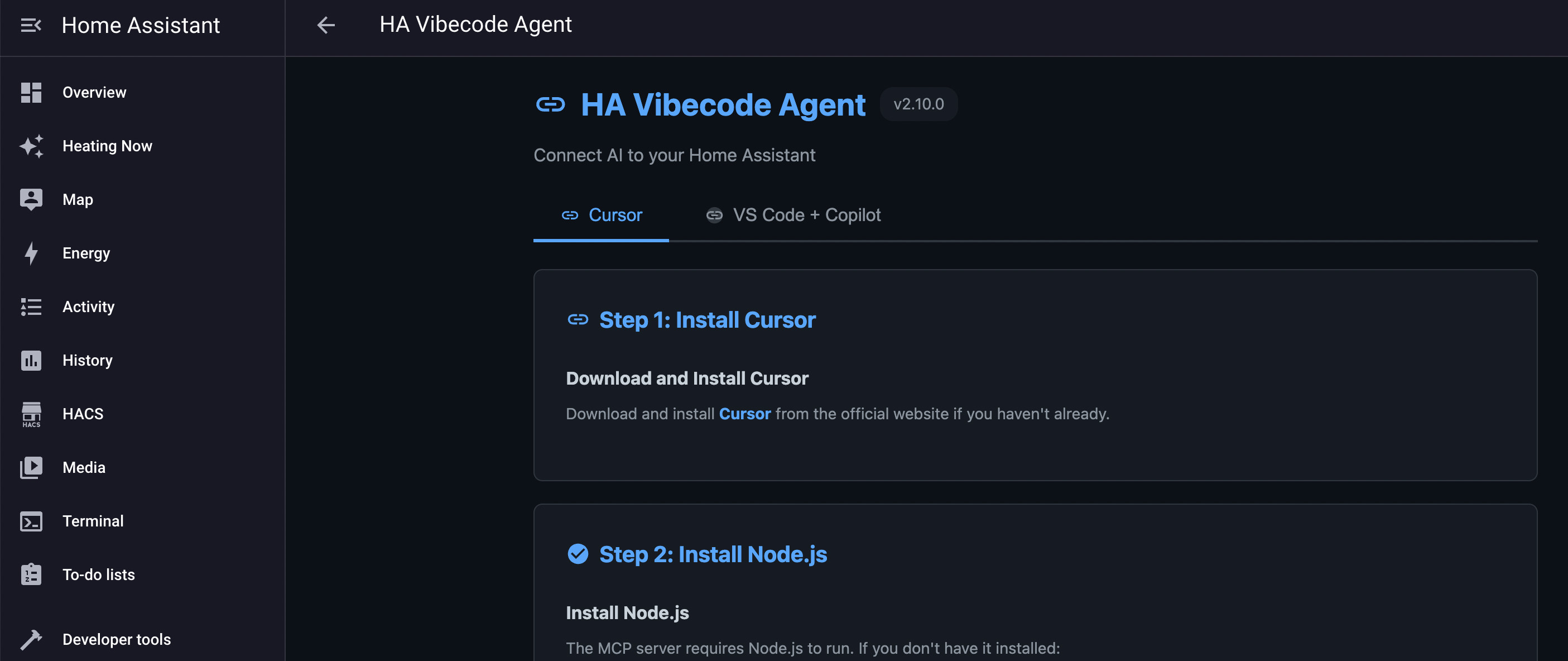
Click the Cursor or VS Code tab (depending on which IDE you want to use with Home Assistant) and follow the setup instructions. You'll need to install and configure Cursor or VS Code so they can connect to the HA Agent via the MCP protocol.
That's it — you're ready to start working with your Home Assistant scripts, automations and dashboards using AI.
If you find this project useful and want to support its development, please consider giving it a GitHub Star ⭐
YouTube Installation guide: how to install the Home Assistant Cursor Agent
Option B: Standalone Docker (Proxmox / Docker / NAS)
For users running Home Assistant Container without Supervisor (e.g., in Proxmox LXC/VM, Synology NAS, or plain Docker Compose).
The agent runs as a separate Docker container alongside your Home Assistant instance and connects via a Long-Lived Access Token.
Prerequisites
- Home Assistant running and accessible over the network
- Long-Lived Access Token — create one in HA UI: Profile (bottom-left) → Long-Lived Access Tokens → Create Token
- Docker and Docker Compose installed on the host
1. Clone the repository
git clone https://github.com/Coolver/home-assistant-vibecode-agent.git
cd home-assistant-vibecode-agent
2. Configure environment
cp .env.example .env
Edit .env with your values:
HA_URL=http://192.168.1.100:8123
HA_TOKEN=your_long_lived_access_token_here
HA_CONFIG_PATH=/path/to/homeassistant/config
3. Start the agent
docker compose -f docker-compose.standalone.yml up -d
4. Get the API key
The agent auto-generates an API key on first start. View it in the logs:
docker compose -f docker-compose.standalone.yml logs | grep "API Key"
Or read it directly from the config directory:
cat /path/to/homeassistant/config/.ha_cursor_agent_key
5. Configure your IDE
The agent is now available at http://:8099. Configure your MCP client (Cursor, VS Code, etc.) to connect using the API key from step 4.
🤖 Using with AI IDE (Cursor, VS Code etc)
This agent enables AI IDE to autonomously manage your Home Assistant through natural language - no manual copy-pasting needed!
⚠️ Important Disclaimer
This tool is designed for experienced Home Assistant users who understand what they're doing.
- ✅ Always review changes before applying them to production systems
- ⚠️ AI can accidentally break your configuration if given incorrect instructions or outdated information
- 💾 Git versioning is enabled by default - all changes are backed up and can be rolled back
- 🔄 Test in a safe environment first if you're new to AI-driven automation
- 📖 Verify syntax and compatibility with your Home Assistant version
Use at your own risk. The automatic backup system minimizes risk but doesn't eliminate it.
Start Using
Once connected, just describe what you want in natural language:
Show me all my climate entities and their current states
Analyze my automations and suggest optimizations
Create a smart lighting automation for movie mode
AI will autonomously read your configuration, create components, and deploy everything automatically!
That's it! AI IDE will use the MCP protocol to communicate with your Home Assistant.
Learn more: MCP Home Assistant on GitHub | NPM Package
Real-World Examples
Build Smart Climate Control:
Install a smart climate control system for my TRV radiators.
Analyze my current devices, create automations for efficient heating
with predictive shutdown, buffer radiators, and adaptive cooldowns.
Set up monitoring sensors and dashboard.
AI will autonomously:
- Detect all your TRV entities by analyzing Home Assistant
- Create 10+ automations for intelligent heating control
- Add 9 input helpers for system state management
- Generate 10 template sensors for monitoring
- Create 5 scripts for boiler and buffer control
- Build Lovelace dashboard with all metrics
- Test and deploy everything
- All tailored to YOUR specific TRVs and configuration!
Optimize Existing System:
My heating wastes energy. Analyze my current climate automations
and optimize for efficiency while maintaining comfort.
Debug Issues:
My bedroom lights automation isn't working. Check the logs,
find the problem, and fix it.
Stop writing YAML manually! Just describe what you want. 🚀
📚 API Documentation
For complete API documentation, authentication details, and usage examples, see DEVELOPMENT.md.
Quick access:
- Swagger UI:
http://homeassistant.local:8099/docs(when installed) - ReDoc:
http://homeassistant.local:8099/redoc(when installed)
🔍 Monitoring
Check Agent Health
# No auth required for health check
curl http://homeassistant.local:8099/api/health
Example response:
{
  "status": "healthy",
  "version": "2.0.1"
}
View Agent Logs
curl -H "Authorization: Bearer YOUR_AGENT_KEY" \
     http://homeassistant.local:8099/api/logs/?limit=50
View Backup History
curl -H "Authorization: Bearer YOUR_AGENT_KEY" \
     http://homeassistant.local:8099/api/backup/history
🛡️ Security
Safety Features
- ✅ Path validation - Cannot access files outside
/config - ✅ Authentication required - All endpoints (except health) require token
- ✅ Automatic backups - Git commits before modifications with meaningful commit messages
- ✅ Rollback capability - Restore any previous state
- ✅ Configuration validation - Check before applying
- ✅ Audit logs - Track all operations
Best Practices
- Always backup before major changes
- Check config before reloading
- Review logs after operations
- Use rollback if something breaks
- Test in dev environment first
🔧 Development
For development setup, project structure, API documentation, and local development instructions, see DEVELOPMENT.md.
🤝 Contributing
Contributions are welcome! If you'd like to contribute:
- Fork the repository
- Create a feature branch
- Make your changes
- Submit a pull request
For detailed contribution guidelines, see CONTRIBUTING.md.
🐛 Troubleshooting
"spawn npx ENOENT" error (Claude Code / Cursor / VS Code / Other IDE Console)
This error means Node.js is not installed or not found in your system PATH.
Solution: Install Node.js (v20.0.0 or higher; Node.js 24 LTS recommended) on the computer where Cursor is running:
Download and install Node.js from https://nodejs.org Restart Cursor completely after installation Verify installation by running node --version in a terminal Important: Node.js must be installed on your computer (where Cursor runs), not on the Home Assistant server.
Add-on won't start
Check logs: Supervisor → HA Vibecode Agent → Logs
Common issues:
- Port 8099 already in use
- Invalid configuration
- Missing permissions
Standalone container won't start
Check logs: docker compose -f docker-compose.standalone.yml logs
Common issues:
HA_URLnot set or unreachableHA_TOKENinvalid or expired — regenerate in HA UI → Profile → Long-Lived Access Tokens- Config volume not mounted correctly — verify
HA_CONFIG_PATHin.env
API returns 401 Unauthorized
- Check Agent Key is correct
- Regenerate key if needed: Settings → Add-ons → HA Vibecode Agent → Open Web UI (add-on mode), or read from
/config/.ha_cursor_agent_key(standalone mode) - Ensure Authorization header is present
- Format:
Authorization: Bearer YOUR_AGENT_KEY
File operations fail
- Check file paths are relative to
/config - Ensure files exist for read/delete operations
- Check YAML syntax for parse errors
Git versioning not working
- Git versioning is always enabled in shadow repository (
/config/ha_vibecode_git) - Check
git_versioning_autosetting for auto/manual commit mode - View logs for Git errors
- Ensure
/configis writable
💬 Support
- 🐛 Issues: GitHub Issues
- 💡 Discussions: GitHub Discussions
📜 License
MIT License - See LICENSE file
Ready to give your AI full control of Home Assistant? Install now! 🚀