hl 


High-performance log viewer and processor that transforms logs in JSON and logfmt formats into a human-readable output. Built with efficiency in mind, it enables quick parsing and analysis of large log files with minimal overhead.
Features overview
- Automatic Pager Integration: Automatically integrates with a pager for enhanced convenience, defaulting to less if available, but fully supporting any compatible pager.
- Log Streaming Mode: Enable log streaming with the
-Pflag, which disables the pager. - Field-Based Filtering: Filter log records by key/value pairs using the
-foption, with support for hierarchical keys. - Level Filtering: Easily filter logs by level with the
-loption. - Timestamp Range Filtering: Filter logs by timestamp range using the
--sinceand--untiloptions with intuitive formats:- RFC-3339 timestamp format.
- Current configured timestamp output format (via the
-toption or environment variable). - User-friendly shortcuts like
today,yesterday,friday, or relative offsets such as-3hor-14d.
- Field Visibility Control: Quickly hide or reveal specific fields using the
-hoption. - Empty Field Hiding: Automatically hide empty fields with the
-eflag. - Field Expansion: Control multi-line field and message formatting with the
-xoption:never: Compact single-line output with escaped newlines.inline: Preserve newlines as-is in the output.auto: Automatically expand fields containing multi-line content.always: Expand all fields into structured multi-line format.
- High-Speed Message Sorting: Achieve lightning-fast message sorting with automatic indexing via the
-sflag.- Performs the initial scan at approximately 2 GiB/s, enabling rapid filtering by timestamp and level without re-scanning.
- Efficiently handles hundreds of local files totaling hundreds of gigabytes.
- Reindexes large, growing files at speeds up to roughly 10 GiB/s by skipping unmodified blocks.
- Live Follow Mode: Use the
-Fflag for live, timestamp-sorted message updates across multiple sources, with a preview of recent messages via the--tailoption. - Complex Query Support: Construct custom queries with logical conditions (AND/OR) and additional advanced filtering options.
- Non-JSON Prefix Handling: Process logs with non-JSON prefixes using the
--allow-prefixflag. - Timezone Flexibility: Displays timestamps in UTC by default while allowing effortless timezone switching with the
-Zoption or local timezone adjustments using the-Lflag. - Customizability and Themes: Fully customizable through configuration files and environment variables, with support for easy theme switching and custom themes.
Performance comparison chart
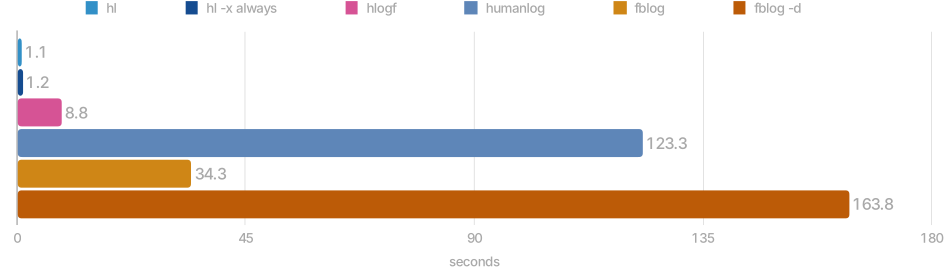
Performance comparison with humanlog, hlogf and fblog on a 2.3 GiB log file
- See performance section for more details.
Installation options
macOS
Install using homebrew on macOS
brew install hl
Other options
Download and extract using
curlandtaron macOScurl -sSfL https://github.com/pamburus/hl/releases/latest/download/hl-macos.tar.gz | tar xzInstall using cargo
cargo install --locked --git https://github.com/pamburus/hl.gitDownload latest release from download page
Linux
Download and extract using
curlandtaron Linux (x86_64)curl -sSfL https://github.com/pamburus/hl/releases/latest/download/hl-linux-x86_64-musl.tar.gz | tar xzInstall hl package from Arch Linux extra repository
pacman -S hl
Other options
Download and extract using
curlandtaron Linux (arm64/aarch64)curl -sSfL https://github.com/pamburus/hl/releases/latest/download/hl-linux-arm64-musl.tar.gz | tar xzInstall using cargo
cargo install --locked --git https://github.com/pamburus/hl.git
Windows
Install from Scoop
scoop bucket add pamburus https://github.com/pamburus/scoop-bucket.git
scoop install hl
[!TIP] It is recommended to use Windows Terminal for better experience.
[!TIP] To make mouse scrolling work in the less pager, set the
LESSenvironment variable to-R --mouse.
[!IMPORTANT] Currently,
hldoes not provide a built-in pager and relies on external pagers such as less. However, the build for Windows referenced on the original download page and distributed in the WinGet package manager does not work as expected. The authors state that they have not tested or verified this build and suggest that you use it at your own risk. Unfortunately, this build breaks some ANSI escape sequences and does not work properly withhland many other programs that use ANSI escape sequences for colors and styles. It is recommended to install less from the Scoop or Chocolatey package manager. If you are using Scoop and installhlby runningscoop install hl, it already installs less automatically as a dependency. Just make sure you do not have any other conflicting installations by runningwhere lessin cmd orGet-Command lessin powershell.
- Download latest release from download page
Other options
Install using cargo
cargo install --locked --git https://github.com/pamburus/hl.git
NixOS
Run using nix
nix run github:pamburus/hlor binary package
nix run github:pamburus/hl#binor install with nix profile:
nix profile add github:pamburus/hlor binary package
nix profile add github:pamburus/hl#binInstall the package from source using nix-flakes
Example how to update nix configuration
{
  inputs = {
    nixpkgs.url = "github:NixOS/nixpkgs/nixos-25.05";
    hl.url = "github:pamburus/hl";
  };
  outputs = {nixpkgs, hl, ...}:
  let
    system = "x86_64-linux";
  in
  {
    # this is just an example!
    nixosConfigurations.yourHost = nixpkgs.lib.nixosSystem {
      inherit system;
      modules = [
        ({...}: {
          environment.systemPackages = [
            hl.packages.${system}
          ];
        })
      ];
    };
  };
}
- Install the package with pre-built binaries using nix-flakes
Example how to update nix configuration
{
  inputs = {
    nixpkgs.url = "github:NixOS/nixpkgs/nixos-25.05";
    hl.url = "github:pamburus/hl";
  };
  outputs = {nixpkgs, hl, ...}:
  let
    system = "x86_64-linux";
  in
  {
    # this is just an example!
    nixosConfigurations.yourHost = nixpkgs.lib.nixosSystem {
      inherit system;
      modules = [
        ({...}: {
          environment.systemPackages = [
            hl.packages.${system}.bin
          ];
        })
      ];
    };
  };
}
Examples
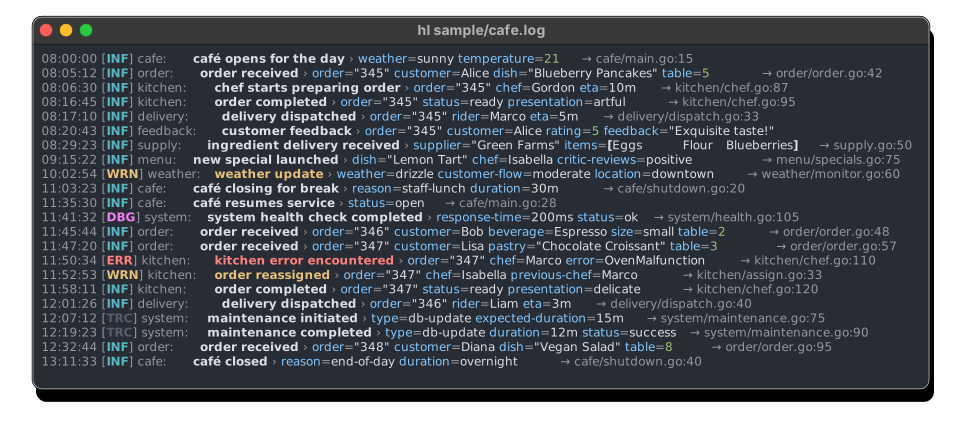
Screenshot
See other screenshots
Features and usage
Concatenation of multiple log files
Concatenate all log files
Command
hl *.logConcatenates and displays all
*.logfiles found in the current directory.
Support for compressed (bzip2, gzip, xz, zstd) log files
Concatenate all log files including compressed log files
Command
hl $(ls -tr /var/log/example/*.{log,log.gz,log.zst,s})Concatenates and displays all
*.log,*.log.gz,*.log.zstand*.s(will detect compression) files found in/var/log/example/.
Automatic usage of pager
Use the default pager with the default parameters
Command
hl example.logAutomatically opens
lesspager with the default parameters.Override options for default pager
Command
LESS=-SR hl example.logOpens
lesspager with disabled line wrapping.Use custom pager
Command
PAGER="most -w" hl example.logOpens
mostpager with-woption.
Quick filtering by log level
Errors only
Command
hl -l eDisplays only error log level messages.
Errors and warnings
Command
hl -l wDisplays only warning and error log level messages.
Errors, warnings and informational
Command
hl -l iDisplays all log messages except debug level messages.
Using live log streaming
Command
tail -f example.log | hl -PTracks changes in the example.log file and displays them immediately. Flag
-Pdisables automatic using of pager in this case.
Filtering by field values
Command
hl example.log --filter component=tsdbDisplays only messages where the
componentfield has the valuetsdb.Command
hl example.log -f component!=tsdb -f component!=uninterestingDisplays only messages where the
componentfield exists and has a value other thantsdboruninteresting.Command
hl example.log -f provider~=stringDisplays only messages where the
providerfield contains thestringsub-string.Command
hl example.log -f 'provider!~=string'Displays only messages where the
providerfield exists and does not contain thestringsub-string.Command
hl example.log -f 'request.method?!=GET'Displays only messages where the
request.methodfield does not exist or exists and is not equal toGET. In JSON messages, this also matches composite fields, e.g.,{"request":{"method":"POST"}}.Command
hl example.log -f 'span.[].name=sp0001'Displays only messages where the
spanfield is an array that contains an object with anamefield equal tosp0001.Command
hl example.log -f 'span.[1].name=sp0001'Displays only messages where the
spanfield is an array with at least two elements, and the element at index 1 (i.e., the second element) is an object with anamefield equal tosp0001.
Performing complex queries
Command
hl my-service.log --query 'level > info or status-code >= 400 or duration > 0.5'Displays messages that either have a level higher than info (i.e. warning or error) or have a status code field with a numeric value >= 400 or a duration field with a numeric value >= 0.5.
Command
hl my-service.log -q '(request in (95c72499d9ec, 9697f7aa134f, bc3451d0ad60)) or (method != GET)'Displays all messages that have the 'request' field with one of these values, or the 'method' field with a value other than 'GET'.
Command
hl my-service.log -q '.price?=3'Displays messages where the
pricefield equals3OR thepricefield is absent. The?modifier after a field name includes records that don't have that field. Without the?modifier, filtering on a missing field will skip the record.Command
hl my-service.log -q '.status?!=error'Displays messages where the
statusfield is not equal toerrorOR thestatusfield is absent. This is useful to include records that may not have a status field at all.Command
hl my-service.log -q 'exists(.price)'Displays only messages that have the
pricefield, regardless of its value. Theexists()operator tests for field presence without any value comparison.Command
hl my-service.log -q 'exists(msg) and msg~=warning'Displays messages that have a
msgfield that exists AND contains the substringwarning. This combines field existence checking with value matching.Command
hl my-service.log -q 'not exists(.internal)'Displays messages that do NOT have an
internalfield, effectively filtering out records with that field.Complete set of supported operators
Logical operators
- Logical conjunction -
and,&& - Logical disjunction -
or,|| - Logical negation -
not,!
- Logical conjunction -
Comparison operators
Equal -
eq,=Not equal -
ne,!=Greater than -
gt,>Greater or equal -
ge,>=Less than -
lt, `/dev/null hlogf example.log --color always > /dev/null 6.79s user 2.05s system 100% cpu 8.787 totalhumanlog v0.8.9 ~ 123 seconds
$ time humanlog /dev/null
humanlog --color always  /dev/null  136.18s user 7.17s system 116% cpu 2:03.25 total
fblog v4.17.0 ~ 34 seconds
$ time fblog example.log >/dev/null
fblog example.log > /dev/null  31.92s user 2.39s system 99% cpu 34.327 total
fblog with
-dflag v4.17.0 ~ 164 seconds$ time fblog -d example.log >/dev/null fblog -d example.log > /dev/null 147.57s user 16.20s system 99% cpu 2:43.82 total
See #132 for how to repeat measurements