HermesOffice
The world's first full-featured open-source AI Office suite.



HermesOffice is a free, open-source alternative to Microsoft Office for macOS,
Windows, and Linux, built around AI editing as a first-class workflow rather
than a bolted-on chat box. It opens and saves the real Microsoft Office
formats — Word (.docx), Excel (.xlsx), PowerPoint (.pptx) — and edits
PDF and Markdown too: a word processor, spreadsheet, presentation editor,
PDF editor, and Markdown editor as six Electron apps sharing one engine
layer.
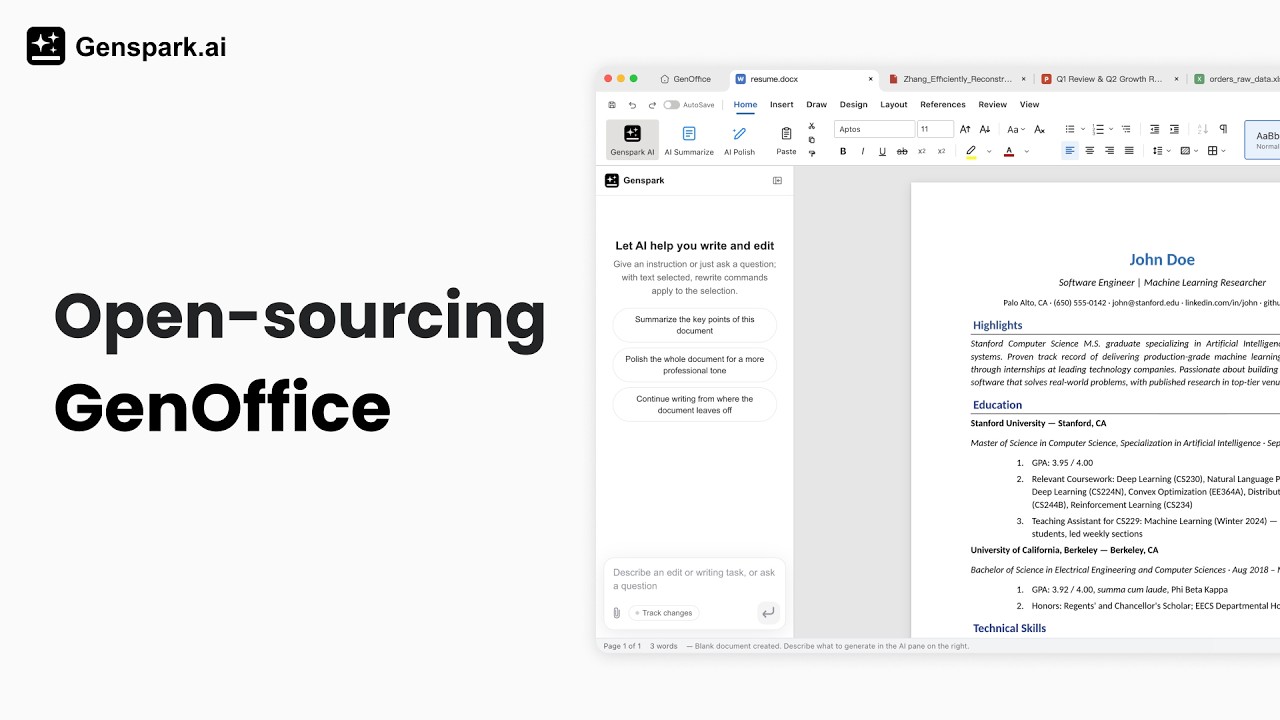
Watch the demo video on YouTube
Features
- Real PDF editing — retype text and edit images in the page itself, original fonts preserved.
- Local PDF → Word / PowerPoint / Excel conversion — turn a PDF into an editable
.docx,.pptx, or.xlsxentirely on your machine: no cloud, no upload. - Scanned PDFs too — on macOS and Windows scanned pages are read with the system OCR, so they convert to editable text.
- Microsoft Word–compatible, byte-preserving
.docxediting — only what you touched changes; Word never notices. - Word-faithful pagination — page breaks land where Word puts them.
- Excel-compatible spreadsheets — in-house engine with a Rust
.xlsxsidecar, own charts, pivot tables, slicers. - PowerPoint-compatible presentations — in-house
.pptxengine with masters, layouts, smart guides, non-destructive crop. - Markdown to Word, fully local — the same OOXML engine, no Pandoc, no cloud.
- AI that edits documents — block-level edits with snapshots and diffs, document-aware agents.
- Bring your own key (BYOK) — run the AI on your own API key: Claude, OpenAI, Gemini, DeepSeek, Kimi, GLM, Qwen, Doubao, MiniMax, Grok, Mistral, OpenRouter, or any OpenAI-compatible endpoint — or sign in with Genspark and skip keys entirely.
- Agent tools built in — web/image search, image generation, media analysis.
- Light / dark / system themes.
- macOS, Windows, Linux.
- Free & open-source (Apache-2.0).
Download
macOS · Apple Silicon — download the latest .dmg
One click, always the newest build. That link never changes — it is also the one to share or put on a page.
| Platform | Requirements | Download |
|---|---|---|
| macOS — Apple Silicon (arm64) | macOS 11+ | .dmg · .zip |
| macOS — Intel (x64) | macOS 11+ | build from source — no published artifact yet |
| Windows (x64) | Windows 10+ | build from source — no published artifact yet |
| Linux — Debian / Ubuntu | x86_64, glibc 2.34+ | build from source — no published artifact yet |
| Linux — Fedora / RHEL / openSUSE | x86_64, glibc 2.34+ | build from source — no published artifact yet |
| Linux — other distributions | x86_64, glibc 2.34+, FUSE 2 | build from source — no published artifact yet |
Builds come from main. The macOS bundle is ad-hoc signed, not notarized (there is no
Apple Developer ID behind it yet), so the first launch needs one confirmation: right-click
the app → Open, or allow it under System Settings → Privacy & Security.
Older versions are on the Releases page.
Installing on Linux
The deb installs with apt — it pulls in the dependencies and adds HermesOffice to the applications menu:
sudo apt install ./hermesoffice_<version>_amd64.deb
On Fedora / RHEL-family / openSUSE, install the rpm instead:
sudo dnf install ./hermesoffice-<version>.x86_64.rpm     # Fedora / RHEL family
sudo zypper install ./hermesoffice-<version>.x86_64.rpm  # openSUSE
The AppImage instead runs in place: install the FUSE 2 runtime
(sudo apt install libfuse2; on Ubuntu 24.04 the package is libfuse2t64),
make the file executable, then run it:
chmod +x HermesOffice-<version>.AppImage
./HermesOffice-<version>.AppImage
Apps
| App | Product | What it is |
|---|---|---|
apps/docs |
HermesOffice Docs | .docx word processor. Byte-preserving round trip: only dirty paragraphs are regenerated (paragraph patch), everything else in the original file is kept byte-for-byte, so opening and saving never breaks layout in Word. Paginated view whose line metrics reproduce the original document's layout, tracked changes, comments, styles, equations, ink. |
apps/sheets |
HermesOffice Sheets | .xlsx spreadsheet. UI built on the open-source Univer core (Apache-2.0) with a large layer of in-house extensions; .xlsx import/export runs through an in-house Rust sidecar (calamine + IronCalc), charts are rendered in-house (Konva), plus pivot tables, slicers, conditional formatting, and formula tracing. |
apps/slides |
HermesOffice Slides | .pptx presentations. In-house .pptx parse/render/edit engine with masters, charts, cropping, ink, and text shaping (HarfBuzz metrics). |
apps/pdf |
HermesOffice PDF | .pdf viewer/editor on pdf.js (Apache-2.0) + pdf-lib (MIT): annotations, forms, outlines, stamps, signatures, page operations, and printing support. True text editing — paragraph selection with in-block reflow, alignment restoration, original-font preservation — and content-stream image insert/edit, all rewriting page content streams through PDFium wasm (BSD-3-Clause) with subset-embedded fonts — no cover-up annotations. Converts PDFs into editable Word, PowerPoint, and Excel files fully locally (packages/pdf2docx), with OCR support for scanned pages (system OCR on macOS and Windows). |
apps/markdown |
HermesOffice Markdown | .md / .markdown editor: Tiptap block editor over plain Markdown files — headings, lists, tables, images, code blocks — saved back as plain Markdown, hosted in shell tabs. |
apps/shell |
HermesOffice | The suite shell: home screen, tabbed hosting of the five editors, light/dark/system theme, auto-update. |
Every app embeds the same AI panel: block-granular AI editing with version snapshots and diffs in docs, a tool-calling agent over workbook/slide/PDF state in the others.
The whole suite ships light / dark / system UI themes built on shared design
tokens (packages/ui), with a CI guard that keeps chrome colors on the token
system. Document surfaces stay light in dark mode — Word-style dark chrome
around white paper — so files render and export identically in both themes.
AI backends — Genspark sign-in or bring your own key. By default the
apps sign in to a Genspark account through a device-code flow — no model API
key to enter — and model calls route through the Genspark proxy (Claude,
GPT, and Gemini families). Or bring your own key (BYOK) in the AI settings:
Claude, OpenAI, Gemini, DeepSeek, Kimi, GLM, Qwen, Doubao, MiniMax, Grok,
Mistral, and OpenRouter are built in, plus a custom provider slot for any
OpenAI-compatible endpoint (base URL + key), local servers included. A
Genspark account also unlocks the Genspark ("gsk") tool endpoints the agents
build on — web and image search, image generation and editing,
image/audio/video analysis, and audio transcription — all reachable through
packages/ai-search for anyone extending the agent layer.
Engine packages
All pure TypeScript, no Electron dependency, unit-tested (except the UI kit):
packages/docx-engine— docx parsing → block tree (withdocxIndexanchors and passthrough), OOXML fragment generation, byte-level paragraph patching.packages/pptx-engine/packages/pptx-render— pptx model and rendering.packages/pdf2docx— local PDF → DOCX conversion: PDFium character-level extraction, pure-geometry layout analysis, rebuild throughdocx-engine; the same analysis drives the PDF app's PowerPoint and Excel exports.packages/file-parse— text extraction for AI attachments (office formats, text formats).packages/agent-core— the AI agent loop and skill composition shared by every app.packages/ai-provider— provider abstraction and streaming for the model backends.packages/ai-search— Genspark auth + web/image search tools.packages/i18n,packages/ui,packages/project-store,packages/electron-utils— shared i18n core, React UI kit, recent-files store, and Electron main-process helpers.
Development
npm install
npm run fixtures     # generate test .docx fixtures
npm test             # engine + app unit tests (docs/sheets/slides need no display)
npm run typecheck    # tsc --noEmit across every workspace
npm run dev          # all five editors + shell against Vite dev servers
npm run dev:docs     # a single app (same pattern works per workspace)
npm run dist:mac     # package macOS dmg (regenerates third-party notices)
npm run dist:win     # package Windows nsis installer
npm run dist:linux   # package Linux AppImage + deb + rpm
The sheets app additionally needs a Rust toolchain for its xlsx sidecar
(cargo on PATH); npm run build -w @hermesoffice/sheets compiles it
automatically.
Local UI/e2e driver scripts (Playwright + Electron, for local acceptance, not
committed by default) live in scripts/drivers/.
Architecture notes (docx round trip)
open docx ─► archive original by hash (never touched)
          ─► docx-engine parses word/document.xml top-level elements (w:p / w:tbl / …)
          ─► Block tree, each block anchored by docxIndex + original XML slice
          ─► Tiptap streaming editor (manual + AI editing, dirty tracking)
save      ─► dirty blocks → OOXML fragments (referencing existing styles only)
          ─► splice into original document.xml (untouched blocks keep original bytes)
          ─► repack zip; all other entries copied byte-for-byte
The same philosophy holds in sheets and slides: the original file is the source of truth, edits are applied as narrow patches, and everything the editor didn't touch survives the round trip untouched.
FAQ
Is HermesOffice free? Yes. HermesOffice is free and open-source under the Apache-2.0 license — no trial, no paid tier for the apps themselves.
Can HermesOffice open Microsoft Word, Excel, and PowerPoint files?
Yes. HermesOffice opens and saves native .docx, .xlsx, and .pptx files.
Saving is byte-preserving: parts of the file you didn't touch are written
back byte-for-byte, so documents keep working in Microsoft Office.
Does HermesOffice work offline? Document editing is fully local — files never leave your machine to be opened, edited, or saved. The AI features (agents, search, image tools) need a network connection, with either a Genspark sign-in or your own model API key (BYOK).
Can HermesOffice edit PDF files? Yes — real PDF text and image editing that rewrites the page content stream with the original fonts preserved, not cover-up annotations.
Can HermesOffice convert PDF to Word, Excel, or PowerPoint?
Yes — HermesOffice converts PDFs into editable .docx, .xlsx, and .pptx
files entirely on-device: PDFium character-level extraction plus
geometry-based layout analysis, no cloud service, no upload. Scanned pages are
covered too — on macOS and Windows the system OCR reads them, so they convert
to editable text rather than a page image.
Can I use my own AI model or API key? Yes. Besides the keyless Genspark sign-in, HermesOffice supports bring your own key (BYOK) for Claude, OpenAI, Gemini, DeepSeek, Kimi, GLM, Qwen, Doubao, MiniMax, Grok, Mistral, and OpenRouter, plus any OpenAI-compatible endpoint — including local model servers.
Does HermesOffice collect any data? Official packaged builds send limited usage analytics by default, and you can disable reporting at any time under Settings → General. Analytics never sends document content, file names, file paths, account identity, or email addresses. See HermesOffice Privacy for the complete event and data disclosures.
Security
See SECURITY.md for the process security posture (renderer sandboxing, IPC validation, external-link gating) and the threat models for AI-generated content.
Acknowledgements
HermesOffice would not be possible without these open-source projects:
- Electron — the desktop runtime for every app.
- Univer (Apache-2.0) — the spreadsheet UI core that Sheets extends.
- PDFium (BSD-3-Clause, bundled via @embedpdf/pdfium) — the content-stream engine behind true PDF text and image editing.
- pdf.js (Apache-2.0) and pdf-lib (MIT) — PDF rendering and document assembly.
- Tiptap / ProseMirror — the block editors in Docs and Markdown.
- Konva — canvas rendering for Slides and Sheets charts.
- HarfBuzz (wasm) — text-shaping metrics for complex scripts.
- calamine and IronCalc — the read and calc layers of the Rust xlsx sidecar.
- Liberation, Carlito, Caladea, and Noto CJK fonts (OFL/Apache-2.0) — bundled document fonts.
Third-party notices
npm run notices regenerates the bundled third-party license summary
(tools/gen-third-party-notices.mjs); all runtime dependencies are
MIT/Apache-2.0/BSD-3-Clause/OFL, and the bundled fonts (Liberation, Carlito,
Caladea, Noto CJK subsets) are OFL/Apache.
License
HermesOffice is licensed under the Apache License 2.0, with one
exception: the ee/ directory is reserved for future enterprise modules and
is covered by the HermesOffice Enterprise License.
The HermesOffice and Genspark names and logos are trademarks of Mainfunc, Inc. The Apache-2.0 license does not grant permission to use them (see section 6); forks should use their own branding.