Headlamp is an Apache-2.0 licensed, vendor-independent Kubernetes web UI written in TypeScript that runs either inside a cluster or locally as a desktop application, and it is built for platform engineers, cluster operators, and developers who need to inspect and change Kubernetes resources through a graphical interface.
What it is
Headlamp is an easy-to-use and extensible Kubernetes web UI that lives in the cloud-native ecosystem and is currently developed under the Kubernetes SIG UI, with the repository hosted in the kubernetes-sigs organization. The project was created to blend the traditional feature set of other web UIs and dashboards, meaning the ability to list and view resources, with added functionality such as interactive, permission-aware operations and a plugin system. It is a generic Kubernetes UI rather than a wrapper around one distribution, and it is distributed both as an in-cluster deployment and as a desktop application.
The concrete problem it solves is the gap between a read-only resource browser and a full interactive console. Headlamp offers a read-write experience in which the available actions are based on the permissions the user actually holds, so the interface does not offer deletion or update controls when those operations are not allowed. Access is checked through Kubernetes RBAC, which means a token with very limited permissions will not be able to view cluster resources correctly. It also handles multiple clusters and supports cancellable creation, update, and deletion operations, so a long-running action can be stopped rather than left to complete.
Key capabilities
- Vendor-independent and generic Kubernetes UI, not tied to a single distribution.
- Runs in-cluster or locally as a desktop application for Linux, Mac, and Windows.
- Multi-cluster support, so several clusters can be viewed from one interface.
- Extensible through plugins, with official plugins in the
headlamp-k8s/plugins repository and published plugins listed on Artifact Hub.
- UI controls that reflect user roles, with no deletion or update offered when RBAC does not permit it.
- Read-write, interactive actions based on permissions, including logs,
exec, and a resource editor with documentation.
- Cancellable creation, update, and deletion operations.
Who uses it and how
- Platform and operations teams deploy it in-cluster following the documented in-cluster installation path, giving the whole team a shared view of workloads.
- Individual developers and operators run it as a desktop application when they already have a
kubeconfig file in the default path, which lets them try the tool without changing the cluster.
- Debugging and monitoring workflows, reflected in the
kubernetes-debugging and kubernetes-monitoring topics, use logs, exec, and the resource editor to inspect running workloads.
- Plugin authors extend the UI for their own use cases using the plugin development guide and the plugins repository.
- Contributors participate through the
#headlamp channel in Kubernetes Slack, the monthly community meeting, and the roadmap project.
Getting started
Deploy Headlamp in-cluster using the installation instructions on headlamp.dev, or run it locally as a desktop application for Linux, Mac, or Windows, making sure a kubeconfig file is set up with your clusters in the default path. Documentation also covers creating a Service Account token for a cluster.
How it compares
Headlamp sits alongside other Kubernetes dashboards, and its own topics and README reference kubernetes-dashboard and the broader set of web UIs and dashboards whose listing and viewing features it deliberately blends with additional interactive functionality. Unlike a hosted or vendor-owned dashboard, it is Apache-2.0 licensed, can be run entirely inside your own cluster or on your own desktop, and places no licence cost or external data dependency on the operator.
When to use it — and when not to
Choose Headlamp when the team wants a self-hosted, plugin-extensible Kubernetes UI with role-aware controls and multi-cluster support, and when the deploying team is comfortable operating the in-cluster deployment and managing kubeconfig or Service Account tokens for access. It is a poor fit for anyone who wants a fully managed dashboard with no operational responsibility, and for anyone who cannot issue a token with sufficient RBAC permissions, since a limited token will not display cluster resources correctly. Prospective adopters should also note the project's notice about its recent move under Kubernetes SIG UI, which warns that some links may be broken during the transition, and the substantial open issue count of 1422, both of which suggest some rough edges around documentation and support.
project readme (upstream, from github) — read inline

NOTICE: We have recently moved the project under the Kubernetes SIG UI (and the repo under the kubernetes-sigs org). Container images are still at ghcr.io. Please bear with us while we may experience some broken links.



Headlamp is an easy-to-use and extensible Kubernetes web UI.
Headlamp was created to blend the traditional feature set of other web UIs/dashboards
(i.e., to list and view resources) with added functionality.
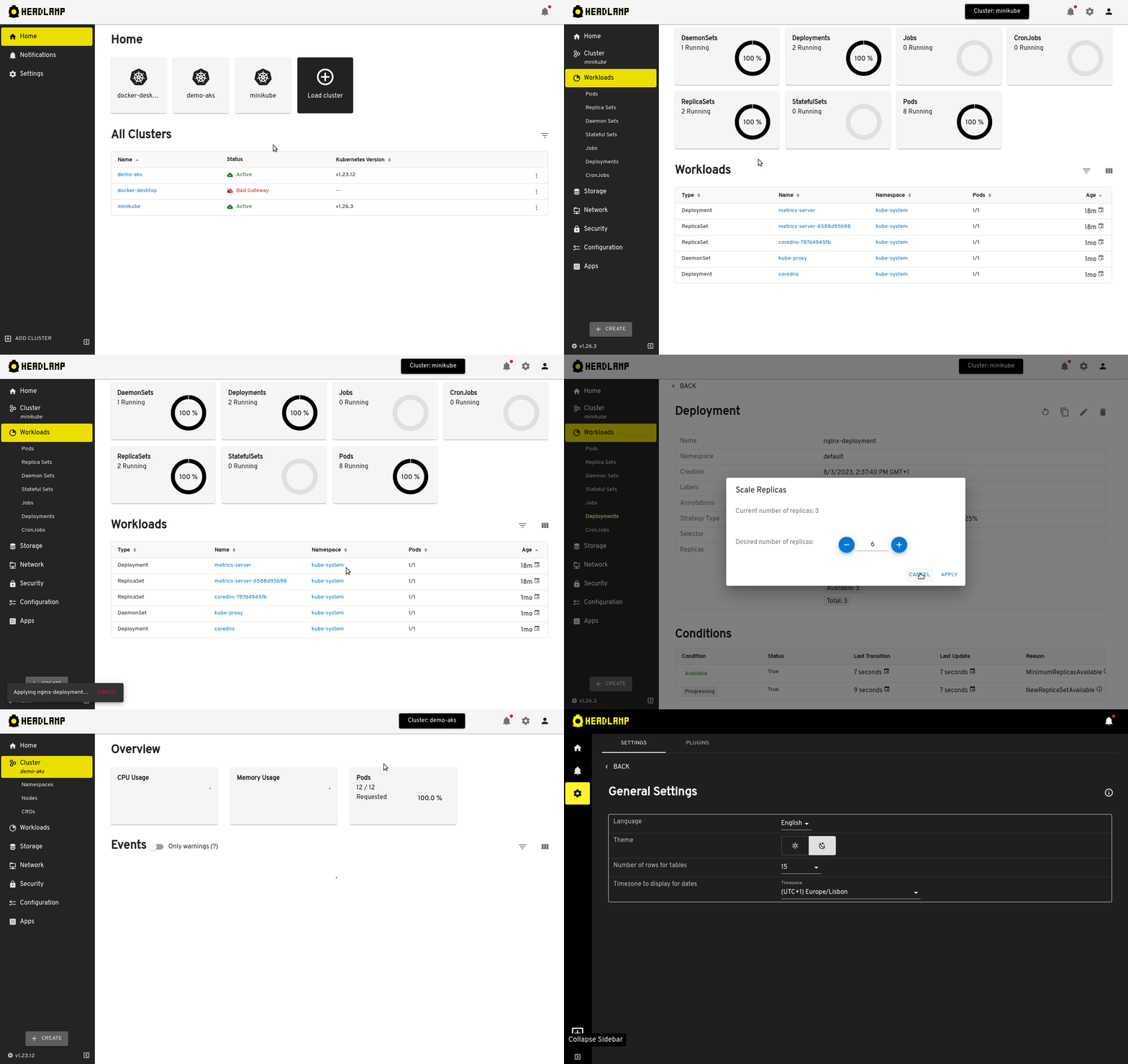
Features
- Vendor-independent / generic Kubernetes UI
- Works in-cluster, or locally as a desktop app
- Multi-cluster
- Extensible through plugins
- UI controls reflecting user roles (no deletion/update if not allowed)
- Clean & modern UI
- Cancellable creation/update/deletion operations
- Logs, exec, and resource editor with documentation
- Read-write / interactive (actions based on permissions)
Screenshots
Quickstart
If you want to deploy Headlamp in your cluster, check out the instructions on running it in-cluster.
If you have a kubeconfig already, you can quickly try Headlamp locally as a
desktop application
for Linux,
Mac,
or Windows.
Make sure you have a kubeconfig file set up with your favorite clusters and
in the default path so Headlamp can use it.
Accessing
Headlamp uses RBAC for checking
users' access to resources. If you try Headlamp with a token that has very limited
permissions, you may not be able to view your cluster resources correctly.
See the documentation on how to easily get a Service Account token for your cluster.
Quick Start for Contributors
Want to hack on Headlamp? We'd love your help!
Check out the Contributing Guidelines for detailed instructions on setting up your local development environment, building the project, and platform-specific tips (including Apple Silicon and macOS).
For more in-depth development docs, see the Development Guide.
Tested platforms
We maintain a list of the Kubernetes platforms we have
tested Headlamp with. We invite you to add any missing platforms you have
tested, or comment if there are any regressions in the existing ones.
Extensions / Plugins
Please see headlamp plugins on Artifact Hub for a list of plugins published.
See the plugins repo for some official plugins.
Plugin development
If you are interested in tweaking Headlamp to fit your use-cases, you can check out
our plugin development guide.
Get involved
Check out our:
Roadmap / Release Planning
If you are interested in the direction of the project, we maintain a
Roadmap. It has the
biggest changes planned so far, as well as a board tracking each release.
License
Headlamp is released under the terms of the Apache 2.0 license.
Frequently Asked Questions
For more information about Headlamp, see the Headlamp FAQ.


