What it is
Hackertab.dev is a browser extension for Chrome and Firefox, written in TypeScript and licensed under Apache-2.0. It lives in the browser-extension ecosystem and is categorized as a community and social networking tool. It changes the default new-tab page into a personalized feed for developer news, tools, jobs, and events.
The concrete problem is information overload for developers who need to monitor many technical sources. The project lets users select preferred programming languages, frameworks, topics, and sources, then see daily updated content in one tab. It aggregates material from sources named in the README, including GitHub Trendings, Hacker News, DevTo, Hashnode, Lobsters, Confs.tech, Product Hunt, Reddit, Freecodecamp, Medium, Indiehackers, Hackernoon, and custom RSS feeds.
Key capabilities
- It customizes the browser new-tab page with developer news, tools, jobs, and events.
- It filters content by programming language, framework, and topic.
- It updates the displayed content daily.
- It presents curated content from the sources listed in the README.
- It lets users bookmark items to read later.
- It provides a dark mode for low-light use.
- It offers AI-powered recommendations tailored to user preferences.
Who uses it and how
- Browser users install the extension from the Chrome Web Store or Mozilla Add-ons, open a new tab, and choose languages and sources.
- Developers and data scientists can use the extension as a daily tab for news, tools, jobs, and events.
- Readers can bookmark relevant articles, tools, or events and return to them later through the extension.
- Project contributors use the develop branch, create a local .env file, install dependencies with Yarn, and start the application at http://localhost:5173.
- Users who need an additional source can create an issue to request it, and support questions can be sent to hello@hackertab.dev.
Getting started
Install Hackertab.dev from the Chrome Web Store or Mozilla Add-ons, or open the demo at now.hackertab.dev. For local development, use Node.js version 18, clone the repository, run yarn and yarn start, and use the web, Chrome, or Firefox build commands when packaging the project.
When to use it — and when not to
Use Hackertab.dev when you want a browser new-tab feed for developer news, tools, jobs, and events, especially if you prefer to filter sources by language, framework, and topic. Do not choose it if you need a deployment that avoids the listed hosted API URL, because the development setup points to https://api.hackertab.dev/ and optional Firebase API keys for authentication features. Also weigh the repository signals: it has 772 stars, 95 forks, 14 open issues, and the contributors field is not populated, so potential adopters may want to review current maintenance activity before depending on it.
project readme (upstream, from github) — read inline





Hackertab.dev — All Developer news in one tab!
Hackertab makes it easy for you to stay up-to-date with the latest developer news, tools, jobs and events.
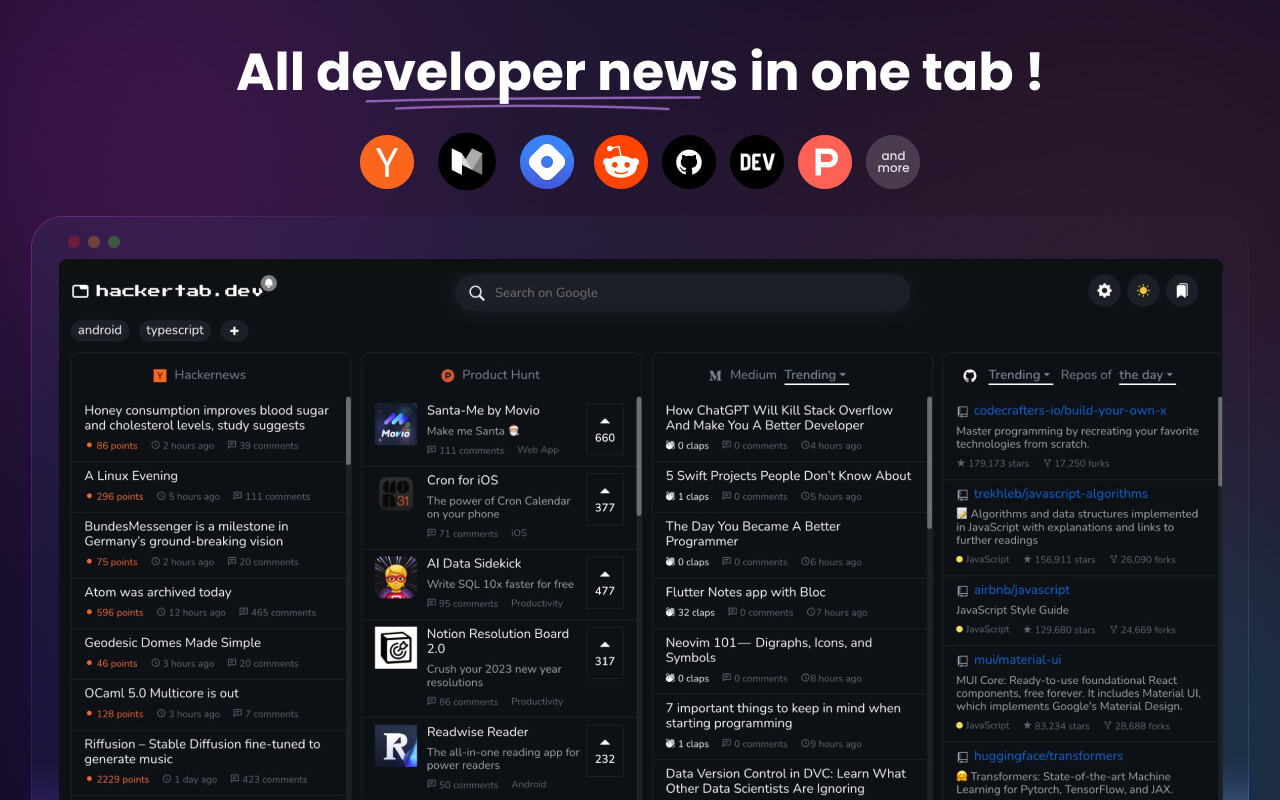
As a developer, it can be difficult to stay on top of everything happening in the field. Hackertab makes it easy by allowing you to customize your default tab page to include news, tools and events from top sources such as GitHub Trendings, Hacker News, DevTo, Medium, and Product Hunt. No matter what type of developer you are, you'll find valuable and relevant information with Hackertab. Don't miss out - give it a try today!
Demo
👉 now.hackertab.dev
👩💻 How to use it
- Install the extension from the Chrome store, or Mozilla add-ons
- Open a new tab
- The extension should now be running and visible
- Select your preferred programming languages and sources.
- Enjoy
🔥 Features
- 🆕 Daily updated content
- 💻 Customizable by programming language, framework and topic.
- 👍 Curated content from the best sources.
- 🔖 Bookmark and read it later.
- 🌙 Dark mode for when it gets late.
- ✨ AI-powered recommendations exclusively tailored to your preferences.
Even more features are going to come in the future!
Data sources
- Github Trendings
- Hackernews
- DevTo
- Hashnode
- Lobsters
- Confs.tech
- Product Hunt
- Reddit
- Freecodecamp
- Medium
- Indiehackers
- Hackernoon
- Custom RSS Feed
- or create an issue to ask for a new data source
Support
Please do not hesitate to ask a question, report a bug or add a suggestion. or send an email to hello@hackertab.dev
Development
Please use the develop branch. Create an .env file in the root directory with the following variables:
VITE_API_URL=https://api.hackertab.dev/
VITE_BUILD_TARGET=web # or extension
VITE_BUILD_PLATFORM=chrome # optional, used for extension builds (chrome or firefox)
VITE_FIREBASE_API_KEY= # optional for local dev, required for auth features
VITE_AMPLITUDE_URL= # optional
VITE_AMPLITUDE_KEY= # optional
VITE_SENTRY_DSN= # optional
Setup
Make sure you are using Node.js version 18.
$ git clone https://github.com/medyo/hackertab.dev.git
$ cd hackertab.dev
$ yarn
$ yarn start
Then visit http://localhost:5173 (or the port shown in your terminal).
🚀 Build
To build the project for different targets:
# Web build
$ yarn build:web

# Chrome extension
$ yarn build:chrome

# Firefox extension
$ yarn build:firefox
Maintainers
Licencing
Hackertab is licensed under the Apache License, Version 2.0.
See LICENSE for the full license text.