ha-fusion is a free, open source internet of things (iot) project written in Svelte and released under MIT. It has 3,018 GitHub stars, 176 forks and 128 open issues, and was last pushed 3 months ago. On this registry it ranks #24 of 69 tracked projects in Internet of Things (IoT), with 5 head-to-head comparisons available.

What is ha-fusion?

ha-fusion is a modern, easy-to-use and performant custom dashboard for Home Assistant, written in Svelte under the MIT licence, for home-automation users who want to design their own dashboard views and open them from any browser.

What it is

ha-fusion is a self-hosted front end for the Home Assistant platform. It is not an integration or a custom card: it is a standalone Svelte application that connects to an existing Home Assistant instance through the HASS_URL environment variable and serves its own dashboard on port 5050, configured with little more than a time zone and a mounted /app/data volume.

The concrete thing it replaces is the dashboard Home Assistant presents by default. ha-fusion lets a user define named views — a "Bedroom" view, a wall panel — and address them directly, for example with ?view=Bedroom in the URL, which makes the same installation usable both as an editing surface and as a fixed display. The project is MIT-licensed and records 3,018 stars, 176 forks and 128 open issues.

Key capabilities

  • Named views that can be opened directly from a URL query string such as ?view=Bedroom.
  • A ?menu=false query string that hides the menu button, aimed at wall-mounted tablets where the dashboard should not be changed by whoever touches the screen.
  • Keyboard shortcuts for editing work: f to filter, esc to exit, cmd + s to save, cmd + z to undo and cmd + shift + z to redo.
  • Three deployment routes from one project: a Home Assistant add-on, a Docker image published as ghcr.io/matt8707/ha-fusion, and a Kubernetes chart under charts/ha-fusion.
  • Configuration through the TZ and HASS_URL environment variables, with persistent data kept in the mounted /app/data directory.
  • Diagnostics through the add-on's "Log" tab, docker logs ha-fusion for container setups, and the browser console for frontend issues.
  • A documented development setup using pnpm, npm run dev -- --open, npm run check, npm run lint and npm run format.

Who uses it and how

  • Home Assistant users on "Operating System" or "Supervised" installations, who add the repository github.com/matt8707/addon-ha-fusion and install ha-fusion from the add-on store.
  • Users of "Container" or "Core" installations, who run it beside Home Assistant from the project's docker-compose.yml and update with docker-compose pull ha-fusion, or with a direct docker run that maps port 5050 and mounts a host directory for /app/data.
  • Operators on Kubernetes, who deploy from the chart under charts/ha-fusion.
  • Households and shared spaces that mount the dashboard on a tablet and use ?menu=false to keep the display effectively read-only.
  • Contributors working locally with node and pnpm.

Getting started

Installation is either as a Home Assistant add-on from the repository at github.com/matt8707/addon-ha-fusion, or, for "Container" and "Core" installations, by placing a copy of the project's docker-compose.yml in a suitable directory and running docker-compose up -d ha-fusion; the underlying command is docker run with ghcr.io/matt8707/ha-fusion, port 5050, a /app/data volume, and TZ and HASS_URL set.

How it compares

The facts name no other dashboard product, paid or self-hosted, so ha-fusion stands alone in this registry rather than in a documented field of alternatives. Its closest named relative is not a competitor but a successor: the README states that development continues in the fork knowald/ha-fusion, which uses Svelte 5 and carries ongoing fixes and new features, with a matching add-on repository at knowald/addon-ha-fusion and a migration guide in the fork's README.

When to use it — and when not to

A self-hoster must run and update a container or add-on, expose port 5050, mount storage for /app/data, and supply TZ and HASS_URL; no database or mail server is mentioned, but the container lifecycle stays with the operator. Anyone who depends on Ingress cannot use the query strings, since the README notes they are not read through Ingress, so URL-driven view selection and ingress-based access are mutually exclusive. Most importantly, the README states plainly that this repository is no longer actively maintained, so new users and anyone wanting current work should go to the knowald fork instead.

project readme (upstream, from github) — read inline

ha-fusion

A modern, easy-to-use and performant custom Home Assistant dashboard
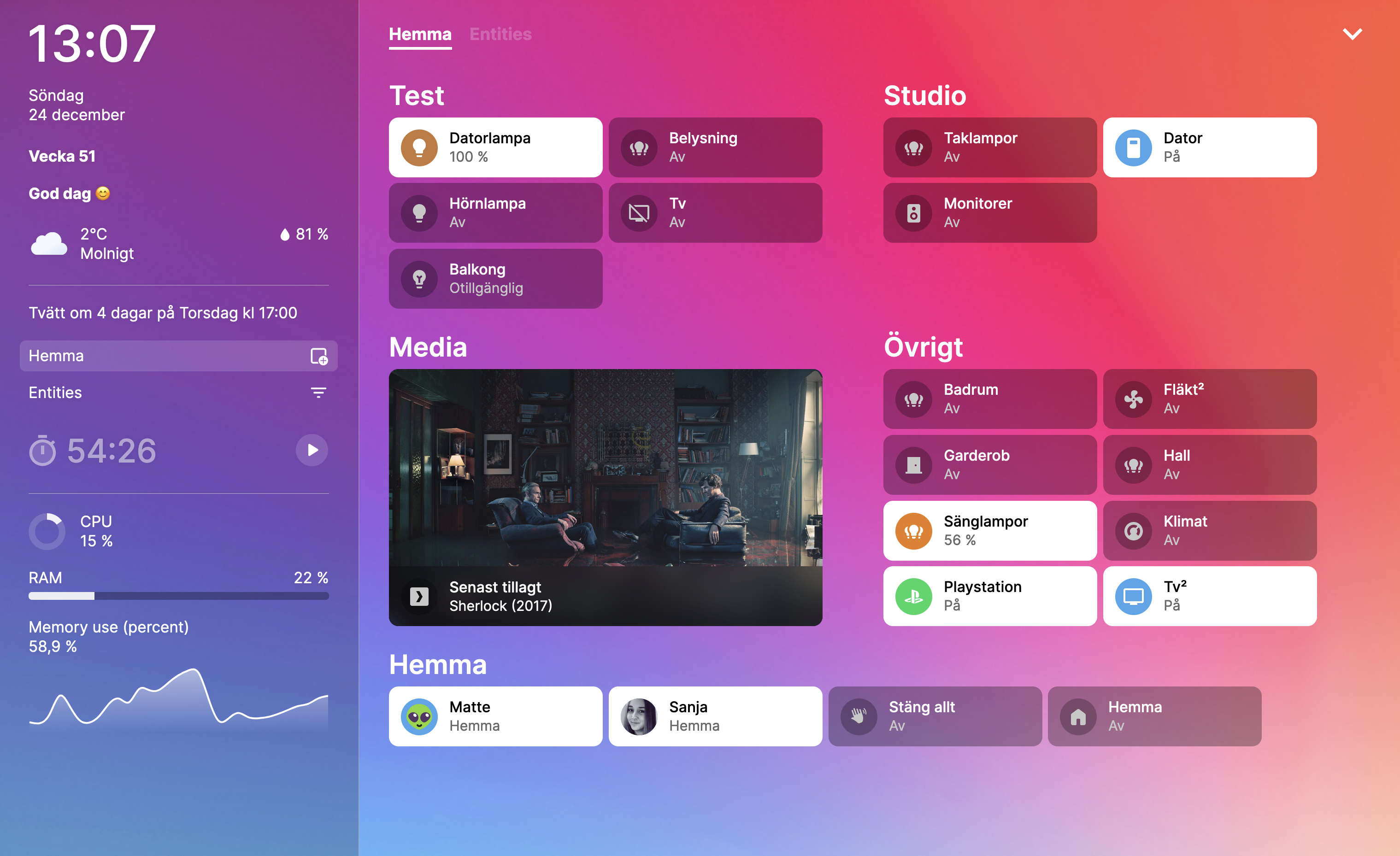
preview

If you find this project useful, be sure to 🌟 this repository! If you love it, please consider donating! ❤️


📣 Important

This repository is no longer actively maintained. Development continues in a maintained fork: knowald/ha-fusion (Svelte 5, ongoing fixes and new features). The matching add-on repository is knowald/addon-ha-fusion, and the fork's README has a short migration guide.


Installation

Add-on

For "Operating System" or "Supervised" installation methods, you can install ha-fusion as an add-on:

  1. Add Repository: To begin, add the ha-fusion add-on repository to your Home Assistant instance. Click the button below or manually add the repository using this URL: .

    Open your Home Assistant instance and show the add add-on repository dialog with a specific repository URL pre-filled.

  2. Install Add-on: After adding the repository, refresh the add-on store page. Locate ha-fusion in the list and proceed with the installation.


Docker

If you're using the "Container" or "Core" installation methods, ha-fusion can be installed via Docker:

  1. Docker Compose File: Place your edited copy of the docker-compose.yml file in a suitable directory.

  2. Create Container: Run the following commands in your terminal to start the container:

    cd path/to/docker-compose.yml
    docker-compose up -d ha-fusion
    
Update

To update to the latest version of ha-fusion, run the following commands:

docker-compose pull ha-fusion
docker-compose up -d ha-fusion
Other

Without docker-compose, updating the container involves additional steps. For each update, it's necessary to first stop the current container, remove it, pull the new image, and then execute the docker run command again.

docker run -d \
  --name ha-fusion \
  --network bridge \
  -p 5050:5050 \
  -v /path/to/ha-fusion:/app/data \
  -e TZ=Europe/Stockholm \
  -e HASS_URL=http://192.168.1.241:8123 \
  --restart always \
  ghcr.io/matt8707/ha-fusion
Kubernetes

If you prefer to use Kubernetes, see Chart README.md

...


Query strings

These will only function if you have exposed a port in the add-on configuration or by using Docker. Note that when using Ingress, query strings cannot be read.

View

To set a particular view when the page loads, add the "view" parameter. For example, if you have a "Bedroom" view, append the query string ?view=Bedroom to the URL.

Menu

To disable the menu button, append the query string ?menu=false to the URL. This is useful when you want to avoid unwanted changes to your dashboard, such as on wall-mounted tablets.


Keyboard Shortcuts

Key Description
f filter
esc exit
cmd + s save
cmd + z undo
cmd + shift + z redo

Debug

To debug any errors, check the "Log" tab if you're using the addon, or use docker logs ha-fusion for Docker setups. To inspect frontend issues, open the browser's console.


Develop

To begin contributing to the project, you'll first need to install node. It's also recommended to install pnpm. If you're unfamiliar with Svelte, consider doing the tutorial at

# prerequisites (macos)
brew install node pnpm

# install
git clone https://github.com/matt8707/ha-fusion.git
cd ha-fusion
pnpm install

# environment
cp .env.example .env
code .env

# server
npm run dev -- --open

# dependencies
pnpm outdated
pnpm update

# lint
npm run check
npm run lint
npm run format

Frequently asked questions

Is ha-fusion free to use?

ha-fusion is open source under the MIT licence. There is no licence fee and no seat count — you can self-host it or, where the project offers one, pay a vendor for a managed version instead.

What does ha-fusion do?

A modern, easy-to-use and performant custom Home Assistant dashboard

What is ha-fusion written in?

ha-fusion is primarily written in Svelte. Its source is publicly available at https://github.com/matt8707/ha-fusion, and it has 3,018 GitHub stars.