




Overview
GPUStack is an open-source GPU cluster manager for AI model serving and GPU instance provisioning. It configures and orchestrates inference engines — vLLM, SGLang, TensorRT-LLM, or your own — and lets you launch SSH-accessible GPU instances on demand. Its core features include:
- Multi-Cluster GPU Management. Manages GPU clusters across multiple environments. This includes on-premises servers, Kubernetes clusters, and cloud providers.
- Pluggable Inference Engines. Automatically configures high-performance inference engines such as vLLM, SGLang, and TensorRT-LLM. You can also add custom inference engines as needed.
- Day 0 Model Support. GPUStack's pluggable engine architecture enables you to deploy new models on the day they are released.
- Performance-Optimized Configurations. Offers pre-tuned modes for low latency or high throughput. GPUStack supports extended KV cache systems like LMCache and HiCache to reduce TTFT. It also includes built-in support for speculative decoding methods such as EAGLE3, MTP, and N-grams.
- GPU Instances. Launches SSH-accessible GPU instances on demand for development, fine-tuning, and interactive workloads.
- Enterprise-Grade Operations. Offers support for automated failure recovery, load balancing, monitoring, authentication, and access control.
Architecture
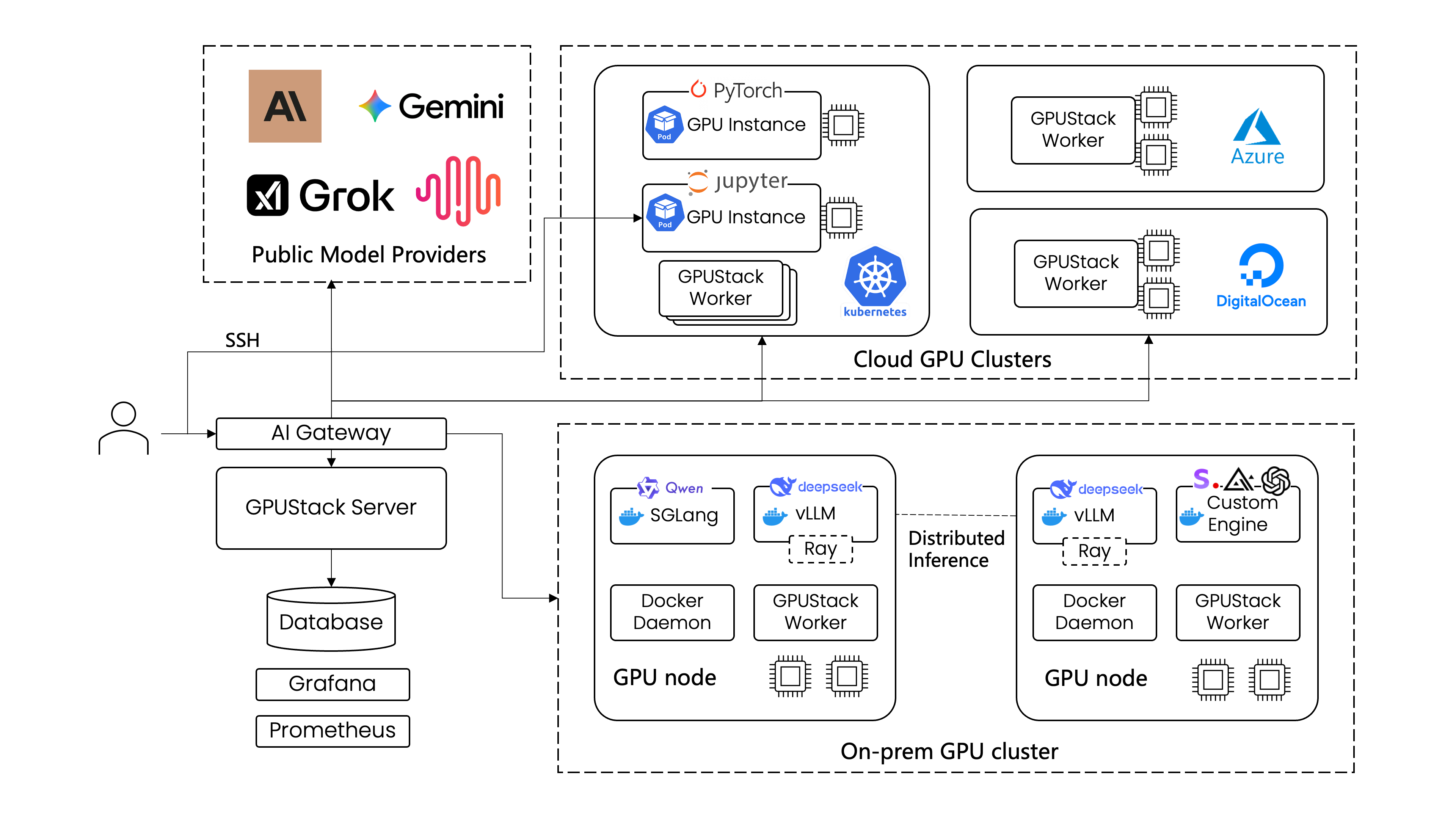
GPUStack enables development teams, IT organizations, and service providers to deliver Model-as-a-Service at scale. It supports industry-standard APIs for LLM, voice, image, and video models. The platform includes built-in user authentication and access control, real-time monitoring of GPU performance and utilization, and detailed metering of token usage and API request rates.
The figure below illustrates how a single GPUStack server can manage multiple GPU clusters across both on-premises and cloud environments. The GPUStack scheduler allocates GPUs to maximize resource utilization and selects the appropriate inference engines for optimal performance. Administrators also gain full visibility into system health and metrics through integrated Grafana and Prometheus dashboards.
Cluster Visibility at a Glance
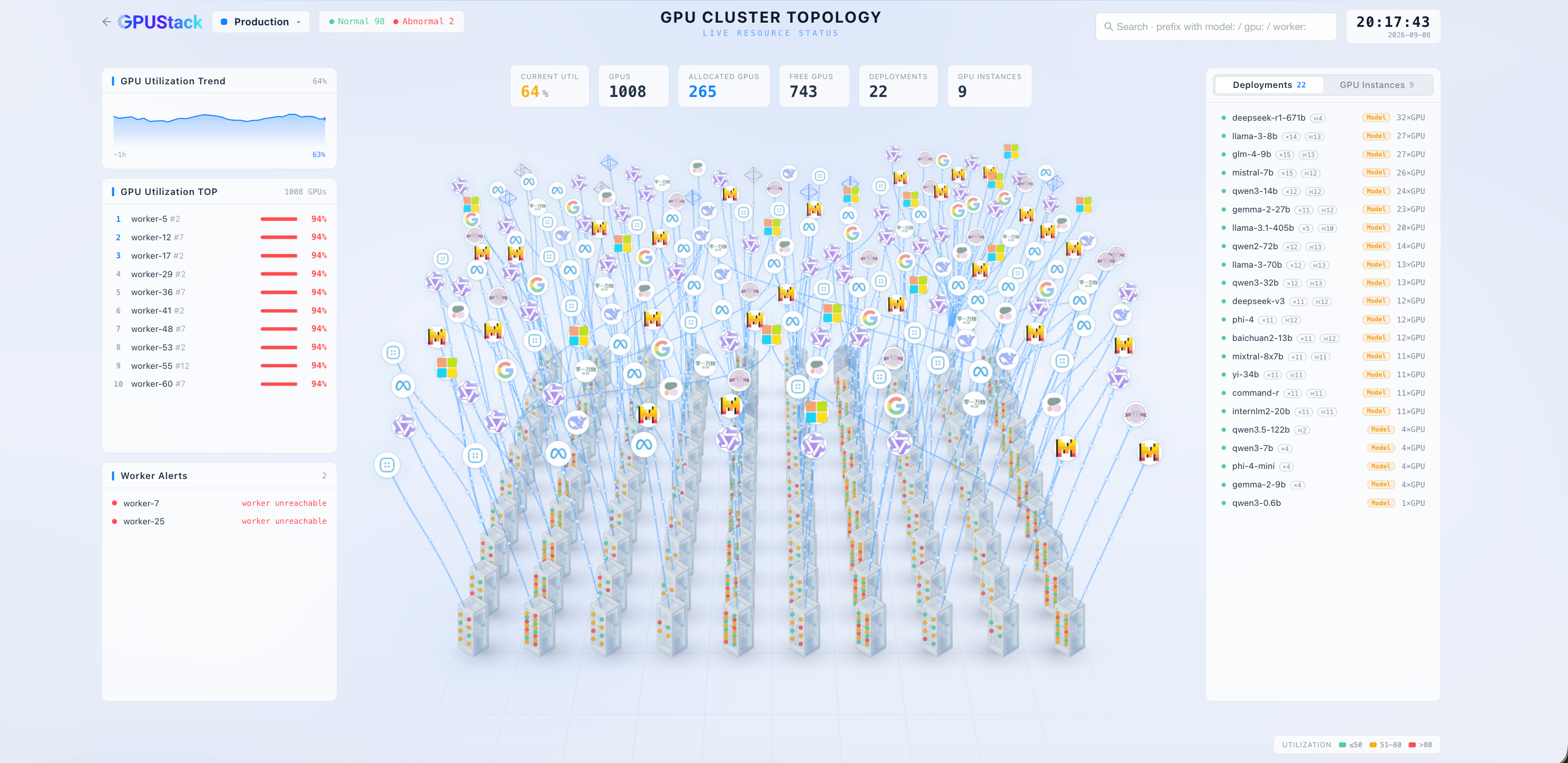
The GPU Cluster Topology view in GPUStack Enterprise provides a live, bird's-eye view of your entire fleet — every worker, GPU, and model deployment in one place, with real-time utilization, allocation, and health status.
Optimized Inference Performance
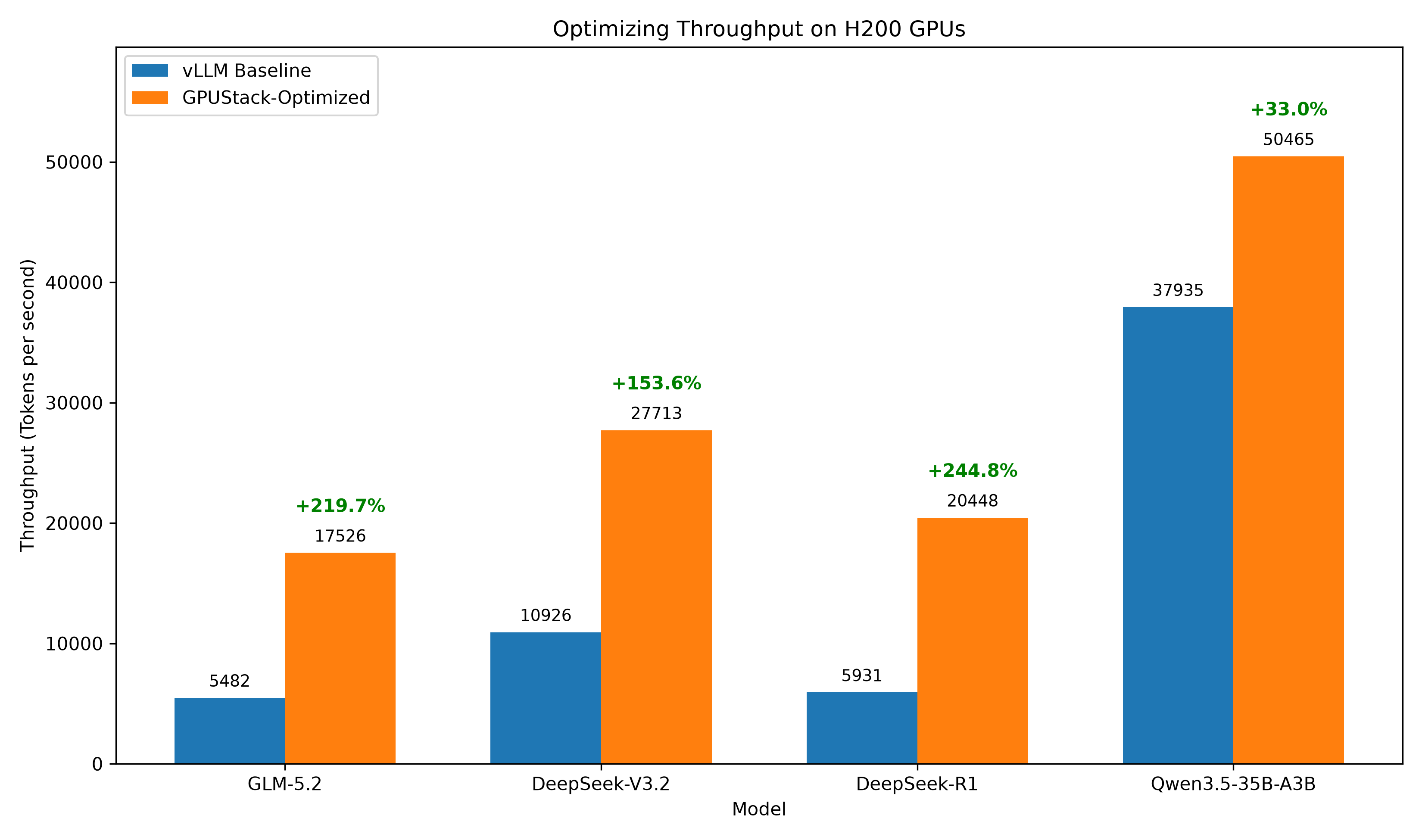
GPUStack's automated engine selection and parameter optimization deliver strong inference performance out of the box. The following figure shows throughput improvements over default vLLM configurations:
For detailed benchmarking methods and results, visit our Inference Performance Lab.
Supported Accelerators
GPUStack supports a wide range of accelerators for AI inference:
- NVIDIA GPU
- AMD GPU
- Ascend NPU
- Hygon DCU
- MThreads GPU
- Iluvatar GPU
- MetaX GPU
- Cambricon MLU
- T-Head PPU
For detailed requirements and setup instructions, see the Installation Requirements documentation.
Quick Start
Prerequisites
- A node with at least one NVIDIA GPU. For other GPU types, please check the guidelines in the GPUStack UI when adding a worker, or refer to the Installation documentation for more details.
- Ensure the NVIDIA driver, Docker and NVIDIA Container Toolkit are installed on the worker node.
- (Optional) A CPU node for hosting the GPUStack server. The GPUStack server does not require a GPU and can run on a CPU-only machine. Docker must be installed. Docker Desktop (for Windows and macOS) is also supported. If no dedicated CPU node is available, the GPUStack server can be installed on the same machine as a GPU worker node.
- Only Linux is supported for GPUStack worker nodes. If you use Windows, consider using WSL2 and avoid using Docker Desktop. macOS is not supported for GPUStack worker nodes.
Install GPUStack
Run the following command to install and start the GPUStack server using Docker:
sudo docker run -d --name gpustack \
    --restart unless-stopped \
    -p 80:80 \
    --volume gpustack-data:/var/lib/gpustack \
    gpustack/gpustack
Alternative: Use Quay Container Registry Mirror
If you cannot pull images from Docker Hub or the download is very slow, you can use our Quay.io mirror by pointing your registry to quay.io:
sudo docker run -d --name gpustack \
    --restart unless-stopped \
    -p 80:80 \
    --volume gpustack-data:/var/lib/gpustack \
    quay.io/gpustack/gpustack \
    --system-default-container-registry quay.io
Check the GPUStack startup logs:
sudo docker logs -f gpustack
After GPUStack starts, run the following command to get the default admin password:
sudo docker exec gpustack cat /var/lib/gpustack/initial_admin_password
Open your browser and navigate to http://your_host_ip to access the GPUStack UI. Use the default username admin and the password you retrieved above to log in.
Set Up a GPU Cluster
On the GPUStack UI, navigate to the
Clusterspage.Click the
Add Clusterbutton.Select
Dockeras the cluster provider.Fill in the
NameandDescriptionfields for the new cluster, then click theSavebutton.Follow the UI guidelines to configure the new worker node. You will need to run a Docker command on the worker node to connect it to the GPUStack server. The command will look similar to the following:
sudo docker run -d --name gpustack-worker \
      --restart=unless-stopped \
      --privileged \
      --network=host \
      --volume /var/run/docker.sock:/var/run/docker.sock \
      --volume gpustack-data:/var/lib/gpustack \
      --runtime nvidia \
      gpustack/gpustack \
      --server-url http://your_gpustack_server_url \
      --token your_worker_token \
      --advertise-address 192.168.1.2
Execute the command on the worker node to connect it to the GPUStack server.
After the worker node connects successfully, it will appear on the
Workerspage in the GPUStack UI.
Deploy a Model
Navigate to the
Catalogpage in the GPUStack UI.Select the
Qwen3.5-0.8Bmodel from the list of available models.
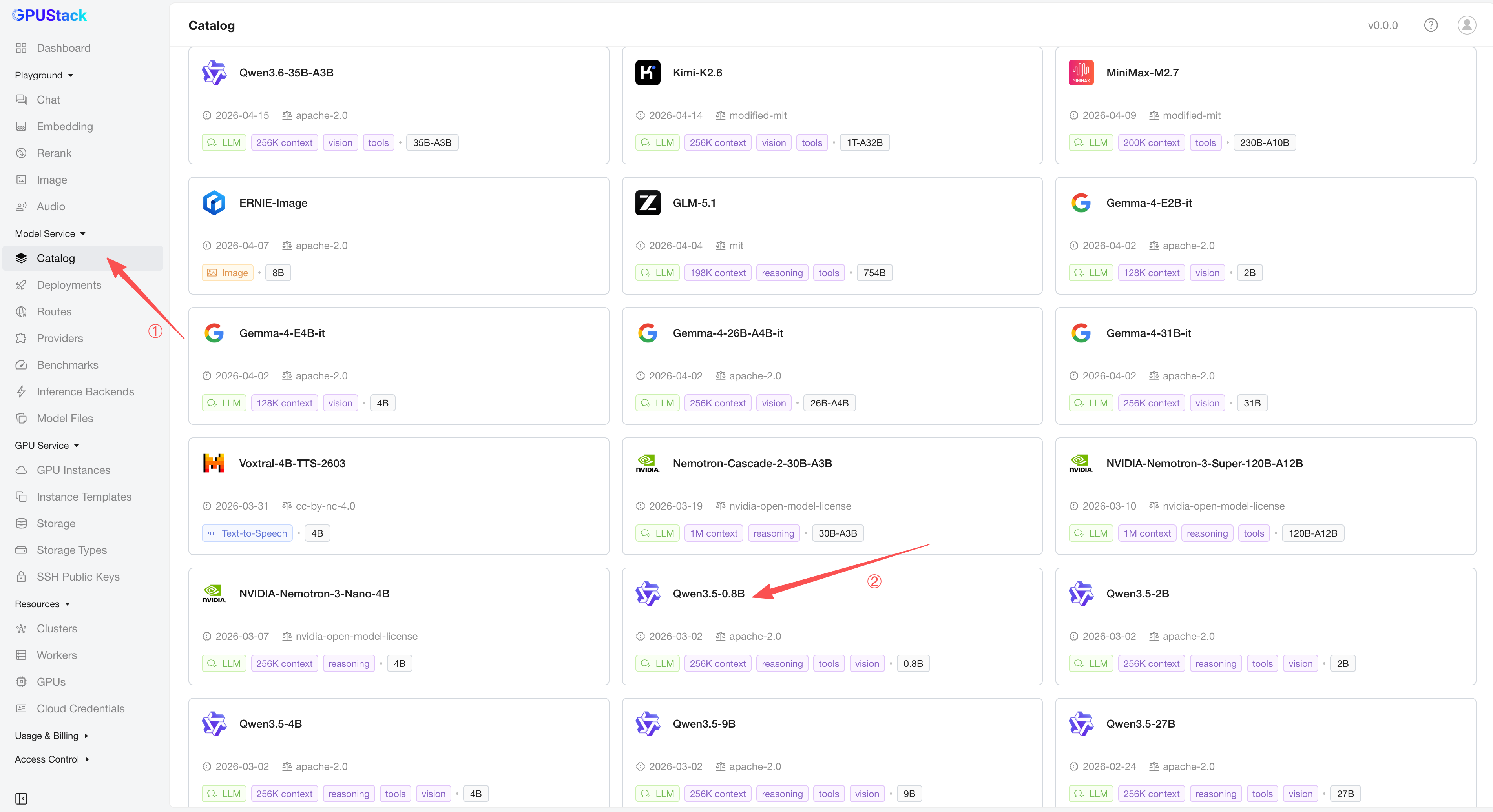
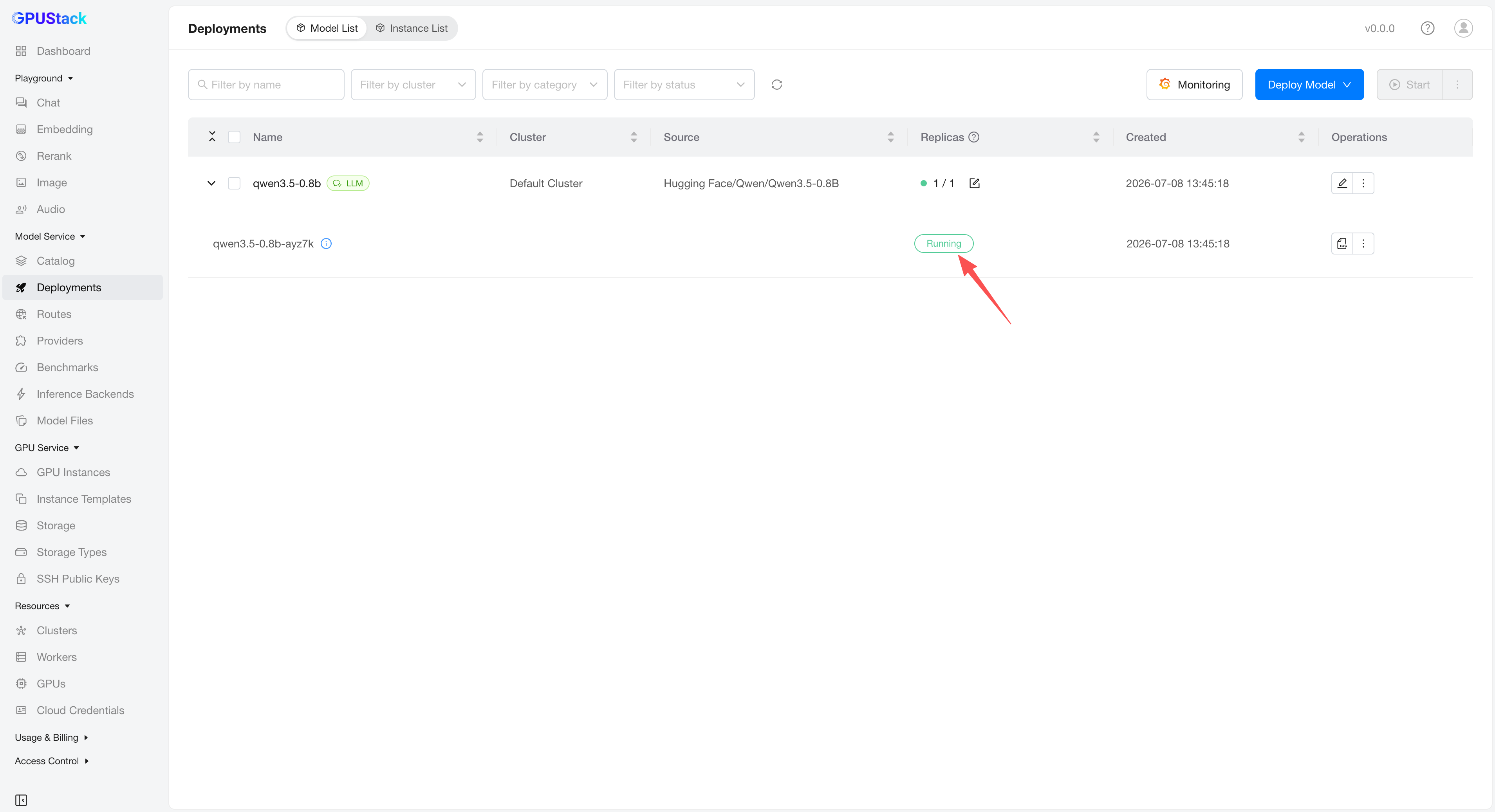
After the deployment compatibility checks pass, click the
Savebutton to deploy the model.GPUStack will start downloading the model files and deploying the model. When the deployment status shows
Running, the model has been deployed successfully.
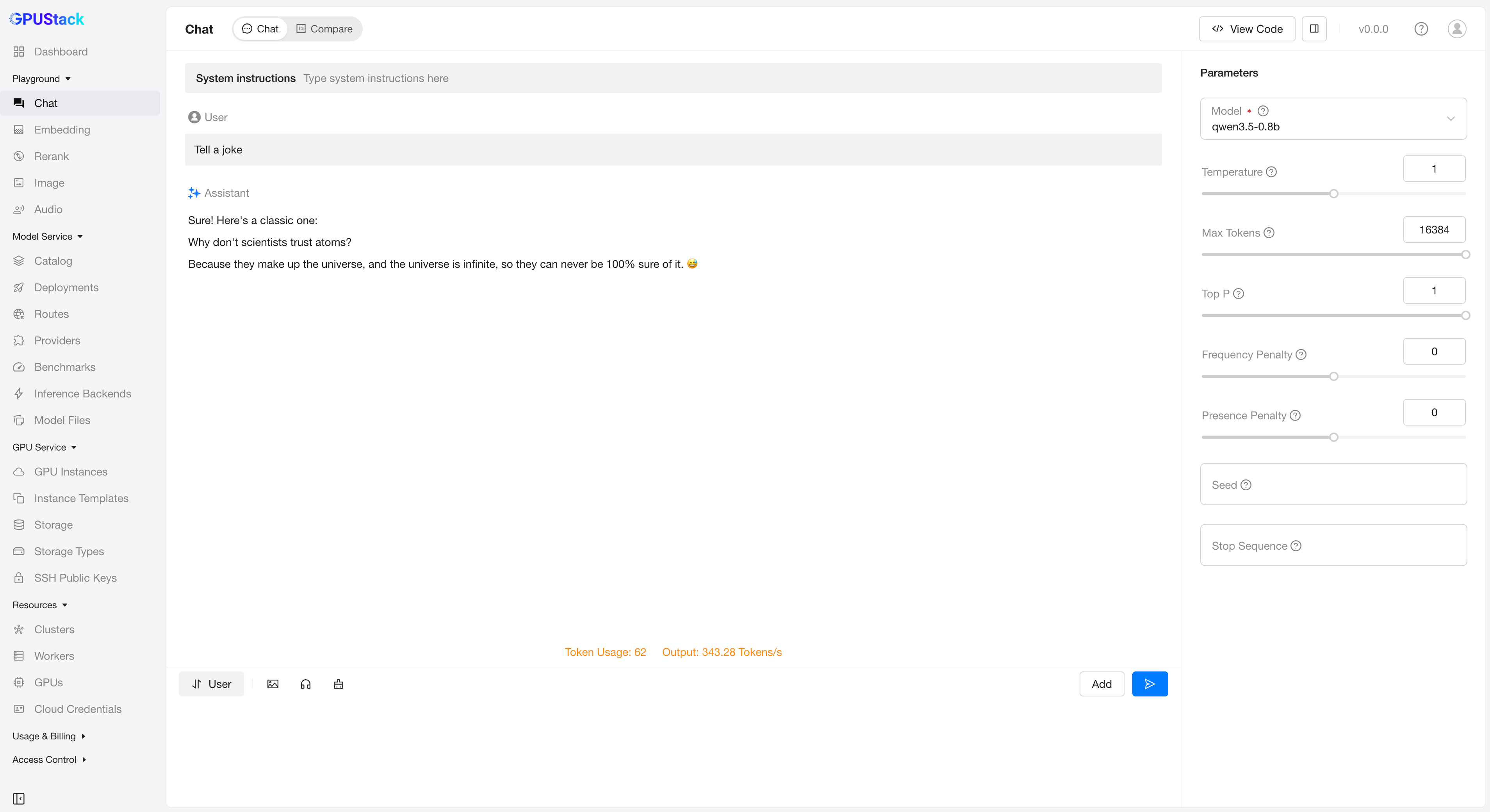
- Click
Playground - Chatin the navigation menu, check that the modelqwen3.5-0.8bis selected from the top-rightModeldropdown. Now you can chat with the model in the UI playground.
Use the model via API
Navigate to the
Access Control>API Keyspage, then click theNew API Keybutton.Fill in the
Nameand click theSavebutton.Copy the generated API key and save it somewhere safe. Please note that you can only see it once on creation.
You can now use the API key to access the OpenAI-compatible API endpoints provided by GPUStack. For example, use curl as the following:
# Replace `your_api_key` and `your_gpustack_server_url`
# with your actual API key and GPUStack server URL.
export GPUSTACK_API_KEY=your_api_key
curl http://your_gpustack_server_url/v1/chat/completions \
  -H "Content-Type: application/json" \
  -H "Authorization: Bearer $GPUSTACK_API_KEY" \
  -d '{
    "model": "qwen3.5-0.8b",
    "messages": [
      {
        "role": "system",
        "content": "You are a helpful assistant."
      },
      {
        "role": "user",
        "content": "Tell me a joke."
      }
    ],
    "stream": true
  }'
Documentation
Please see the official docs site for complete documentation.
Build
Install Docker.
Run
make package.
Contributing
Please read the Contributing Guide if you're interested in contributing to GPUStack.
Join Community
Any issues or have suggestions, feel free to join our Community for support.
License
Copyright (c) 2024-2026 The GPUStack authors
Licensed under the Apache License, Version 2.0 (the "License"); you may not use this file except in compliance with the License. You may obtain a copy of the License at LICENSE file for details.
Unless required by applicable law or agreed to in writing, software distributed under the License is distributed on an "AS IS" BASIS, WITHOUT WARRANTIES OR CONDITIONS OF ANY KIND, either express or implied. See the License for the specific language governing permissions and limitations under the License.