gpu-hot is a free, open source machine learning infrastructure project written in JavaScript and released under MIT. It has 1,636 GitHub stars, 83 forks and 8 open issues, and was last pushed 24 days ago. On this registry it ranks #48 of 57 tracked projects in Machine Learning Infrastructure, with 5 head-to-head comparisons available.

What is gpu-hot?

gpu-hot is a self-hosted, real-time NVIDIA GPU monitoring dashboard that ships as a Docker image and serves a live browser UI on port 1312 for a single machine or an entire cluster of GPU servers.

What it is

gpu-hot lives in the NVIDIA GPU monitoring and MLOps tooling space. It is a lightweight, web-based, self-hosted dashboard: a FastAPI server (app.py) polls the GPUs through NVML in core/monitor.py, falls back to nvidia-smi for older cards, and pushes the results over Socket.IO to a frontend built from Chart.js chart code and GPU cards. The project is MIT-licensed, has 1,636 stars and 83 forks, and documents an HTTP API, a WebSocket feed, and a multi-node hub mode in the same repository.

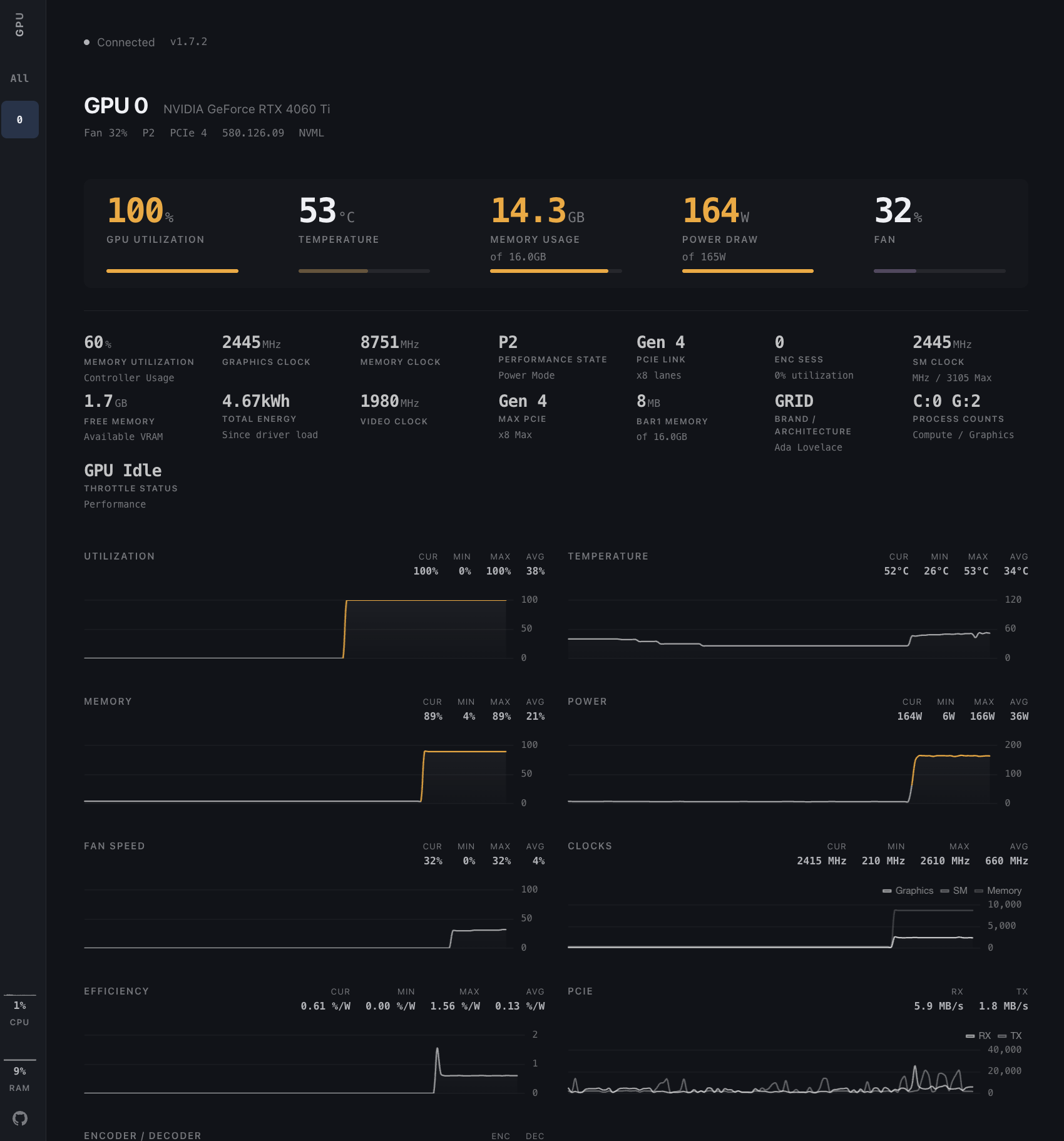
The concrete problem it solves is the terminal loop. Checking a fleet of GPU boxes normally means opening an SSH session to each host and rerunning nvidia-smi by hand, which gives a snapshot rather than a live view and does not aggregate across machines. gpu-hot replaces that with one continuously updating page showing utilization, temperature, memory, power draw, fan speed, clock speeds, PCIe info, P-State, throttle status and encoder/decoder sessions, alongside PID-level process monitoring and host CPU, RAM, swap, disk and network metrics.

Key capabilities

  • Sub-second real-time metrics collected through NVML, with UPDATE_INTERVAL controlling the polling interval (default 0.5 seconds).
  • Automatic multi-GPU detection, documented as scaling from 1 to 100+ GPUs, with NVIDIA_VISIBLE_DEVICES=0,1 to restrict monitoring to specific cards.
  • Process monitoring that reports PID and memory usage, enabled by running the container with --init --pid=host.
  • Historical charts for utilization, temperature, power draw and clock speeds, plus system metrics for CPU, RAM, swap, disk and network.
  • Multi-node aggregation: GPU_HOT_MODE=hub with a comma-separated NODE_URLS=http://server1:1312,http://server2:1312 list, where the hub machine itself needs no GPU.
  • HTTP endpoints GET /api/gpu-data for a JSON metrics snapshot and GET /api/version for version and update info, plus a Socket.IO stream at ws://localhost:1312/socket.io/ delivering data.gpus, data.processes and data.system.
  • nvidia-smi fallback mode for older GPUs via NVIDIA_SMI=true and NVIDIA_SMI_INTERVAL (default 2.0 seconds); polling pauses automatically when no clients are connected, so idle CPU usage stays near zero.

Who uses it and how

  • Individual researchers and engineers watching a single workstation or training box, launched with one docker run --gpus all command.
  • ML platform and DevOps teams running training fleets, who start one container per GPU server with NODE_NAME=$(hostname) and point a GPU-less hub host at all of them.
  • Teams working on CUDA, LLM and MLOps workloads that need per-process visibility to find which job is holding memory or driving power draw.
  • Operators who want the metrics elsewhere, consuming GET /api/gpu-data or the Socket.IO feed instead of reading the dashboard by eye.
  • On-premises and self-hosted environments where the image runs inside the existing Docker and NVIDIA Container Toolkit setup rather than sending telemetry outward.

Getting started

Run the published image with docker run -d --gpus all -p 1312:1312 ghcr.io/psalias2006/gpu-hot:latest and open http://localhost:1312. Building from source uses git clone, cd gpu-hot and docker-compose up --build, and both paths require Docker plus the NVIDIA Container Toolkit.

How it compares

The facts supplied for this entry list no paid products that gpu-hot replaces and name no sibling monitoring tools, so it stands alone in this registry. Its own documentation places it as a self-hosted, MIT-licensed container image, with the nvidia-smi command it wraps as the nearest reference point rather than any commercial product.

When to use it β€” and when not to

A self-hoster must run Docker and the NVIDIA Container Toolkit on every GPU host, though the hub machine needs no GPU of its own. Process names require --init --pid=host, which grants the container access to host process information, so it should not be enabled where that access is unacceptable. The README excerpt documents no authentication or TLS, and the registry lists the language as JavaScript while the README describes a Python 3.8+ FastAPI stack, so anyone deploying beyond a trusted network or contributing code should verify those points first.

project readme (upstream, from github) β€” read inline

GPU Hot

Real-time NVIDIA GPU monitoring dashboard. Lightweight, web-based, and self-hosted.

Python Docker License: MIT NVIDIA

Live Demo


Usage

Monitor a single machine or an entire cluster with the same Docker image.

Single machine:

docker run -d --gpus all -p 1312:1312 ghcr.io/psalias2006/gpu-hot:latest

Multiple machines:

# On each GPU server
docker run -d --gpus all -p 1312:1312 -e NODE_NAME=$(hostname) ghcr.io/psalias2006/gpu-hot:latest

# On a hub machine (no GPU required)
docker run -d -p 1312:1312 -e GPU_HOT_MODE=hub -e NODE_URLS=http://server1:1312,http://server2:1312,http://server3:1312 ghcr.io/psalias2006/gpu-hot:latest

Open http://localhost:1312

Older GPUs: Add -e NVIDIA_SMI=true if metrics don't appear.

Process monitoring: Add --init --pid=host to see process names. Note: This allows the container to access host process information.

From source:

git clone https://github.com/psalias2006/gpu-hot
cd gpu-hot
docker-compose up --build

Requirements: Docker + NVIDIA Container Toolkit


Features

  • Real-time metrics (sub-second)
  • Automatic multi-GPU detection
  • Process monitoring (PID, memory usage)
  • Historical charts (utilization, temperature, power, clocks)
  • System metrics (CPU, RAM)
  • Scale from 1 to 100+ GPUs

Metrics: Utilization, temperature, memory, power draw, fan speed, clock speeds, PCIe info, P-State, throttle status, encoder/decoder sessions


Configuration

Environment variables:

NVIDIA_VISIBLE_DEVICES=0,1     # Specific GPUs (default: all)
NVIDIA_SMI=true                # Force nvidia-smi mode for older GPUs
GPU_HOT_MODE=hub               # Set to 'hub' for multi-node aggregation (default: single node)
NODE_NAME=gpu-server-1         # Node display name (default: hostname)
NODE_URLS=http://host:1312...  # Comma-separated node URLs (required for hub mode)
UPDATE_INTERVAL=0.5            # Optional. NVML polling interval in seconds (default: 0.5)
NVIDIA_SMI_INTERVAL=2.0        # Optional. nvidia-smi fallback polling interval (default: 2.0)

Polling is paused automatically when no clients are connected, so idle CPU usage stays near zero.

Backend (core/config.py):

PORT = 1312            # Server port

API

HTTP

GET /              # Dashboard
GET /api/gpu-data  # JSON metrics snapshot
GET /api/version   # Version and update info

WebSocket

const ws = new WebSocket('ws://localhost:1312/socket.io/');

ws.onmessage = (event) => {
  const data = JSON.parse(event.data);
  // data.gpus      β€” per-GPU metrics
  // data.processes  β€” active GPU processes
  // data.system     β€” host CPU, RAM, swap, disk, network
};

Project Structure

gpu-hot/
β”œβ”€β”€ app.py                      # FastAPI server + routes
β”œβ”€β”€ version.py                  # Version info
β”œβ”€β”€ core/
β”‚   β”œβ”€β”€ config.py               # Configuration
β”‚   β”œβ”€β”€ monitor.py              # NVML GPU monitoring
β”‚   β”œβ”€β”€ handlers.py             # WebSocket handlers
β”‚   β”œβ”€β”€ hub.py                  # Multi-node hub aggregator
β”‚   β”œβ”€β”€ hub_handlers.py         # Hub WebSocket handlers
β”‚   β”œβ”€β”€ nvidia_smi_fallback.py  # nvidia-smi fallback for older GPUs
β”‚   └── metrics/
β”‚       β”œβ”€β”€ collector.py        # Metrics collection
β”‚       └── utils.py            # Metric utilities
β”œβ”€β”€ static/
β”‚   β”œβ”€β”€ css/
β”‚   β”‚   β”œβ”€β”€ tokens.css          # Design tokens (colors, spacing)
β”‚   β”‚   β”œβ”€β”€ layout.css          # Page layout (sidebar, main)
β”‚   β”‚   └── components.css      # UI components (cards, charts)
β”‚   β”œβ”€β”€ js/
β”‚   β”‚   β”œβ”€β”€ chart-config.js     # Chart.js configurations
β”‚   β”‚   β”œβ”€β”€ chart-manager.js    # Chart data + lifecycle
β”‚   β”‚   β”œβ”€β”€ chart-drawer.js     # Correlation drawer
β”‚   β”‚   β”œβ”€β”€ gpu-cards.js        # GPU card rendering
β”‚   β”‚   β”œβ”€β”€ socket-handlers.js  # WebSocket + batched rendering
β”‚   β”‚   β”œβ”€β”€ ui.js               # Sidebar navigation
β”‚   β”‚   └── app.js              # Init + version check
β”‚   └── favicon.svg
β”œβ”€β”€ templates/index.html
β”œβ”€β”€ Dockerfile
β”œβ”€β”€ docker-compose.yml
└── requirements.txt

Troubleshooting

No GPUs detected:

nvidia-smi  # Verify drivers work
docker run --rm --gpus all nvidia/cuda:12.1.0-base-ubuntu22.04 nvidia-smi  # Test Docker GPU access

Hub can't connect to nodes:

curl http://node-ip:1312/api/gpu-data  # Test connectivity
sudo ufw allow 1312/tcp                # Check firewall

Performance issues: Increase UPDATE_INTERVAL (env var, seconds β€” e.g. -e UPDATE_INTERVAL=2.0)


Star History

Star History Chart

Contributing

PRs welcome. Open an issue for major changes.

License

MIT - see LICENSE

Frequently asked questions

Is gpu-hot free to use?

gpu-hot is open source under the MIT licence. There is no licence fee and no seat count β€” you can self-host it or, where the project offers one, pay a vendor for a managed version instead.

What does gpu-hot do?

πŸ”₯ Real-time NVIDIA GPU dashboard

What is gpu-hot written in?

gpu-hot is primarily written in JavaScript. Its source is publicly available at https://github.com/psalias2006/gpu-hot, and it has 1,636 GitHub stars.