Design By Achno
Overview
Installation
Contributions
Overview :framed_picture:
Gowall started as a tool to convert an image ( specifically a wallpaper ) to any color-scheme / palette you like! It has now evolved to a swiss army knife of image prosessing offering (OCR,Image upsacling,image compression and a lot more)
Docs
Gowall is really well documented with visual examples: Gowall Docs
Features
❗ Although Gowall is a CLI tool, it has an Image preview feature that allows
printing images directly in the terminal. See Gowall Terminal Image preview
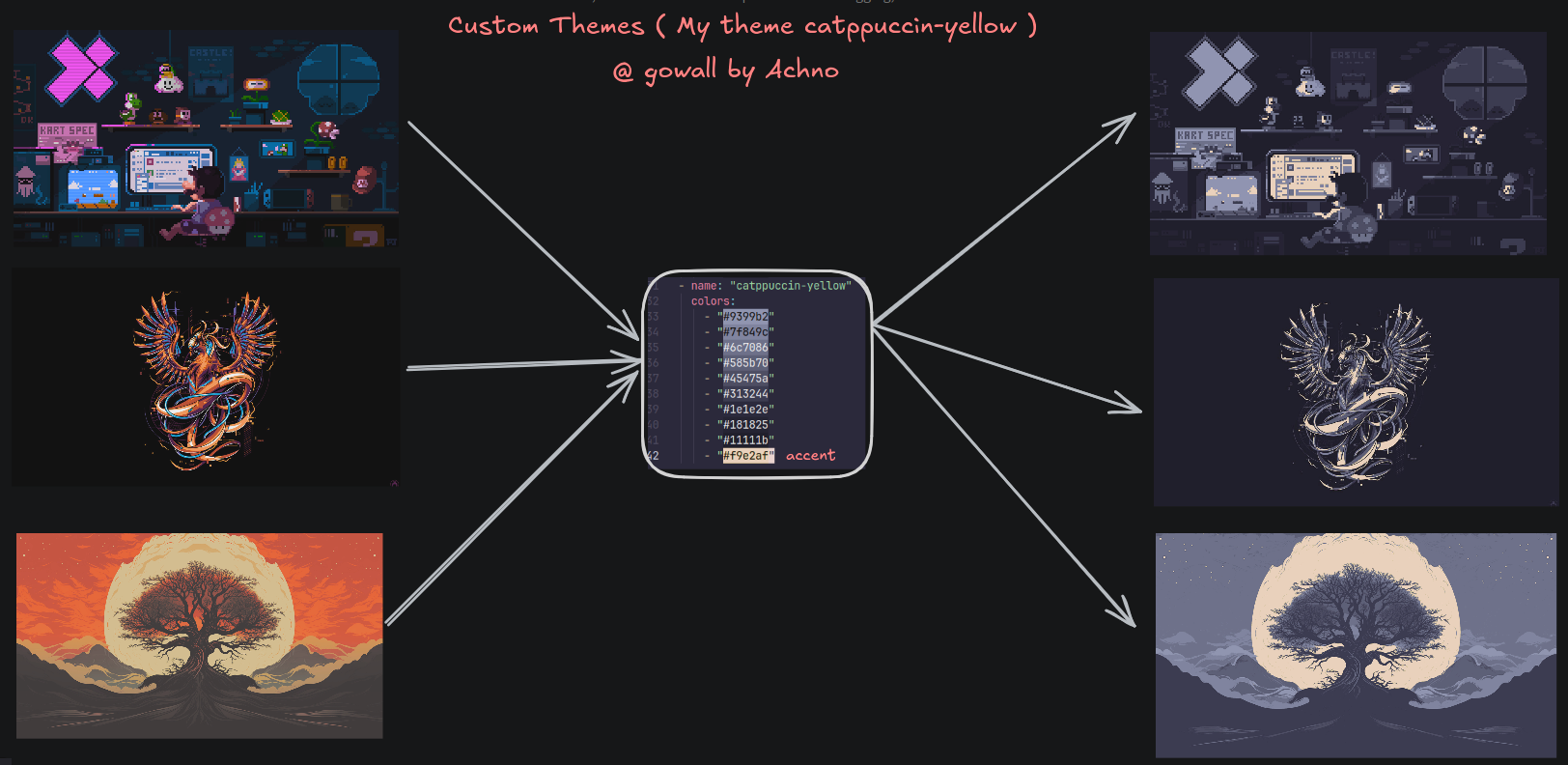
- Convert Wallpaper's theme – Recolor an image to match your favorite + (Custom) themes (Catppuccin...).
- Image compression - Reduce the size of png,jpeg,jpg,webp images.
- OCR - Extract text from images and pdfs', supporting 9+ providers (Traditional OCR, Visual Language Models and hybrid methods).
- AI Image Upscaling - Increase the resolution of the image while preserving or improving its quality.
- Convert Icon's theme (svg,ico) - Recolor your icons to match a theme.
- Support for Unix pipes/redirection - Read from stdin and write to stdout.
- Image to pixel art - Transforms your image to the typical blocky appearance of pixel art.
- Replace a specific color in an image - Pretty self explanatory.
- Create a gif from images - Use the images as frames and specify a delay and the number of loops.
- Extract color palette - Extracts all the dominant colors in an image (like pywal).
- Change Image format - Ex. change format from .webp to .png.
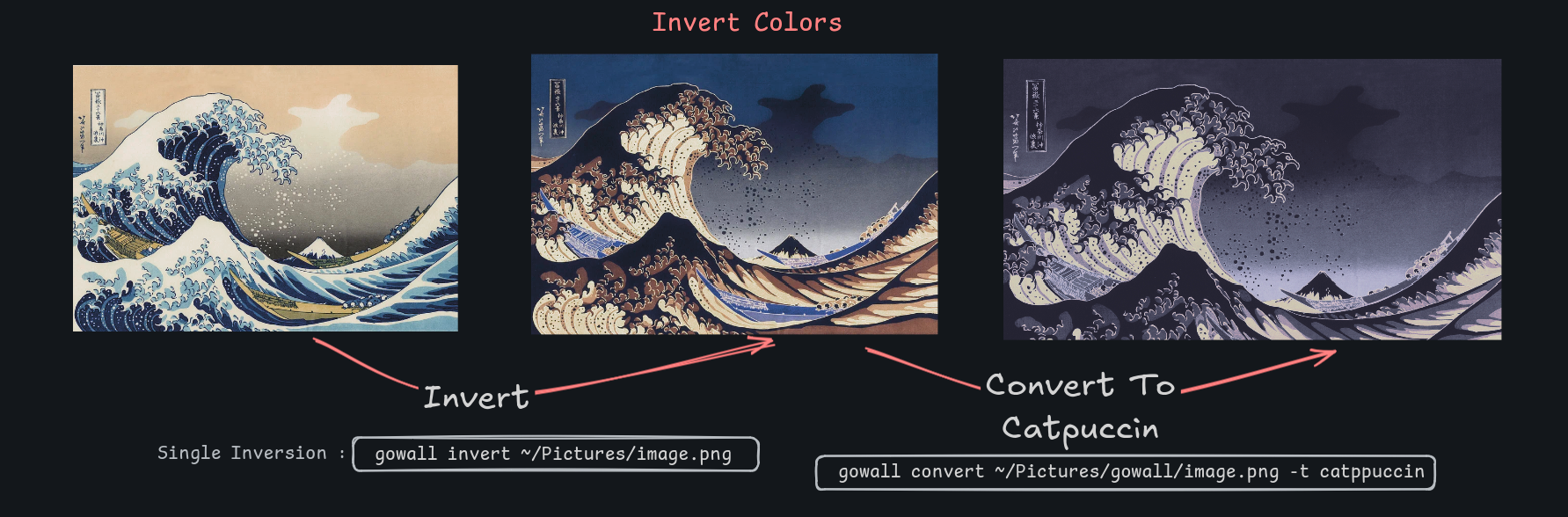
- Invert image colors - Pretty self explanatory.
- Draw on the Image - Draw borders,grids on the image
- Remove the background of the image - Pretty self explanatory.
- Effects - Mirror,Flip,Grayscale,change brightness and more to come!
- Daily wallpapers - Explore community-voted wallpapers that reset daily.
Themes :art:
You can check the section here on how to create a Custom Theme.
The currently supported themes are featured below, if your favourite theme is missing open an issue or a pull request
All themes can be shown (both default and user-created via ~/.config/gowall/config.yml) by gowall list.
- Catppuccin flavors
- Dracula
- Everforest
- Gruvbox
- Nord
- Onedark
- Solarized
- Tokyo-dark/storm/moon
Click to see more themes
- Arc Dark
- Atom Dark
- Atom One Light
- Cat Frappe/latte
- Cyberpunk
- Github Light (black & white)
- Kanagawa
- Material
- Melange (Dark & Light)
- Night Owl
- Oceanic Next
- Rose Pine
- Shades of Purple
- Sunset Aurant
- Sunset Saffron
- Sunset Tangerine
- Sweet
- Synthwave 84
Installation :package:
Make sure to do gowall -v and compare it against the release page version,
since the docs only show the commands/flags and capabilities of the latest released version.
Grab the binary from the release section (Stable Release) 🢀 Prefered Method
- If the installation options do not cover your package manager of your distro/OS
- If gowall in your package manager is not up to date as per the release section's latest version
- If you don't know how to install gowall and don't want to build the project.
Head over to the release section
Choose the latest version of gowall. You should see a .tar.gz for your operating system and architecture. Simply Extract the binary inside named gowall and place it inside your $PATH
sudo cp gowall /usr/local/bin/
MacOS (Homebrew) - currently on v0.2.0
brew install gowall
Thank you to chenrui333. You can find the ruby formula there.
Arch linux - AUR
yay -S gowall
Fedora - COPR
sudo dnf copr enable achno/gowall
sudo dnf install gowall
NixOS - ( Maintainer : Emily Trau)
  environment.systemPackages = [
    pkgs.gowall
  ];
More installation options : here
Void Linux - ( Maintainer : elbachir-one)
sudo xbps-install -S gowall
Build from source (Cutting Edge)
If you are a normal user, consider using using the method above for a stable gowall release.
If you want to contribute to the project
Or have all the latest features that have not been released yet then
🔨 Clone the repo, build the project and move it inside your $PATH
git clone https://github.com/Achno/gowall
cd gowall
go build
sudo cp gowall /usr/local/bin/
gowall
If this threw any errors while building simply follow the solution below.
Windows (Or any OS if git cloning and go build did not work)
For Windows we need to install zig & go to build it. I advise you to use a package manager like scoop to install it. Obviously you can just go the zig website and download the installer, it doesn't really matter, the zig binary needs to be in your $PATH.
scoop install main/zig # or just go to the website and download zig if you don't want to use a package manager
git clone https://github.com/Achno/gowall
cd gowall

export CGO_ENABLED=1 # if you are using powershell : $env:CGO_ENABLED=1
export CC="zig cc" # if you are using powershell : $env:CC="zig cc"
export CXX="zig c++" # if you are using powershell : $env:CXX="zig c++"

go clean -cache
go build -v

# then simply add the binary to your PATH
Contributions :handshake:
If you wish to contribute by adding a new theme please open an issue
I would also be very happy if you can provide the rgb values of your theme as well :) but not required if it's popular
Feel free to suggest any cool features that would improve gowall even further by opening an issue
Community
Community Extensions
The following are third-party projects built by the community that extend or integrate with gowall.
[!Warning] These tools are not officially affiliated with the
gowallproject. Please audit/inspects scripts before running them.
🔗 Projects
- tinted-gowall — A bridge between
gowalland the tinted-theming ecosystem. This project enables users to apply theirbase16/base24themes withgowall, unlocking hundreds of new visual styles.
Special Thanks
Special thanks to lutgen for the original implementation of the color correction algorithm which i adapted for this project.