





GooFuzz - The Power of Google Dorks
Credits
Author: M3n0sD0n4ld
Twitter: @David_Uton
Description:
GooFuzz is a script written in Bash Scripting that uses advanced Google search techniques to obtain sensitive information in files or directories without making requests to the web server.
What's new
Want to learn about the new features in version 2.0 and how to use the tool correctly?
Check out the following article and get the most out of the tool.
Prerequisites
- Bash/Zsh: The main engine where the script runs.
- curl: Used to make HTTP requests to search engines.
- jq: Required to process and filter responses in JSON format.
- sed: Standard text processing tool in Unix systems.
- Google API and create a programmable search engine: Required to add the
cxIdandapikeyto a file. Both are free.
Get your API Key
- Go to Google Cloud Console.
- Create a new project (give it a name, such as
GooFuzz-Project). - In the search bar at the top, type "Custom Search API" and click the Enable button.
- Once enabled, go to the "Credentials" tab in the left-hand menu.
- Click on "Create credentials" -> "API key".
- Keep it safe! That's your
API key.
2. Get your CX ID (Programmable Search Engine)
- Go to the Programmable Search Engine dashboard.
- Click “Add” to create a new search engine.
- In the “What to search” section, select “Search the entire Web” (this is vital so that GooFuzz is not limited to a single website).
- Give it a name (e.g.,
GooFuzz-Search) and click Create. - Now go to the settings for the search engine you just created and look for “Search engine ID.”
- That alphanumeric code is your
cxId.
Download and install:
git clone https://github.com/m3n0sd0n4ld/GooFuzz.git
cd GooFuzz
sudo apt install jq
chmod +x GooFuzz
./GooFuzz -h
Docker version:
git clone https://github.com/m3n0sd0n4ld/GooFuzz.git
cd GooFuzz
docker build -t goofuzz .
docker run --rm -it goofuzz -h
Use:
Menu
> ./GooFuzz -h
*********************************************************
* GooFuzz v.2.0 - The Power of Google Dorks             *
*                                                       *
* David Utón (@David_Uton)                              *
*********************************************************

Usage:
    -h                        Display this help message.
    -k <FILE>                 Specify a FILE with CX_ID,API_KEY pairs, one per line.
    -w <DICTIONARY>           Specify a DICTIONARY, PATHS or FILES.
    -e <EXTENSION>            Specify comma-separated extensions.
    -t <TARGET>               Specify a DOMAIN or IP Address.
    -p <PAGES>                Specify the number of PAGES (Default: 1).
    -x <EXCLUSIONS>           EXCLUDES targets (comma-separated or file).
    -d <DELAY>                Delay in seconds between requests.
    -s                        Lists subdomains of the specified domain.
    -c <TEXT>                 Specify relevant content (comma-separated or file).
    -o <FILENAME>             Export the results to a file (results only).
    -r <PROXY>                Specify an [protocol://]host[:port] proxy.

Examples:
    GooFuzz -t site.com -k keys_file.txt -e pdf,doc,bak
    GooFuzz -t site.com -k keys_file.txt -s -p 10 -d 5 -o GooFuzz-subdomains.txt
    GooFuzz -t site.com -k keys_file.txt -w config.php,admin,/images/
    GooFuzz -t site.com -k keys_file.txt -w wordlist.txt
    GooFuzz -t site.com -k keys_file.txt -w login.html -x dev.site.com
    GooFuzz -t site.com -k keys_file.txt -w admin.html -x exclusion_list.txt
    GooFuzz -t site.com -k keys_file.txt -c P@ssw0rd!
    GooFuzz -t site.com -k keys_file.txt -e pdf -r http://proxy.example.com:8080
Lists files by extensions separated by commas.
> ./GooFuzz -t nasa.gov -e pdf,doc,docx,txt,xls,zip -p 3 -k apikey.lst -o extensions.txt

*********************************************************
* GooFuzz v.2.0 - The Power of Google Dorks             *
*********************************************************

Target: nasa.gov

===================================================================
Extension: pdf
===================================================================
https://above.nasa.gov/pdfs/20171020_ASC_Webinar.pdf
https://above.nasa.gov/safety/documents/Bear/bear_ID_brochure_BC.pdf
https://carbon.nasa.gov/pdfs/CMSAVtelecon_20150401_McKainSargent.pdf
https://fun3d.larc.nasa.gov/papers/LowPrecisionSolver.pdf
https://go.nasa.gov/385anj3
https://go.nasa.gov/42QfgGH
https://human-factors.arc.nasa.gov/publications/wenzel_1993_Localization_Head_Related.pdf
https://humansystems.arc.nasa.gov/publications/Barshi_Procedure_Checklist_Design_NASA_TM_2016.pdf
https://mars.nasa.gov/internal_resources/1489/
https://naif.jpl.nasa.gov/pub/naif/generic_kernels/spk/planets/de430_and_de431.pdf
https://nodis3.gsfc.nasa.gov/OPD_Docs/NAII_2800_2_.pdf
https://oig.nasa.gov/docs/IG-15-013.pdf
https://oig.nasa.gov/docs/IG-17-016.pdf
https://oig.nasa.gov/docs/IG-18-016.pdf
https://oig.nasa.gov/docs/IG-18-021.pdf
https://oig.nasa.gov/docs/IG-19-022.pdf
https://orbitaldebris.jsc.nasa.gov/library/usg_orbital_debris_mitigation_standard_practices_november_2019.pdf
https://s3vi.ndc.nasa.gov/ssri-kb/static/resources/529x0g1.pdf
https://sealevel.nasa.gov/internal_resources/535/Suva_Fiji_combined.pdf
https://smap.jpl.nasa.gov/files/smap2/SMAP_Handbook_FINAL_1_JULY_2014_Web.pdf
https://spacemath.gsfc.nasa.gov/moon/5Page28.pdf
https://spacemath.gsfc.nasa.gov/stars/5Page44.pdf
https://spacemath.gsfc.nasa.gov/stars/6Page106.pdf
https://spacemath.gsfc.nasa.gov/weekly/10Page55.pdf
https://spacemath.gsfc.nasa.gov/weekly/6Page89.pdf
https://spaceradiation.larc.nasa.gov/nasapapers/RP1257.pdf
https://spinoff.nasa.gov/back_issues_archives/1985.pdf
https://swift.gsfc.nasa.gov/analysis/xrt_swguide_v1_2.pdf
https://tmo.jpl.nasa.gov/progress_report2/42-44/44N.PDF
https://wind.nasa.gov/docs/MFI_Lepping_SSR1995.pdf

===================================================================
Extension: doc
===================================================================
https://acquisition.jpl.nasa.gov/download/terms-conditions/solicitation-group-a/A16-0359.doc
https://acquisition.jpl.nasa.gov/download/terms-conditions/solicitation-group-b/B13-2703.doc
https://acquisition.jpl.nasa.gov/download/terms-conditions/solicitation-group-b/B1-62-301.doc
https://acquisition.jpl.nasa.gov/download/terms-conditions/solicitation-group-b/B7-2891.doc
https://acquisition.jpl.nasa.gov/download/terms-conditions/supporting-documents/1047-NC.doc
https://acquisition.jpl.nasa.gov/download/terms-conditions/supporting-documents/JPL-Form-7112.doc
https://invention.nasa.gov/assets/downloads/nf1679.doc

===================================================================
Extension: docx
===================================================================
https://exoplanets.nasa.gov/internal_resources/1914/

===================================================================
Extension: txt
===================================================================
https://nrt3.modaps.eosdis.nasa.gov/archive/FIRMS/modis-c6.1/Canada/MODIS_C6_1_Canada_MCD14DL_NRT_2025329.txt
https://nrt3.modaps.eosdis.nasa.gov/archive/FIRMS/modis-c6.1/USA_contiguous_and_Hawaii/MODIS_C6_1_USA_contiguous_and_Hawaii_MCD14DL_NRT_2025314.txt
https://nrt3.modaps.eosdis.nasa.gov/archive/FIRMS/suomi-npp-viirs-c2/Northern_and_Central_Africa/SUOMI_VIIRS_C2_Northern_and_Central_Africa_VNP14IMGTDL_NRT_2025193.txt
https://www3.nasa.gov/robots.txt

===================================================================
Extension: xls
===================================================================
https://carbon.nasa.gov/files/tempfiles/cms_short_products_excel.xls
Lists files by extensions contained in a txt file.
> ./GooFuzz -t nasa.gov -e wordlists/extensions.txt -k apikey.lst -o extensions.txt

*********************************************************
* GooFuzz v.2.0 - The Power of Google Dorks             *
*********************************************************

Target: nasa.gov

===================================================================
Extension: pdf
===================================================================

https://history.nasa.gov/alsj/a11/A11_PressKit.pdf
https://history.nasa.gov/alsj/a13/A13_PressKit.pdf
https://history.nasa.gov/alsj/a14/A14_PressKit.pdf
https://history.nasa.gov/alsj/a15/A15_PressKit.pdf
https://history.nasa.gov/alsj/a410/A09_PressKit.pdf
https://oig.nasa.gov/NASA2011MajorChallenges.pdf
https://solarsystem.nasa.gov/stardust/aerogel_factsheet.pdf
https://www.hq.nasa.gov/alsj/LLRV_Monograph.pdf

===================================================================
Extension: xls
===================================================================

https://oig.nasa.gov/NASA_OIG_FY2013_Recovery_Act_Work_Plan.xls
https://www.nasa.gov/xls/163559main_LunarExplorationObjectives.xls
https://www.nasa.gov/xls/209970main_acr_section_c_icac_redacted_final_rev8_fixed.xls
https://www.nasa.gov/xls/220716main_Ch2_6TV.xls
https://www.nasa.gov/xls/279268main_Bird_Strikes.xls
https://www.nasa.gov/xls/279283main_Collided_Nearly_Collided_With_Another_Aircraft_While_Both_on_Ground.xls
https://www.nasa.gov/xls/279298main_Flight_Operations_Quality_Assurance_Program.xls
https://www.nasa.gov/xls/279309main_Location_Aircraft_Unrequested_Clearance_Change.xls
https://www.nasa.gov/xls/279532main_Runway_Taxiway_Excursions.xls
https://www.nasa.gov/xls/279539main_Takeoffs_With_Out_of_Limit_Center_of_Gravity.xls

===================================================================
Extension: doc
===================================================================

https://cce.nasa.gov/te2010_ab_presentations/Breakout_report.doc
https://hdrl.gsfc.nasa.gov/LWS_Data_System_Final.doc
https://pumas.nasa.gov/files/01_06_14_1.doc
https://www.nasa.gov/279987main_0929MT.DOC
https://www.nasa.gov/88878main_C_PDP03.DOC
https://www.nasa.gov/doc/311200main_SELDP_Guideline_Rev_01262009.doc
https://www.nasa.gov/doc/378831main_Huntsville_Transcript_part5.doc

===================================================================
Extension: txt
===================================================================

https://aeronet.gsfc.nasa.gov/aeronet_locations.txt
https://atmcorr.gsfc.nasa.gov/actual_holdings.txt
https://fits.gsfc.nasa.gov/rfc4047.txt
https://leonid.arc.nasa.gov/02comment66.txt
https://leonid.arc.nasa.gov/99comment10.txt
https://leonid.arc.nasa.gov/comment36.txt
https://www.nasa.gov/190381main_Feldman-transcript.txt
https://www.nasa.gov/366950main_1.txt
https://www.nasa.gov/378571main_0728NASAMeeting.txt
https://www.nasa.gov/382774main_081209_DC_Transcript.txt
List files, directories and even parameters by means of a wordlist (it is recommended to use only very small files).
> ./GooFuzz -t nasa.gov -e wordlists/words-100.txt -k apikey.lst -p 1

*********************************************************
* GooFuzz v.2.0 - The Power of Google Dorks             *
*********************************************************

Target: nasa.gov

===================================================================
Directories and files found from: wordlists/words-100.txt
===================================================================

https://aeronet.gsfc.nasa.gov/cgi-bin/bamgomas_interactive
https://aeronet.gsfc.nasa.gov/cgi-bin/draw_map_display_aod_v3
https://aeronet.gsfc.nasa.gov/cgi-bin/webtool_aod_v3
https://cdaweb.gsfc.nasa.gov/cgi-bin/eval2.cgi
https://heasarc.gsfc.nasa.gov/cgi-bin/tess/webtess/wtv.py
https://heasarc.gsfc.nasa.gov/cgi-bin/Tools/convcoord/convcoord.pl
https://heasarc.gsfc.nasa.gov/cgi-bin/Tools/w3nh/w3nh.pl
https://heasarc.gsfc.nasa.gov/cgi-bin/Tools/w3pimms/w3pimms.pl
https://heasarc.gsfc.nasa.gov/cgi-bin/Tools/xraybg...
https://heasarc.gsfc.nasa.gov/cgi-bin/Tools/xraybg/xraybg.pl
https://heasarc.gsfc.nasa.gov/cgi-bin/W3Browse/swift.pl
https://heasarc.gsfc.nasa.gov/cgi-bin/W3Browse/w3browse.pl
https://heasarc.gsfc.nasa.gov/cgi-bin/W3Browse/w3catindex.pl
https://landweb.modaps.eosdis.nasa.gov/cgi-bin/QA_WWW/qaFlagPage.cgi?sat
https://landweb.modaps.eosdis.nasa.gov/cgi-bin/QA_WWW/qaFlagPage.cgi?sat=terra
https://landweb.modaps.eosdis.nasa.gov/cgi-bin/QA_WWW/qaFlagPage.cgi?sat=terra%26ver=C6
https://sscweb.gsfc.nasa.gov/cgi-bin/Locator.cgi
https://stereo.gsfc.nasa.gov/cgi-bin/images
https://stereo-ssc.nascom.nasa.gov/cgi-bin/images
https://svs.gsfc.nasa.gov/cgi-bin/details.cgi?aid
https://svs.gsfc.nasa.gov/cgi-bin/details.cgi?aid=4285
https://uavsar.jpl.nasa.gov/cgi-bin/data.pl?search
https://uavsar.jpl.nasa.gov/cgi-bin/data.pl?search=10G004
https://uavsar.jpl.nasa.gov/cgi-bin/data.pl?search=11G020
https://uavsar.jpl.nasa.gov/cgi-bin/data.pl?search=11G032
https://uavsar.jpl.nasa.gov/cgi-bin/data.pl?search=12G008
https://uavsar.jpl.nasa.gov/cgi-bin/data.pl?search=12G028
https://uavsar.jpl.nasa.gov/cgi-bin/data.pl?search=13G019
https://uavsar.jpl.nasa.gov/cgi-bin/data.pl?search=14G009
https://uavsar.jpl.nasa.gov/cgi-bin/data.pl?search=19G014
https://uavsar.jpl.nasa.gov/cgi-bin/data.pl?search=20G024
https://uavsar.jpl.nasa.gov/cgi-bin/data.pl?search=22G012
https://uavsar.jpl.nasa.gov/cgi-bin/data.pl?search=9G023
Lists directories and files by specifying paths, words or file names.
> ./GooFuzz -t nasa.gov -w adm,/login/,password,db.html -p 3 -k apikey.lst
*********************************************************
* GooFuzz v.2.0 - The Power of Google Dorks             *
*********************************************************

Target: nasa.gov

===================================================================
Directories and files found: adm,/login/,password,db.html
===================================================================
https://ahed.nasa.gov/login
https://airbornescience.nasa.gov/espo-auth/ajax-login
https://c3.ndc.nasa.gov/dashlink/auth/login/
https://ceres-tool.larc.nasa.gov/ord-tool/jsp/Password.jsp
https://dir.jpl.nasa.gov/PIV%20Smartcard%20Login%20for%20NASA%20Web%20Applications.pdf
https://dir.jpl.nasa.gov/projects/Login.jsp
https://gcn.nasa.gov/login
https://gipoc.grc.nasa.gov/pbre/log/login.html
https://guest.nasa.gov/forgot-password
https://montepy.jpl.nasa.gov/login
https://my.nasa.gov/s/login/?
https://oltaris.nasa.gov/password/new
https://software.nasa.gov/login
https://sso1.jpl.nasa.gov/cgi-bin/session/login.cgi
https://stemgateway.nasa.gov/login
https://stemgateway.nasa.gov/public/s/login
https://stemgateway.nasa.gov/public/s/login/SelfRegister
https://subset.larc.nasa.gov/calipso/login.php
https://uavsar.jpl.nasa.gov/cgi-bin/airborne-login.pl
https://urs.earthdata.nasa.gov/login
https://www.earthdata.nasa.gov/data/earthdata-login
https://www.earthdata.nasa.gov/data/earthdata-login/guidance
https://www.earthdata.nasa.gov/engage/open-data-services-software/earthdata-developer-portal/earthdata-login-api
https://www.earthdata.nasa.gov/learn/tutorials/access-nasa-earth-science-data-earthdata-login
https://www.jpl.nasa.gov/site/NSET/accounts/login/
https://www.nas.nasa.gov/hecc/support/kb/common-login-failures-or-issues_162.html
https://www.nas.nasa.gov/hecc/support/kb/i-cant-log-inmy-password-is-not-workingmy-account-is-locked_5.html
https://www.nas.nasa.gov/hecc/support/kb/password-creation-rules_270.html
https://www.nccs.nasa.gov/nccs-users/Login-Bastions-Change
Exclusion of subdomains in your searches (separated by commas or by a list)
Example 1:
In this example we remove the subdomain "www.earthdata.nasa.gov" from the search.
> ./GooFuzz -t nasa.gov -w login -p 1 -k apikey.lst
*********************************************************
* GooFuzz v.2.0 - The Power of Google Dorks             *
*********************************************************

Target: nasa.gov

===================================================================
Directories and files found from: login
===================================================================
https://firms.modaps.eosdis.nasa.gov/oauth/login?redirect=/api/auth/login/alerts/ed/
https://my.nasa.gov/s/login/?
https://software.nasa.gov/login
https://sso1.jpl.nasa.gov/cgi-bin/session/login.cgi
https://stemgateway.nasa.gov/public/s/login
https://urs.earthdata.nasa.gov/login
https://www.earthdata.nasa.gov/data/earthdata-login
https://www.earthdata.nasa.gov/engage/open-data-services-software/earthdata-developer-portal/earthdata-login-api
https://www.jpl.nasa.gov/site/NSET/accounts/login/
> ./GooFuzz -t nasa.gov -w login -p 1 -x www.earthdata.nasa.gov -k apikey.lst
*********************************************************
* GooFuzz v.2.0 - The Power of Google Dorks             *
*********************************************************

Target: nasa.gov

===================================================================
Directories and files found from: login
===================================================================
https://ahed.nasa.gov/login
https://firms.modaps.eosdis.nasa.gov/oauth/login?redirect=/api/auth/login/alerts/ed/
https://my.nasa.gov/s/login/?
https://software.nasa.gov/login
https://sso1.jpl.nasa.gov/cgi-bin/session/login.cgi
https://stemgateway.nasa.gov/public/s/login
https://subset.larc.nasa.gov/calipso/login.php
https://urs.earthdata.nasa.gov/login
https://www.jpl.nasa.gov/site/NSET/accounts/login/
Example 2:
Using the previous example, we create a file called "exclusion_list.txt" and insert the three subdomains to exclude, we perform the same search again, but passing the list of excluded targets.
> cat exclusion-list.txt
daac.gsfc.nasa.gov
invention.nasa.gov
software.nasa.gov

> ./GooFuzz -t nasa.gov -w login -p 1 -x exclusion-list.txt -k apikey.lst
*********************************************************
* GooFuzz v.2.0 - The Power of Google Dorks             *
*********************************************************

Target: nasa.gov

===================================================================
Directories and files found from: login
===================================================================

https://disc.gsfc.nasa.gov/earthdata-login
https://ladsweb.modaps.eosdis.nasa.gov/oauth/login
https://nightsky.jpl.nasa.gov/login.cfm
https://podaac-tools.jpl.nasa.gov/drive/login?action
https://podaac-tools.jpl.nasa.gov/drive/login?action=login
https://stemgateway.nasa.gov/public/s/login/
https://technology.nasa.gov/login
https://wiki.earthdata.nasa.gov/login.action
https://www.earthdata.nasa.gov/eosdis/science-system-description/eosdis-components/earthdata-login
https://www.jpl.nasa.gov/site/NSET/accounts/login/
https://www.sewp.nasa.gov/qrt/security/login.sa
Subdomains enumeration
The functionality to list subdomains (parameter "-s") and in conjunction with a number of between 10 and 20 pages (parameter "-p"), it is possible to obtain a large number of subdomains of the organization.
> ./GooFuzz -t nasa.gov -s -p 10 -k apikey.lst
*********************************************************
* GooFuzz v.2.0 - The Power of Google Dorks             *
*********************************************************

Target: nasa.gov

===================================================================
Subdomains found:
===================================================================
above.nasa.gov
aeronet.gsfc.nasa.gov
appeears.earthdatacloud.nasa.gov
ares.jsc.nasa.gov
asterweb.jpl.nasa.gov
astrobiology.nasa.gov
esto.nasa.gov
explorers.gsfc.nasa.gov
eyes.nasa.gov
firms.modaps.eosdis.nasa.gov
go.nasa.gov
homeandcity.nasa.gov
imagine.gsfc.nasa.gov
lambda.gsfc.nasa.gov
oig.nasa.gov
plus.nasa.gov
science.nasa.gov
sdo.gsfc.nasa.gov
sealevel.nasa.gov
soma.larc.nasa.gov
space.jpl.nasa.gov
spacemath.gsfc.nasa.gov
spaceplace.nasa.gov
svs.gsfc.nasa.gov
swot.jpl.nasa.gov
technology.nasa.gov
terra.nasa.gov
worldwind.arc.nasa.gov
wvs.earthdata.nasa.gov
www.csbf.nasa.gov
www.earthdata.nasa.gov
www.jpl.nasa.gov
www.sewp.nasa.gov
Files found containing enumeration
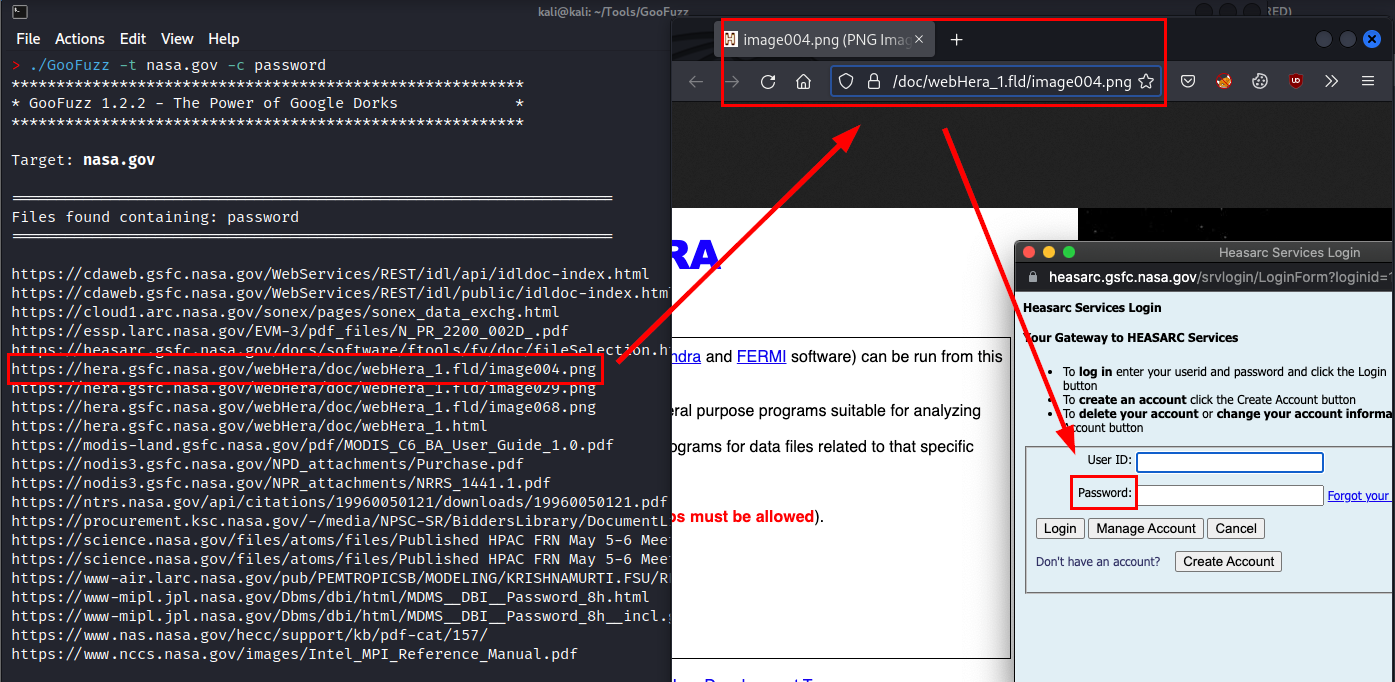
The functionality to list files by their content (parameter "-c"), is very useful to identify relevant files (e.g. containing the word "password"), even if the word is in an image file (e.g. .png).
> ./GooFuzz -t nasa.gov -c password -k apikey.lst
*********************************************************
* GooFuzz v.2.0 - The Power of Google Dorks             *
*********************************************************

Target: nasa.gov

===================================================================
Files found containing: password
===================================================================

https://cdaweb.gsfc.nasa.gov/WebServices/REST/idl/api/idldoc-index.html
https://cdaweb.gsfc.nasa.gov/WebServices/REST/idl/public/idldoc-index.html
https://cloud1.arc.nasa.gov/sonex/pages/sonex_data_exchg.html
https://essp.larc.nasa.gov/EVM-3/pdf_files/N_PR_2200_002D_.pdf
https://heasarc.gsfc.nasa.gov/docs/software/ftools/fv/doc/fileSelection.html
https://hera.gsfc.nasa.gov/webHera/doc/webHera_1.fld/image004.png
https://hera.gsfc.nasa.gov/webHera/doc/webHera_1.fld/image029.png
https://hera.gsfc.nasa.gov/webHera/doc/webHera_1.fld/image068.png
https://hera.gsfc.nasa.gov/webHera/doc/webHera_1.html
https://modis-land.gsfc.nasa.gov/pdf/MODIS_C6_BA_User_Guide_1.0.pdf
https://nodis3.gsfc.nasa.gov/NPD_attachments/Purchase.pdf
https://nodis3.gsfc.nasa.gov/NPR_attachments/NRRS_1441.1.pdf
https://ntrs.nasa.gov/api/citations/19960050121/downloads/19960050121.pdf
https://procurement.ksc.nasa.gov/-/media/NPSC-SR/BiddersLibrary/DocumentLibrary/NRRS 14411 NASA Record Retention Schedules.ashx
https://science.nasa.gov/files/atoms/files/Published HPAC FRN May 5-6 Meeting
https://science.nasa.gov/files/atoms/files/Published HPAC FRN May 5-6 Meeting%5B1%5D.pdf
https://www-air.larc.nasa.gov/pub/PEMTROPICSB/MODELING/KRISHNAMURTI.FSU/README.txt
https://www-mipl.jpl.nasa.gov/Dbms/dbi/html/MDMS__DBI__Password_8h.html
https://www-mipl.jpl.nasa.gov/Dbms/dbi/html/MDMS__DBI__Password_8h__incl.gif
https://www.nas.nasa.gov/hecc/support/kb/pdf-cat/157/
https://www.nccs.nasa.gov/images/Intel_MPI_Reference_Manual.pdf
Proof of concept with an image
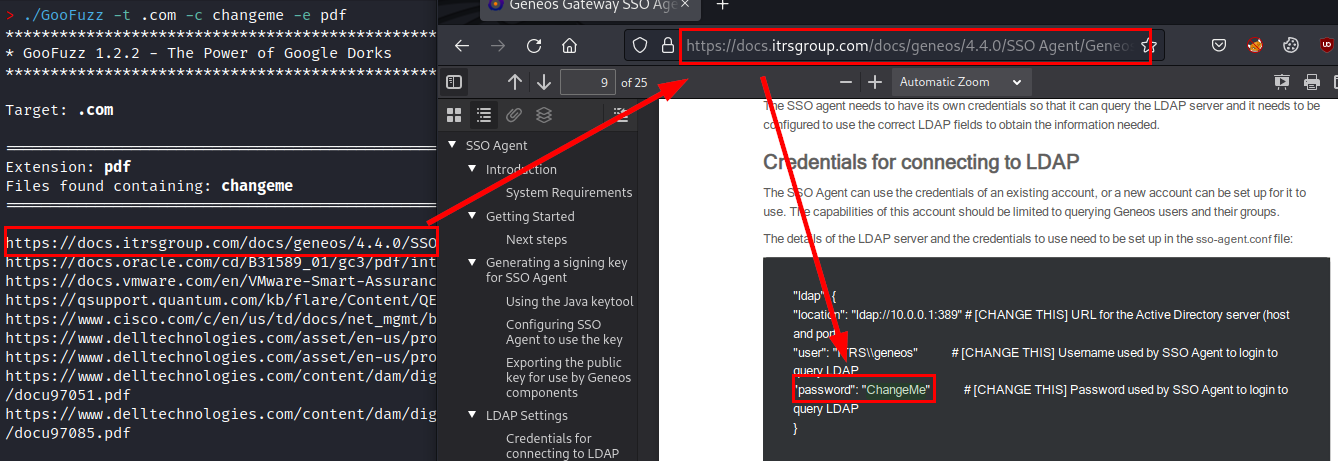
Or even, search for a possible password in a pdf file:
> ./GooFuzz -t .com -c changeme -e pdf
*********************************************************
* GooFuzz v.2.0 - The Power of Google Dorks             *
*********************************************************

Target: .com

===================================================================
Extension: pdf
Files found containing: changeme
===================================================================

https://docs.itrsgroup.com/docs/geneos/4.4.0/SSO Agent/Geneos SSO User Guide v1.0.0.pdf
https://docs.oracle.com/cd/B31589_01/gc3/pdf/integration/gc3datamanagement.pdf
https://docs.vmware.com/en/VMware-Smart-Assurance/10.1.5/sm-pub-smarts-security-config-guide-1015.pdf
https://qsupport.quantum.com/kb/flare/Content/QEKM/Downloads/6-01847-02_Q-EKM_UsersGuide.pdf
https://www.cisco.com/c/en/us/td/docs/net_mgmt/broadband_access_center/3-6/administration/guide/admbac36/chap_20.pdf
https://www.delltechnologies.com/asset/en-us/products/data-protection/technical-support/docu96471.pdf
https://www.delltechnologies.com/asset/en-us/products/data-protection/technical-support/docu97051.pdf
https://www.delltechnologies.com/content/dam/digitalassets/active/en/unauth/technical-guides-support-information/products/data-protection/docu97051.pdf
https://www.delltechnologies.com/content/dam/digitalassets/active/en/unauth/technical-guides-support-information/products/data-protection/docu97085.pdf
Proof of concept with an PDF file
Disclaimer
- I am not responsible for any misuse of this tool.
- I am not responsible if Google blocks your account for abuse of its API.
- All information obtained is public and comes from Google results.
- Logically, searches are performed on Google, so they leave no trace in the target server's logs.
- And very importantly, if you see a file, directory, subdomain, etc. indexed on Google, it does not mean that it still exists on the server (or it does ;)).
Useful?
If you like the tool, find it useful in your work, Bug Bounty or as a hobby, you could help me like this:
- Tell your friends and co-workers about it.
- Contribute new ideas or help me to improve it by correcting bugs from here.
- How? Do you want to buy me a coffee? Thank you very much!