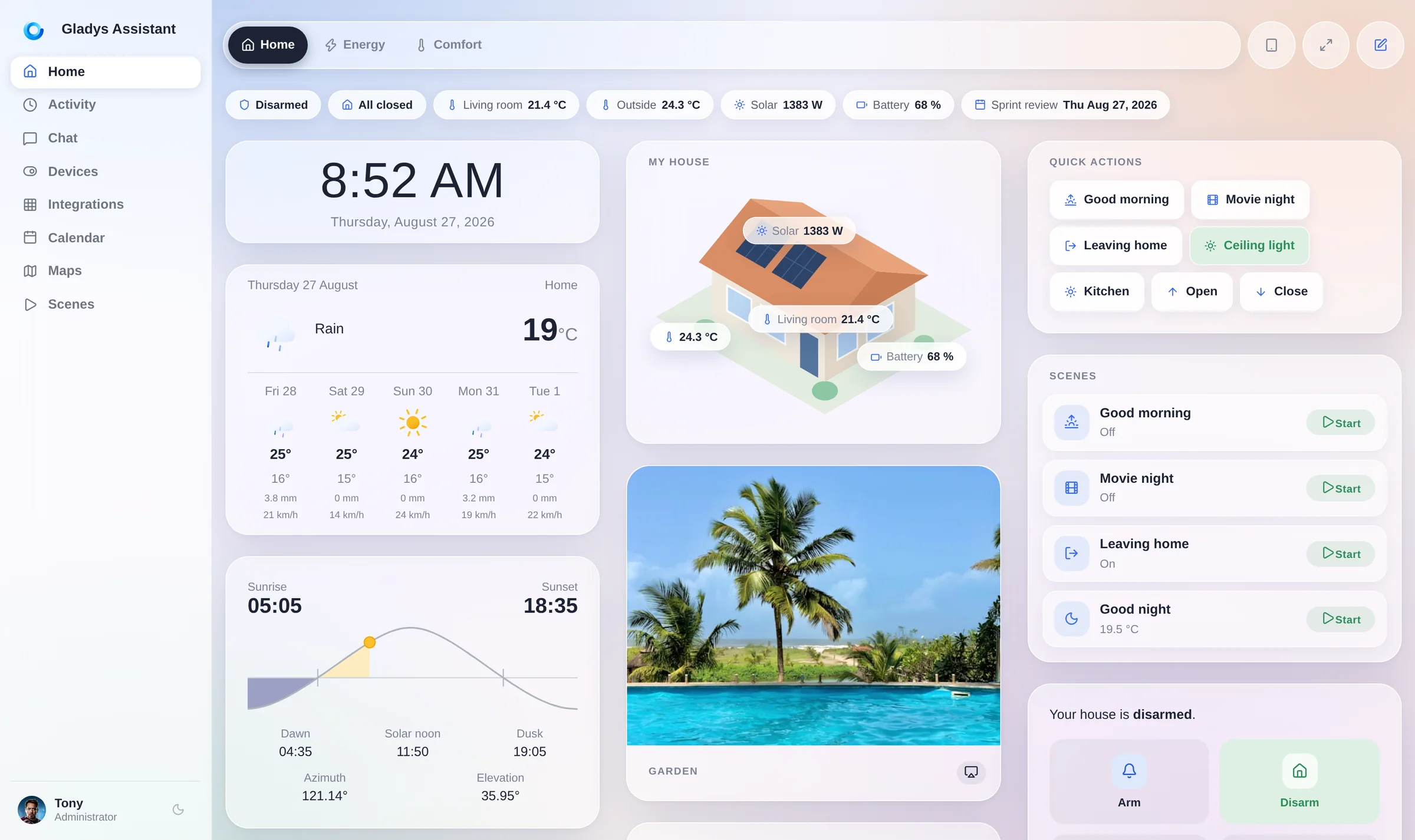
Gladys Assistant is a privacy-first, open-source home automation assistant, written in JavaScript and licensed under Apache-2.0, that runs on hardware you own — a Raspberry Pi, a NAS or a mini-PC — so that smart-home data stays local instead of living in a vendor cloud.
What it is
Gladys Assistant is a self-hosted home automation platform that lives in the JavaScript and Node.js ecosystem and ships as a Docker image, gladysassistant/gladys:v5. It is distributed as a container rather than as a managed online service: the operator supplies the machine, the container runtime and the storage volume, and the assistant runs on top of them. The README positions the project as a smart-home assistant that can be installed on a Raspberry Pi, a NAS or a mini-PC, with installation guides published on the project's own website for each of those targets, including a dedicated Docker Compose path.
The concrete problem it solves is dependence on a vendor-operated cloud for home automation. A household that wants its lights, sensors and devices automated without shipping telemetry to a third party normally has to accept a hosted account and the vendor's terms. Gladys replaces that account-based model with a service running inside the home: state is persisted to a SQLite file on a local path, configuration is passed as environment variables, and the container is given direct access to the host's hardware interfaces so that it can talk to attached devices. The result is an automation assistant whose operational boundary is the operator's own network.
Key capabilities
- Runs from the published Docker image
gladysassistant/gladys:v5, started with a single docker run command documented in the README.
- Persists its data in SQLite at the path given by
SQLITE_FILE_PATH, for example /var/lib/gladysassistant/gladys-production.db, backed by the mounted volume /var/lib/gladysassistant.
- Reaches host hardware through explicit mounts:
/var/run/docker.sock, /dev, /run/udev (read-only) and /run/dbus (read-only), which allows the assistant to see container state and attached devices.
- Configures runtime behaviour through environment variables, including
NODE_ENV=production, SERVER_PORT=80 and TZ, the latter shown as Europe/Paris in the README example.
- Supports a Docker Compose installation route, documented separately on the project website, as an alternative to the long-form
docker run invocation.
- Accepts contributions in code, documentation, translations and feature ideas, and follows the
all-contributors specification for recognising them.
- Supports AI-assisted development: the contributing guide contains a dedicated AI-assisted development section and points agents at the repository's
AGENTS.md file.
Who uses it and how
- Raspberry Pi owners running a single-board home hub, a target the README treats as first-class alongside mini-PCs and NAS devices, and which the project's press coverage describes as installable through Raspberry Pi Imager.
- Home-lab operators already running Docker who want automation as one more container on an existing host; the install command assumes a Docker host with
--network=host and --privileged, so the surrounding environment is already container-literate.
- French- and English-speaking users: the README lists coverage in English from Console and Hackster.io and in French from Framboise 314, whose article reports more than 500 installations of the assistant.
- Contributors working across code, documentation, translations and issue triage, with 320 forks and 51 open issues on the repository at the time of writing.
- Developers using AI agents on the codebase, a workflow the project explicitly encourages rather than discourages.
Getting started
Install by running the Docker command from the README, which pulls gladysassistant/gladys:v5 and starts it with the required mounts and environment variables, or follow the project's Docker Compose installation guide if a compose file fits the host better. Step-by-step guides for mini-PC, NAS and Raspberry Pi targets are published at gladysassistant.com.
How it compares
No paid product is listed among the facts as something this project replaces, and the facts do not name any comparable open-source assistant either. On the evidence available, Gladys Assistant stands alone in this registry.
When to use it — and when not to
Pick Gladys if you are comfortable operating a Docker host: you will manage the container, the persistent volume that holds the SQLite database, and the host mounts for /dev, udev and D-Bus that the README's install command requires, and the container expects --privileged and host networking, which is a broad grant of access to the machine. Do not pick it if you want a zero-operations hosted service or cannot give a container that level of host access. The README is also thin on feature detail — it documents installation and contribution far more than day-to-day use — so evaluate the website documentation before committing a household to it.
project readme (upstream, from github) — read inline

Gladys Assistant
Your privacy-first, open-source smart home assistant





Try It •
Getting Started •
Contribute •
Contributors •
License
🚀 Try Gladys Assistant
Spin up a local Gladys Assistant instance in seconds using Docker:
sudo docker run -d \
  --log-driver json-file \
  --log-opt max-size=10m \
  --cgroupns=host \
  --restart=always \
  --privileged \
  --network=host \
  --name gladys \
  -e NODE_ENV=production \
  -e SERVER_PORT=80 \
  -e TZ=Europe/Paris \
  -e SQLITE_FILE_PATH=/var/lib/gladysassistant/gladys-production.db \
  -v /var/run/docker.sock:/var/run/docker.sock \
  -v /var/lib/gladysassistant:/var/lib/gladysassistant \
  -v /dev:/dev \
  -v /run/udev:/run/udev:ro \
  -v /run/dbus:/run/dbus:ro \
  gladysassistant/gladys:v5
Prefer using Docker Compose? Check out our Docker Compose installation guide.
📚 Getting Started
To install Gladys Assistant on your smart home setup, head over to our official website for a step-by-step guide.
Whether you're installing on a mini-PC, a NAS or a Raspberry Pi, we've got you covered with clear instructions tailored to your setup.
🤝 Contribute to Gladys
We welcome contributions of all kinds — code, documentation, translations, or feature ideas.
Gladys is built by an open-source community, and you can be a part of it!
1. Set up your development environment
Follow the guide that matches your system to get started:
2. Start developing
Once your environment is ready, dive into our contributing guide to understand the project structure, how to build features, and how to open a pull request.
3. AI-assisted development is welcome
We use AI extensively to build Gladys ourselves, and we're very favorable to AI-assisted contributions. Read the AI-assisted development section of our contributing guide, and point your agent to AGENTS.md: it contains everything needed to work on this codebase.
🧑💻 Contributors
A huge thank you to all our amazing contributors! 💜
Gladys wouldn't be where it is today without your help.
Thanks goes to these wonderful people 👏
This project follows the all-contributors specification. Contributions of any kind welcome!
Read Contributing.md if you want to help us on Gladys Assistant.
Articles
📄 License
This project is licensed under the Apache 2.0 License. See the LICENSE file for details.
© 2014–present Gladys Assistant.


