




Geodesic is a robust Linux toolbox container, crafted to optimize DevOps workflows. This container comes loaded with essential dependencies for a DevOps toolchain. It's designed to bring consistency and boost efficiency across development environments. It achieves this without the need for installing additional software on your workstation. Think of Geodesic as a containerized parallel to Vagrant, offering similar functionality within a Docker container context.
Although Geodesic is packed with essentials, it is designed to be extended and customized to suit your specific needs.
Create your own Dockerfile based on Geodesic and add your favorite tools to the mix.
Then share the resulting container with everyone on your team to ensure everyone is working in the same environment.

Key Features
- Unified Toolchain: By packaging all necessary DevOps tools and dependencies, Geodesic eliminates the "works on my machine" problem, ensuring toolchain uniformity across different machines.
- Consistent Environment: Geodesic guarantees that every developer operates in a uniform OS environment with consistent tool versions, sidestepping discrepancies that often arise in diverse development setups.
- Quick Start for New Developers: It streamlines the onboarding process for new team members, allowing them to bypass lengthy workstation configurations and dive straight into productivity.
- Cross-Platform Compatibility: With native support for Mac OSX, Linux, and Windows (via WSL), Geodesic extends its versatile toolchain to a wide range of operating systems, ensuring broad accessibility and functionality.
- Version Control for Tools: Geodesic facilitates easy versioning of tools for different environments, enabling repeatable setups and minimizing compatibility issues.
- Reusable Base Image for Toolboxes: Empower teams to create and maintain consistent toolbox images, ensuring a standardized development environment across the board.
Screenshots
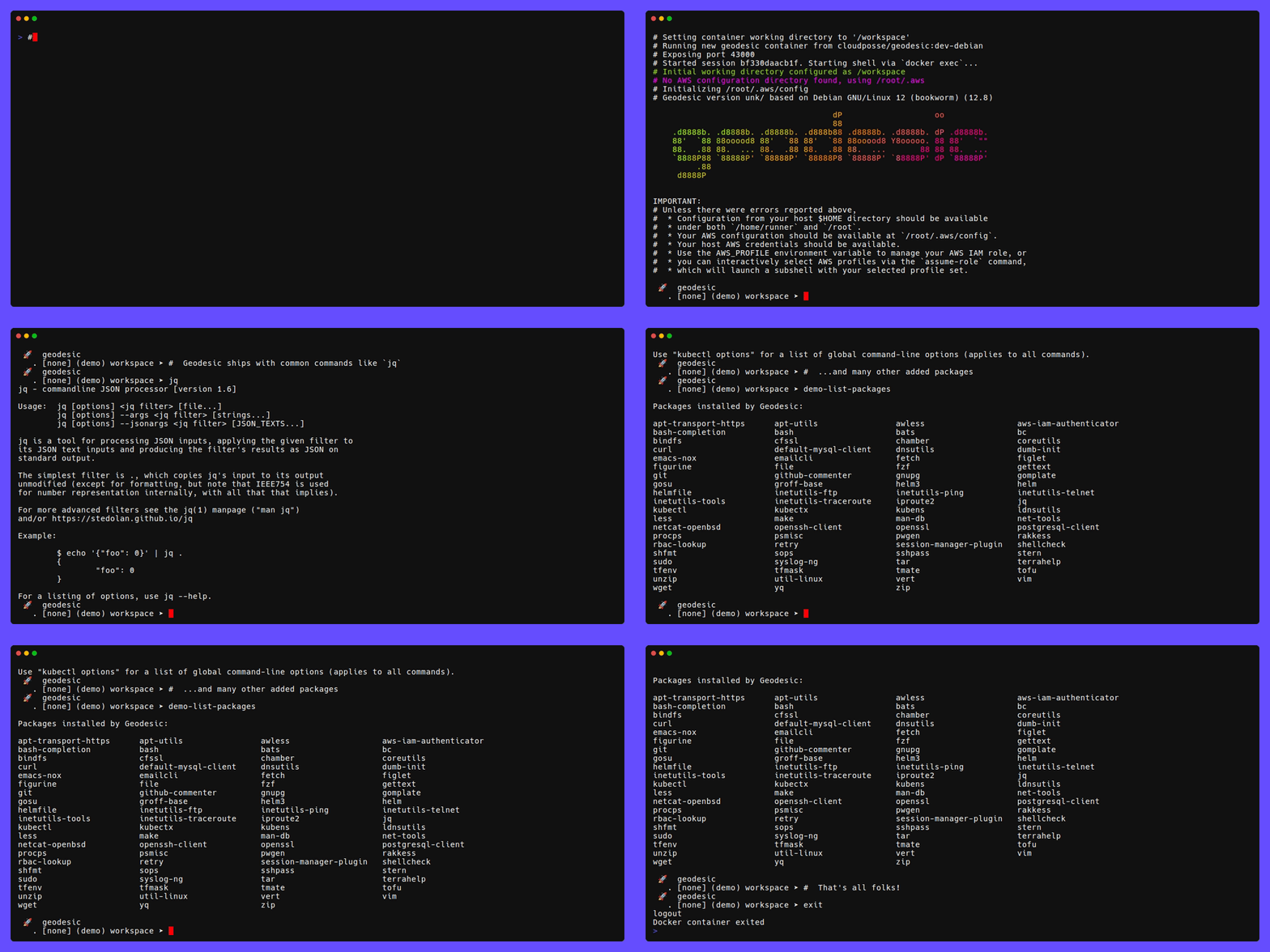
Example of running a shell based on the cloudposse/geodesic base docker image.
Introduction
These days, the typical software application is distributed as a docker image and run as a container. Why should infrastructure be any different? Since everything we write is "Infrastructure as Code", we believe that it should be treated the same way. This is the "Geodesic Way". Use containers+envs instead of unconventional wrappers, complicated folder structures and symlink hacks. Geodesic is the container for all your infrastructure automation needs that enables you to truly achieve SweetOps.
Geodesic is best used in one of these two ways:
- Interactive Shell It is optimized to work as an interactive command-line shell. The shell includes a powerful set of tools for the DevOps practitioner, with many more available through our packages. Installation of the shell is as easy as running a docker container or using it as a base image for your own Docker toolbox.
- Docker Base Image You can create your own
Dockerfileand usecloudposse/geodesicas the base image. This way, all you need to add are the few of your favorite tools not already installed, and then you have a consistent toolbox for everyone to share.
An organization may chose to leverage all of these components, or just the parts that make their life easier.
We recommend starting by using geodesic as a Docker base image (e.g. FROM cloudposse/geodesic:... pinned to a release and base OS) in your projects.
[!IMPORTANT] Note: Starting with Geodesic 3.0, we distribute Geodesic as a multi-platform (
linux/amd64,linux/arm64) Debian-based Docker image only. We no longer publish an Alpine version, but continue to include thedebianlabels for compatibility. As with Geodesic 2.0, thelatesttag points to the Debian image.Starting with Geodesic 2.0, we distributed Geodesic as a multi-platform (
linux/amd64,linux/arm64) Debian-based Docker image and a single-platform (linux/amd64) Alpine-based image. We moved thecloudposse/geodesic:latestDocker image tag from the Alpine version to the Debian version at that time.
What’s Changed in Geodesic 4.0
Geodesic 4.0 is a major release that brings many new features and improvements. The most notable changes are:
- The first launched shell is no longer special. All shells are now equal, and you can quit them in any order. The geodesic container remains running until the last shell exits.
- The
geodesiccommand now has a--solooption that allows you to launch a new Geodesic container for just that one shell. - Geodesic no longer mounts the host user's entire home directory into the container. Instead, it mounts only selected directories.
- The
geodesic stopcommand has been enhanced to shut down the Geodesic container gracefully, rather than forcefully, allowing, among other things, shell scripts to run their exit handlers.
See extensive release notes for Geodesic 4.0 here.
What’s Changed in Geodesic 3.0
Rather than bringing new features, Geodesic 3.0 is focused on slimming down the Docker image and removing outdated tools. Geodesic 3.0 is approximately half the size of Geodesic 2.10! See the v3.0.0 release notes for details on what was removed, but for most users, we expect the impact to be minimal.
This release is intended to set the stage for future improvements, so although we cannot announce a time frame, be on the lookout for Geodesic 4.0, which will bring many long-requested new features.
Want to learn more? Check out our getting started with Geodesic guide!
Alpine and Terraform dropped
The biggest impacts are that the Alpine-based image has been dropped, and Terraform has been replaced with OpenTofu.
- OpenTofu is installed as a
terraformalternative using the Debian alternatives system, soterraformcommands will still work without modification. - We have been encouraging users to switch from Alpine to Debian for years, so we hope most people have already done so. For the rest, switching to Debian should be straightforward, and brings the added advantage of support for Apple Silicon.
Highlights from Geodesic 2.11
Since the release of Geodesic 2.0, we have been continuing to improve the Geodesic experience.
- We have added preliminary support for "dark mode" terminals. Your terminal mode should be detected automatically,
but you can force it by running
update-terminal-mode {dark|light}. - The
GEODESIC_TF_PROMPT_ENABLEDenvironment variable has been revived. Set it totrueand when in a Terraform or Tofu directory, the prompt will display the currently selected workspace. (We had, for a time, incorrectly suggested you control this feature viaGEODESIC_TF_PROMPT_ACTIVE. That environment variable is for internal use and you should never set it.)
What’s New in Geodesic 2.0
Geodesic 2.0 introduces support for Apple Silicon (M1 and later chips), and prioritizes Debian over Alpine as the base OS. Users new to Geodesic should use the Debian-based version and existing users of the Alpine-based image should switch to the Debian-based image as soon as is convenient. They each have nearly all the same tools pre-installed, so switching is mainly a matter of updating how you customize it, replacing Alpine packages with Debian packages.
In order for a tool to be included in Geodesic 2.0, it must be available as both a linux/amd64 and linux/arm64 binary.
(In exceptional cases, if a tool is written in the go language and distributes source code only, Cloud Posse may build the needed binaries.)
A few tools that were in Geodesic 1.0 had not yet been updated to provide linux/arm64 binaries and were omitted from Geodesic 2.0.
(See the Geodesic 2.0 Release Notes
for details on which tools were removed.)
Docker Tags and Their Evolution
Geodesic Docker images are tagged with VERSION-BASE_OS, e.g. 2.0.0-debian or 2.0.0-alpine.
The latest tag points to the latest Debian-based image, although we recommend pinning to a specific version.
- Prior to Geodesic 2.0, the
latesttag pointed to the latest Alpine-based image. - Prior to Geodesic 0.138.0, all Docker images were based on Alpine only and simply tagged
VERSION.
Usage
Quickstart
Installing Geodesic
Launching Geodesic is a bit complex, so we recommend you install a launch script by running
docker run --rm cloudposse/geodesic:latest-debian init | bash
After that, you should be able to launch Geodesic just by typing
geodesic
Alternately, customize the Makefile as described below and use make install to build your custom image
and install the launch script.
Running Geodesic
Geodesic has only a few commands and command-line options. The most important command is geodesic, which launches the Geodesic shell.
The only other command you might normally use is geodesic stop, which stops the Geodesic container, but
Geodesic automatically quits (and removes the Docker container) when you exit the last shell, so you should rarely need to use geodesic stop.
Run geodesic help for a list of command-line options.
See customization documentation for information on how to customize your Geodesic environment. Geodesic has many customization options, but they are most commonly set in configuration files, not on the command line.
Customizing your Docker image
In general we recommend creating a customized version of Geodesic by creating your own Dockerfile starting with
# We always recommend pinning versions to avoid surprises and breaking changes.
# We put the version up top here so it is easy to find and update.
# Find the latest version at https://github.com/cloudposse/geodesic/releases
ARG VERSION=4.0.0
# If you don't want to bothered with updating the version, you can use `latest` instead,
# but keep in mind that as long as you have a local image with the `latest` tag,
# it will not be updated by `docker run`. You will have to explicitly pull the latest image.
# ARG VERSION=latest
ARG OS=debian
FROM cloudposse/geodesic:$VERSION-$OS

# Add configuration options such as setting a custom BANNER,
# setting the initial AWS_PROFILE and AWS_DEFAULT_REGION, etc. here

ENV BANNER="my-custom-geodesic"
You can see some example configuration options to include in Dockerfile.options.
Makefile customizations
We also recommend creating a Makefile to simplify building and running your custom image.
You can use the Makefile in this repository with minimal modifications.
- Update
DOCKER_ORGandDOCKER_IMAGEto match your Docker Hub username and the name of your custom image. - Update
DOCKER_FILEto match the path to your customDockerfile. - Update
APP_NAMEto give the command to launch your custom image a custom name.
Then you can build your custom image with make build and run it with make run.
Multi-platform gotchas
Although the Geodesic base image is provided in 2 architectures, when you do a local build
of your custom image, it will, by default, only be built for the architecture of the machine you are building on.
This is fine until you want to share it. You need to be aware that if you push just the image you
built with docker build you will only be supporting a single architecture. You should use docker buildx
to build a multi-platform image and push it to a Docker repository for sharing.
If you intend to support both architectures, you need to be sure that any customizations
you install are properly installed for both architectures. Package managers handle this for you
automatically, but if you are downloading files directly, you need to be careful to select the right one.
See the use of TARGETARCH in Dockerfile.debian for some examples.
Installing extra packages
You can also add extra commands by installing "packages".
- Debian has a large selection of packages to choose from.
- Cloud Posse also provides a large set of packages for installing common DevOps commands and utilities via cloudposse/packages.
- Google Cloud provides a set of packages for working with GCP
- OpenTofu provides a package for installing it, too.
Those package repositories are pre-installed in Geodesic, so all you need to do is add the packages you want via
RUN apt-get update && apt-get install -y <package-name>...
commands in your Dockerfile. The package manager will automatically select the correct architecture for the package.
Pinning package versions in Debian
Debian uses apt for package management and we generally recommend using
the apt-get command to install packages.
However, apt-get does not let you specify a version range on the command line, but it does
allow wildcards. Package versions include a release number (typically "1") at the end, to allow for
updated packages when there is a bug in the package itself. Therefore, best practice is to use a wildcard
for the release number when specifying a package version. For example,
to install the Google Cloud SDK at a version 300.0.0:
RUN apt-get update && apt-get install -y google-cloud-sdk="400.0.0-*"
Note the -y flag to apt-get install. That is required for scripted installation, otherwise the command
will ask for confirmation from the keyboard before installing a package.
Unfortunately, OpenTofu does not follow this convention, so you will need to specify the exact version number (only) when installing OpenTofu. For example, to install OpenTofu version 1.6.2:
RUN apt-get update && apt-get install -y tofu=1.6.2
Customizing your shell at launch time
After you have built your Docker image, or if you are using a shared Docker image, you can
add further customization at launch time. When Geodesic starts up, it looks for customization
scripts and configuration so you can do things like add command aliases or override preconfigured options.
Detailed information about launch-time configuration is in the customization
document, available from within the shell via man customization.
Related Projects
Check out these related projects.
- Atmos - Cloud Posse's FOSS DevOps Automation Tool
- Packages - Cloud Posse installer and distribution of native apps
- terraform-aws-components - Catalog of reusable Terraform components and blueprints for provisioning reference architectures
✨ Contributing
This project is under active development, and we encourage contributions from our community.
Many thanks to our outstanding contributors:
For 🐛 bug reports & feature requests, please use the issue tracker.
In general, PRs are welcome. We follow the typical "fork-and-pull" Git workflow.
- Review our Code of Conduct and Contributor Guidelines.
- Fork the repo on GitHub
- Clone the project to your own machine
- Commit changes to your own branch
- Push your work back up to your fork
- Submit a Pull Request so that we can review your changes
NOTE: Be sure to merge the latest changes from "upstream" before making a pull request!
🌎 Slack Community
Join our Open Source Community on Slack. It's FREE for everyone! Our "SweetOps" community is where you get to talk with others who share a similar vision for how to rollout and manage infrastructure. This is the best place to talk shop, ask questions, solicit feedback, and work together as a community to build totally sweet infrastructure.
📰 Newsletter
Sign up for our newsletter and join 3,000+ DevOps engineers, CTOs, and founders who get insider access to the latest DevOps trends, so you can always stay in the know. Dropped straight into your Inbox every week — and usually a 5-minute read.
📆 Office Hours 
Join us every Wednesday via Zoom for your weekly dose of insider DevOps trends, AWS news and Terraform insights, all sourced from our SweetOps community, plus a live Q&A that you can’t find anywhere else. It's FREE for everyone!
License

Preamble to the Apache License, Version 2.0
Complete license is available in the LICENSE file.
Licensed to the Apache Software Foundation (ASF) under one
or more contributor license agreements.  See the NOTICE file
distributed with this work for additional information
regarding copyright ownership.  The ASF licenses this file
to you under the Apache License, Version 2.0 (the
"License"); you may not use this file except in compliance
with the License.  You may obtain a copy of the License at

  https://www.apache.org/licenses/LICENSE-2.0

Unless required by applicable law or agreed to in writing,
software distributed under the License is distributed on an
"AS IS" BASIS, WITHOUT WARRANTIES OR CONDITIONS OF ANY
KIND, either express or implied.  See the License for the
specific language governing permissions and limitations
under the License.
Trademarks
All other trademarks referenced herein are the property of their respective owners.
Copyright © 2017-2025 Cloud Posse, LLC