

Genkit is an open-source framework for building full-stack AI-powered applications, built and used in production by Google's Firebase. It provides SDKs for multiple programming languages with varying levels of stability:
- JavaScript/TypeScript: Production-ready with full feature support
- Go: Production-ready with full feature support
- Python (Beta): Wide feature support approaching production-readiness
- Dart (Preview): Early development with core functionality
It offers a unified interface for integrating AI models from providers like Google, OpenAI, Anthropic, Ollama, and more. Rapidly build and deploy production-ready chatbots, automations, and recommendation systems using streamlined APIs for multimodal content, structured outputs, tool calling, and agentic workflows.
Get started with just a few lines of code:
import { genkit } from 'genkit';
import { googleAI } from '@genkit-ai/google-genai';

const ai = genkit({ plugins: [googleAI()] });

const { text } = await ai.generate({
    model: googleAI.model('gemini-flash-latest'),
    prompt: 'What is the meaning of life?'
});
Explore & build with Genkit
Play with AI sample apps, with visualizations of the Genkit code that powers them, at no cost to you.
Key capabilities
| Broad AI model support | Use a unified interface to integrate with hundreds of models from providers like Google, OpenAI, Anthropic, Ollama, and more. Explore, compare, and use the best models for your needs. |
| Simplified AI development | Use streamlined APIs to build AI features with structured output, agentic tool calling, context-aware generation, multi-modal input/output, and more. Genkit handles the complexity of AI development, so you can build and iterate faster. |
| Web and mobile ready | Integrate seamlessly with frameworks and platforms including Next.js, React, Angular, iOS, Android, using purpose-built client SDKs and helpers. |
| Cross-language support | Build with the language that best fits your project. Genkit provides SDKs for JavaScript/TypeScript, Go, Python (Beta), and Dart (Preview) with consistent APIs and capabilities across all supported languages. |
| Deploy anywhere | Deploy AI logic to any environment that supports your chosen programming language, such as Cloud Functions for Firebase, Google Cloud Run, or third-party platforms, with or without Google services. |
| Developer tools | Accelerate AI development with a purpose-built, local CLI and Developer UI. Test prompts and flows against individual inputs or datasets, compare outputs from different models, debug with detailed execution traces, and use immediate visual feedback to iterate rapidly on prompts. |
| Production monitoring | Ship AI features with confidence using comprehensive production monitoring. Track model performance, and request volumes, latency, and error rates in a purpose-built dashboard. Identify issues quickly with detailed observability metrics, and ensure your AI features meet quality and performance targets in real-world usage. |
How does it work?
Genkit simplifies AI integration with an open-source SDK and unified APIs that work across various model providers and programming languages. It abstracts away complexity so you can focus on delivering great user experiences.
Some key features offered by Genkit include:
- Text and image generation
- Type-safe, structured data generation
- Tool calling
- Prompt templating
- Persisted chat interfaces
- AI workflows
- AI-powered data retrieval (RAG)
Genkit is designed for server-side deployment in multiple language environments, and also provides seamless client-side integration through dedicated helpers and client SDKs.
Implementation path
| 1 | Choose your language and model provider | Select the Genkit SDK for your preferred language (JavaScript/TypeScript, Go, Python (Beta), Dart (Preview)). Choose a model provider like Google Gemini or Anthropic, and get an API key. Some providers, like Vertex AI, may rely on a different means of authentication. |
| 2 | Install the SDK and initialize | Install the Genkit SDK, model-provider package of your choice, and the Genkit CLI. Import the Genkit and provider packages and initialize Genkit with the provider API key. |
| 3 | Write and test AI features | Use the Genkit SDK to build AI features for your use case, from basic text generation to complex multi-step workflows and agents. Use the CLI and Developer UI to help you rapidly test and iterate. |
| 4 | Deploy and monitor | Deploy your AI features to Firebase, Google Cloud Run, or any environment that supports your chosen programming language. Integrate them into your app, and monitor them in production in the Firebase console. |
Get started
- JavaScript/TypeScript quickstart
- Go quickstart
- Python quickstart (Beta)
- Dart quickstart (Preview)
Development tools
Genkit provides a CLI and a local UI to streamline your AI development workflow.
CLI
The Genkit CLI includes commands for running and evaluating your Genkit functions (flows) and collecting telemetry and logs.
- Install:
npm install -g genkit-cli - Run a command, wrapped with telemetry, a interactive developer UI, etc:
genkit start --
Developer UI
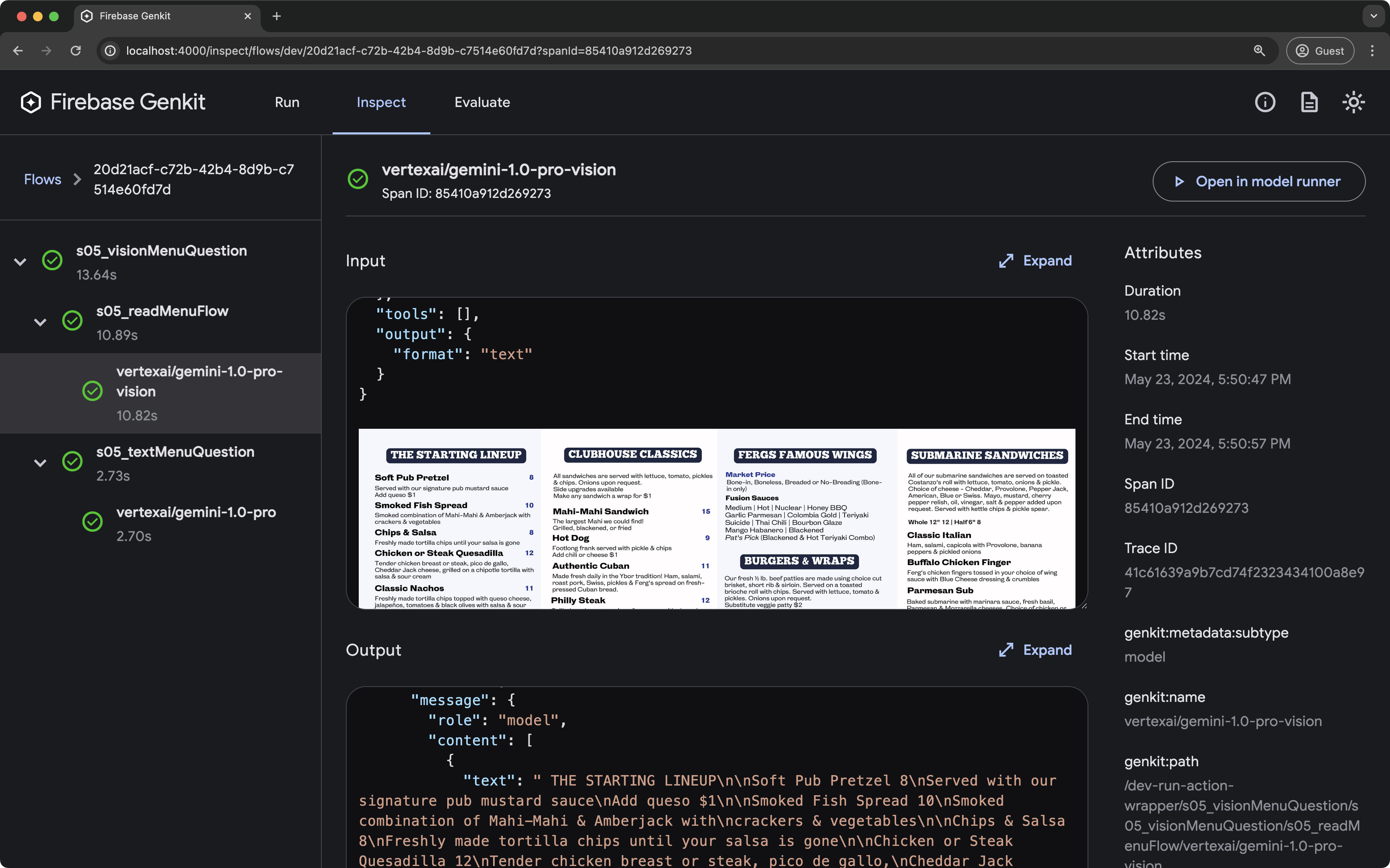
The Genkit developer UI is a local interface for testing, debugging, and iterating on your AI application.
Key features:
- Run: Execute and experiment with Genkit flows, prompts, queries, and more in dedicated playgrounds.
- Inspect: Analyze detailed traces of past executions, including step-by-step breakdowns of complex flows.
- Evaluate: Review the results of evaluations run against your flows, including performance metrics and links to relevant traces.
Connect with us
- Follow us on X/Twitter – Get the latest news, updates, releases, tips and samples from the Genkit team.
- Join us on Reddit – Post questions, learn advanced features, connect with the team and read the latest developments.
- Join us on Discord – Get help, share ideas, and chat with other developers.
- Contribute on GitHub – Report bugs, suggest features, or explore the source code.
- Contribute to Documentation and Samples – Report issues in Genkit's documentation, or contribute to the samples.

Contributing
Contributions to Genkit are welcome and highly appreciated! See our Contribution Guide to get started.
Authors
Genkit is built by Google with contributions from the Open Source Community.