
Fusio
Open Source API Management Platform
Turn your business logic into scalable API products for humans and AI agents.
📖 Documentation • 📺 Video Walkthrough (15m) • 💬 Discord Community
Fusio is a self-hosted, open-source backend platform and API gateway written in PHP that bridges the gap between your internal infrastructure and the outside world. Whether you are exposing legacy databases, orchestrating microservices, or building custom business logic, Fusio handles the heavy lifting. It transforms your services into a professional API product, complete with an automated developer portal, SDK generation, and monetization tools. With native MCP support, Fusio also acts as a bridge to the AI ecosystem, allowing you to turn your backend logic into tools for autonomous agents.
🚀 Features
- Database API Gateway - Instantly expose legacy SQL/NoSQL databases (MySQL, PostgreSQL, etc.) as REST APIs.
- Microservice Gateway - Securely route, orchestrate, and load-balance traffic between your distributed services.
- Custom API Logic - Build powerful backend logic using reusable actions in PHP or Javascript.
- Agent Development - Use your custom API logic as "Tools" to build and power autonomous AI agents.
- AI-Assisted Development - Generate custom backend logic and schemas using natural language prompts.
- MCP Integration - Native support for the Model Context Protocol to expose APIs to AI ecosystems.
- API Developer Portal - A self-service portal for third-party developers with docs, testing tools, and keys.
- SDK Automation - Zero-effort generation of client SDKs for all major programming languages.
- API Monetization - Turn your API into a product with subscription plans, quotas, and automated billing.
- Analytics & Monitoring - Real-time tracking of API usage, performance metrics, and error logging.
📦 Installation
🐳 Docker
The fastest way to try Fusio locally is with Docker and docker-compose.
services:
  fusio:
    image: fusio/fusio
    restart: always
    environment:
      FUSIO_PROJECT_KEY: "42eec18ffdbffc9fda6110dcc705d6ce"
      FUSIO_CONNECTION: "pdo-mysql://fusio:61ad6c605975@mysql-fusio/fusio"
      FUSIO_BACKEND_USER: "test"
      FUSIO_BACKEND_EMAIL: "demo@fusio-project.org"
      FUSIO_BACKEND_PW: "test1234"
    ports:
      - "8080:80"

  mysql-fusio:
    image: mysql:8.0
    restart: always
    environment:
      MYSQL_RANDOM_ROOT_PASSWORD: "1"
      MYSQL_USER: "fusio"
      MYSQL_PASSWORD: "61ad6c605975"
      MYSQL_DATABASE: "fusio"
    volumes:
      - ./db:/var/lib/mysql
docker compose up -d
After startup
- Backend: http://localhost:8080/apps/fusio
- Login with the credentials you configured
- For the first steps, take a look at our Getting Started guide
🛠️ Manual Installation
Download artifact
You can either download the official release or clone the repository.
git clone https://github.com/apioo/fusio.gitConfigure
.envConfigure fitting database credentials at the
APP_CONNECTIONvariable, all other parameters are optional.APP_CONNECTION=pdo-mysql://root:password@localhost/fusio APP_URL=http://localhost:8080It is also recommended to provide the
APP_URLwhich contains the domain pointing to the public folder i.e.https://api.my_domain.comorhttps://my_domain.com/fusio, this is required if you host Fusio inside a sub-folder otherwise Fusio tries to detect the domain via the Host header.Supported DBs:
- MySQL:
pdo-mysql://user:pass@host/db - PostgreSQL:
pdo-pgsql://user:pass@host/db - SQLite:
pdo-sqlite:///fusio.sqlite
- MySQL:
Run migrations
php bin/fusio migrateCreate administrator user
php bin/fusio adduserChoose Administrator as account type.
Install backend app
php bin/fusio marketplace:install fusioStart server (dev only)
php -S 127.0.0.1:8080 -t publicThis should be only used for testing, for production you need a classical Nginx/Apache setup or use Docker, take a look at our installation documentation for more details.
🌐 Web-Installer
Instead of manual installation you can also use the web installer script located at /install.php
to complete the installation. After installation, it is recommended to delete this "install" script.
🧭 Getting Started
Use our Getting Started guide to build your first action and configure an operation to expose the action as API endpoint.
Action
At the core of Fusio, you describe your business logic in an Action. An Action is a PHP class that receives an incoming request and returns a response.
<?php

namespace App\Action;

use Fusio\Engine;

class MyAction implements Engine\ActionInterface
{
    public function handle(Engine\RequestInterface $request, Engine\ParametersInterface $configuration, Engine\ContextInterface $context): mixed
    {
        return [
            'hello' => 'world'
        ];
    }
}
Once defined, this action can be bound to an Operation so that it executes for a specific HTTP method and path.
Configuration
Fusio allows you to build actions that are configurable directly from the backend. In the example below, we add a
message configuration parameter so a user can customize the response without changing the code.
<?php

namespace App\Action;

use Fusio\Engine;

class MyAction extends Engine\ActionAbstract
{
    public function handle(Engine\RequestInterface $request, Engine\ParametersInterface $configuration, Engine\ContextInterface $context): mixed
    {
        return [
            'hello' => $configuration->get('message'),
        ];
    }

    public function configure(Engine\Form\BuilderInterface $builder, Engine\Form\ElementFactoryInterface $elementFactory): void
    {
        $builder->add($elementFactory->newInput('message', 'Message', 'text', 'The message which should be returned'));
    }
}
In the backend, this parameter is now exposed via a generated form:
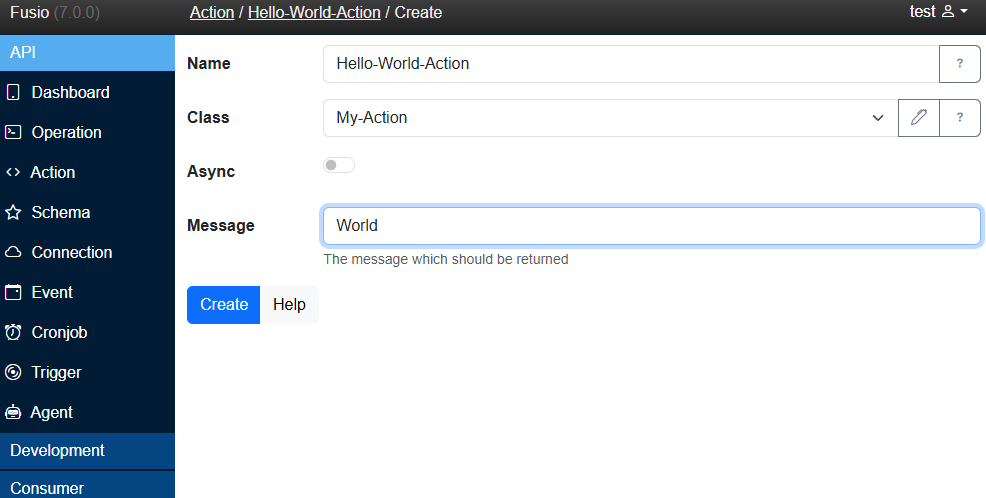
This concept makes actions highly reusable for both developers and non-technical users. We also provide a preset of actions for common tasks. If you build an action you'd like to share, check out our Adapter page. See our custom action documentation for more details.
Worker
Fusio provides Worker actions, which allow you to develop logic directly in the backend without building custom PHP classes.
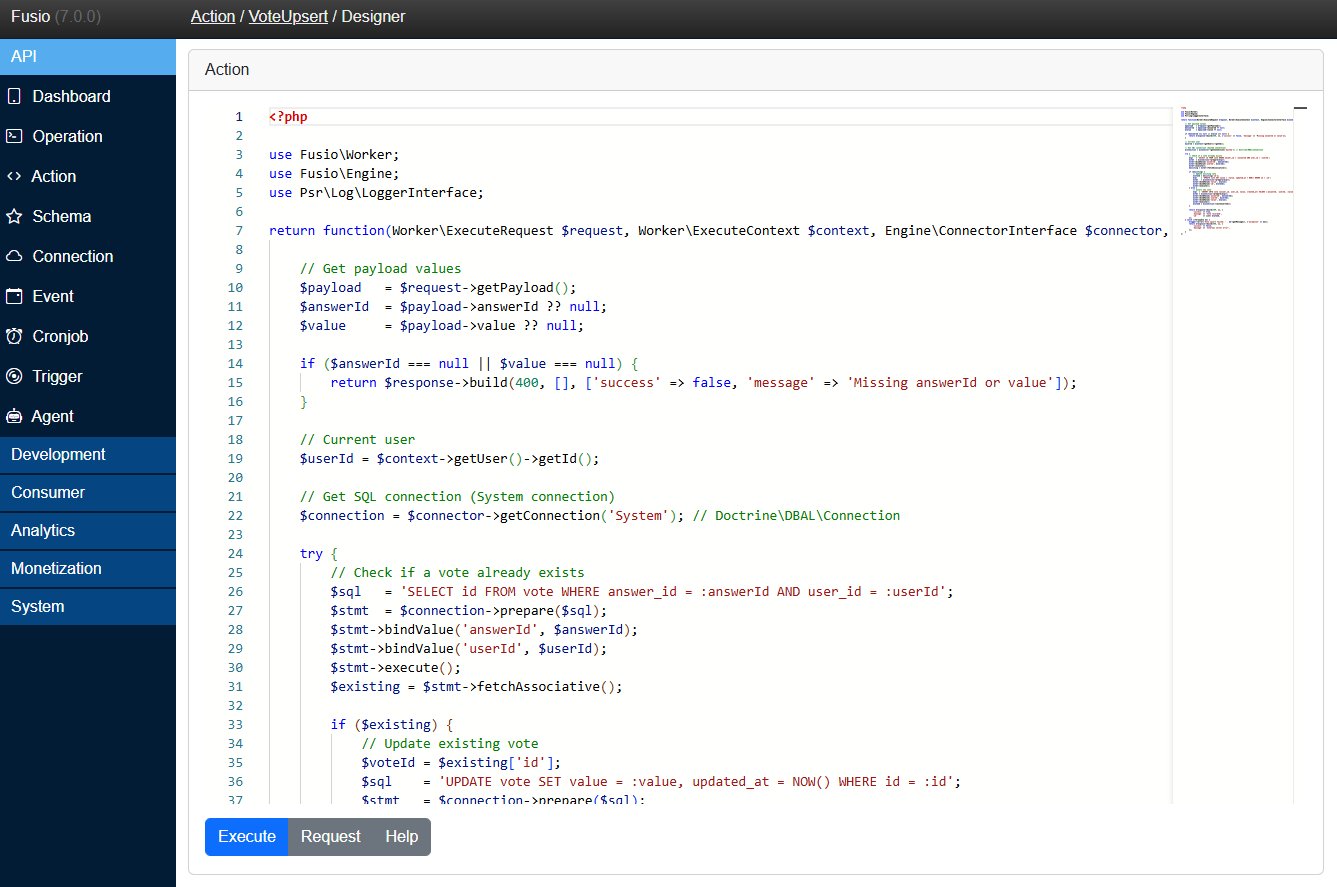
This also enables you to build actions in other languages like JavaScript or Python, which is ideal if your team is more familiar with those ecosystems. Learn more in the worker documentation.
AI
With the 7.0 release, we introduced a new Agent concept that allows you to generate worker actions using AI.
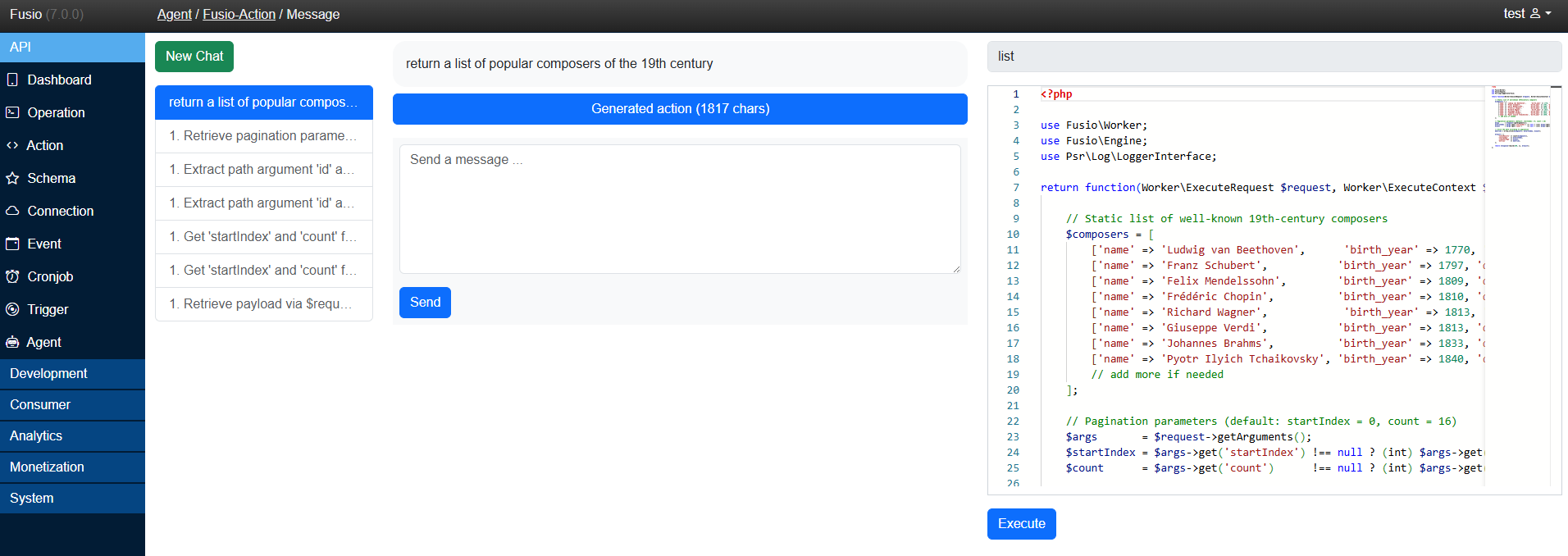
This makes developing backend logic accessible to everyone. Simply describe the logic you need:
return a list of popular composers of the 19th century
The Agent then generates the appropriate action logic automatically. Fusio supports multiple providers, including Ollama, ChatGPT, and Gemini, so you are never locked into a specific AI. Explore the AI agent documentation for more.
🧩 Apps
Fusio includes a flexible app system that lets you install various web-based apps to support different API-related use cases. These apps are typically simple JavaScript frontends that interact with Fusio's internal API.
You can browse all available apps in the Fusio Marketplace, and install them using either the CLI:
php bin/fusio marketplace:install fusio
or directly through the backend interface.
🖥️ Backend
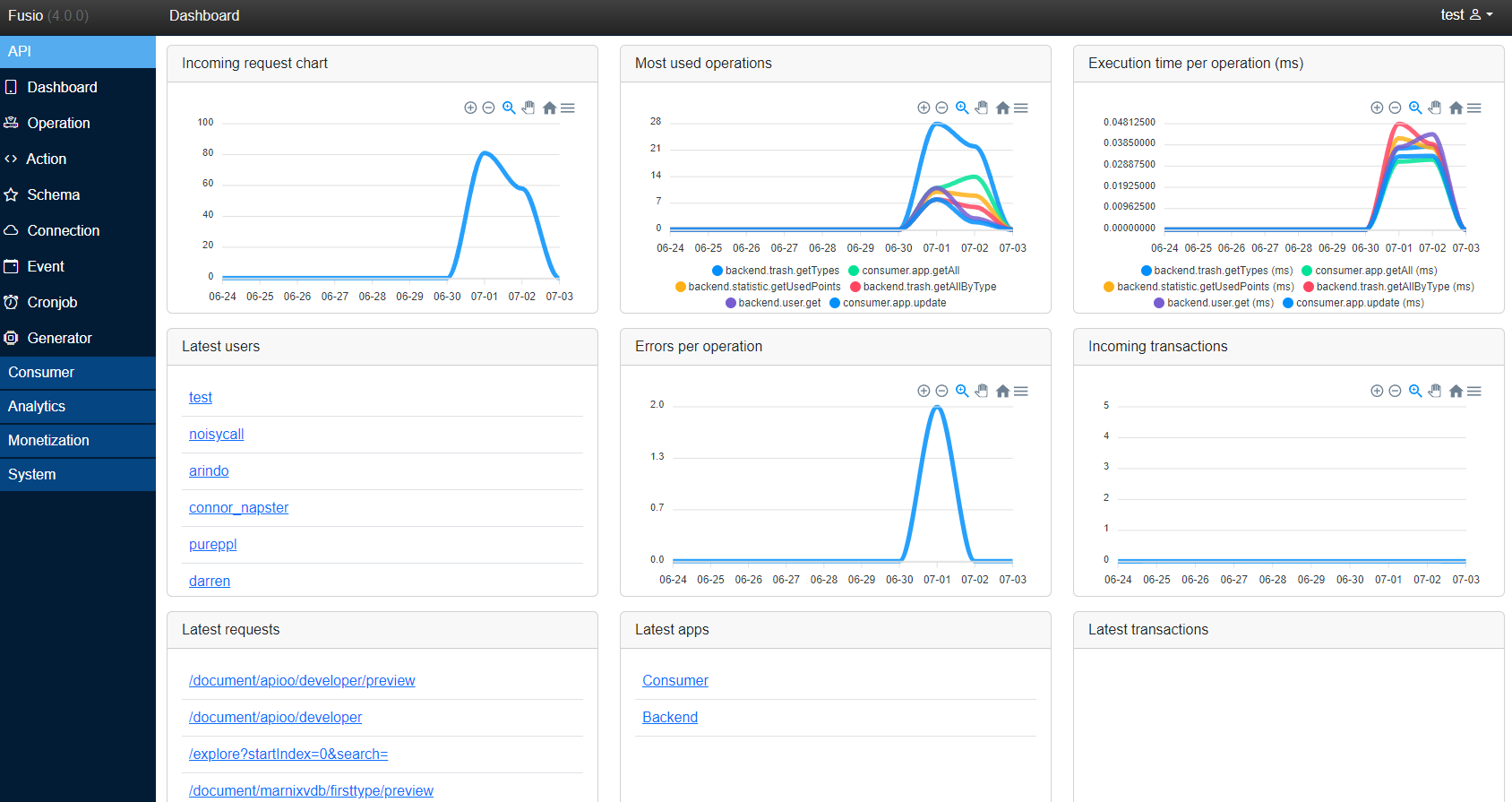
The backend app is the main app to configure and manage your API located at /apps/fusio/.
💡 VSCode
Fusio provides a VSCode extension which can be used to simplify action development.
🔗 Integration
🧰 SDK
To build and integrate applications with Fusio, you can use one of our officially supported SDKs, which simplify interaction with a Fusio instance. Alternatively, you can directly communicate with the REST API for full control and flexibility.
| Language | GitHub | Package | Example |
|---|---|---|---|
| C# | GitHub | NuGet | Example |
| Go | GitHub | go get | Example |
| Java | GitHub | Maven | Example |
| Javascript | GitHub | NPM | |
| PHP | GitHub | Packagist | Example |
| Python | GitHub | PyPI | Example |
🖥️ Frontend
📡 REST API
| Domain | Documentation | Specification |
|---|---|---|
| Backend | ReDoc | OpenAPI |
| Consumer | ReDoc | OpenAPI |
| System | ReDoc | OpenAPI |
🌍 Ecosystem
Besides our core product, we offer additional services to augment the functionality of Fusio.
- Marketplace
The Fusio marketplace is the place to share apps and actions with other Fusio users, it helps to quickly build your API by using existing code from other users. You can register and configure the credentials at your local Fusio installation under System / Config s.marketplace_client_idandmarketplace_client_secretthen you can use the panel under Development / Marketplace to install apps or actions. - SDKgen
SDK as a service platform which helps you to generate client SDKs for your API in different languages likeCSharp,Go,JavaandPythonwhich helps your customers to interact with your API. Therefor you need to register at the SDKgen app and provide the credentials under System / Config s.sdkgen_client_idandsdkgen_client_secret. Then you can generate the SDK directly at the backend under Development / SDK. - TypeHub
API and data design platform, basically you can push your API specification to this platform so that users can simply discover your API. It tracks all changes of your API so that you have always a clean history how your API evolves. - APIgen
Service which generates fully working Fusio APIs based on a data model. It also includes a simple Angular frontend app to CRUD your models. It can be seen as low-code generator to quickly generate CRUD APIs but the generated code is clean and can be also used as foundation for your next app. - APImon
Simple API monitoring service which helps to monitor your Fusio installation. It is optimized for Fusio, but it can be also used for different API endpoints. APImon invokes your endpoints in specific intervals and notifies you about changes. It also includes an uptime page for your users for example s. https://api.apimon.app/status/fusio_marketplace
🏷️ Domains
By default, the entire Fusio project can be hosted on a single domain. In this setup:
- Your API is served from the root path (e.g., https://acme.com/).
- Web apps like the developer portal and admin backend are accessible under the
/appsdirectory (e.g., https://acme.com/apps/developer).
This setup is quick to get started with and requires no additional configuration. For production environments, we recommend a subdomain-based structure:
- api.acme.com
Hosts only the Fusio API. In this setup, you can safely remove theapps/folder from thepublic/directory. - developer.acme.com
Hosts the Developer App, a portal where third-party developers can register, view documentation, and access their credentials. - fusio.acme.com (optional)
Hosts the Backend App, used to manage your Fusio instance. You can also host this on a separate internal domain.
Note: This is just a suggested setup. You're free to choose any domain or subdomain structure that best fits your infrastructure.
📚 Documentation
Please check out our official documentation website where we bundle all documentation resources:
https://docs.fusio-project.org/
🤝 Support & Community
If you have questions, found a bug, or want to share your feedback, we are active across the following channels:
- GitHub Discussions - Best for "How-to" questions, architectural feedback, and sharing feature ideas.
- Discord Community - Join our real-time chat to connect with other Fusio developers and the core maintainers.
- Issue Tracker - Report technical bugs or reproducible errors. Please check the Documentation first.
- Direct Contact - Reach out via our official website for specific inquiries or high-level feedback.
🤝 Partners
We're grateful to our partners who support the Fusio project and share our vision of advancing open API development.
If your company is interested in becoming a partner and being listed here, consider becoming a sponsor.
