fscrawler is a free, open source data extraction & web scraping project written in Java and released under Apache-2.0. It has 1,455 GitHub stars, 307 forks and 87 open issues, and was last pushed 21 hours ago. On this registry it ranks #101 of 150 tracked projects in Data Extraction & Web Scraping, with 5 head-to-head comparisons available. It gained 3 stars over the last 30 tracked days.

What is fscrawler?

FSCrawler is a Java-based file system crawler that indexes binary documents such as PDF, Open Office, and MS Office files into Elasticsearch, and it is intended for teams that already run Elasticsearch and need their file systems searchable.

What it is

FSCrawler is an Apache-2.0 licensed Java project published under the Data & Analytics / Data Extraction & Web Scraping category, tagged with crawler, elasticsearch, java, and tika. It walks a local file system or a mounted drive, reaches remote file systems over SSH and FTP, and also exposes a REST interface that lets an operator upload binary documents into Elasticsearch. Documentation lives at fscrawler.readthedocs.io.

The concrete problem it solves is keeping an Elasticsearch index synchronised with a tree of documents without writing custom ingestion code: the crawler indexes new files, updates existing ones, and removes old ones as the underlying file system changes. It replaces the homegrown scripts and manual upload steps that teams otherwise assemble to feed PDFs, Open Office, and MS Office binaries into Elasticsearch, and it tracks Elasticsearch releases explicitly, pairing FSCrawler 2.9 with Elasticsearch 6.x and 7.x, and FSCrawler 3.0 with Elasticsearch 7.x, 8.x, and 9.x.

Key capabilities

  • Crawls a local file system or a mounted drive, indexing new files, updating existing ones, and deleting documents whose files are gone.
  • Crawls remote file systems over SSH and FTP.
  • Offers a REST interface so binary documents can be "uploaded" into Elasticsearch directly.
  • Indexes binary formats including PDF, Open Office, and MS Office.
  • Supports querying crawled content in Kibana with ES|QL, for example FROM fscrawler | STATS numDocs = COUNT(*), FROM fscrawler | WHERE content : "David", and counting by file.content_type.
  • Stores per-job configuration in ~/.fscrawler/fscrawler/_settings.yaml.
  • Ships documentation for automated consumers: an llms.txt index, clean Markdown versions of every docs page (*.html.md), and an LLM assistant guide with a ready-made prompt for writing job settings.

Who uses it and how

  • Teams that already operate Elasticsearch and want file shares, document folders, or resume collections searchable through Kibana, without building their own extraction and indexing pipeline.
  • Operators who start Elasticsearch and Kibana with the start-local script, then point the crawler at a directory such as ~/resumes and watch documents arrive under the fscrawler alias.
  • Container-based deployments that configure everything through environment variables: FSCRAWLER_ELASTICSEARCH_URLS, FSCRAWLER_ELASTICSEARCH_API_KEY, and FS_JAVA_OPTS for settings such as the log level.
  • Installations that need to index documents living on remote hosts, using the SSH and FTP crawling paths rather than a local mount.
  • Users pinned to a specific Elasticsearch generation, selecting FSCrawler 2.9 for Elasticsearch 6.x or 7.x and FSCrawler 3.0 for 7.x, 8.x, and 9.x, with 3.1-SNAPSHOT documented for the 8.x and 9.x line.

Getting started

The README's quick start runs Elasticsearch and Kibana through the start-local script, then pulls the Docker image dadoonet/fscrawler and runs it with a mounted settings volume, a read-only document directory, and the Elasticsearch URL and API key passed as environment variables. A snapshot tag is published for testing the SNAPSHOT build.

How it compares

No other project in this registry occupies the same filesystem-to-Elasticsearch path, so FSCrawler stands alone here. Its position is defined by the ecosystem it targets rather than by a set of named rivals: it assumes Elasticsearch as the index and Kibana as the query surface.

When to use it — and when not to

A self-hoster must operate Elasticsearch itself, manage the API key the crawler authenticates with, and maintain job settings in ~/.fscrawler/fscrawler/_settings.yaml; the crawler is not a hosted service. Anyone who does not already run Elasticsearch, or who wants a managed search backend, should not pick it. The repository also shows an uneven release cadence, with FSCrawler 2.9 dating to 2022-03-08, the 3.0 release dated 2026-08-26, and 3.1 still available only as a snapshot, alongside 87 open issues.

project readme (upstream, from github) — read inline

File System Crawler for Elasticsearch

Welcome to FSCrawler for Elasticsearch

This crawler helps to index binary documents such as PDF, Open Office, MS Office.
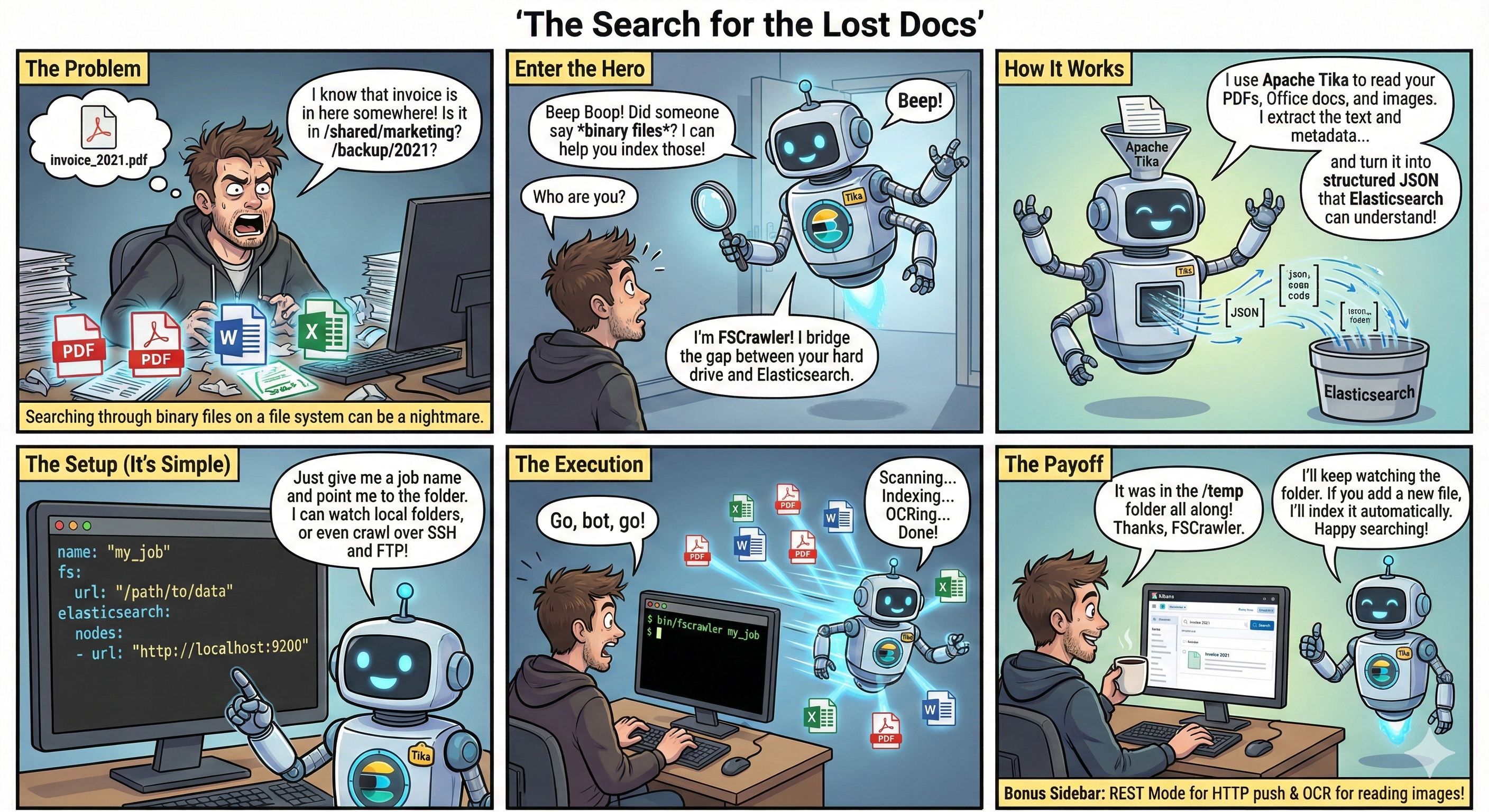
FSCrawler Explained - Generated with Gemini

Main features:

  • Local file system (or a mounted drive) crawling and index new files, update existing ones and removes old ones.
  • Remote file system over SSH/FTP crawling.
  • REST interface to let you "upload" your binary documents to elasticsearch.

Latest versions

Current versions are:

Elasticsearch FSCrawler Released Docs
6.x, 7.x 2.9 2022-03-08 2.9
7.x, 8.x, 9.x 3.0 2026-08-26 3.0
8.x, 9.x 3.1-SNAPSHOT 3.1-SNAPSHOT

Quick start

Run Elasticsearch with start-local:

# Start Elasticsearch and Kibana
curl -fsSL https://elastic.co/start-local | sh
# Get the generated API key (you will need it for FSCrawler)
source elastic-start-local/.env

Run FSCrawler with Docker:

docker pull dadoonet/fscrawler
docker run -it --rm \
  --add-host=host.docker.internal:host-gateway \
  -v ~/.fscrawler:/root/.fscrawler \
  -v $(pwd)/resumes:/tmp/es:ro \
  -e FSCRAWLER_ELASTICSEARCH_URLS=http://host.docker.internal:9200 \
  -e FSCRAWLER_ELASTICSEARCH_API_KEY="${ES_LOCAL_API_KEY}" \
  -e FS_JAVA_OPTS="-DLOG_LEVEL=debug" \
  dadoonet/fscrawler

Then open Kibana and watch for your documents coming to the fscrawler alias:

FROM fscrawler 
| STATS numDocs = COUNT(*)

Or search for some text:

FROM fscrawler
| WHERE content : "David"

Or count by file.content_type:

FROM fscrawler 
| STATS numDocs = COUNT(*) BY file.content_type

Note:

  • ~/resumes contains the documents you want to index
  • Job settings will be stored in ~/.fscrawler/fscrawler/_settings.yaml

Read the documentation for more details and specifically the tutorial page.

Need help writing your job settings? Copy a ready-made prompt from the LLM assistant guide into ChatGPT, Claude, or your favorite AI assistant.

FSCrawler also publishes an llms.txt index (mirrored in the repo) and clean Markdown versions of every docs page (*.html.md) so agents can skip HTML chrome — see the llms.txt v2 proposal.

Project information

Stats

GitHub Repo stars GitHub forks GitHub contributors Docker Pulls GitHub License

Version in preparation

Latest SNAPSHOT Docker Image Version (snapshot) Docker Image Size (snapshot) GitHub commits since latest release GitHub last commit Build Documentation Status

To test this SNAPSHOT with Docker, use the snapshot tag. Untagged dadoonet/fscrawler (or :latest) is the last stable release:

docker pull dadoonet/fscrawler:snapshot

For Docker Compose, set FSCRAWLER_VERSION=snapshot in .env. Use snapshot-noocr if you do not need OCR. The ZIP is published as a GitHub pre-release on every push to main.

Latest release

GitHub Release GitHub Release Date Docker Image Version Docker Image Size

Build & quality

Quality Gate Status Security Rating Reliability Rating Maintainability Rating

Bugs Vulnerabilities Code Smells Lines of Code Duplicated Lines (%) Technical Debt

License

Read more about the Apache2 License.

Thanks

Thanks to JetBrains for the IntelliJ IDEA License! The best IDE out there!

Thanks to SonarCloud for the free analysis! You guys rock!

SonarCloud

Frequently asked questions

Is fscrawler free to use?

fscrawler is open source under the Apache-2.0 licence. There is no licence fee and no seat count — you can self-host it or, where the project offers one, pay a vendor for a managed version instead.

What does fscrawler do?

Elasticsearch File System Crawler (FS Crawler)

What is fscrawler written in?

fscrawler is primarily written in Java. Its source is publicly available at https://github.com/dadoonet/fscrawler, and it has 1,455 GitHub stars.



