

frpmgr is a free, open source networking & connectivity project written in Go and released under Apache-2.0. It has 2,053 GitHub stars, 185 forks and 21 open issues, and was last pushed 24 days ago. On this registry it ranks #42 of 55 tracked projects in Networking & Connectivity, with 5 head-to-head comparisons available.

What is frpmgr?

FRP Manager (frpmgr) is a user-friendly desktop GUI client for FRP on Windows that lets users configure, launch, and monitor reverse proxies without ever writing a configuration file.

What it is

FRP Manager is a multi-node, graphical reverse proxy tool built on top of FRP, written in Go and licensed under Apache-2.0. It is aimed squarely at Windows users — the latest release requires at least Windows 10 or Server 2016 — and it covers a complete workflow: a configuration editor, a launcher, status tracking, and hot reload. Documentation lives in the project Wiki, which carries installation instructions, a Quick Start guide, a Configuration reference covering proxy, visitor, and log settings, and a set of worked examples.

The concrete problem it solves is a common one described by the authors: exposing a local server that sits behind a NAT or firewall to the Internet normally means juggling several separate pieces at once — the FRP client binary, a hand-written configuration file, and some kind of launcher — in order to keep a stable service running. FRP Manager collapses that into an all-in-one application and eliminates the tedious manual operations that come with deploying a reverse proxy that way.

Key capabilities

  • Configurations launched from the application run independently as background services, so the GUI can be closed after setup while the proxies keep working.
  • A launched configuration is registered as an auto-start service by default and comes up during system boot, without requiring anyone to log in.
  • Hot reload applies proxy changes to a running configuration without restarting the service and without losing proxy state.
  • Multiple configurations make it possible to connect to several nodes at once, with each node kept as its own configuration.
  • Configurations can be imported from a local file, from the clipboard, or over HTTP, and exported again for reuse.
  • A self-destructing configuration disappears and becomes unreachable after a set amount of time.
  • Proxy status is shown directly in a table view, so there is no need to read logs to see what is running.

Who uses it and how

  • Windows users who need to expose a local server behind NAT or a firewall to the Internet, replacing the usual client-plus-config-plus-launcher arrangement with a single application.
  • Operators managing connections to multiple nodes, who keep one configuration per node and track each proxy's state from the status table rather than from log output.
  • People who want a proxy service that survives reboots unattended, since launched configurations register as auto-start services that start at boot without a login.
  • Users working with short-lived or shareable access, who rely on the self-destructing configuration type to make a configuration unreachable after a given period.
  • Contributors building the project from source, who need Go, Node v22, the Windows SDK, MinGW, and the WiX Toolset v3.14, set WindowsSdkVerBinPath, and run build.bat to produce installation files in the bin directory.

Getting started

Install the application from the releases page following the Wiki's Installation Instructions, or build it from source with git clone, cd frpmgr, and build.bat — passing build.bat -p skips the installer and produces a portable application instead.

How it compares

FRP Manager sits on top of FRP itself rather than next to an alternative: it is the graphical front end for the same frpc client, so it competes with nothing so much as the manual workflow of editing a config file and launching the FRP binary by hand. In this registry it stands alongside the underlying FRP project as the tool you reach for when that command-line workflow is the part you would rather not maintain.

When to use it — and when not

The trade-off is platform and scope: you are accepting a Windows-only GUI (Windows 10 or Server 2016 and above) that manages FRP clients, and you still need a reachable FRP node for the proxy to connect to. It is a poor fit for Linux servers, headless deployments with no desktop, or anyone who already drives frpc comfortably from configuration files and a shell. Building it yourself also carries a fairly heavy toolchain — Go, Node v22, the Windows SDK, MinGW, and WiX — and the README itself is thin, deferring most guidance to the Wiki, while the project carries 21 open issues.

project readme (upstream, from github) — read inline

FRP Manager

GitHub Release FRP Version GitHub Downloads

English | 简体中文

FRP Manager is a multi-node, graphical reverse proxy tool designed for FRP on Windows. It allows users to setup reverse proxy easily without writing the configuration file. FRP Manager offers a complete solution including editor, launcher, status tracking, and hot reload.

The tool was inspired by a common use case where we often need to combine multiple tools including client, configuration file, and launcher to create a stable service that exposes a local server behind a NAT or firewall to the Internet. Now, with FRP Manager, an all-in-one solution, you can avoid many tedious operations when deploying a reverse proxy.

The latest release requires at least Windows 10 or Server 2016. Please visit the Wiki for comprehensive guides.
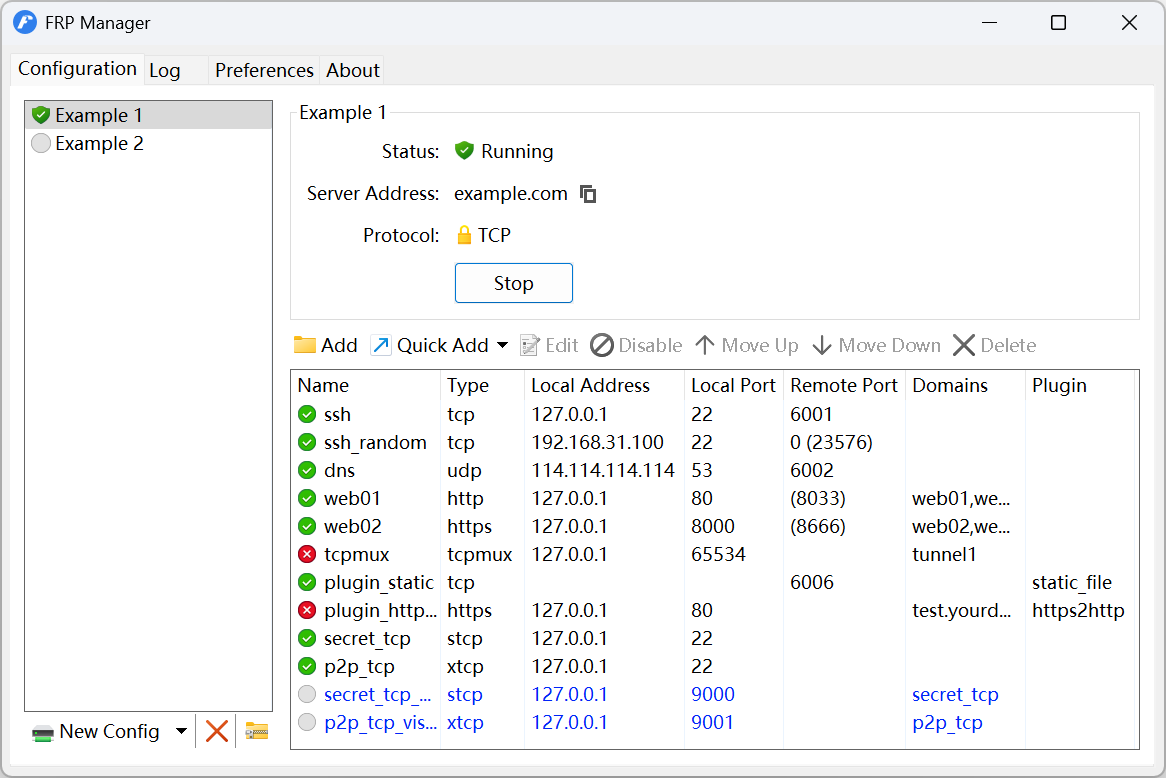
screenshot

Features

  • Closable GUI: All launched configurations will run independently as background services, so you can close the GUI after finishing all settings.
  • Auto-start: A launched configuration is registered as an auto-start service by default and starts automatically during system boot (no login required).
  • Hot reload: Allows users to apply proxy changes to a running configuration without restarting the service and without losing proxy state.
  • Multiple configurations: It's easy to connect to multiple nodes by creating multiple configurations.
  • Import and export configurations: Provides the option to import configuration file from multiple sources, including local file, clipboard, and HTTP.
  • Self-destructing configuration: A special configuration that disappears and becomes unreachable after a certain amount of time.
  • Status tracking: You can check the proxy status directly in the table view without looking at the logs.

Visit the Wiki for comprehensive guides, including:

Building

To build FRP Manager from source, you need to install the following dependencies:

Once installed, the WindowsSdkVerBinPath environment variable should be set to tell build script where to find the specific version of Windows SDK, e.g., set WindowsSdkVerBinPath=C:\Program Files (x86)\Windows Kits\10\bin\10.0.26100.0\. You should also add the bin directory of MinGW to the PATH environment variable.

You can compile the project by opening the terminal:

git clone https://github.com/koho/frpmgr
cd frpmgr
build.bat

The generated installation files are located in the bin directory.

You can also skip building the installation package and get a portable application by passing the -p option to the build command:

build.bat -p

In this case, you only need to install Go and MinGW.

Debugging

If you're building the project for the first time, you need to compile resources:

go generate

The command does not need to be executed again unless the project's resources change.

After that, the application can be run directly:

go run ./cmd/frpmgr

Sponsors

We are really thankful for all of our users, contributors, and sponsors that has been keeping this project alive and well. We are also giving our gratitude for these company/organization for providing their service for us.

  1. SignPath Foundation for providing us free code signing!

Code Signing Policy

Free code signing provided by SignPath.io, certificate by SignPath Foundation.

Team roles:

Read our full Privacy Policy.

Privacy Policy

This program will not transfer any information to other networked systems unless specifically requested by the user or the person installing or operating it.

FRP Manager has integrated the following services for additional functions, which can be enabled or disabled at any time in the settings:

Donation

If this project is useful to you, consider supporting its development in one of the following ways:

Frequently asked questions

Is frpmgr free to use?

frpmgr is open source under the Apache-2.0 licence. There is no licence fee and no seat count — you can self-host it or, where the project offers one, pay a vendor for a managed version instead.

What does frpmgr do?

A user-friendly desktop GUI client for FRP on Windows.

What is frpmgr written in?

frpmgr is primarily written in Go. Its source is publicly available at https://github.com/koho/frpmgr, and it has 2,053 GitHub stars.