English | 中文
FlubuCore





- Introduction
- Features and Advantages
- Getting Started
- Examples
- Contributing
- Backers and Sponsors
- Acknowledgements
Introduction
"FlubuCore - Fluent Builder Core" is a cross platform build and deployment automation system. You can define your build and deployment scripts in C# using an intuitive fluent interface. This gives you code completion, IntelliSense, debugging, FlubuCore custom analyzers, and native access to the whole .NET ecosystem inside of your scripts.
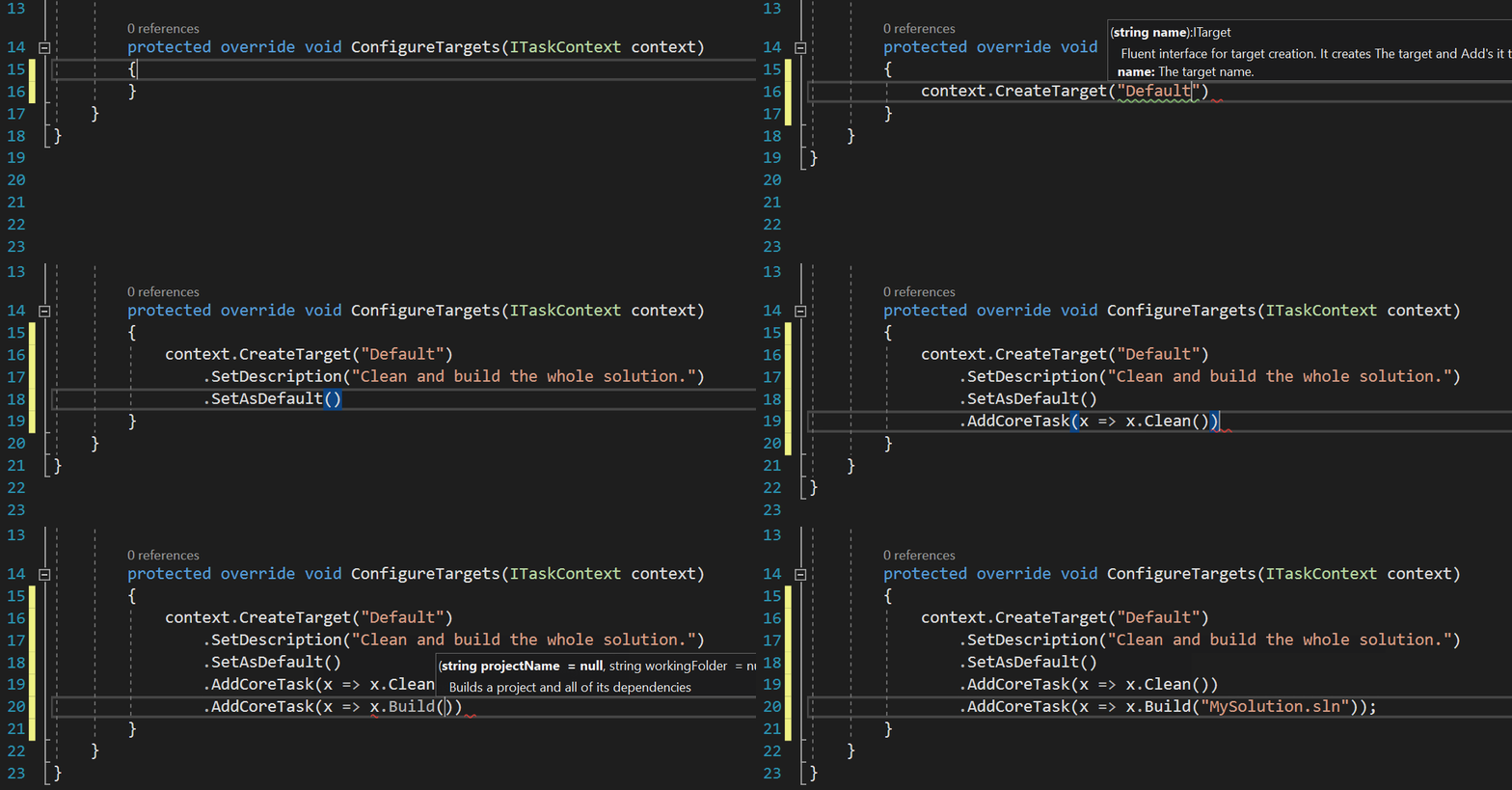
FlubuCore offers a .net (core) console application that uses power of roslyn to compile and execute scripts. Above example can be run from console with:
- FlubuCore runner (.NET 4.62+)
flubu.exe Default - FlubuCore dotnet cli tool (.NET Core 1.0+)
dotnet flubu Default - FlubuCore local or global tool (.NET Core 2.1+)
flubu Default
Features and Advantages
- Intuitive an easy to learn. C#, fluent interface, and IntelliSense make even most complex script creation a breeze.
    [FromArg("nugetKey", "Nuget api key for publishing Flubu nuget packages.")]
    public string NugetApiKey { get; set; }

    protected override void ConfigureTargets(ITaskContext context)
    {
        var pack = context.CreateTarget("Pack")
            .SetDescription("Prepare's nuget package.")
            .AddCoreTask(x => x.Pack()
                .NoBuild()
                .OutputDirectory(OutputDirectory)
                .WithArguments("--force")); //you can add your own custom arguments on each task

        var branch = context.BuildSystems().Travis().Branch;

        var nugetPush = context.CreateTarget("Nuget.publish")
            .SetDescription("Publishes nuget package.")
            .DependsOn(pack)
            .AddCoreTask(x => x.NugetPush($"{OutputDirectory}/NetCoreOpenSource.nupkg")
                .ServerUrl("https://www.nuget.org/api/v2/package")
                .ApiKey(NugetApiKey)
            )
            .When(c => c.BuildSystems().RunningOn == BuildSystemType.TravisCI
                        && !string.IsNullOrEmpty(branch)
                        && branch.EndsWith("stable", StringComparison.OrdinalIgnoreCase));
    }
- Large number of often used built-in tasks like e.g. versioning, running tests, creating deployment packages, publishing NuGet packages, docker tasks, git tasts, sql tasks, npm tasks, executing PowerShell, managing IIS scripts and many more.
context.CreateTarget("build")
   .AddTask(x => x.GitVersionTask())
   .AddTask(x => x.CompileSolutionTask("MySolution.sln").BuildConfiguration("Release");

context.CreateTarget("run.tests")
   .AddTask(x => x.XunitTaskByProjectName("MyProject").StopOnFail())
   .AddTask(x => x.NUnitTask(NunitCmdOptions.V3, "MyProject2").ExcludeCategory("Linux"))
   .AddCoreTask(x => x.CoverletTask("MyProject.dll"));
context.CreateTarget("DoExample")
        .Do(c =>
        {
            // write your awesome code.
            File.Copy("NotSoAwesome.txt", Path.Combine(OutputDirectory, "JustAnExample.txt") );
            // Access flubu built in tasks in DO if needed.
            c.Tasks().GenerateT4Template("example.TT").Execute(c);
        })
        .AddTask(x => x.CompileSolutionTask())
        .Do(NuGetPackageReferencingExample);
- assembly references and nuget packages are loaded automatically when script is used together with project file. When script is executed alone (for example when deploying with FlubuCore script on production environment) references can be added with attributes.
[NugetPackage("Newtonsoft.json", "11.0.2")]
[Assembly(".\Lib\EntityFramework.dll")]
public class BuildScript : DefaultBuildScript
{
   public void NuGetPackageReferencingExample(ITaskContext context)
    {
        JsonConvert.SerializeObject("Example");
    }
}
context.CreateTarget("Run.Libz")
    .AddTask(x => x.RunProgramTask(@"packages\LibZ.Tool\1.2.0\tools\libz.exe")
        .WorkingFolder(@".\src")
        .WithArguments("add")
        .WithArguments("--libz", "Assemblies.libz"));
public class SimpleScript : DefaultBuildScript
{
   [FromArg("c", "The configuration to use for building the project.")]
   public string Configuration { get; set; } = "Release"

   [FromArg("sn", "If true app is deployed on second node. Otherwise not.")]
   public bool deployOnSecondNode { get; set; }

   protected override void ConfigureTargets(ITaskContext context)
   {
        context.CreateTarget("build")
           .AddCoreTask(x => x.Build()
               .Configuration(Configuration)
               .ForMember(x =>  x.Framework("net462"), "f", "The target framework to build for."));
   }
}
flubu build -c=Debug -f=netcoreapp2.0
Extending FlubuCore fluent interface by writing your own tasks within FlubuCore plugins.
public class ExampleFlubuPluginTask : TaskBase
{
    protected override int DoExecute(ITaskContextInternal context)
    {
        // Write your task logic here.
        return 0;
    }
}
Growing list of FlubuCore plugins complements built in tasks.
Asynchronous or parallel execution of tasks, target dependencies and custom code.
context.CreateTarget("Run.Tests")
    .AddTaskAsync(x => x.NUnitTaskForNunitV3("TestProjectName1"))
    .AddTaskAsync(x => x.NUnitTaskForNunitV3("TestProjectName1"))
    .AddTaskAsync(x => x.NUnitTaskForNunitV3("TestProjectName3"));
Override existing options or add additional options to tasks through console
context.CreateTarget("Example")`
   .AddCoreTask(x => x.Build("MySolution.sln").Configuration("Release");
flubu example --configuration=Debugflubu would execute
dotnet build MySolution.sln --configuration DebugFull .NET Core support including the local and global CLI tool
dotnet tool install --global FlubuCore.Tool
flubu compile
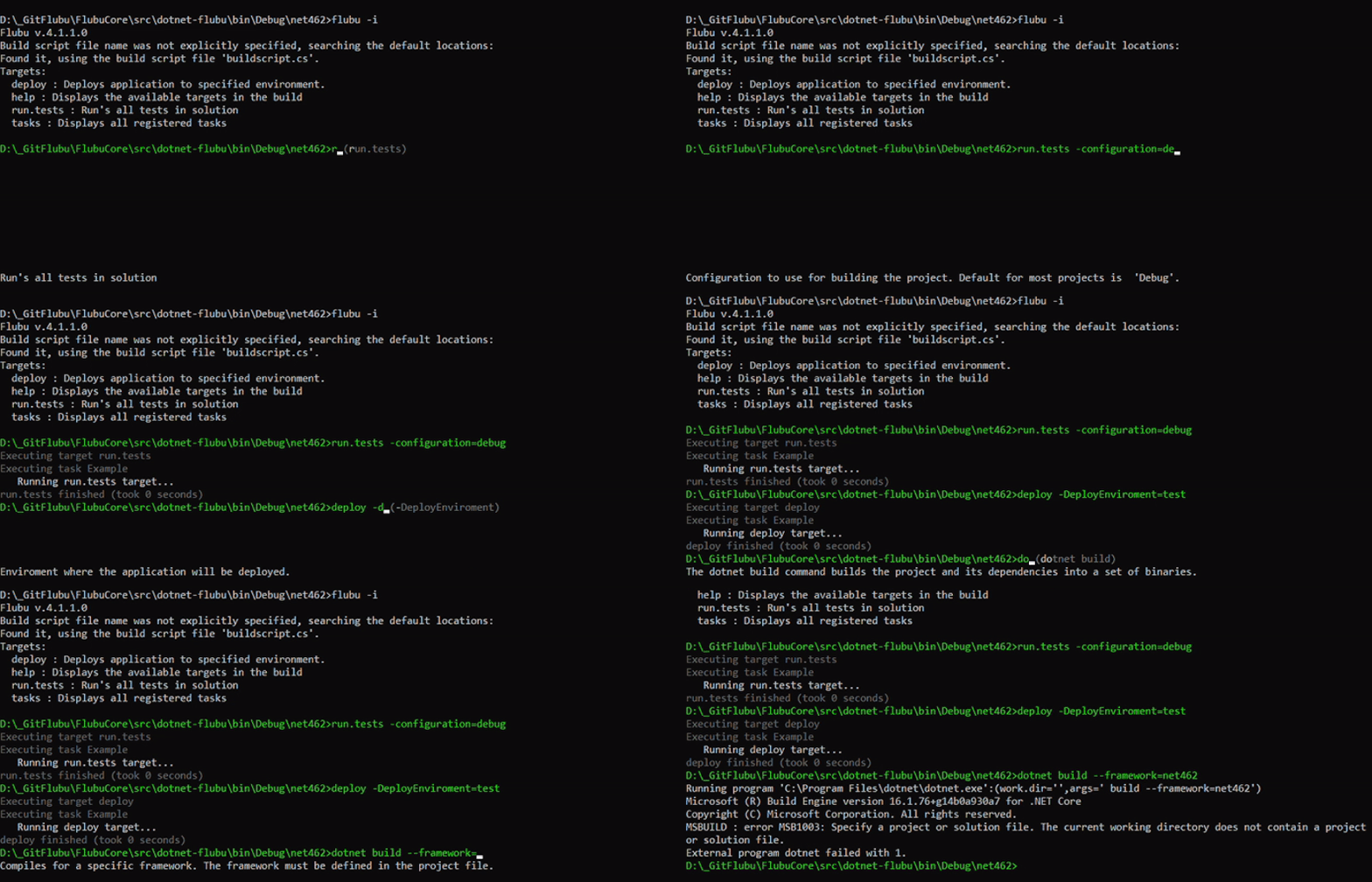
FlubuCore interactive mode which offers target tab completition, options tab completition, toogle targets/options, executed commands history. It is also possible to execute external commands and operable programs. For some of them FlubuCore offers tab completion with help displayed at the bottom of console out of the box(such as dotnet, git..)
Possibility to test and debug your build scripts.
context.WaitForDebugger();Easily automate deployments remotely via the FlubuCore Web API.
Possibility to use FlubuCore tasks in any other .NET application.
Execute script in your console application or pack it as global tool
Improved developer experience with FlubuCore custom analyzers.

Getting Started
Using FlubuCore is straightforward and very simple :-) It is also fully and throughly documented.
The Getting Started chapter in FlubuCore Documentation will help you set up your first FlubuCore build in no time. You should also check getting started blog. It has some more details with some nice tips and tricks.
A comprehensive list of features that FlubuCore has to offer with descriptions can be found in the Build Script Fundamentals chapter.
Once you have your build and deployment scripts defined, the following Wiki chapters will explain how to run them:
- For .NET Framework projects use FlubuCore.Runner
- For .NET Core projects use FlubuCore CLI global tool
Examples
Aside from the detailed Wiki FlubuCore comes with example projects that reflect real-life situations. The examples can be found in the separate Examples repository.
These examples will help you to get quickly start with FlubuCore:
.NET Framework build example - Example covers versioning, building the project, running tests, packaging application for deployment and some other basic use cases.
.NET Core build example - Example covers versioning, building the project, running tests, packaging application for deployment and some other basic use cases.
Deployment script example - Example shows how to write simple deployment script.
Open source library example - Example covers versioning, building the project, running tests and publishing nuget package. It also covers how to run build script on Appveyor and Travis CI.
Have a question?

Contributing
Please see CONTRIBUTING.md.
Ways to Contribute
- We appreciate deeply any feedback that you may have! Feel free to participate in the chat, or add an issue in the issue tracker.
- Spread the word about the project.
- If you like the project don't forget to give it a star so that the community get's bigger.
- Improve documentation.
- Report, fix a bug.
- Implement a new feature.
- Discuss potential ways to improve project.
- Improve existing implementation, performance, etc.
Changelog and Roadmap
Changes with description and examples can be found in Changelog
You can see FlubuCore roadmap by exploring opened Milestones.
Further Development
If you find FlubuCore useful (you feel it helps you on the daily basis) you can support further development by buying us a coffee (or become a backer or sponsor). Sometimes it's hard to stay awake till midnight implementing new features, coffee helps us with that. We would really appreciate your support. Money from sponsorship will also be used for the promotion of the project. If you are a backer or a sponsor you can also request for a new feature or ask for support. These issues will be handled with highest priority.

Backers and Sponsors


Used & Powered by
Thank's to Comtrade for supporting us.

Acknowledgements
- Special thanks to @ironcev for greatly improving readme and for giving some valuable advices.
- Special thanks to @alexinea for translating whole documentation to Chinese.
- Special thanks to @huanlin for writing blogs about FlubuCore in Traditional Chinese and for translating them to English.
Code of Conduct
This project has adopted the code of conduct defined by the Contributor Covenant to clarify expected behavior in our community. For more information see the .NET Foundation Code of Conduct.
.NET Foundation
This project is supported by the .NET Foundation.