OWASP Find Security Bugs is a SpotBugs plugin that performs static security audits — including taint analysis — of Java web applications and Android applications, and it also works with Kotlin, Groovy and Scala projects, for developers and security reviewers who scan JVM bytecode in an IDE, a build pipeline or SonarQube.
What it is
Find Security Bugs is an open-source static analysis plugin for SpotBugs, the bytecode analysis tool that succeeded FindBugs. It is not a standalone scanner: it extends the SpotBugs engine with security-focused detectors and maps its findings to CWE identifiers, so that an existing SpotBugs run also reports security defects instead of only general code-quality bug patterns. The project lives in the JVM tooling ecosystem and is published under the LGPL-3.0 licence as part of the OWASP family, with development supported by GoSecure since 2016 and main developers Philippe Arteau, David Formánek and Tomáš Polešovský.
The concrete problem it solves is that a generic bug-pattern analyser has no notion of injection, credential handling or cryptographic key management. Find Security Bugs contributes that knowledge as detectors: taint analysis that follows untrusted input into sink APIs, a detector for hard-coded passwords and cryptographic keys, and support for declaring injection in custom APIs. That replaces reviewer-driven, manual inspection of the same defect classes in Java web and Android code, and it replaces the assumption that a plain SpotBugs report covers security.
Key capabilities
- Taint analysis for injection flaws, with the topic list naming
taint-analysis as a first-class capability of the project.
- A dedicated detector for hard-coded passwords and cryptographic keys, contributed as part of the taint and credential work.
- The
CUSTOM_INJECTION detector, documented at bugs.htm#CUSTOM_INJECTION, which lets teams model injection in their own APIs.
- Detectors covering the Play Framework, alongside broader improvements for Scala codebases.
- Analysis of compiled bytecode rather than source, which is why Java, Kotlin, Groovy and Scala projects can be scanned by the same detectors.
- Findings mapped to CWE identifiers, matching the project's
cwe and owasp topics.
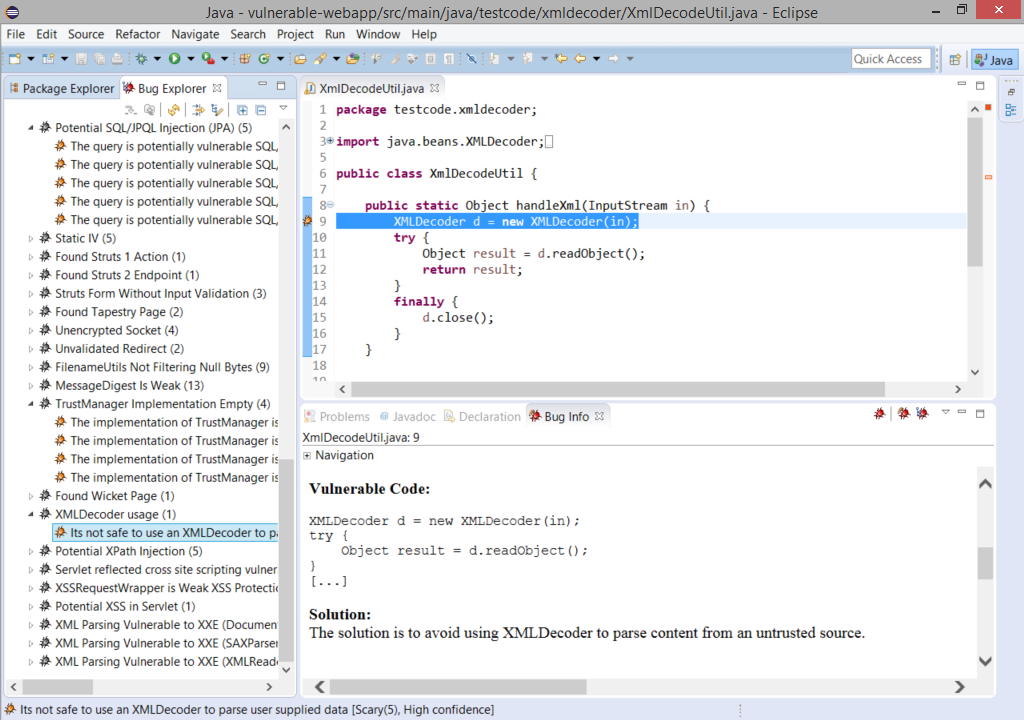
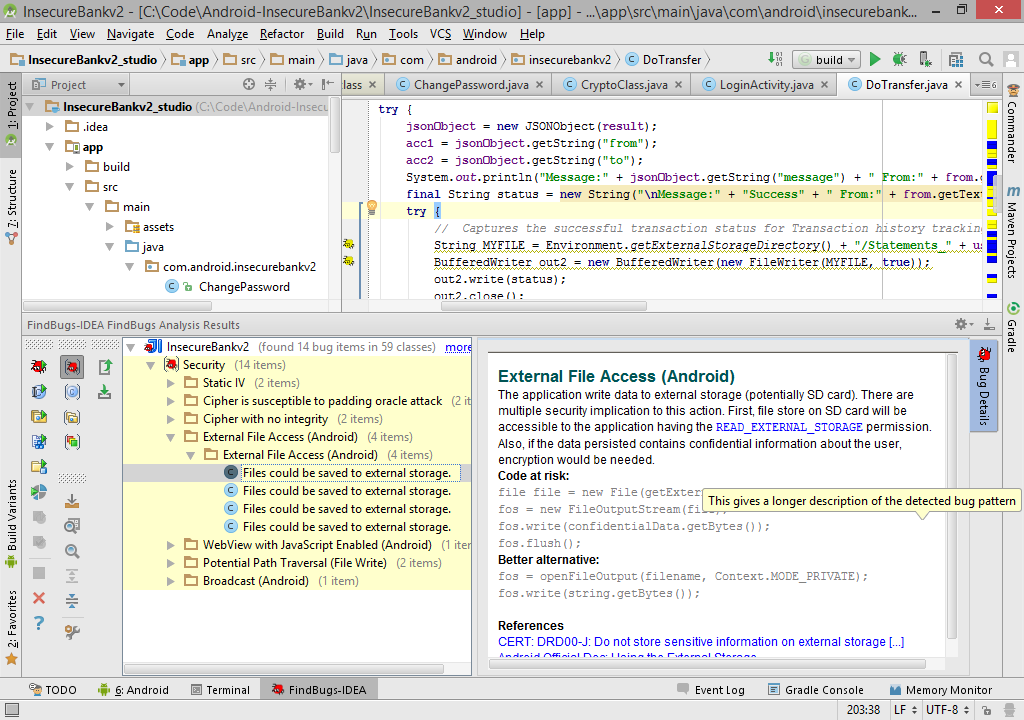
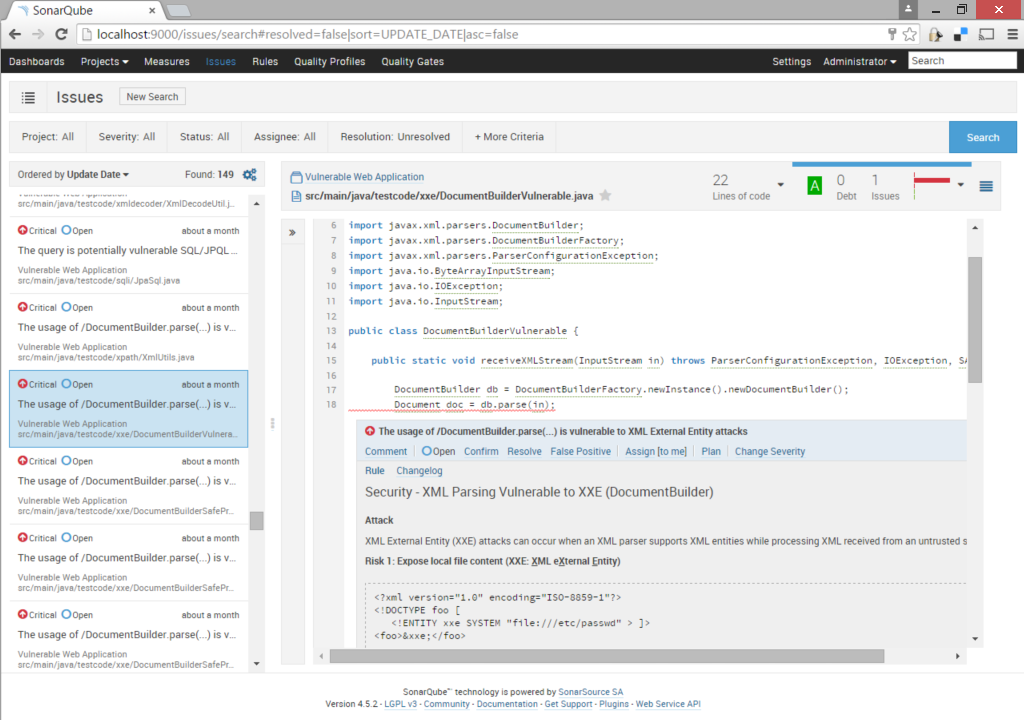
- Editor and platform integrations shown for Eclipse, IntelliJ / Android Studio and SonarQube, plus Japanese-language messages published alongside the English bug descriptions.
Who uses it and how
- Application security teams auditing Java web applications as part of a release or review process, running the plugin wherever SpotBugs already runs.
- Android developers who need the same checks inside Android Studio during normal development, per the IDE screenshot in the README.
- Teams with mixed JVM stacks — Java, Kotlin, Groovy and Scala in one repository — who get one scanner instead of per-language tooling.
- SonarQube users who want the plugin's security findings surfaced in the same dashboard as their other code metrics.
- Contributors and integrators who work through the project's Slack channel,
OWASP/find-sec-bugs, and follow its Java CI workflow, spotbugs.yml, on GitHub.
Getting started
Install the plugin where SpotBugs runs and pull it from Maven Central as com.h3xstream.findsecbugs:findsecbugs-plugin, then enable it in Eclipse, IntelliJ / Android Studio or SonarQube. The project website, find-sec-bugs.github.io, carries the bug descriptions and integration detail.
How it compares
No list of paid products is given in the facts, so the honest comparison is with the tools it actually names: SpotBugs, which is the host engine this plugin extends rather than competes with, the FindBugs lineage preserved in its topics, and SonarQube, which it feeds findings into rather than replaces. Within that set, it is best understood as the security layer of an existing SpotBugs deployment.
When to use it — and when not to
Choose it if you already run SpotBugs, or are willing to, and you need CWE-mapped security findings for JVM code without buying a separate commercial scanner. Do not choose it expecting a hosted or standalone service, for non-JVM languages, or if LGPL-3.0 copyleft obligations on redistribution are a blocker for your organisation. The README itself is brief — installation and detector documentation live on the website rather than in the repository — and with 115 open issues, findings still require triage rather than blind trust.