FairScan is a free, open-source Android document scanner, released under GPL-3.0, that turns camera captures into shareable PDFs entirely on the device, built for anyone who wants a quick scan without ads, tracking, or cloud processing.
What it is
FairScan is an Android application written in Kotlin and published under the GPL-3.0 licence. Its interface is built with Jetpack Compose and image capture runs through CameraX; a custom segmentation model executed with LiteRT detects the document automatically, OpenCV handles perspective correction and image enhancement, Tesseract provides text recognition, and PDFBox-Android generates the PDF. The app is distributed through F-Droid, Google Play and GitHub, and it runs on any device that has Android 8.0 or later and a camera.
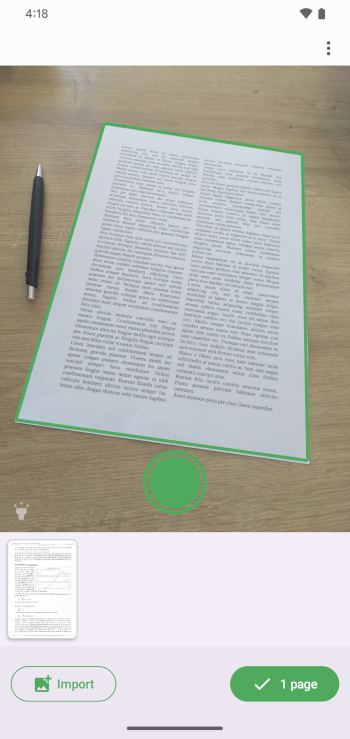
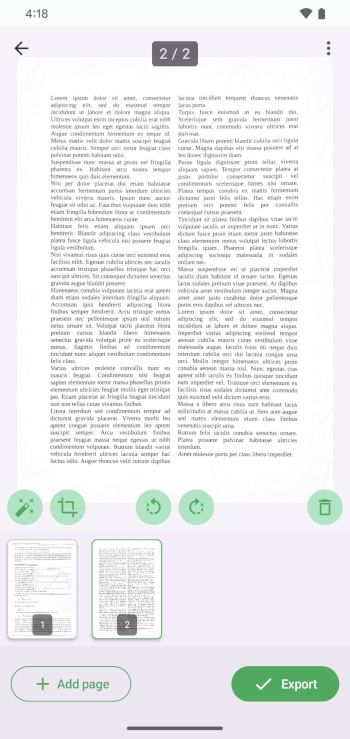
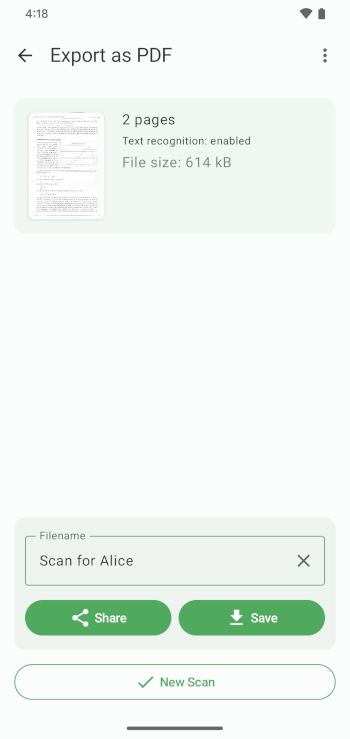
The concrete problem it addresses is the fiddly middle of document scanning: the crop, the corner-dragging, the brightness slider. FairScan is organised around an easy flow of scan, review if needed, then save or share, and it produces a PDF in seconds with no manual adjustments. Everything happens locally on the phone, the permission set is minimal, and there is no tracking and no advertising. The README is explicit about what it replaces: it is not intended to replicate all features found in other scanning apps, and it is not intended to provide fine-grained manual control over document processing — the automation is the point.
Key capabilities
- Automatic document detection using a custom-trained segmentation model that is downloaded at build time by
download-tflite.gradle.kts.
- Automatic perspective correction and automatic image enhancement powered by OpenCV.
- Fast PDF generation with PDFBox-Android, producing a clean, shareable file with no manual adjustments.
- All document processing happens locally on the device, with no cloud processing and a minimal permission set.
- An experimental implicit intent,
org.fairscan.app.action.SCAN_TO_PDF, that launches FairScan in a dedicated external mode, lets the user scan one or more pages, and returns a single generated PDF as a URI with a limited lifetime.
- Text recognition through Tesseract.
- Distributions on F-Droid, Google Play and GitHub, with translations managed on Weblate and contribution guidelines in
CONTRIBUTING.md.
Who uses it and how
- Individuals with an Android 8.0+ phone and a camera, whose entire workflow is capture, optional review, then save or share.
- Privacy-sensitive users and teams that cannot send documents to a cloud service, since processing stays on the handset.
- Android developers who would rather not build scanning themselves: the
SCAN_TO_PDF intent returns a PDF to the calling app, and an example integration is published as fairscan-intent-sample.
- Translators contributing through the project's hosted Weblate instance, and contributors working against the guidelines in
CONTRIBUTING.md.
- Self-builders who compile their own APK or Android App Bundle from source under the GPL-3.0 terms.
Getting started
Install it from F-Droid, Google Play or GitHub, or build it from source with ./gradlew clean check assembleRelease for an APK, with a separate documented Gradle invocation for an Android App Bundle.
How it compares
The facts supplied for this entry list no paid products that FairScan replaces, and they name no sibling tools either, so it stands alone in this registry. Its distinguishing commitments show up in the licence and the architecture rather than in a comparison table: the source is public under GPL-3.0, the segmentation model and its training dataset are published as separate repositories, and no document processing leaves the phone.
When to use it — and when not to
There is no server component to operate, but the flip side of that simplicity is that the project deliberately refuses fine-grained manual control and does not aim at feature parity with fuller scanning apps, so anyone who needs to hand-tune crop, contrast or output should look elsewhere. The intent contract is explicitly experimental, may change between versions, and offers no backward-compatibility guarantee, and because FairScan deletes the returned URI, calling applications must copy its content immediately. The repository carried 38 open issues at the time of writing.
project readme (upstream, from github) — read inline
FairScan
An Android app to scan your documents —
simple and respectful.


FairScan is an Android app to scan documents quickly, easily and privately.
It's designed to be simple: users get a clean, shareable PDF in seconds, with no manual adjustments.
And respectful: open source, minimal permissions, no tracking, no ads.
Contributing
Contributions are welcome, but please read the guidelines first: CONTRIBUTING.md
Translations
Translations are managed on Weblate, and everyone is welcome to contribute.

Start translating:
https://hosted.weblate.org/projects/fairscan/
Screenshots
Features
- Clear, distraction-free interface
- Easy flow: scan, review if needed, save or share
- Automatic document detection using a custom segmentation model
- Automatic perspective correction
- Automatic image enhancement
- Fast PDF generation with no manual adjustments
- All document processing happens locally on your device, no cloud processing
- Minimal permissions
- Open source, GPLv3
What FairScan is not
FairScan is not intended to:
- provide fine-grained manual control over document processing
- replicate all features found in other scanning apps
- optimize for highly specific use cases at the expense of simplicity
Compatibility
FairScan works on any device that:
- runs Android 8.0+
- has a camera
Experimental: Scan to PDF via intent
FairScan can be invoked by other Android applications to perform a document scan and return a generated PDF.
This feature is experimental and intended for developers who want to rely on FairScan as a
simple, privacy-respecting scanning tool.
The intent contract and behavior may change between versions, and backward compatibility
is not guaranteed at this stage.
Intent action: org.fairscan.app.action.SCAN_TO_PDF
This is an implicit intent that launches FairScan in a dedicated external mode.
When started via this intent:
- FairScan opens directly in scan mode
- the user scans one or more pages
- FairScan generates a single PDF
- the resulting PDF is returned to the calling application as a URI with a limited lifetime
- the calling application should immediately copy the content of the URI as FairScan deletes it later
See an example app: fairscan-intent-sample
Technical details
FairScan uses:
The segmentation model
FairScan uses a custom-trained image segmentation model to detect documents:
https://github.com/pynicolas/fairscan-segmentation-model
It's based on a fully public dataset that is available here:
https://github.com/pynicolas/fairscan-dataset
The build system automatically downloads the model using
download-tflite.gradle.kts.
Related blog posts:
Build
To build an APK:
./gradlew clean check assembleRelease
To build an Android App Bundle:
./gradlew clean check :app:bundleRelease
License
This project is licensed under the GNU GPLv3. See LICENSE for details.