ezEngine is an open source C++ game engine, released under the MIT licence, that provides a modular engine core and a feature-rich editor for building 3D games and for constructing custom engine technology on top of a reusable foundation.
What it is
ezEngine lives in the C++ 3D game development ecosystem and ships as a full engine plus editor. Its defining design choice is modularity: the engine is built so that a project can adopt all of the available functionality or pick and choose individual features and build the rest itself. Larger features are implemented as engine and editor plugins, which means components such as sound (Fmod), physics (Jolt) and particle effects can be removed or replaced rather than being welded into the core. On top of that core sits a feature-rich editor that supports rapid prototyping through visual scripting and custom C++ code, with C++ project generation for teams that want to write gameplay in native code.
The concrete problem it solves is the amount of undifferentiated infrastructure work that precedes an actual game. Rather than assembling a rendering layer, plugin boundaries, editor tooling and a scripting path from scratch, a team starts from a working editor, sample projects and a documented code base, then strips out the subsystems it does not want. The engine also positions its foundation as useful independently of rendering, so developers who are building their own engine can reuse the lower layers instead of rewriting them. The rendering path is Direct3D 11, and full engine functionality is currently available only on Windows, with a Vulkan port in progress.
Key capabilities
- A plugin-based architecture in which sound (Fmod), physics (Jolt) and particle effects are supplied as removable or replaceable engine and editor plugins.
- A feature-rich editor supporting visual scripting and custom C++ code, plus C++ project generation for code-driven workflows.
- A Direct3D 11 renderer on Windows, with ongoing work to port rendering to Vulkan.
- Non-rendering functionality that compiles on Windows, Android, Linux and macOS.
- Prebuilt binaries published through GitHub releases, alongside instructions for building the engine yourself.
- A Windows build script,
GenerateWin64vs2022.bat, which produces the Visual Studio 2022 solution at Workspace\vs2022x64\ezEngine_vs2022x64.sln.
- Documentation on the project website, code API documentation at
ezengine.github.io/api-docs, sample projects, screenshots and tutorial videos on YouTube.
Who uses it and how
- Windows developers building 3D games who need the full renderer and are willing to work within the Direct3D 11 path.
- Teams that want to compose an engine from parts, keeping Fmod audio and Jolt physics or swapping them for alternatives via the plugin system.
- Developers constructing their own engine on top of ezEngine's foundation, using the non-rendering functionality that compiles across Windows, Android, Linux and macOS.
- Studios that pair visual scripting for fast prototyping with custom C++ code for production gameplay logic.
- Contributors and integrators: the repository carries 266 forks and 34 open issues, and the README explicitly invites contributions and directs people to a contribution guide.
Getting started
Clone the repository, run .\GenerateWin64vs2022.bat, open Workspace\vs2022x64\ezEngine_vs2022x64.sln in Visual Studio, build everything and launch the Editor project to open a sample project. Prebuilt binaries are available from the GitHub releases page, though the README notes that releases are infrequent and that building the engine yourself is the expected route.
How it compares
No list of paid or commercial products that ezEngine replaces is provided here, and no comparable engines are named in the supplied facts, so it stands alone in this registry on that basis. The material that is available describes it on its own terms: an MIT-licensed, self-hosted C++ engine whose feature set is assembled through plugins rather than sold as tiers. Any cost comparison beyond the licence would have to be made against documentation outside these facts.
When to use it — and when not to
Choose ezEngine if a Windows-first 3D project with a Direct3D 11 renderer suits the target, or if the plugin architecture and reusable foundation match how the team wants to assemble technology. A self-hoster must operate a Windows build toolchain around Visual Studio 2022 and be prepared to build the engine from source, since prebuilt releases are described as infrequent. It is a poor fit for teams that need a production-ready Linux editor today, for anyone requiring a mature Vulkan renderer, or for those wanting a fully supported binary release cadence.
project readme (upstream, from github) — read inline
ezEngine
ezEngine is an open source C++ game engine.
Watch the trailer below for a quick feature overview:

Visit for documentation, samples and detailed build instructions.
Supported Platforms
The full engine functionality is currently only available on Windows, because the renderer uses Direct3D 11. Work on porting the renderer to Vulkan is ongoing. There is an experimental Linux port of the editor, but it is not yet functional enough for productive use.
All non-rendering related functionality compiles on Windows, Android, Linux and MacOS. See this page for details.
Prebuilt Binaries
See the releases for recent changes and prebuilt binaries. Note, however, that releases are infrequent and you are generally expected to build the engine yourself.
Building the Engine
These are the instructions for Windows. For other platforms see this page.
Open a Windows Terminal to clone and build the engine:
git clone https://github.com/ezEngine/ezEngine.gitcd ezEngine.\GenerateWin64vs2022.bat- Open the Visual Studio solution
Workspace\vs2022x64\ezEngine_vs2022x64.sln and build everything.
- Launch the
Editor project from Visual Studio and open one of the sample projects.
Design Philosophy
EZ is built in a modular way, enabling users to either use all available functionality, or to pick and choose individual features and build the rest themselves. Larger features are implemented through engine and editor plugins and can therefore easily be removed or replaced. For instance sound (Fmod), physics (Jolt) and particle effects are all provided through plugins.
EZ puts a strong emphasis on a solid foundation that is both easy and efficient to use. Even if you do not use the rendering functionality, EZ has a lot to offer to build your own engine on top of.
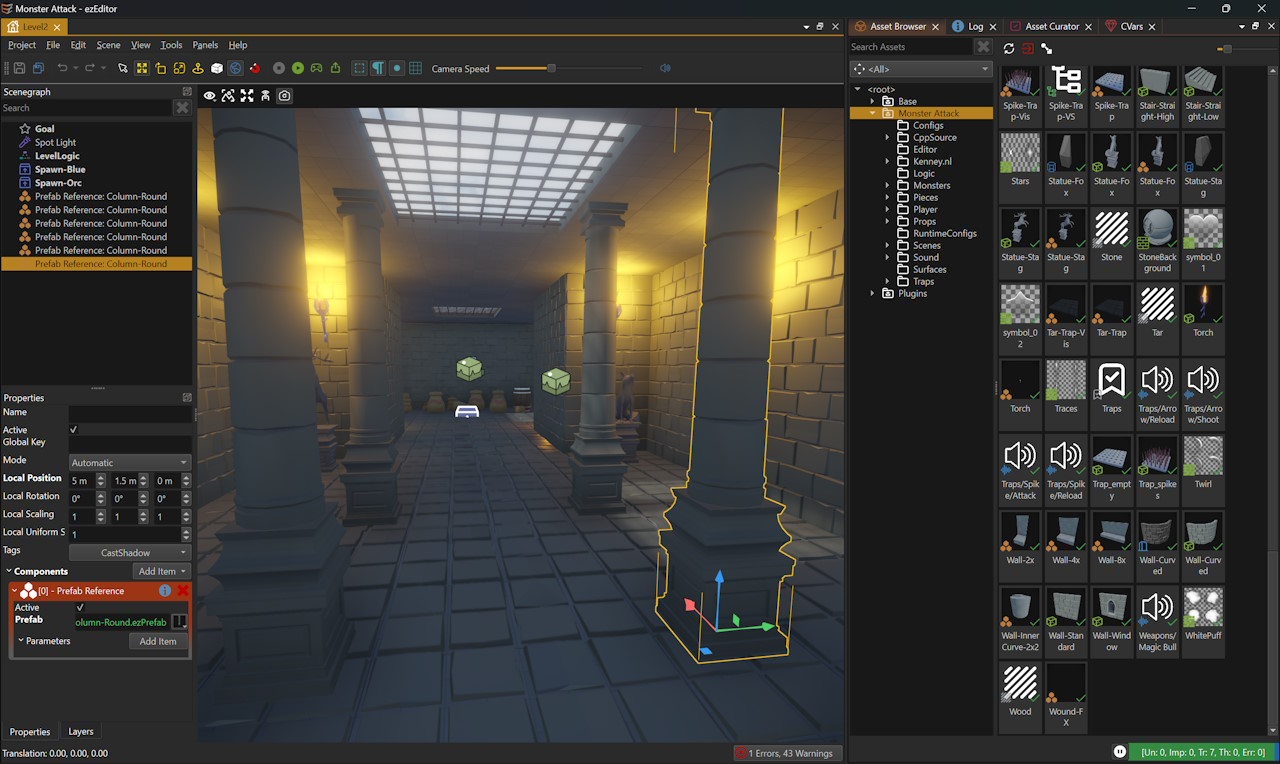
Finally, EZ comes with a feature rich editor that makes it possible to quickly prototype your game using visual scripting and custom C++ code.
Screenshots, Videos, Samples
Documentation and FAQ
Contributing
Contributions are always welcome. Please see this page for details on how you can contribute.
Contact
If you have a question, contact us.