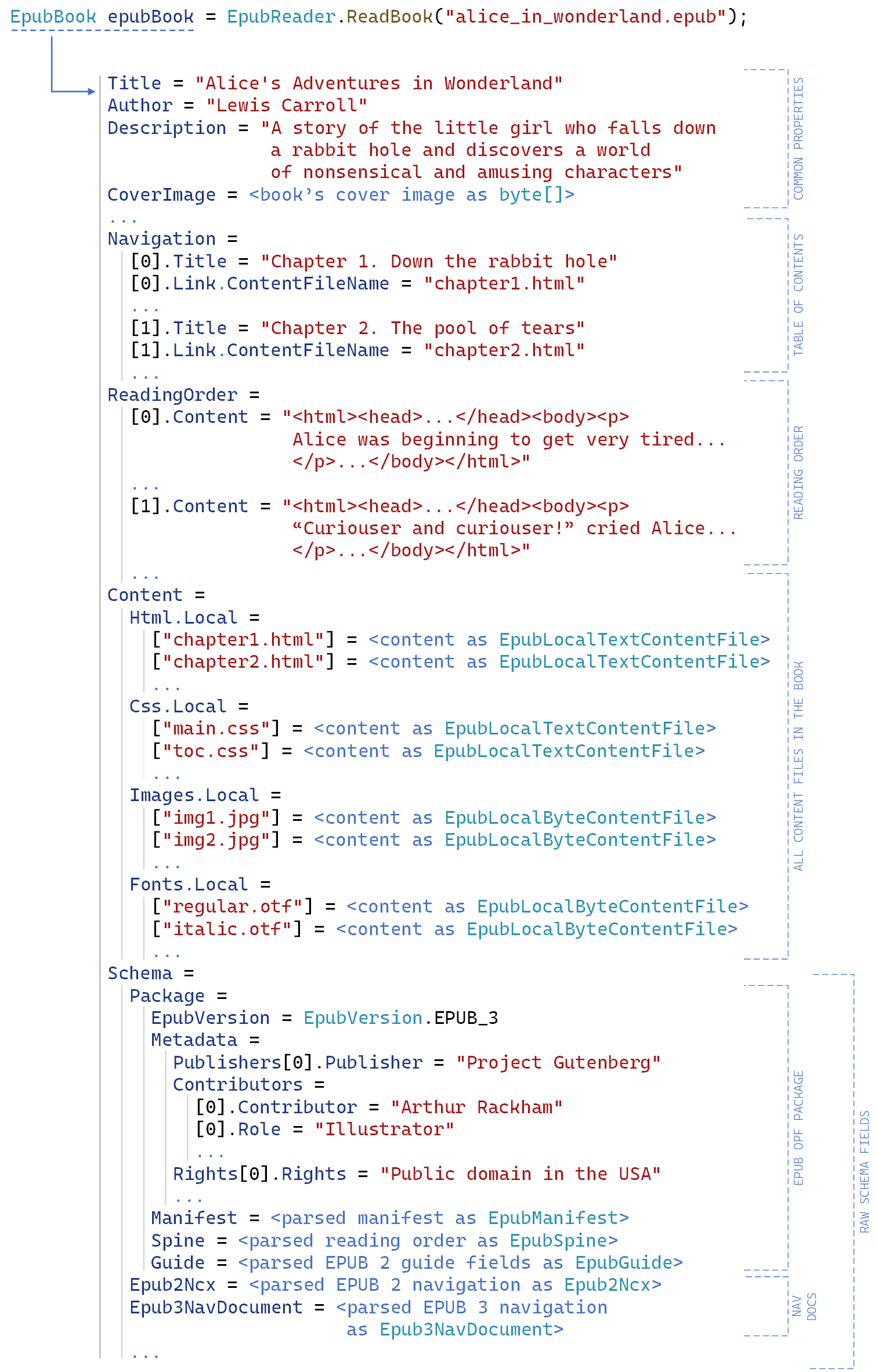
EpubReader is a .NET library, published on NuGet as VersOne.Epub, that opens and reads EPUB 2 and EPUB 3 electronic books so that C# developers can pull out a book's table of contents or full text without writing an EPUB parser themselves.
What it is
EpubReader is an open-source EPUB parsing library written in C# and distributed through the NuGet ecosystem as the package VersOne.Epub. It supports the EPUB 2 family (versions 2.0 and 2.0.1) and the EPUB 3 family (versions 3.0, 3.0.1, 3.1, 3.2 and 3.3), and it targets .NET Standard 1.3 or later, which includes .NET Core 1.0 and above and .NET 5 and above, as well as .NET Framework 4.6 and above. It ships under the Unlicense, a public-domain-style licence, and the repository carries 550 stars, 108 forks and 5 open issues, with the latest push dated 18 April 2026.
The concrete problem it solves is that EPUB is a zip container holding XHTML content documents, an OPF package document, a navigation document or NCX table of contents, and a manifest of assets, and any .NET application that wants book text has to unpack and interpret all of that itself. EpubReader replaces that hand-rolled parsing layer. It is the piece a .NET reading application, converter or indexing tool depends on when it needs the table of contents or the plain text of a book rather than a rendering of it.
Key capabilities
- Reads EPUB 2 (2.0, 2.0.1) and EPUB 3 (3.0, 3.0.1, 3.1, 3.2, 3.3) books through a single API.
- Runs on .NET Standard 1.3 or later, covering .NET Core 1.0 and above and .NET 5 and above, and on .NET Framework 4.6 and above.
- Extracts the table of contents, as shown in the first documented example.
- Extracts the plain text of an entire book, as shown in the second documented example.
- Iterates over every EPUB file in a directory and gathers statistics, as shown in the third documented example.
- Ships two demo applications: WpfDemo.zip, a .NET Framework WPF application that opens books and extracts content, and ConsoleDemo.zip, a .NET 10 console application that retrieves text content.
- Publishes build and test workflow badges plus Codecov coverage reporting, alongside versioned DLL builds in VersOne.Epub.Net46.zip and VersOne.Epub.NetStandard.zip.
Who uses it and how
- Desktop .NET developers building book readers, following the WPF demo application that opens EPUB books and extracts their content.
- Batch and command-line tooling, following the pattern in the third example where every EPUB file in a directory is read and summarised.
- Applications that need book text rather than book layout, following the second example, which retrieves the plain text of a whole book.
- Teams that must serve both legacy and current .NET, using the separate .NET Framework and .NET Standard DLL packages.
- Content and indexing pipelines that need the table of contents of a book as structured data, as covered by the first example.
Getting started
Install the VersOne.Epub package from nuget.org, or download the DLL directly from the latest GitHub release, choosing VersOne.Epub.Net46.zip for .NET Framework or VersOne.Epub.NetStandard.zip for .NET Standard.
How it compares
No comparable .NET EPUB reading libraries are named in the facts available here, so this project stands alone in this registry rather than sitting in a documented field of alternatives. It is a library rather than a hosted product, carries the Unlicense, and has no paid tier or commercial edition.
When to use it — and when not
There is nothing to operate: EpubReader is a library, so a self-hoster runs no database, storage service or mail server, and the cost is simply a package reference. Do not choose it if you need a renderer with high HTML fidelity, because the README warns that the HTML renderer used in the WPF demo may struggle to render content in books whose HTML structure is too complicated. Do not choose it outside the .NET ecosystem, and note that the README excerpt describes only supported standards, runtimes, demos and examples, so anything beyond reading and text extraction should be treated as unclaimed.