

Development environment for AI/ML







What is envd?
envd (ɪnˈvdɪ) is a command-line tool that helps you create the container-based development environment for AI/ML.
Creating development environments is not easy, especially with today's complex systems and dependencies. With everything from Python to CUDA, BASH scripts, and Dockerfiles constantly breaking, it can feel like a nightmare - until now!
Instantly get your environment running exactly as you need with a simple declaration of the packages you seek in build.envd and just one command: envd up!

Why use envd?
Environments built with envd provide the following features out-of-the-box:
Simple CLI and language
envd enables you to quickly and seamlessly integrate powerful CLI tools into your existing Python workflow to provision your programming environment without learning a new language or DSL.
def build():
    base(dev=True)
    install.conda()
    install.python()
    install.python_packages(name = [
        "numpy",
    ])
    shell("fish")
    config.jupyter()
Isolation, compatible with OCI image
With envd, users can create an isolated space to train, fine-tune, or serve. By utilizing sophisticated virtualization technology as well as other features like buildkit, it's an ideal solution for environment setup.
envd environment image is compatible with OCI image specification. By leveraging the power of an OCI image, you can make your environment available to anyone and everyone! Make it happen with a container registry like Harbor or Docker Hub.
Local, and cloud
envd can now be used on a hybrid platform, ranging from local machines to clusters hosted by Kubernetes. Any of these options offers an efficient and versatile way for developers to create their projects!
$ envd context use local
# Run envd environments locally
$ envd up
...
$ envd context use cluster
# Run envd environments in the cluster with the same experience
$ envd up
Check out the doc for more details.
Build anywhere, faster
envd offers a wealth of advantages, such as remote build and software caching capabilities like pip index caches or apt cache, with the help of buildkit - all designed to make your life easier without ever having to step foot in the code itself!
Reusing previously downloaded packages from the PyPI/APT cache saves time and energy, making builds more efficient. No need to redownload what was already acquired before – a single download is enough for repeat usage!
With Dockerfile v1, users are unable to take advantage of PyPI caching for faster installation speeds - but envd offers this support and more!
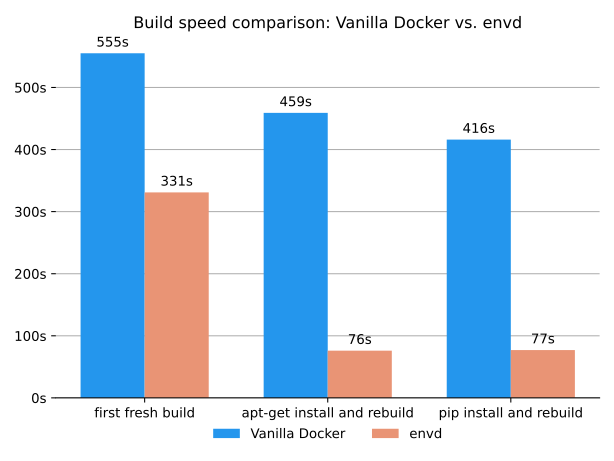

Besides, envd also supports remote build, which means you can build your environment on a remote machine, such as a cloud server, and then push it to the registry. This is especially useful when you are working on a machine with limited resources, or when you expect a build machine with higher performance.
Knowledge reuse in your team
Forget copy-pasting Dockerfile instructions - use envd to easily build functions and reuse them by importing any Git repositories with the include function! Craft powerful custom solutions quickly.
envdlib = include("https://github.com/tensorchord/envdlib")

def build():
    base(dev=True)
    install.conda()
    install.python()
    envdlib.tensorboard(host_port=8888)
envdlib.tensorboard is defined in github.com/tensorchord/envdlib
def tensorboard(
    envd_port=6006,
    envd_dir="/home/envd/logs",
    host_port=0,
    host_dir="/tmp",
):
    """Configure TensorBoard.

    Make sure you have permission for `host_dir`

    Args:
        envd_port (Optional[int]): port used by envd container
        envd_dir (Optional[str]): log storage mount path in the envd container
        host_port (Optional[int]): port used by the host, if not specified or equals to 0,
            envd will randomly choose a free port
        host_dir (Optional[str]): log storage mount path in the host
    """
    install.python_packages(["tensorboard"])
    runtime.mount(host_path=host_dir, envd_path=envd_dir)
    runtime.daemon(
        commands=[
            [
                "tensorboard",
                "--logdir",
                envd_dir,
                "--port",
                str(envd_port),
                "--host",
                "0.0.0.0",
            ],
        ]
    )
    runtime.expose(envd_port=envd_port, host_port=host_port, service="tensorboard")
Getting Started 🚀
Requirements
- Docker (20.10.0 or above)
Install and bootstrap envd
envd can be installed with pip, or you can download the binary release directly. After the installation, please run envd bootstrap to bootstrap.
pip install --upgrade envd
After the installation, please run envd bootstrap to bootstrap:
envd bootstrap
Read the documentation for more alternative installation methods.
You can add
--dockerhub-mirroror-mflag when runningenvd bootstrap, to configure the mirror for docker.io registry:envd bootstrap --dockerhub-mirror https://docker.mirrors.sjtug.sjtu.edu.cn
Create an envd environment
Please clone the envd-quick-start:
git clone https://github.com/tensorchord/envd-quick-start.git
The build manifest build.envd looks like:
def build():
    base(dev=True)
    install.conda()
    install.python()
    # Configure the pip index if needed.
    # config.pip_index(url = "https://pypi.tuna.tsinghua.edu.cn/simple")
    install.python_packages(name = [
        "numpy",
    ])
    shell("fish")
Note that we use Python here as an example but please check out examples for other languages such as R and Julia here.
Then please run the command below to set up a new environment:
cd envd-quick-start && envd up
$ cd envd-quick-start && envd up
[+] ⌚ parse build.envd and download/cache dependencies 6.2s ✅ (finished)
[+] build envd environment 19.0s (47/47) FINISHED
 => CACHED [internal] setting pip cache mount permissions                                     0.0s
 => docker-image://docker.io/tensorchord/envd-sshd-from-scratch:v0.4.3                        2.3s
 => => resolve docker.io/tensorchord/envd-sshd-from-scratch:v0.4.3                            2.3s
 => docker-image://docker.io/library/ubuntu:22.04                                             0.0s
......
 => [internal] pip install numpy                                                              2.5s
 => CACHED [internal] download fish shell                                                     0.0s
 => [internal] configure user permissions for /opt/conda                                      1.0s
 => [internal] create dir for ssh key                                                         0.5s
 => [internal] install ssh keys                                                               0.2s
 => [internal] copy fish shell from the builder image                                         0.2s
 => [internal] install fish shell                                                             0.5s
......
 => [internal] create work dir: /home/envd/envd-quick-start                                   0.2s
 => exporting to image                                                                        7.7s
 => => exporting layers                                                                       7.7s
 => => writing image sha256:464a0c12759d3d1732404f217d5c6e06d0ee4890cccd66391a608daf2bd314e4  0.0s
 => => naming to docker.io/library/envd-quick-start:dev                                       0.0s
------
 > importing cache manifest from docker.io/tensorchord/python-cache:envd-v0.4.3:
------
⣽ [5/5] attach the environment  [2s]
Welcome to fish, the friendly interactive shell
Type help for instructions on how to use fish

envd-quick-start on git master [!] via Py v3.11.11 via 🅒 envd as sudo
⬢ [envd]❯ # You are in the container-based environment!
Set up Jupyter notebook
Please edit the build.envd to enable jupyter notebook:
def build():
    base(dev=True)
    install.conda()
    install.python()
    # Configure the pip index if needed.
    # config.pip_index(url = "https://pypi.tuna.tsinghua.edu.cn/simple")
    install.python_packages(name = [
        "numpy",
    ])
    shell("fish")
    config.jupyter()
You can get the endpoint of the running Jupyter notebook via envd envs ls.
$ envd up --detach
$ envd envs ls
NAME                    JUPYTER                 SSH TARGET              CONTEXT                                 IMAGE                   GPU     CUDA    CUDNN   STATUS          CONTAINER ID
envd-quick-start        http://localhost:42779   envd-quick-start.envd   /home/gaocegege/code/envd-quick-start   envd-quick-start:dev    false   <none>  <none>  Up 54 seconds   bd3f6a729e94
Difference between v0 and v1 syntax
[!NOTE] Start from
envd v1.0,v1syntax is the default syntax forbuild.envdfile, andmoby-workeris the default builder.
| Features | v0 | v1 |
|---|---|---|
| is default for `envd [!IMPORTANT] |
For more details, check the upgrade to v1 doc.
More on documentation 📝
See envd documentation.
Roadmap 🗂️
Please checkout ROADMAP.
Contribute 😊
We welcome all kinds of contributions from the open-source community, individuals, and partners.
- Join our discord community!
- To build from the source, please read our contributing documentation and development tutorial.

Contributors ✨
Thanks goes to these wonderful people (emoji key):


This project follows the all-contributors specification. Contributions of any kind welcome!